
Color-Based Display of Layers
The View By command is not listed on the column header context menu when full MPT scope is enabled; layer-purpose pairs are listed in the Layers panel grouped by layer-purpose name.
You can use the View By feature to customize the listing of layer-purpose pairs in the Layers panel based on various views such as layer, purpose, mask, and color. When MPT support is disabled, if you choose View By – Color, only the layer-purpose pairs without color are listed in the Layers panel, grouped by the color name (grayColor), as shown in the figure.
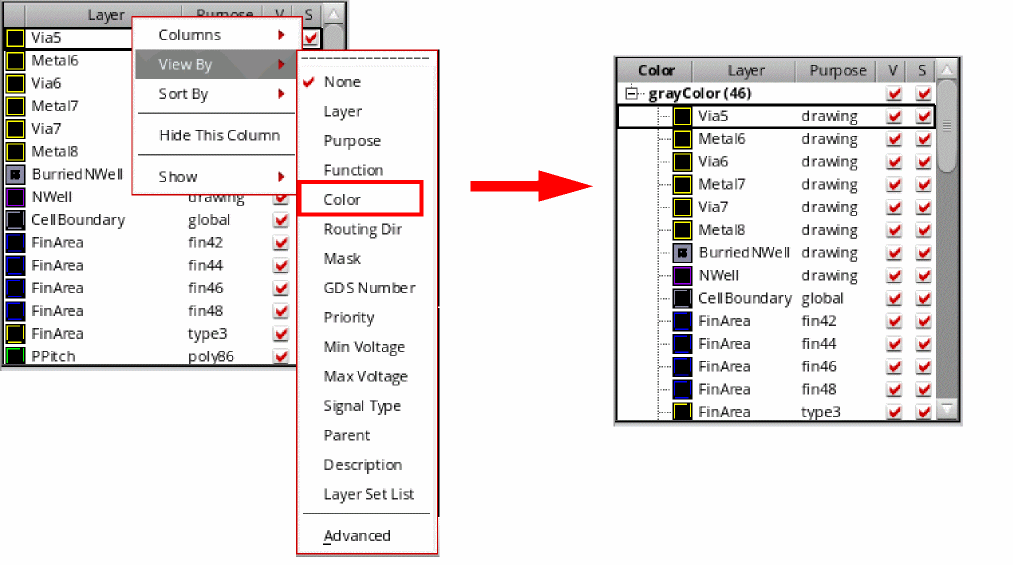
If you choose an option other than Color on the View By menu, color and lock state information for layer-purpose pairs is not displayed.
Related Topics
Layers Panel Column Header Context Menu
Viewing Layer-Purpose Pairs in a Tree Structure
Return to top