
Controls for Display of Shapes
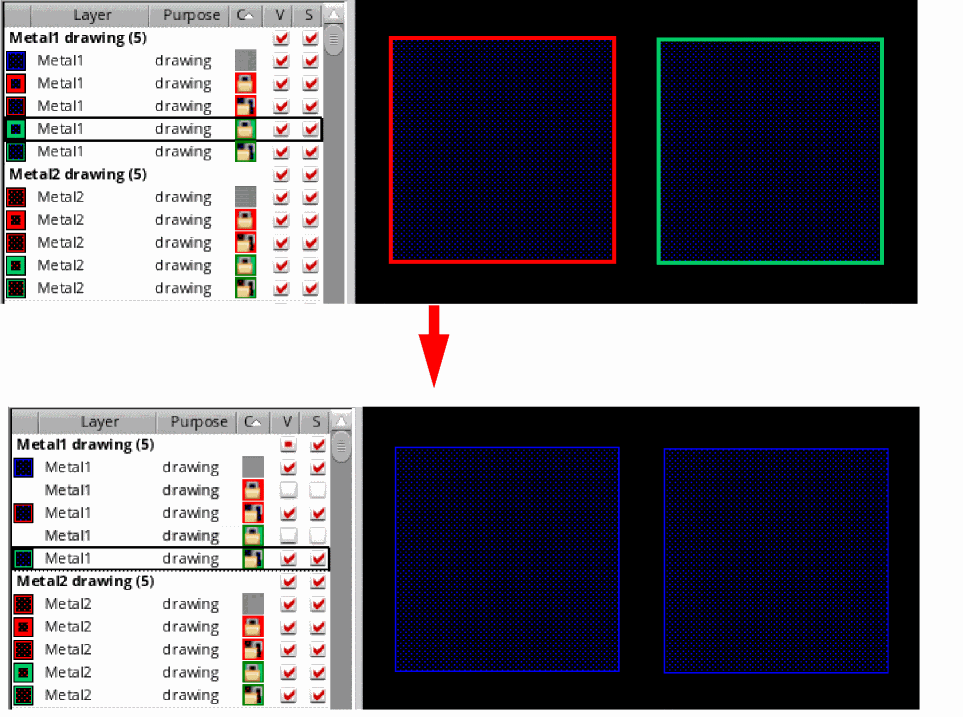
To control the visibility and selectability of shapes drawn on a layer, use the V (Visibility) and S (Selectability) check boxes corresponding to the layer-purpose pair in the Layers panel. Shapes drawn on a layer become invisible if you deselect the V (Visibility) check box corresponding to that layer.
However, when shapes are drawn on a layer that supports color, their visibility is controlled by the Shape visibility by color visibility check box available in the Options form.
- If Shape visibility by color visibility is selected, colored shapes become invisible if you deselect the V (Visibility) check box corresponding to the layers on which they are drawn.
-
If Shape visibility by color visibility is deselected, only the colored outline is hidden; the shapes remain visible.
Related Topics
Purpose-Based Display of Color Information
Color and Lock Information-Based Search
Return to top