
Managing Layers
You can manage layer-purpose pairs according to your design requirements by using the Layers panel in the Palette. You can set a layer-purpose pair as active. You can quickly search for layers using filter and find modes and control how layers are sorted and grouped in the panel. Further, you can change the appearance of layer-purpose pairs by defining attributes such as fill colors and styles.
Changing the Active Layer
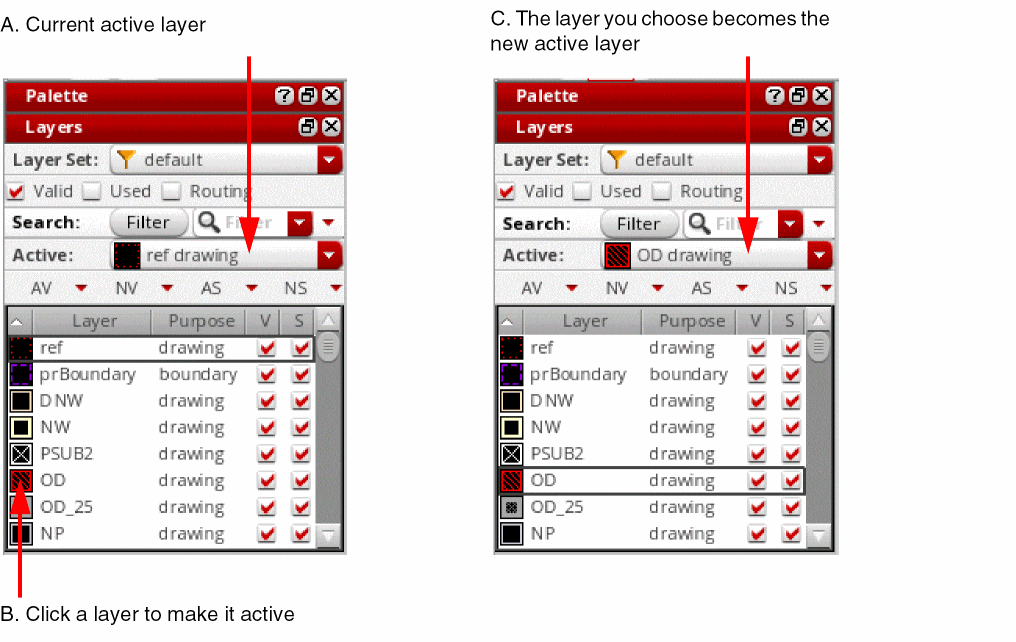
In the Layers panel, the layer-purpose pair listed on the Active Layer toolbar is the one that is currently active.
For example, the first figure shows that ref drawing is set as the active layer. When you click OD drawing in the list, it is set as the new active layer.
The active layer can be marked invisible or invalid with a single click. When you make the active layer invisible or invalid, the next appropriate layer is automatically set as the active layer.
Related Topics
Viewing Layer-Purpose Pairs in a Tree Structure
Return to top