
Initial SiP File to Virtuoso RF Solution Database
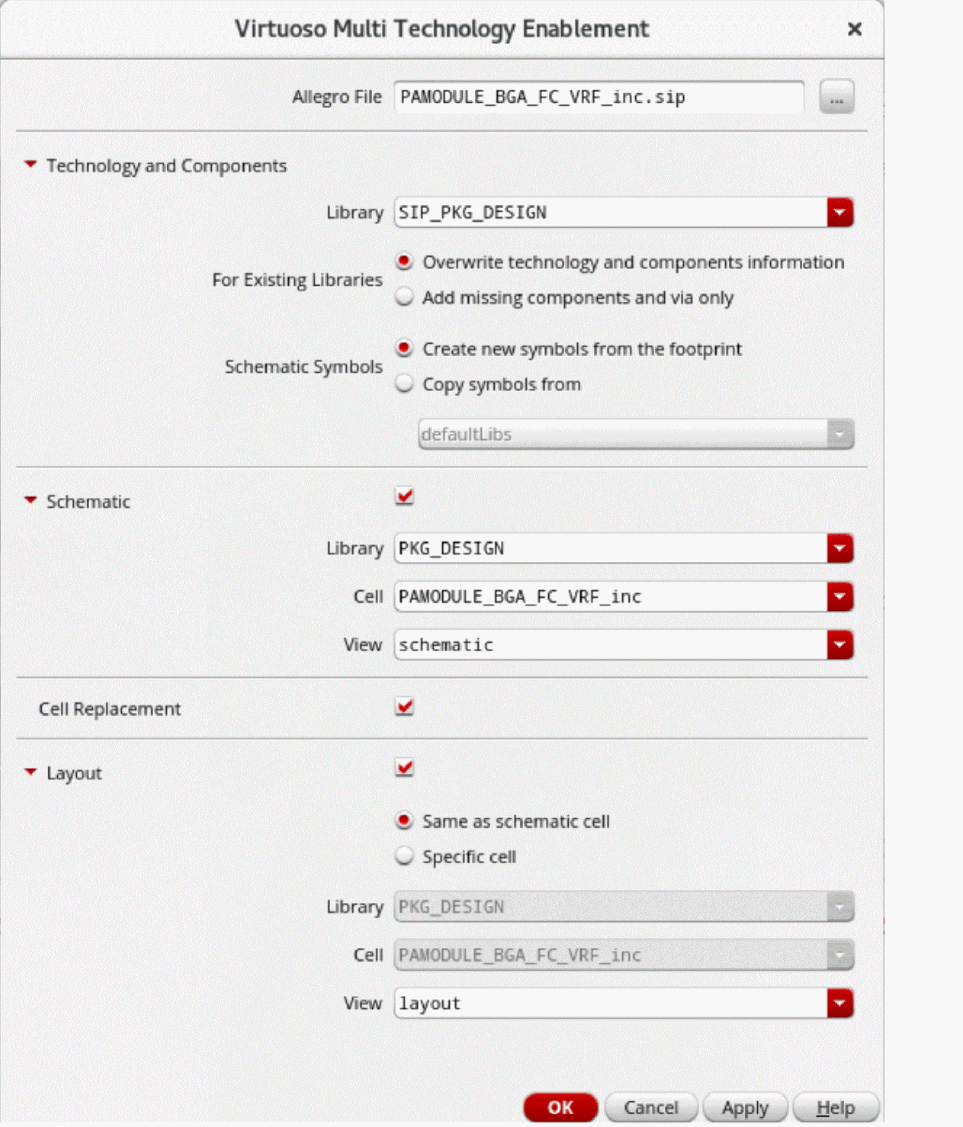
The new Virtuoso Multi Technology Enablement form simplifies the path from a SiP file to a Virtuoso RF Solution database by creating technology and component libraries, schematic, and layout in a single step. The assisted flows augment the enablement flow with verification support at various stages.
To create technology and components, schematic, and layout in one go:
-
Click Tools – Virtuoso Multi Technology– Enablement in CIW.
The Virtuoso Multi Technology Enablement Form opens.
-
Specify the native SiP file that will be used to create technology library, schematic, and layout.
- Click the check box in the Cell Replacement section to replace the cells that have pin mismatches.
- Click OK. A library is created. A multi-technology schematic and layout are also created if the required options are selected in the form.
- Open the schematic and layout views to review the imported data.
Related Topics
Virtuoso Multi Technology Enablement Form
Return to top