
Registering Device and Cell
Register the device and terminal related information on the Devices tab of the Power Manager Setup form. This information is used by Power Manager to read the device type and its topology in the design. For devices with more than two terminals, you can associate terminals to have specific mapping. Correct recognition and identification of device type is important for the supply traversal to find the related supplies of the boundary ports associated with the design logic.
- Use Filter in the Cells group box to search for a cell. The Filter option gives the flexibility to easily filter and sort the desired choice of devices to be registered.
- Select a cell or a set of cells to register in the Cells group box.
- Select the device type for assigning the devices in the Device Type group box.
-
Use
 to perform the assignment.
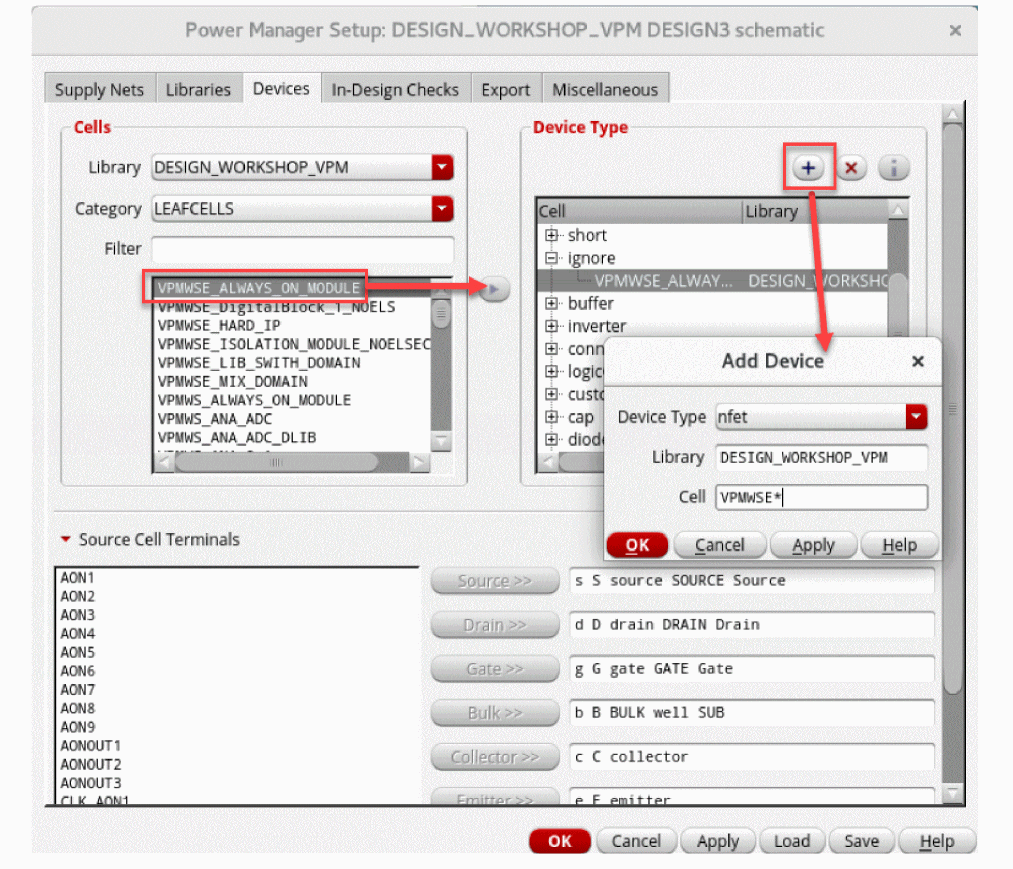
To register devices by using a wildcard-character-based registration:
-
Click
 to open the Add Device form.
 -
Specify a library and cell name based on a wild character notation and register the device in the corresponding Device Type.
For example, specifyinggpdk*andnmos*registers all the devices with a name matching the patternnmos*in all the libraries with the name matching the patterngpdk*to the device typenfet. -
Click
 to remove the assignment.
 -
Specify conditions/criteria with the assigned device by clicking
 .
. - Click OK.
If the Library Name or a cell name field is left blank, all available libraries (for a particular cell name pattern) or all available cells (for a particular library name pattern) will be accounted for and register based on the wild character specification.
Devices used in the design, such as MOS devices, resistors, capacitors, and diodes, need to be registered in the setup under the following categories.
- Transistors (nfet, pfet, npn, pnp)
- Short devices (including devices with n terminals)
- Pad cells
- Cells to be ignored
In a setup file, the device registration is represented as shown below:
;;; Devices
devices (nil
pfet (
(nil "pmos*" nil)
("analogLib" "pmos*" nil)
("gpdk*" "pmos*" nil)
)
nfet (
(nil "nmos*" nil)
("analogLib" "nmos*" nil)
("gpdk*" "nmos*" nil)
)
pnp (
(nil "pnp" nil)
("analogLib" "pnp*" nil)
("gpdk*" "pnp*" nil)
)
npn (
(nil "npn" nil)
("analogLib" "npn*" nil)
("gpdk*" "npn*" nil)
)
Related Topics
Registering Name-Based Supply Nets
Return to top