
Creation of Power Domains
While extracting power intent, Power Manager automatically identifies the power nets and ground nets in the design as described below. Further, for each power net, it finds the ground net associated with it and for each unique pair of power net and ground net, creates a power domain.
Identifying Switchable and Non-Switchable Power Nets and Ground Nets
- A net is identified as a non-switchable power net if either of the following conditions are met:
- A net is identified as a switchable power net if either of the following conditions are met:
- A net is identified as a non-switchable ground net if:
- A net is identified as a switchable ground net if either of the following conditions are met:
After identifying the power nets and ground nets, the unique power net/ground net pairs (Supply sets) are identified. For this, the tool traces the paths from a power net to a ground net. The tool also considers the power net/ground net pairs registered in the setup.
Supply sets can be defined in the setup for the following scenarios.
- The primary supply set for the power domains mentioned in the setup.
- The power and ground nets that cannot be paired by traversing the design hierarchy or parsing the Liberty in case of a Liberty cell.
Supply set identification can be done explicitly in a setup template or by automatic identification.
If you want to partition the design for assigning a particular instance to some power domain, provide the list of domain, instances, and primary supply set.
If power domains and supply set information is provided in the setup, the following is the sequence of tasks being done:
-
create_power_domaincommands are created in the exported 1801 file based on the number of power domains. - Primary supply set are referred from the setup.
- Extra supplies that need not to be a part of setup are identified by the tool.
-
connect_supply_netcommand is generated for supply nets that are a part of extra supplies. - For any other instance that is not a part of any power domain remains in the default domain.
-
If there is no power domain assignment, a single power domain is created and all the instances are connected by using
connect_supply_net.
The following examples show how power domains are created:
Consider the following design that does not have the user-defined supply sets and power domains specified in the setup:
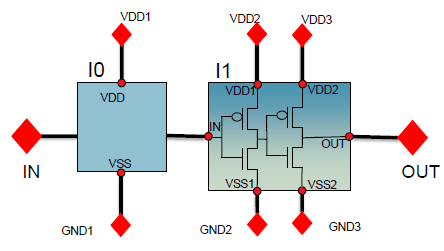
In this case, the tool traverses though the design and creates the following power domains:
Now, consider the following design that contains a head-switch.
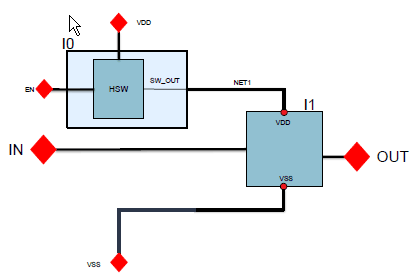
In this case, the tool creates one default power domain and two supply sets:
If a primitive instance has one netSet property each for a power and ground supply, it is added to the power domain created for that power and ground supply pair even if the instance does not have any power/ground pins in the symbol/schematic view. If a power domain does not exist for that power and ground supply pair, a new power domain is created and the primitive instance is added to it. However, if the primitive instance has more than one netSet property for power or ground, it does not contribute towards the creation of a power domain and a warning message is displayed in the power intent extraction log.
Default Power Domain
If the create_power_domain command has the -include_scope or -elements {.} switch, it is considered as the default domain. When no such default domain is found, any create_power_domain command that does not have the -elements switch is considered as the default domain. However, multiple create_power_domain commands cause the 1801 import to fail with an appropriate error message.
Related Topics
Special Isolation Cells in Liberty Power Model Export
Registering Supply Set and Power Domain
Return to top