
Product Documentation
Virtuoso Space-based Router Command Reference
Product Version IC23.1, September 2023

create_pin_halo_shapes

create_pin_halo_shapes 
[ -all ] 
[ -include_power_gnd_nets ] 
[ -inst_set d_instSetObj ] 
[ -multi_pin_terminals ] 
[ -on_all_valid_layers ] 
[ -set d_setObj ] 
[ -user_pin_halo_length f_length ] 

Description

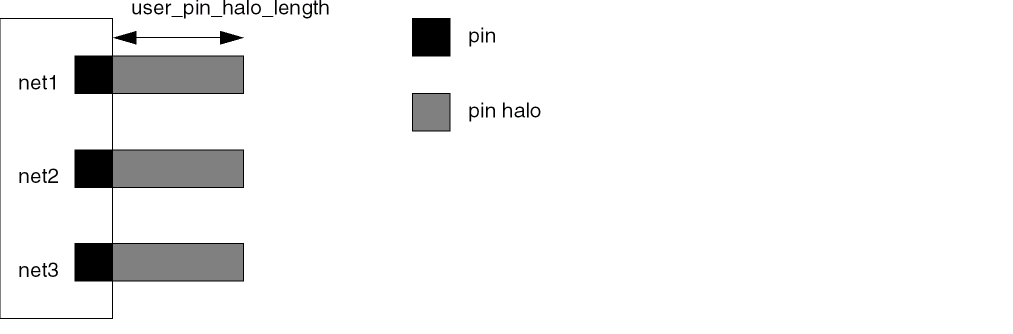
Creates pin halo shapes on the terminals for all the nets in the design, for the selected nets, or on the specified instances. Power and ground nets are excluded from processing unless you include the -include_power_gnd_nets argument. The pin halo creates an area around a pin that is reserved for the net assigned to the pin. This prevents different-net routing from blocking access to the pin. Use delete_floating_trims to remove pin halo shapes after routing.
Arguments

-all

Creates pin halo shapes on all terminals for all the nets in the design.

-include_power_gnd_nets

Creates pin halo shapes on power and ground nets. By default, power and ground nets are excluded from processing.

-inst_set d_instSetObj

Creates pin halo shapes on terminals of the selected instances.

-multi_pin_terminals

Creates pin halo shapes for all pins of a multi-pin terminal. By default, a pin halo is created for only one pin of a multi-pin terminal.

-on_all_valid_layers

Creates pin halo shapes on all valid routing layers. By default, pin halo shapes are created only on the pin layer, and the layers above and below the pin layer.

-set d_instSetObj

Creates pin halo shapes on all the terminals of the nets in the selected set.

-user_pin_halo_length f_userunit

Length, in user units, of the pin halo shapes to be created. The default is 0.0.

Examples

The following command creates pin halo shapes on instance terminals of instances with names beginning with FINST.

create_pin_halo_shapes(-inst_set(find_instance -window_id 1 -name "FINST*"))

Related Topics

Create Commands

delete_floating_trims


Return to top
 ⠀
X