
create_wire_chamfer
create_wire_chamfer
[ -all | -region {f_xlo f_ylo f_xhi f_yhi} ]
[ -set d_setObj ]
[ -layer {s_layerName…} ]
[ -chamfer_filter {s_filter…} ]
[ -length_threshold f_threshold ]
[ -chamfer_value1 {f_chamfer1 | { f_inout1 f_endOfStripe1}} ]
[ -chamfer_value2 {f_chamfer2 | { f_inout2 f_endOfStripe2}} ]
[ -allow_violation [ true | false ] ]
[ -inner_chamfer [ true | false ] ]
[ -chamfer_end_of_stripe [ true | false ] ]
Description
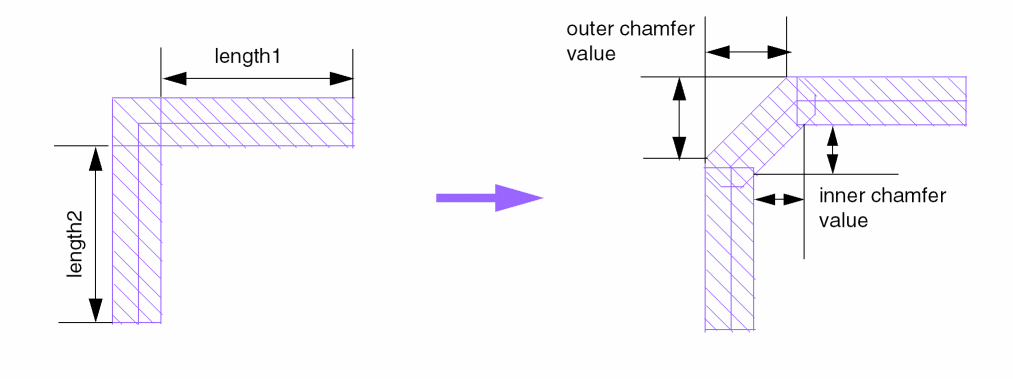
Creates chamfer on wires (pathSegs). The wire chamfer mechanism replaces 90-degree wires with 45-degree wires. An example of a wire chamfer is shown in the following figure.
Arguments
|
Creates wire chamfers on all the wires of the design. This is the default. |
|
|
When |
|
|
When |
|
|
Filters the wires on which chamfers are created based on specified criteria. For example:
|
|
|
Specifies the chamfer value to be applied if |
|
|
Specifies the chamfer value to be applied if |
|
|
If set to |
|
|
Creates wire chamfer only on the layers specified in the list. By default, all the routing layers are included. |
|
|
Specifies the threshold value that is used to determine if
If |
|
|
Creates chamfer only on the wires in the specified region. By default, the entire design is processed. |
|
Examples
Example 1—Inner wire chamfer
create_wire_chamfer -all -layer M2 -length_threshold 5.0 -chamfer_value1 1.5 -chamfer_value2 2.0 -inner_chamfer true
Creates wire chamfer on the M2 layer according to the following conditions:
- If one of the two segments is less than 5 microns in length, then the wire chamfer will be 1.5 microns, measured from the inner side of the wire.
- If both segments are greater than or equal to 5 microns in length, then the wire chamfer will be 2.0 microns, measured from the inner side of the wire.
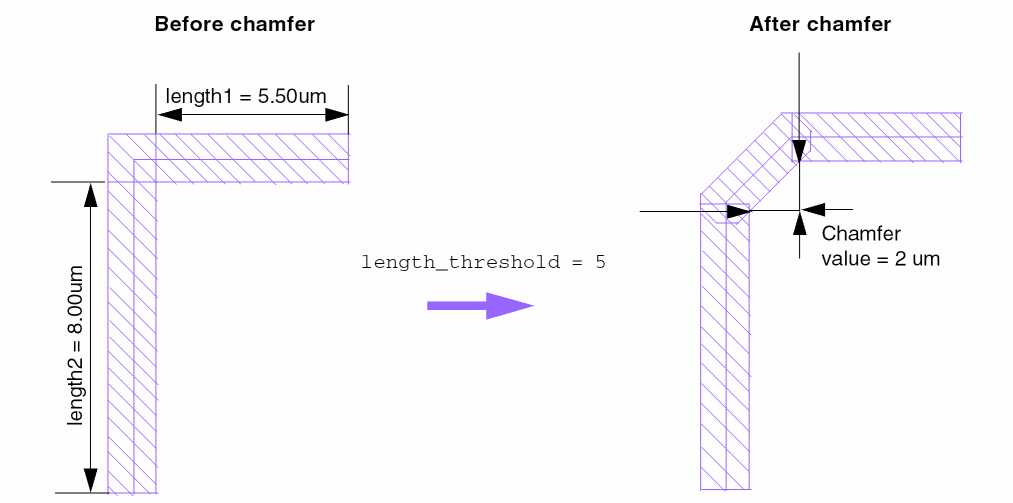
In the following figure, a wire chamfer of 2 microns is created on the inner side of the wire, because the lengths of both segments (5.5 and 8 microns) are greater than length_threshold (5 microns).
Example 2—Outer wire chamfer
create_chamfer_wire -all -layer M2 -length_threshold 6.0 -chamfer_value1 2.0 -chamfer_value2 3.0 -inner_chamfer false
Creates wire chamfer on the M2 layer according to the following conditions:
- If one of the two segments is less than 6 microns in length, then the wire chamfer will be 2.0 microns, measured from the outer side of the wire.
- If both segments are greater than or equal to 6 microns in length, then the wire chamfer will be 3.0 microns, measured from the outer side of the wire.
The following command using dual values for -chamfer_value1 and -chamfer_value2 has the same result:
create_chamfer_wire -all -layer M2 -length_threshold 6.0 -chamfer_value1 {2.0 0} -chamfer_value2 {3.0 0} -inner_chamfer false
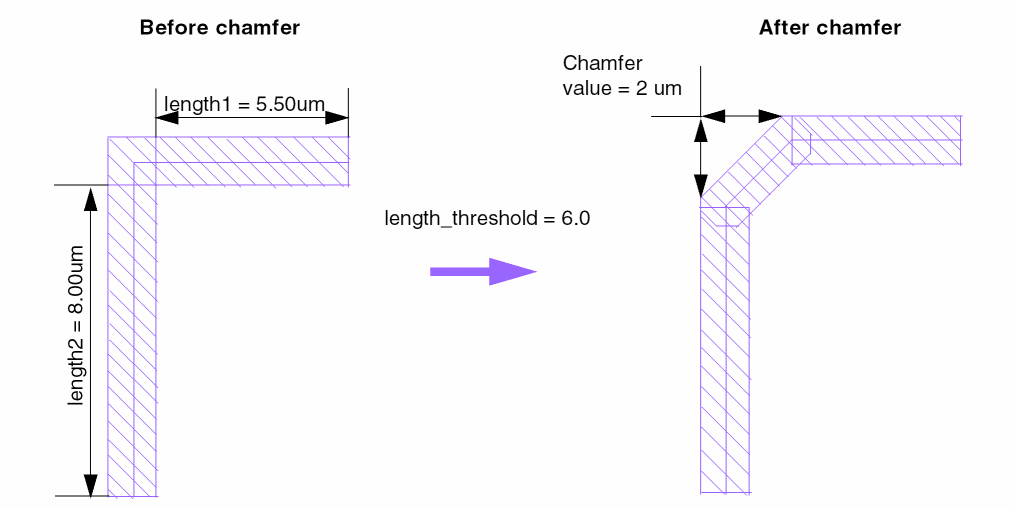
In the following figure, a wire chamfer of 2 microns is created on the outer side of the wire, because the length of one segment (5.5 microns) is less than length_threshold (6 microns).
Example 3—Chamfering end of stripe wires
create_chamfer_wire -all -layer M2 -length_threshold 6.0 -chamfer_value1 {2.5 2.0} -chamfer_value2 {3.5 3.0} -chamfer_end_of_stripe true
Chamfers the ends of stripes by 2.0 if the length of the wire is less than 6.0, or by 3.0 if the length of the wire is greater than or equal to 6.0.
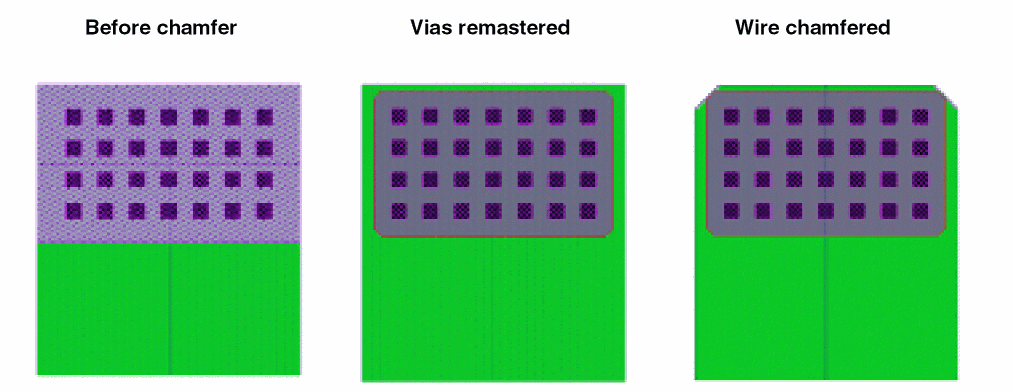
The following figure illustrates the effect of specifying the chamfer_end_of_stripe argument, which chamfers power routing stripes to align with chamfered via arrays.
Related Topics
Return to top