
ECO Routing
ECO routing completes partial routes while maintaining the existing wire segments as much as possible and is useful in cases such as the following:
- The initial routing is completed and minor changes have been made to a design.Cadence Space-based Router and Chip Optimizer User Guide
- The design has general spacing or connectivity violations.
The following sections in this topic describe how the ECO commands can be used to perform netlist changes and commands to use to finish routing:
Buffer Insertion
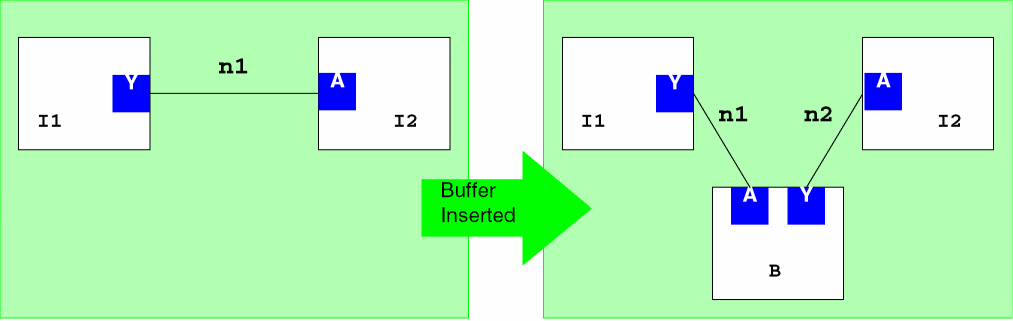
In this example, ECO commands are used to buffer a net. The net n1 is a two-pin net from pin (I1, Y) to pin (I2, A). In this case, the pins are named as instance-pin pairs. The added buffer B will be an instance of master MB. The output pin of MB is Y and the input pin is A. The POWR and GRND pins of the new instance are connected to VDD and VSS, respectively.
set eco [eco_begin]
eco_create_instance -eco_control $eco -cell MB -view abstract -lib libname -name B -origin {x y}
eco_create_net -eco_control $eco -name n2
eco_disconnect_inst_term -eco_control $eco -inst_name I2 -term_name A
eco_connect_inst_term -eco_control $eco -inst_name B -term_name A -net_name n1
eco_connect_inst_term -eco_control $eco -inst_name B -term_name Y -net_name n2
eco_connect_inst_term -eco_control $eco -inst_name I2 -term_name A -net_name n2
eco_connect_inst_term -eco_control $eco -inst_name B -term_name POWR -net_name VDD
eco_connect_inst_term -eco_control $eco -inst_name B -term_name GRND -net_name VSS
The netlist change is graphically shown in the following figure.
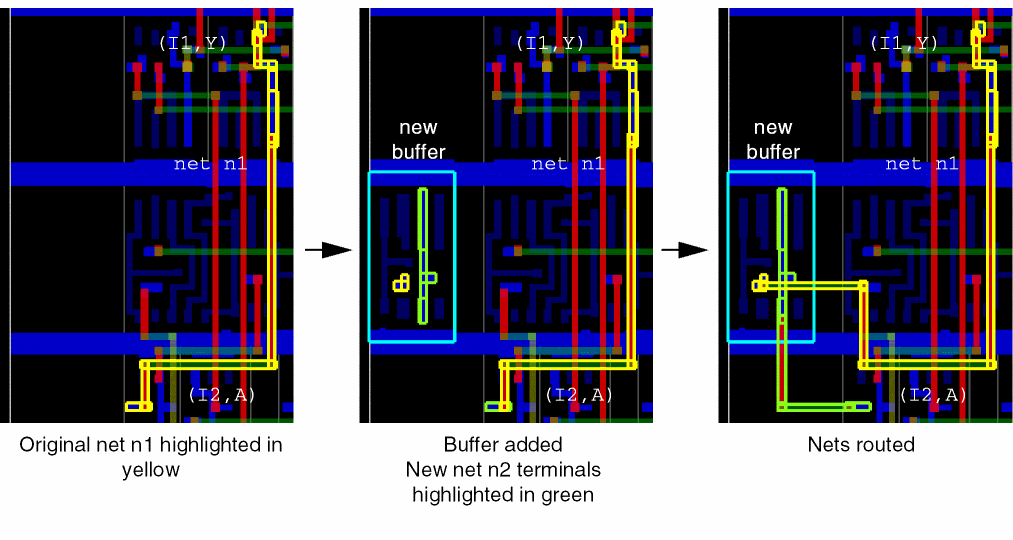
The following figure shows an example of a buffer that is added to a net using these commands.
Copying Routes
In the previous section, Buffer Insertion, little was done to the routes present in net n1. The net was disconnected from pin (I2, A), but all route segments and vias would still be present. Ideally, if the buffer is inserted in an already-routed net, it would be useful if the original net n1 would be split near the buffer. This operation can be simulated with the command sequence:
eco_copy_implementation -eco_control $eco -from_net n1 -to_net n2
eco_repair_net -eco_control $eco -name n1
eco_repair_net -eco_control $eco -name n2
When these commands are issued in the example, the routes in net n1 are copied to net n2, the connectivity is updated, and the nets n1 and n2 are trimmed appropriately by the eco_repair_net command.
The following figure shows how nets are routed when the copy/repair commands are not used.
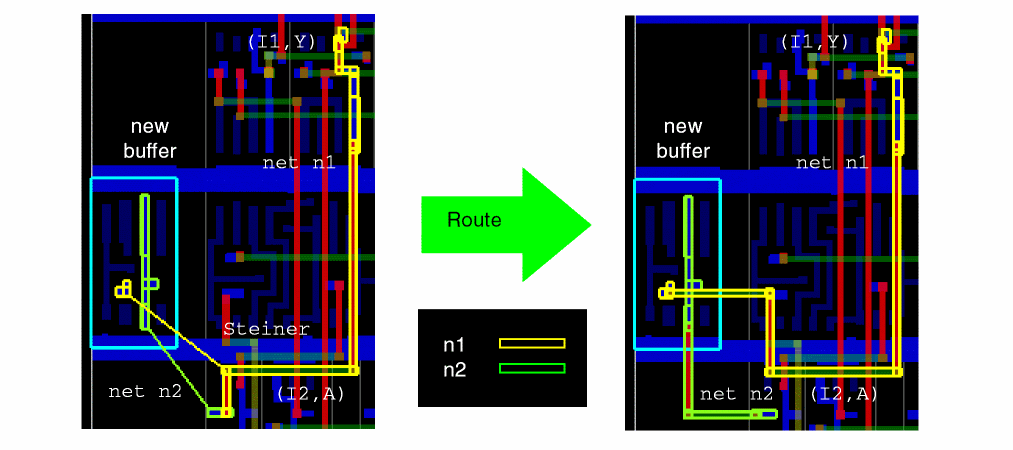
Guides are created (1) between the terminals for the new net n2, and (2) from the closest point of the existing net n1 to its new terminal on the new buffer. This creates a steiner in n1, dividing n1 into two routes. The route to the disconnected n1 terminal is discarded and the guides are routed without changes to the remaining route.
In contrast, the following figure shows the same two nets when copy/repair commands are used.
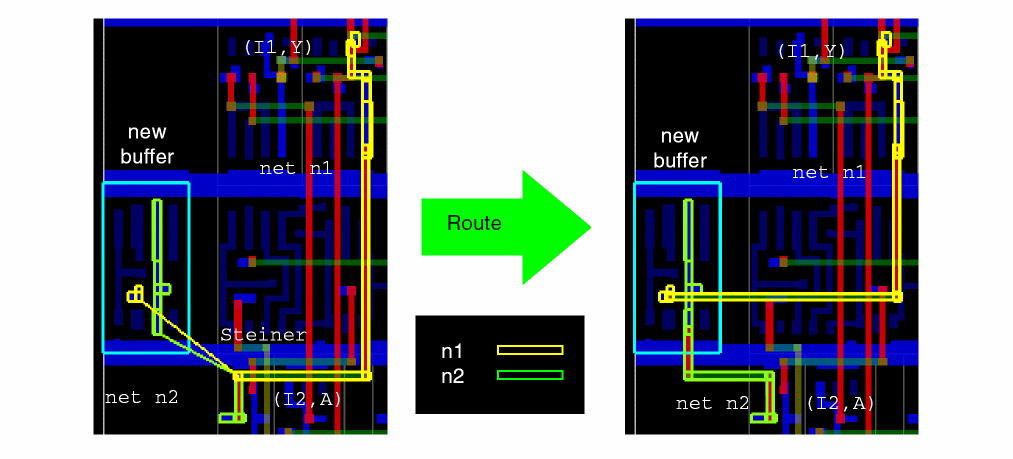
In this case, the route from net n1 is copied to the new net n2. The eco_repair_net command updates the connectivity, creating guides from the closest points on the nets to the new terminals. The routes to the disconnected terminals for both nets are discarded. The guides are routed, and the nets are trimmed where needed. This results in a more direct connection between terminals for n1, compared with the previous example which did not use copy/repair.
Buffer Deletion
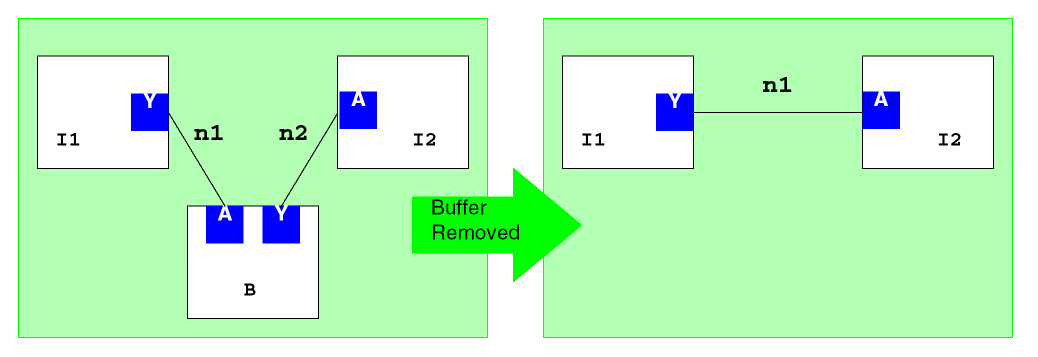
In the previous example, a buffer was added to net n1 and a new net n2 was created. In this example, the buffer and n2 will be removed, and net n1 will be restored to its original state.
set eco [eco_begin]
eco_copy_implementation -eco_control $eco -from_net n2 -to_net n1
eco_disconnect_inst_term -eco_control $eco -inst_name B -term_name A
eco_disconnect_inst_term -eco_control $eco -inst_name B -term_name Y
eco_disconnect_inst_term -eco_control $eco -inst_name I2 -term_name A
eco_disconnect_inst_term -eco_control $eco -inst_name B -term_name POWR
eco_disconnect_inst_term -eco_control $eco -inst_name B -term_name GRND
eco_connect_inst_term -eco_control $eco -inst_name I2 -term_name A -net_name n1

eco_destroy_net -eco_control $eco -name n2
eco_destroy_instance -eco_control $eco -name B

eco_repair_net -eco_control $eco -name n1
In the first step, the implementation of net n2 is copied to net n1. It is expected that the merged net will combine the routes from both n2 and n1. The net connectivity is established, and net n2 and the buffer are destroyed. The new net n1 is repaired and then routed.
eco_destroy_net will remove all routes in the net but cannot remove terminals. In order to remove the net, you must disconnect terminals from the net before using eco_destroy_net.Instance Remastering
In this example, instance I1 is remastered, changing the master from A to B.
set eco [eco_begin]
eco_remaster_instance -eco_control $eco -lib mlib -cell B -view abstract -name I1
eco_move_instance -eco_control $eco -name I -origin {$x $y}
Since remastered instances often do not match the footprint of the original instance, remastered instances might need to be moved to a legal location. This can be done with the eco_move_instance command.
Space-based Router does not check the location of the instance placement.
Related Topics
Return to top