set_treat_blockage_as_metal
set_treat_blockage_as_metal
{-layers {s_layerName…} | -get_layers {s_layerType…}}
{[ -min_width [ true | false ] ] | [ -min_space [ true | false ] ]}
[ -override [ true | false ] ]
[ -eol_style [ preferred | nonpreferred | ring | orthogonal ] ]
[ -force_min_space [ true | false ] ]
[ -span_style [ preferred | nonpreferred | ring | orthogonal ] ]
Description
Determines the effective width and/or spacing to use for blockages on one or more layers or layer types. By default, all blockages are treated as metal and use the minimum spacing rule for blockage-to-neighbor shape spacing.
Using environment variables, you can control which blockages are loaded when you open a design. For more information on these variables, refer to Space-based Router Tcl Environment Variables.
If you load a design with the LEF property USEMINSPACING OBS ON, the blockage settings will automatically be set to min_width true, min_space false, override false, force_min_space false.
Arguments
|
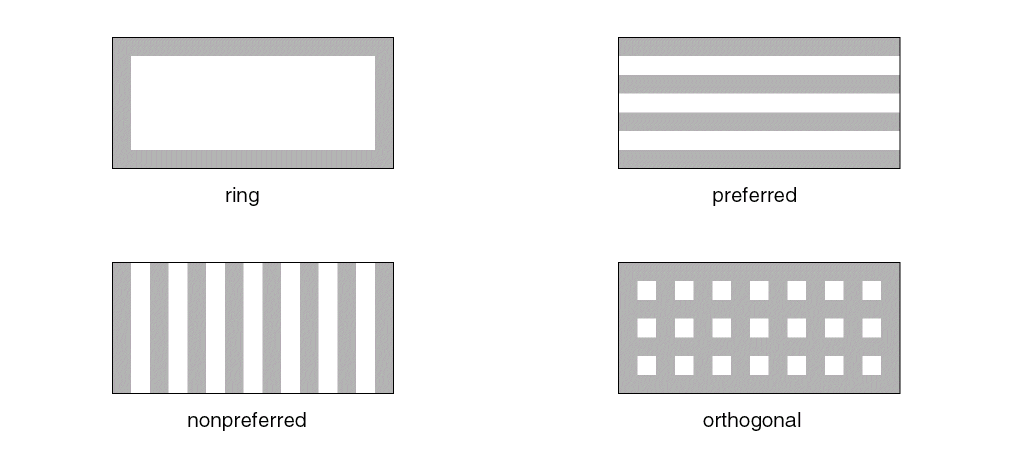
-eol_style [preferred | nonpreferred | ring | orthogonal]
|
|
|
Specifies how to treat blockages with an effective width for end-of-line (EOL) checking.
|
|
|
nonpreferred
|
Parallel wires of effective width oriented perpendicular to the layer’s preferred direction
|
|
|
orthogonal
|
Combination of preferred and nonpreferred wires
|
|
|
preferred
|
Parallel wires of effective width oriented in the layer’s preferred direction
|
|
|
ring
|
(Default) A single ring of effective width inward from the outer edge of the blockage
|
|
-force_min_space [ true | false ]
|
|
|
When true, the minimum spacing rule on all blockages is used for blockage-to-neighboring shape spacing. When false, Space-based Router and Chip Optimizer calculates and uses the larger of minimum spacing for the blockage and the neighboring shape. By default, this value is true.
|
|
-get_layers [[metal][cut][poly][other][all]]
|
|
|
Processes layers of the given types. By default, all types are processed.
|
|
-layers {s_layerName…}
|
|
|
Specifies the name of the layers to set.
|
|
-min_space [ true | false ]
|
|
|
Assigns all unspecified shapes to a minimum space rule. By default, this value is false.
|
|
-min_width [ true | false ]
|
|
|
Assigns all unspecified shapes to a minimum effective width. By default, this value is false.
|
|
-override [ true | false ]
|
|
|
Ignores all preassigned widths and/or spacings and determines blockage settings based on the other arguments given:
|
|
|
-min_space
|
Subjects all blockages to the min space rule.
|
|
|
-min_width
|
Subjects all blockages to the effective width.
|
|
|
(none)
|
Treats all blockages as metal and uses the width to calculate spacing requirements.
|
|
|
The default for this argument is false.
|
|
-span_style [preferred | nonpreferred | ring | orthogonal]
|
|
|
Specifies how to treat blockages with an effective width for span checking.
|
|
|
nonpreferred
|
Parallel wires of effective width oriented perpendicular to the layer’s preferred direction
|
|
|
orthogonal
|
Combination of preferred and nonpreferred wires
|
|
|
preferred
|
(Default) Parallel wires of effective width oriented in the layer’s preferred direction
|
|
|
ring
|
A single ring of effective width inward from the outer edge of the blockage
|
Blockage Modeling Examples for eol_style and span_style
Examples
The following table gives examples of how to interpret the argument settings.
|
Description
|
min_width
|
min_space
|
override
|
force_min_space
|
|
Use preset effective width properties and use minimum effective width for all blockages with no effective width properties
|
true
|
false
|
false
|
false
|
|
Use preset effective spacing properties and use minimum effective spacing for all blockages with no minimum spacing properties
|
false
|
true
|
false
|
false
|
|
Use minimum width for all blockages regardless of effective minimum width properties
|
true
|
false
|
true
|
false
|
|
Use minimum spacing for all blockages regardless of effective minimum spacing properties
|
false
|
true
|
true
|
false
|
|
Use the minimum spacing rule around blockages regardless of the rules for neighboring shapes (Default)
|
false
|
false
|
false
|
true
|
The following example represents the default settings, which use the minimum spacing rule around blockages, regardless of the rules of neighboring shapes.
set_treat_blockage_as_metal -layers $metal_layers -min_width false -min_space false -override false -force_min_space true
Related Topics
Design Configuration Commands
get_treat_blockage_as_metal
Return to top