
minSpacing
Determines the minimum orthogonal spacing, edge-to-edge, required between two geometries on the same layer. Spacing can be specified as the minimum spacing in user units between any two adjacent geometries, as dependent on the widths of the two geometries and, optionally, the parallel run length between the two geometries. Spacing can apply to a specific direction (horizontal or vertical), to power and ground nets only, and can use Euclidean or Manhattan measurements.
Optional parameters determine whether the constraint applies dependent on the type of connectivity or whether the shapes belong to power or ground nets.
In some processes, the spacing between the sides of shapes, when those shapes are drawn in the non-preferred direction, must be greater than the regular spacing. Spacing between an end-of-line and another end-of-line or side-of-line would be determined by an end-of-line spacing rule rather than this rule.
minSpacing Quick Reference
|
net, route, Term, instTerm, blockage, net group, group2group, reflexive, transreflexive, interChild, design, foundry |
|
Value Types
minSpacing constraints have the following value types:
-
Value
Specifies the minimum spacing, edge-to-edge, between shapes on the specified layer. -
OneDTblValue
Specifies the minimum spacing that changes according to the width of the wider of the two shapes. The width of the wider shape is the lookup key for the table. The table value is the minimum spacing. The width of a shape is defined as the smaller of the shape’s two dimensions. -
TwoDTblValue
Specifies the minimum spacing as a table of values based on variables given by thewidthLengthTableTypeparameter setting. For a detailed description of these table types, see the widthLengthTableType Parameter Values table.
Parameters
-
widthLengthTableType(IntValue) specifies the table type, as given in the widthLengthTableType Parameter Values table, whenminSpacingis aTwoDTblValuetable. -
oaSpacingDirection(StringAsIntValue, optional) specifies the measurement direction. anyDirection 0 Horizontally and vertically (default) horizontalDirection 1 Horizontally only verticalDirection 2 Vertically only -
oaSpacingDirection(StringAsIntValue, optional) specifies the measurement direction as given in the following table.String Integer Value Constraint applies: -
endOfLineWidth(Value, optional) When set, the constraint specifies the minimum spacing between the long (or side) edges of two non-end-of-line shapes on the same layer which are aligned in the non-preferred routing direction and are greater than or equal to this parameter value in length, with a non-zero parallel run length.oaSpacingDirectionis required when this parameter is set. -
distanceMeasureType(IntValue, optional) specifies the spacing measurement method as Euclidean (0, default) or Manhattan (1). For information on this parameter, see Euclidean and Manhattan Spacing Constraints. -
oaPGNet(BoolValue, optional) If set totrue, this constraint only applies to power and ground nets. By default and when set tofalse, this constraint applies to all nets. -
oaConnectivityType(IntValue, optional) specifies that the constraint applies only to shapes with the given connectivity, as specified in the following table.String Integer Value Constraint applies to: -
oaArea(AreaValue, optional) specifies that the constraint only applies between any shape with area less than this value and all other shapes on the layer. If this parameter is not specified, the spacing is not dependent on shape area. No other constraint parameters may be used in combination with this constraint parameter. -
sameMask(BoolValue, optional) specifies whether the constraint applies between shapes on the same mask (true) or between all shapes on the given layer (false/default). Whentrue, the constraint specifies side-to-side or corner-to-corner spacing for advanced nodes. -
ignoreShapesInRanges(RangeArray1DTblValue, optional) parameter optionally describes a set of ranges, based on width, where the existence of shapes is allowed. This range should lie within the minimum spacing defined for the given width in the minSpacing's table of spacing values. Shapes at spacings within these ranges are not considered violations. Shapes at spacings outside of these ranges but at less than minSpacing from a given shape violate the minSpacing constraint even if there are shapes in one of the ignoreShapesInRanges between the original shape and another shape within minSpacing. In other words, shapes with a spacing in the ignoreShapesInRanges ranges should be ignored by a design rule checker as if they did not exist.
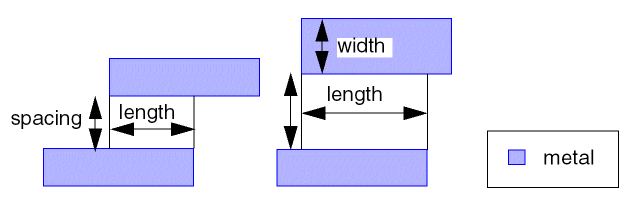
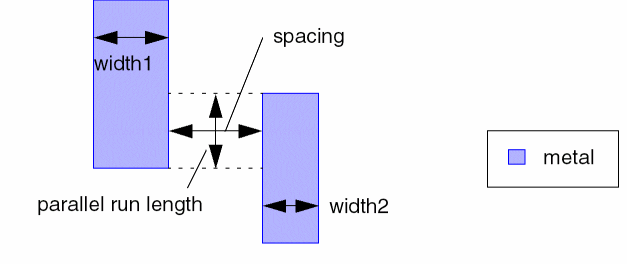
Examples
- Example 1—minSpacing Fixed Value
- Example 2—minSpacing with 1D Table: Index width
- Example 3—minSpacing with 2D Table: Indices width and width
- Example 4—minSpacing with 2D Table: Indices width and length
- Example 5—minSpacing with 2D Table: Indices twoWidths and length
- Example 6—minSpacing with oaArea
- Example 7—minSpacing with endOfLineWidth
- Example 8 —minSpacing with ignoreShapesInRanges
Example 1—minSpacing Fixed Value
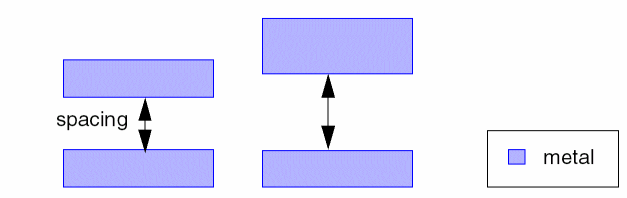
In this example, the spacing between shapes must be greater than or equal to 0.10 user units on Metal2 as shown in the following figure.
| Format | Example |
|---|---|
set_layer_constraint -layer Metal2 -constraint minSpacing \ |
|
LAYER Metal2 |
|
spacings( |

Example 2—minSpacing with 1D Table: Index width
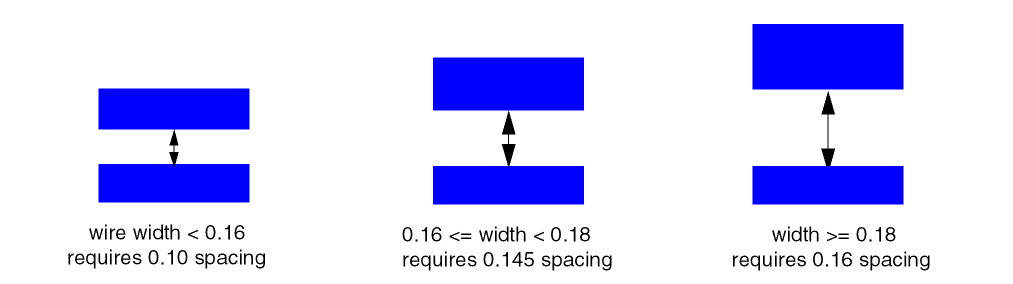
This example establishes a lookup table that is used to set the minimum spacing for a shape on Metal2, based on the width of the shape as shown in the following figure.
Example 3—minSpacing with 2D Table: Indices width and width
This example sets the minimum spacing on Metal2 according to the widths of two shapes on Metal2.
-
The minimum spacing is
0.100μm. -
If the width of one shape is greater than or equal to
0.16, then the minimum spacing is0.140μm. -
If the width of both shapes is greater than or equal to
0.16, then the minimum spacing is0.145μm. -
If the width of one shape is greater than or equal to
0.18, then the minimum spacing is0.160μm. -
If the width of one shape is greater than or equal to
0.18, and the width of the other shape is greater than or equal to 0.16, then the minimum spacing is0.165μm. -
If the width of both shapes is greater than or equal to
0.18, then the minimum spacing is0.180μm.
The Virtuoso technology file ASCII data is interpreted the same as the Space-based Router and Chip Optimizer set_layer_constraint command with -row_interpolation and -col_interpolation set to snap_down. LEF width numbers are slightly different because the LEF data is interpreted the same as Space-based Router and Chip Optimizer set_layer_constraint command with -row_interpolation and -col_interpolation set to snap_down_inclusive. For more information, see Interpolation and Extrapolation Techniques.
Example 4—minSpacing with 2D Table: Indices width and length
This example sets the minimum spacing on Metal2 according to the maximum width of two shapes and the parallel run length between them.
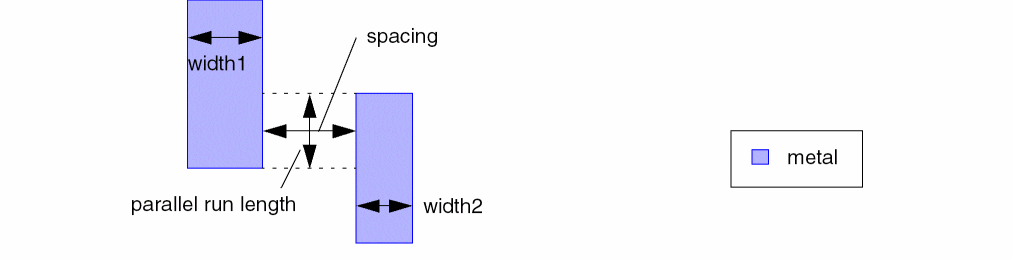
The Virtuoso Space-based Router set_layer_constraint command with -row_interpolation and -col_interpolation set to snap_down_inclusive uses the same width and length numbers as LEF, whereas the Virtuoso syntax is interpreted the same as the Virtuoso Space-based Router set_layer_constraint command with -row_interpolation and -col_interpolation set to snap_down. For more information, see Interpolation and Extrapolation Techniques.
Example 5—minSpacing with 2D Table: Indices twoWidths and length
This example sets a minimum spacing constraint between two shapes which depends on the width of both shapes and the parallel run length between the shapes with the following rules:
Example 6—minSpacing with oaArea
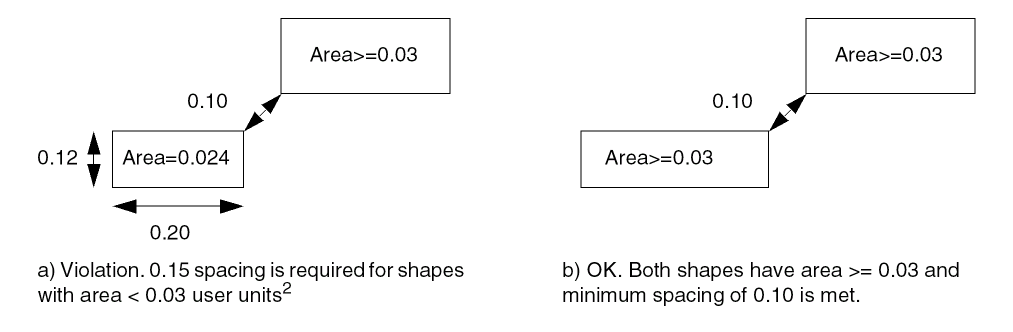
The following example sets minimum spacing for shapes with area less than 0.03 user units2 to 0.15 user units, otherwise a minimum spacing of 0.10 user units is required.
Example 7—minSpacing with endOfLineWidth
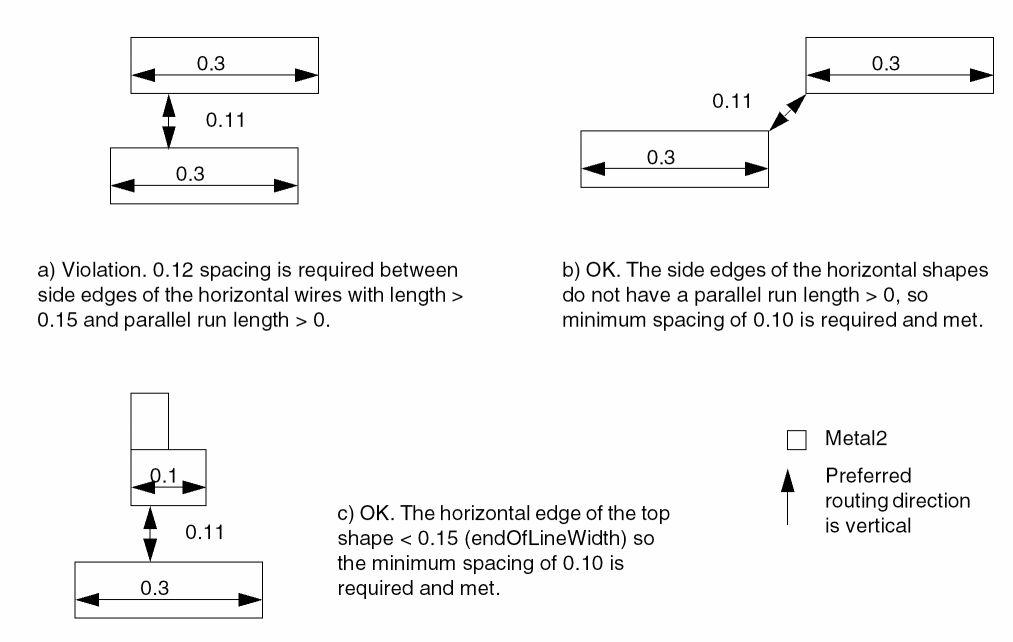
The following wrong direction spacing rule indicates that the long/side edges between two horizontal wires must have a spacing of 0.12 µm if they are not EOL edges with length less than 0.15 µm and they have common parallel run length greater than 0. Otherwise, 0.10 µm is the minimum spacing.
Example 8 —minSpacing with ignoreShapesInRanges
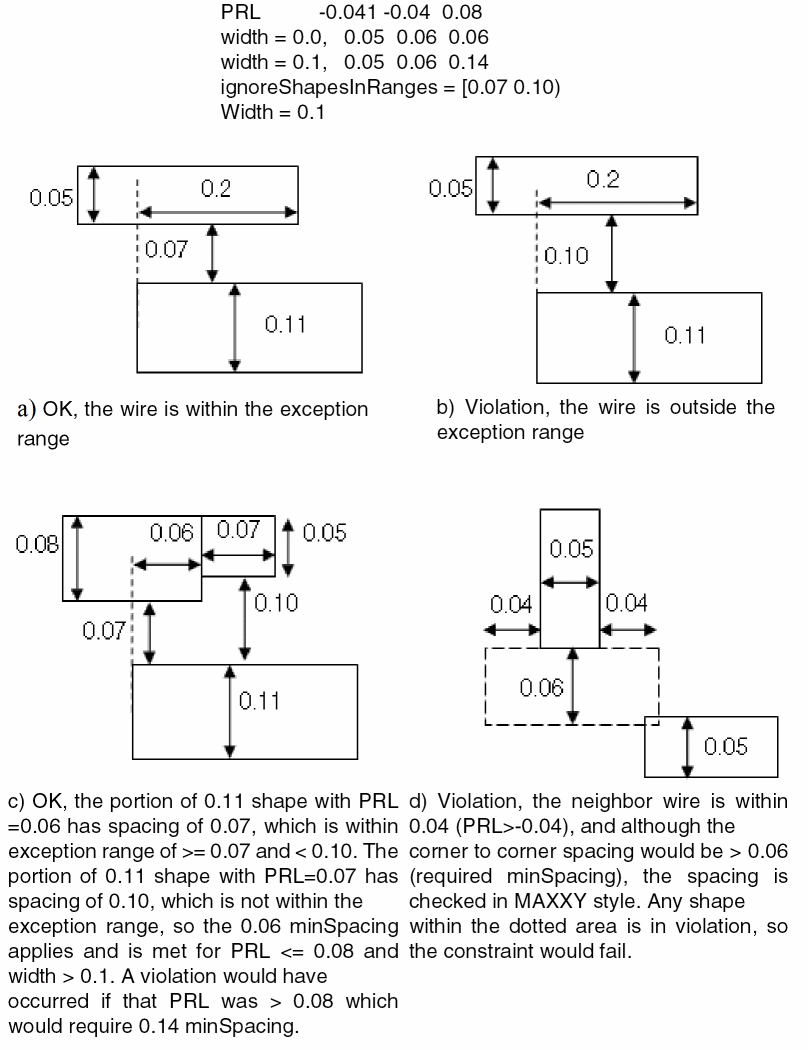
In this example, the shapes which are present in the range of greater than or equal to 0.07µm and less than 0.1µm for width >= 0.1µm are not considered for minimum spacing.
Related Topics
Return to top