
minSpacing (One layer)
spacings( ( minSpacingtx_layer['inLayerDirtx_layer2] [{'horizontal | 'vertical | 'diagonalOnly} ['eolWidthf_eolWidth]] ['sameNet ['PGNet] | 'sameMetal] ['sameMask] ['ignoreShapesInRanges ((("width"))(g_ignoreTable))] ['insideLayers (tx_layer3 tx_layer4 … tx_layerN) ['insidePurposes (t_purpose1 t_purpose2 … t_purposeN)] | 'outsideLayers (tx_layer3 tx_layer4 … tx_layerN) ['outsidePurposes (t_purpose1 t_purpose2 … t_purposeN)] ] ['cornerAllowed] ['lengthf_length] ['intersectLayers (tx_layer2tx_layer3...tx_layerN)]f_spacing['manhattan] )
     ( minSpacing tx_layer
 ['area f_maxArea]
 f_spacing ['manhattan]
)
) ;spacings
spacingTables( ( minSpacingtx_layer(( "width" nil nil ["width" | "length" nil nil] ) ['inLayerDirtx_layer2] [{'horizontal | 'vertical | 'diagonalOnly} ['eolWidthf_eolWidth]] ['sameNet ['PGNet] | 'sameMetal] ['sameMask | [{'mask1 | 'mask2 | 'mask3} ['ignoreIntermediateShapes]] ] ['exceptEolWidthf_eolWidth] ['ignoreShapesInRanges ((("width"))(g_ignoreTable))] ['insideLayers (tx_layer3 tx_layer4 … tx_layerN) ['insidePurposes (t_purpose1 t_purpose2 … t_purposeN)] | 'outsideLayers (tx_layer3 tx_layer4 … tx_layerN) ['outsidePurposes (t_purpose1 t_purpose2 … t_purposeN)] ] [f_default] ) (g_table) ['manhattan] )
     ( minSpacing tx_layer
 (( "twoWidths" nil nil "length" nil nil )
  ['inLayerDir tx_layer2]
  [{'horizontal | 'vertical | 'diagonalOnly} ['eolWidth f_eolWidth]]
  ['sameNet ['PGNet] | 'sameMetal]
  ['sameMask]
  ['fillConcaveCorner f_fill]
  ['ignoreShapesInRanges ((("width"))(g_ignoreTable))]
  ['insideLayers (tx_layer3 tx_layer4 … tx_layerN)
   ['insidePurposes (t_purpose1 t_purpose2 … t_purposeN)]
  |
   'outsideLayers (tx_layer3 tx_layer4 … tx_layerN)
   ['outsidePurposes (t_purpose1 t_purpose2 … t_purposeN)]
  ]
  [f_default]
 )
 (g_table) ['manhattan]
)
) ;spacingTables
Specifies the minimum orthogonal spacing required between two adjacent shapes on the specified layer. The required spacing can be dependent on the direction in which the spacing is measured, on the width of the wider of the two shapes, on the width of both the shapes, or on the width of the shapes and the parallel run length between them.
If the 'eolWidth parameter is specified, the constraint applies to edges with width greater than or equal to eolWidth.
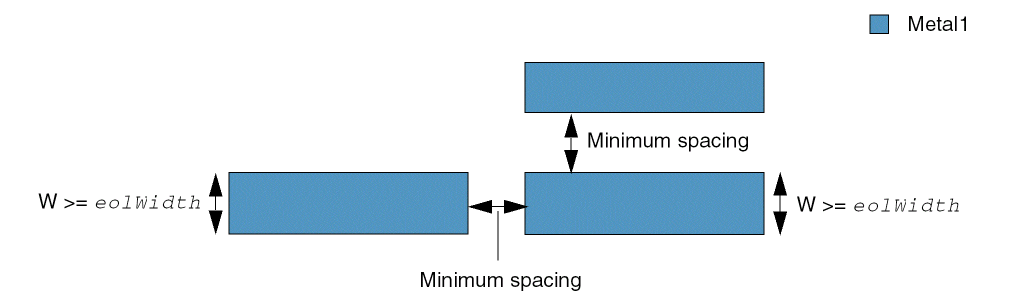
Other optional parameters determine whether the constraint applies to a particular connectivity type or to shapes on power or ground nets. The constraint can also be applied to shapes on the same mask.
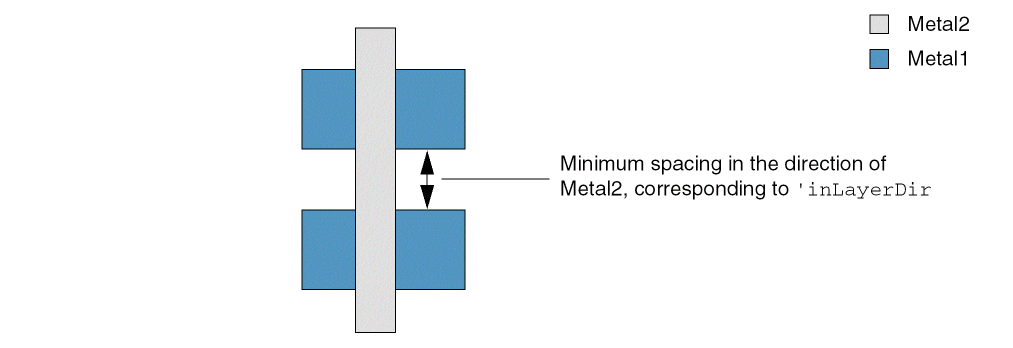
If two shapes on the specified layer are overlapped by a single shape on another layer, you can optionally specify this second layer to indicate the direction in which the constraint applies. This is useful if the structures in the design can be used at various rotations. For example, in the figure below, spacing direction for Metal2 is specified as vertical; therefore, spacing between Metal1 shapes is measured in the vertical direction. If this structure is now rotated by 90 degrees, the spacing between Metal1 shapes, after rotation, would be measured horizontally.
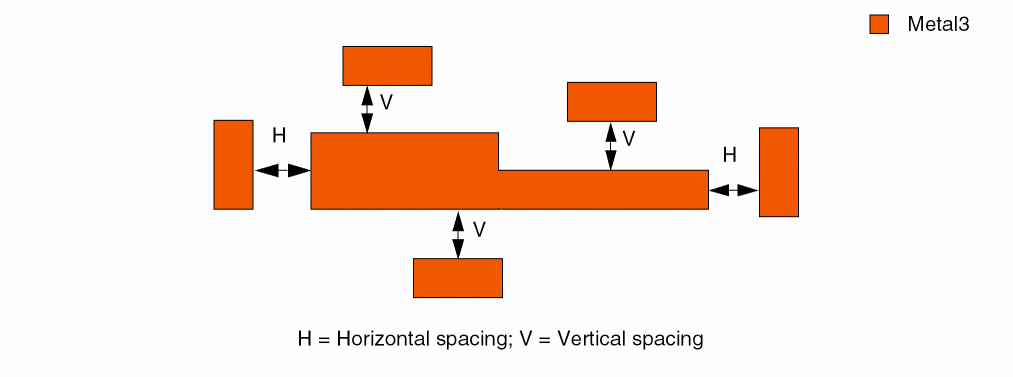
In some advanced processes, the spacing between the sides of shapes when those shapes are drawn in the non-preferred direction must be greater than the regular spacing. For example, the preferred routing direction for Metal3 is vertical. Therefore, the spacing measured horizontally (between vertical Metal3 shapes) must meet the regular spacing requirement, and the spacing measured vertically (between horizontal Metal3 shapes) must be greater than the regular spacing.
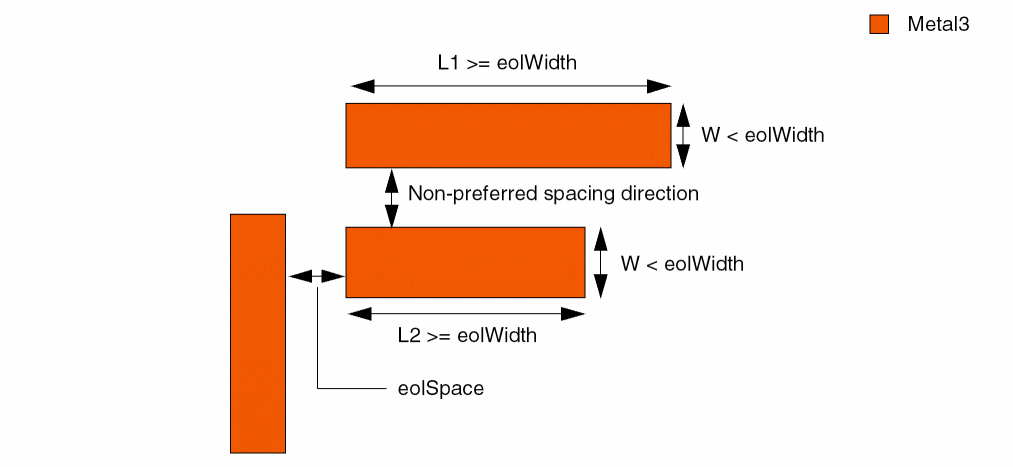
The spacing measured between two end-of-line edges or between an end-of-line edge and a side edge is determined by an end-of-line constraint (for example, minEndOfLineSpacing), instead of minSpacing. The width of an end-of-line edge is less than eolWidth and the width of a side edge is greater than or equal to eolWidth.
Values
Parameters
|
The direction in which the constraint applies.
|
|
|
The constraint applies only if the width of an edge is greater than or equal to this value. This parameter must be used in conjunction with the direction parameter. |
|
|
The connectivity type. If connectivity type is not specified, the constraint applies to any connectivity type, including any two shapes on the same layer with no common metal or net. |
|
|
(Virtuoso Advanced Node for Layout Standard) The constraint applies only to shapes on the same mask. |
|
|
(Virtuoso Advanced Node for Layout Only) The constraint applies only to the shapes on this mask. |
|
|
(Virtuoso Advanced Node for Layout Only) The constraint applies between two shapes if they are on the specified mask, irrespective of whether a shape, gray or on any other mask, is present between them. |
|
|
The constraint applies between a shape with area less than this value and all other shapes on the specified layer. No other parameters are permitted in combination with this parameter. |
|
|
(Virtuoso Advanced Node for Layout Standard) Spacing between two shapes on a layer is ignored if the width of the wider shape is greater than or equal to the specified width and the spacing between the two shapes is within the ignore range for that width. The range of spacing values to be ignored must be less than the minimum spacing for the specified width. Each row of ignoreTable has the following format: Type: A 1-D table specifying floating-point width and spacing values |
|
|
(Virtuoso Advanced Node for Layout Standard) The constraint does not apply to edges with width less than this value. |
|
|
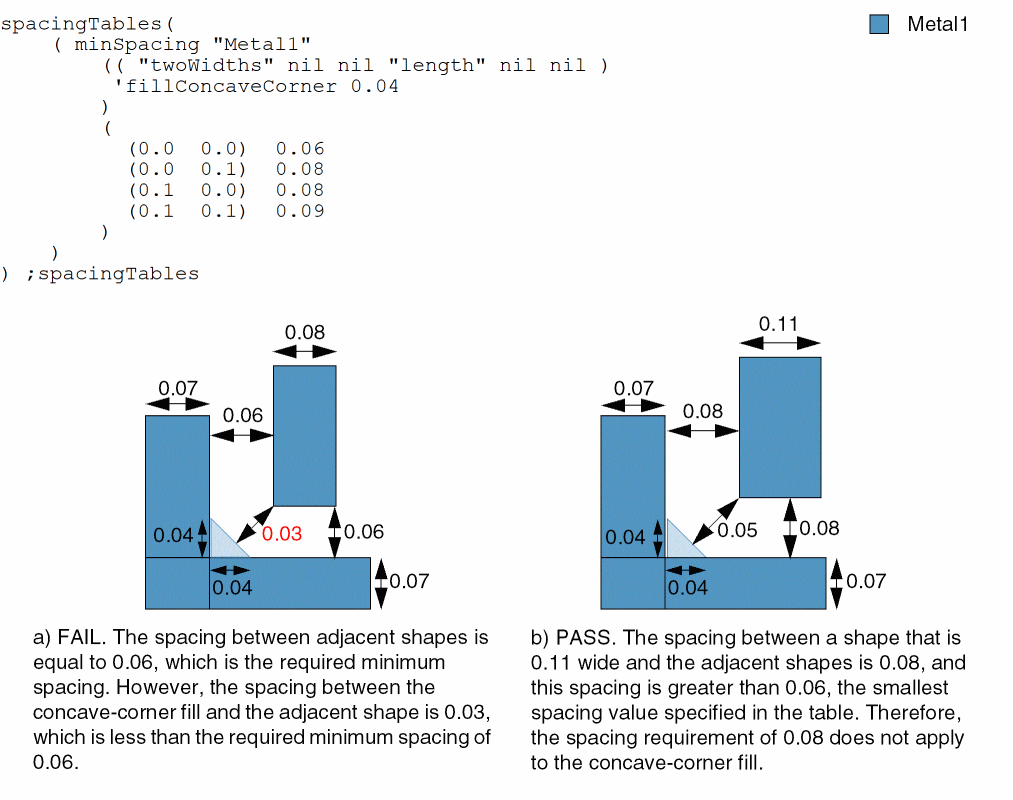
(Virtuoso Advanced Node for Layout Only) Before spacing is checked between a concave corner and a shape, the concave corner is filled with a triangular shape whose sides measured along the concave edges are equal to this value. Moreover, the spacing between this concave fill and a shape must be greater than or equal to the smallest spacing value specified in the table, provided this minimum spacing applies to all related shapes. |
|
|
|
|
|
Determines if the constraint applies, based on the presence or absence of one or more layers.
For more information, see |
|
|
The |
|
|
The |
|
|
The spacing value to be used when no table entry applies or is specified (using g_table). Ensure that the default spacing value is sufficiently large to represent all missing spacing values in the table. Ideally, it should be greater than or equal to the largest specified spacing in the table. |
|
|
(Virtuoso Advanced Node for Layout Only) The constraint does not apply if the corners of the two shapes touch. |
|
|
(Virtuoso Layout Suite EXL and higher tiers) The constraint applies only to shapes with length less than this value. |
|
|
(Virtuoso Layout Suite EXL and higher tiers) The constraint applies only if the spacing gap is covered by shapes on one of the specified layers. |
|
|
The constraint uses Manhattan distance, which allows a larger spacing at the corners. |
|
Examples
- Example 1: minSpacing (fixed value)
- Example 2: minSpacing with width (1-D table)
- Example 3: minSpacing with width and width (2-D table)
- Example 4: minSpacing with width and length (2-D table)
- Example 5: minSpacing with width and length and default spacing (2-D Table)
- Example 6: minSpacing with twoWidths and length (2-D table)
- Example 7: minSpacing with ignoreShapesInRanges
- Example 8: minSpacing with sameMask
- Example 9: minSpacing with fillConcaveCorner
- Example 10: minSpacing with area
- Example 11: minSpacing with mask1 and ignoreIntermediateShapes
- Example 12: minSpacing with intersectLayers
Example 1: minSpacing (fixed value)
The minimum spacing on layer Poly1 is 0.5 and the minimum spacing on layer Metal2 is equal to the value of the technology parameter minspacing1.
spacings(
    ( minSpacing "Poly1" 0.5 )
    ( minSpacing "Metal2" techParam("minspacing1") )
) ;spacings
Example 2: minSpacing with width (1-D table)
The lookup table establishes the minimum spacing for a shape on Metal1 based on the width of the shape. For example, if the width of a shape is greater than or equal to 0.0005, but less than 0.5605, the minimum spacing is 0.12; if the width of a shape is greater than or equal to 0.5605, but less than 1.5005, the minimum spacing is 0.18; and so on.
spacingTables(
    ( minSpacing "Metal1"
     (( "width" nil nil ))
  (
    0.0005  0.12
    0.5605  0.18
    1.5005  0.50
    3.0005  0.90
    7.5005  2.50
    …
  )
 )
) ;spacingTables
Example 3: minSpacing with width and width (2-D table)
The lookup table establishes the minimum spacing for a shape on Metal2 based on the widths of the two shapes. If the width of one shape is greater than or equal to 0.0005 and the width of another shape is greater than or equal to 0.0001, the minimum spacing is 0.10; if the width of one shape is greater than or equal to 0.0005 and the width of another shape is greater than or equal to 0.0010, the minimum spacing is 0.12; and so on.
spacingTables(
    ( minSpacing "Metal2"
     (( "width" nil nil "width" nil nil ))
  (
   (0.0005  0.0001)  0.10
   (0.0005  0.0010)  0.12
   (0.0005  0.0020)  0.14
   (0.0005  0.0030)  0.16
    …
  )
 )
) ;spacingTables
Example 4: minSpacing with width and length (2-D table)
The lookup table establishes the minimum spacing for Metal3 based on the width of the wider shape and the parallel run length (prl) between the two shapes. If the width and prl are both greater than or equal to 0.005, the minimum spacing is 0.12; if the width is greater than or equal to 0.0005 and the prl is greater than or equal to 0.5605, the minimum spacing is 0.18; and so on.
However, if you index into the table with a width less than the first width index, the first width index is used. Similarly, if you index into the table with a prl less than the smallest prl index (length), the constraint value for the smallest prl index is returned.
spacingTables(
    ( minSpacing "Metal3"
     (( "width" nil nil "length" nil nil ))
  (
    (0.0005  0.0005)  0.12
    (0.0005  0.5605)  0.18
    (0.0005  1.5005)  0.50
    (0.0005  3.0005)  0.90
    (0.0005  7.5005)  2.50
    (0.1805  0.0005)  0.18
    (0.1805  0.5605)  0.18
    (0.1805  1.5005)  0.50
    (0.1805  3.0005)  0.90
    (0.1805  7.5005)  2.50
    (1.5005  0.0005)  0.50
    (1.5005  0.5605)  0.50
    (1.5005  1.5005)  0.50
    (1.5005  3.0005)  0.90
    (1.5005  7.5005)  2.50
    (3.0005  0.0005)  0.90
    (3.0005  0.5605)  0.90
    (3.0005  1.5005)  0.90
    (3.0005  3.0005)  0.90
    (3.0005  7.5005)  2.50
    (4.5005  0.0005)  1.50
    (4.5005  0.5605)  1.50
    (4.5005  1.5005)  1.50
    (4.5005  3.0005)  1.50
    (4.5005  7.5005)  2.50
    (7.5005  0.0005)  2.50
    (7.5005  0.5605)  2.50
    (7.5005  1.5005)  2.50
    (7.5005  3.0005)  2.50
    (7.5005  7.5005)  2.50
  )
 )
) ;spacingTables
The following table is a representation of the example above.
In the figure below, the width of the wider of the two shapes (W1) is 1.5005 and the parallel run length (L) between the two shapes is 2.5.
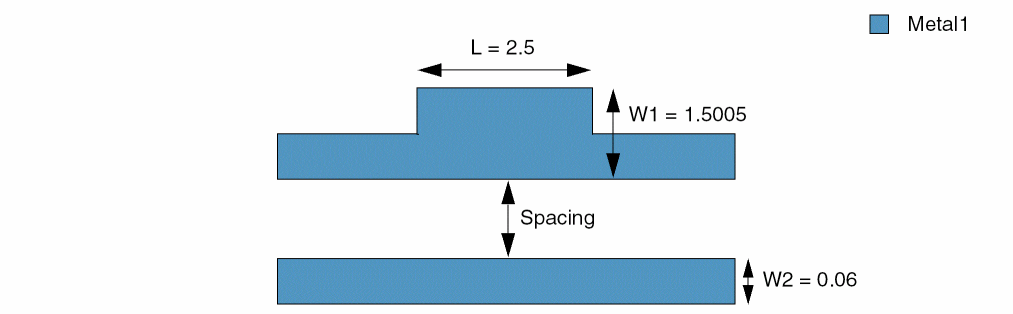
A comparison of W1 and L with the two sets of indexes provides a minimum spacing value of 0.5 — the minimum spacing value found at the intersection of row 3 (index = 1.5005) and column 3 (index = 1.5005).
Example 5: minSpacing with width and length and default spacing (2-D Table)
The lookup table establishes the minimum spacing for Metal1 based on the width of the wider shape and the parallel run length between the two shapes. The default value of 0.9 is used when a table entry is not specified, say, for (1.0 1.0), as shown below. The effective table entry for (1.0 1.0) in such a case would be 0.9.
spacingTables(
    ( minSpacing "Metal1"
     (( "width" nil nil "length" nil nil ) 0.9)
  (
    (0.1  0.5)  0.3
    (0.1  1.0)  0.3
    (0.1  2.0)  0.3
    (1.0  0.5)  0.3
    (1.0  2.0)  0.6
    (2.0  0.5)  0.3
    (2.0  1.0)  0.6
    (2.0  2.0)  1.6
  )
 )
) ;spacingTables
The following table is a representation of the example above.
The default value of 0.9 is used in place of the missing value indicated by the ? symbol in the table above.
Example 6: minSpacing with twoWidths and length (2-D table)
The lookup table establishes the minimum spacing for Metal1 based on the widths of both shapes and the parallel run length between them. A default minimum spacing value of 0.15 applies when no table entry applies.
spacingTables(
    ( minSpacing "Metal1"
     (( "twoWidths" nil nil "length" nil nil ) 0.15 )
  (
    (0.0   none)  0.15
    (0.0   0.0 )  0.20
    (0.0   1.5 )  0.50
    (0.0   3.0 )  1.00

       (0.25  none)  0.20
    (0.25  0.0 )  0.25
    (0.25  1.5 )  0.50
    (0.25  3.0 )  1.00

       (1.50  none)  0.50
    (1.50  0.0 )  0.50
    (1.50  1.5 )  0.60
    (1.50  3.0 )  1.00

       (3.00  none)  1.00
    (3.00  0.0 )  1.00
    (3.00  1.5 )  1.00
    (3.00  3.0 )  1.20
  )
 ) 'ref "Metal4.Space.1, Metal4.S.2, Metal4.S.3, Metal4.S.4"
) ;spacingTables
twoWidths is symmetric, that is, if there are four rows corresponding to one width value, there must be four rows corresponding to each width value. Additionally, duplicate width-length pairs corresponding to different spacing values are allowed.The following table is a representation of the example above.
In the figure below, the width of the first shape (W1) is 0.25 and the width of the second shape (W2) is 0.27. The parallel run length (L) between the two shapes is 0.1.
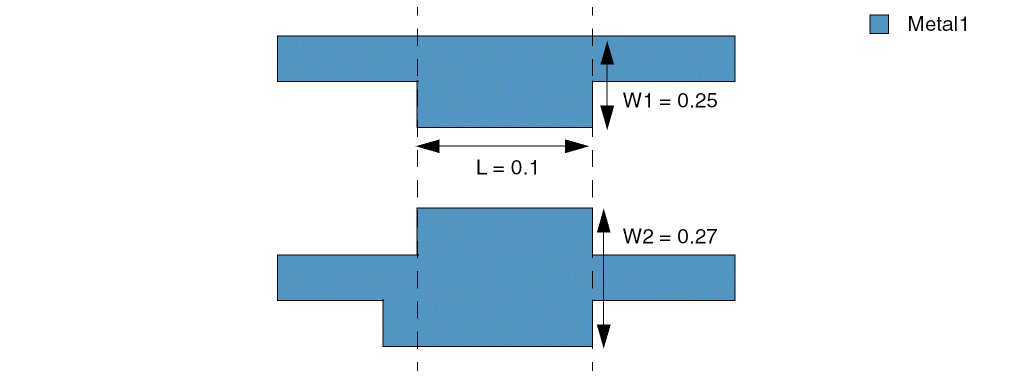
The table is looked up twice to locate the applicable spacing value. During the first pass, W1 and L are looked up horizontally, and, during the second pass, W2 and L are looked up vertically. During each pass, the last width and length index pair that satisfies both "W>width" and "L>length" is located in the table. For example,
-
W1 is equal to 0.25. The
widthindex for which W1>widthis0.00. The value of the correspondinglengthindex isnone, which satisfies L>length. -
W2 is equal to 0.27. The
widthindex for which W2>widthis0.25. The value of the correspondinglengthindex is0.00, which satisfies L>length.
The required spacing lies at the intersection of the row and column corresponding to the two widths and the parallel run length, as shown below:
Because the table is symmetrical, the same spacing value (0.20) is obtained if W1 is looked up vertically and W2 is looked up horizontally, as shown below:
Next, assume that the width of the first shape (W1) is 0.30 and the width of the second shape (W2) is 1.60. The parallel run length (L) between the two shapes is 1.40.
Again, the table is looked up twice to locate the applicable spacing value. During the first pass, W1 and L are looked up horizontally, and, during the second pass, W2 and L are looked up vertically. During each pass, the last width and length index pair that satisfies both "W>width" and "L>length" is located in the table. For example,
-
W1 is equal to 0.30. The
widthindex for which W1>widthis0.25. The value of the correspondinglengthindex is0.00, which satisfies L>length. -
W2 is equal to 1.60. The
widthindex for which W2>widthis1.50. However, the value of the correspondinglengthindex is1.50, which does not satisfy L>length. Therefore,widthindex0.25is considered (because its correspondinglengthindex of 0.00 satisfies L>length).
The required spacing lies at the intersection of the row and column corresponding to the two widths and the parallel run length, as shown below:
Because the table is symmetrical, the same spacing value (0.25) is obtained if W1 is looked up vertically and W2 is looked up horizontally, as shown below:
Example 7: minSpacing with ignoreShapesInRanges
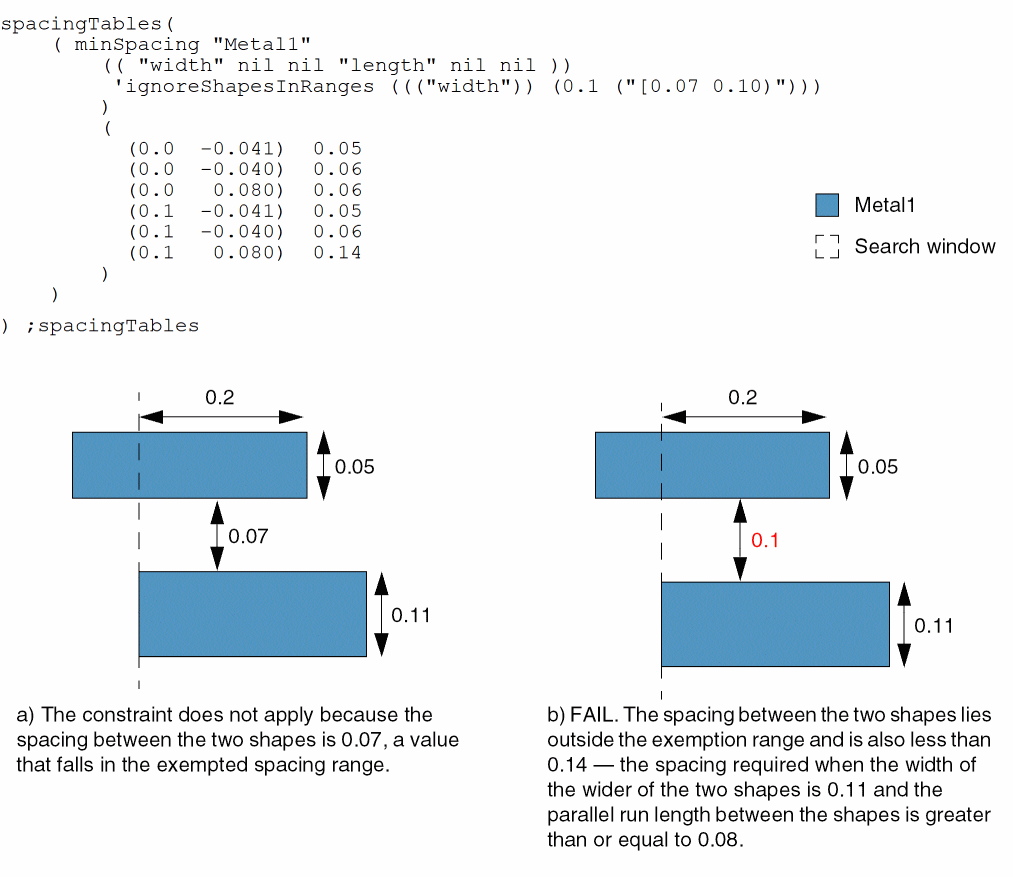
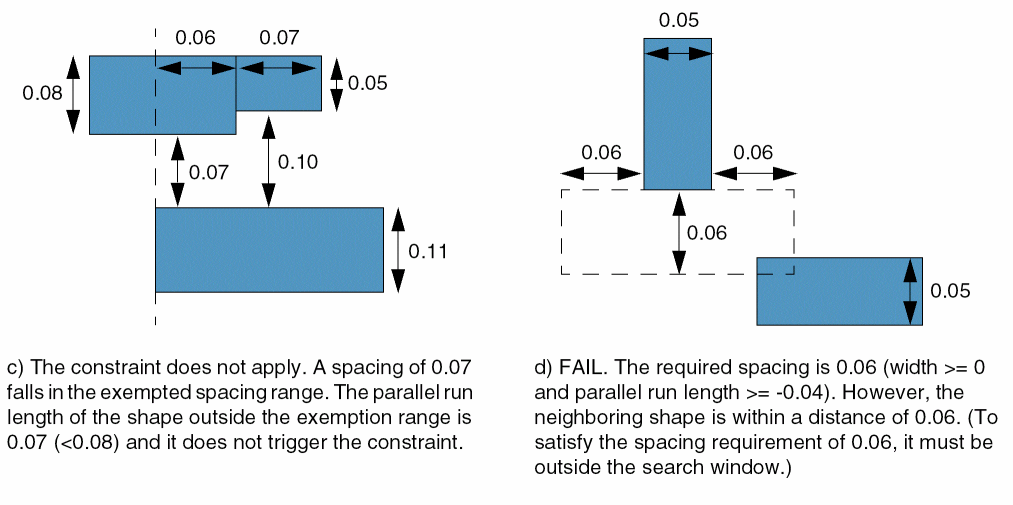
The spacing requirement can vary based on the width of adjacent shapes and the parallel run length between them. For example, the spacing between shapes must be at least 0.14 if the width of the wider of the two shapes is greater than or equal to 0.1 and the parallel run length between the shapes is greater than or equal to 0.08. The constraint does not apply between two shapes if the width of the wider shape is greater than or equal to 0.1 and the spacing between the two shapes is greater than or equal to 0.07 and less than 0.1.
Example 8: minSpacing with sameMask
The minimum spacing between two adjacent shapes must be 0.15 if the two shapes are on the same mask, and 0.1 otherwise.
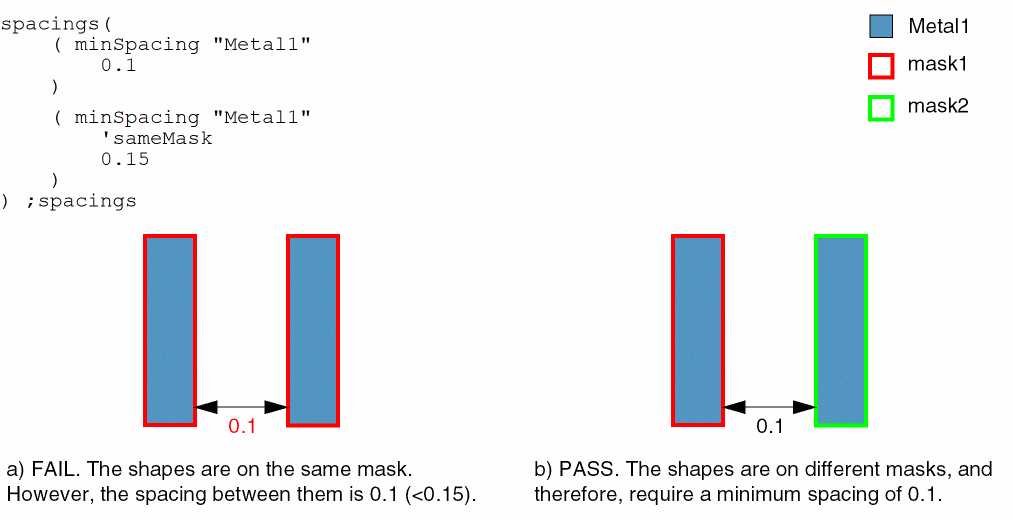
Example 9: minSpacing with fillConcaveCorner
All concave corners must be filled by a triangle whose sides along the concave edges are equal to 0.04 before minimum spacing is checked. The minimum spacing requirement between shapes is 0.06, which also applies to the concave-corner fill. The spacing requirement can vary based on the width of adjacent shapes and is determined by looking up the spacing table. However, this non-minimum spacing requirement does not apply to the concave fill.
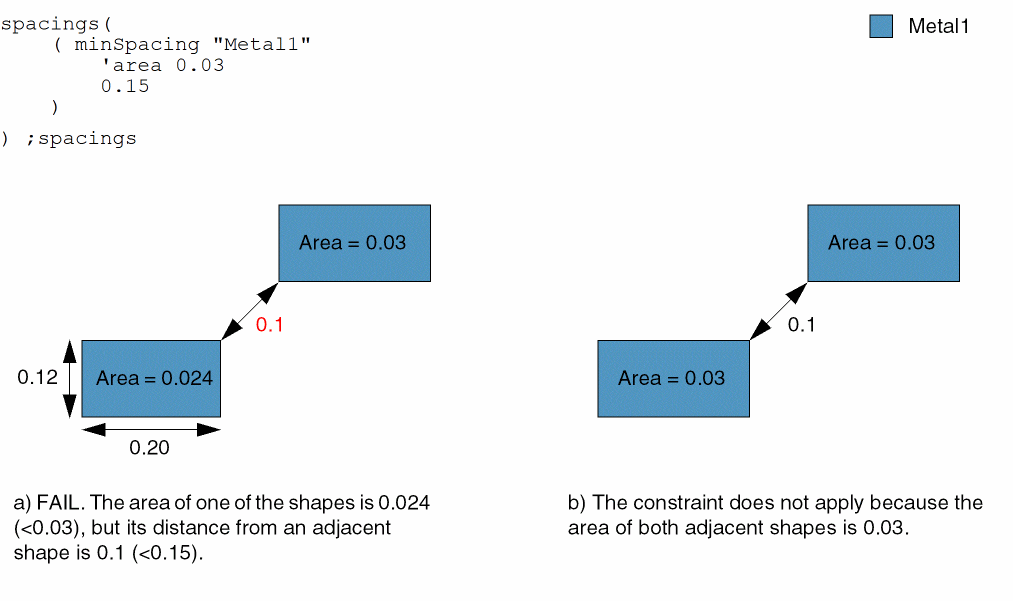
Example 10: minSpacing with area
The minimum spacing between two adjacent shapes must be 0.15 if at least one of the shapes has area less than 0.03.
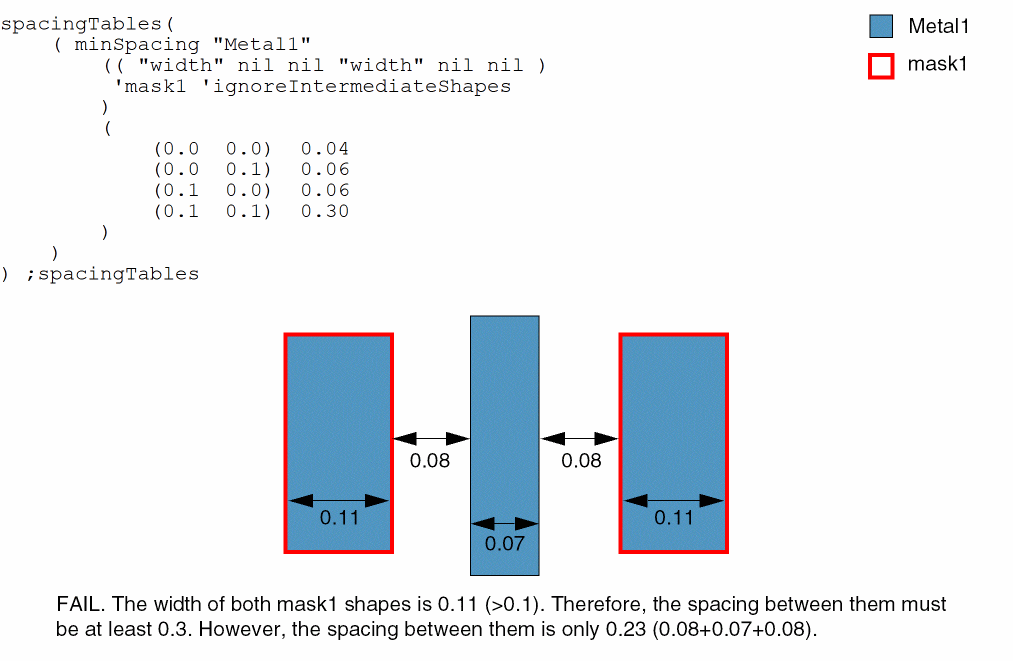
Example 11: minSpacing with mask1 and ignoreIntermediateShapes
The spacing between two Metal1 shapes on mask1 must be greater than or equal to 0.3 if both shapes have width greater than or equal to 0.1. If a shape, gray or on any other mask, is present between them, it is ignored.
Example 12: minSpacing with intersectLayers
The constraint applies only if the spacing between the shapes on Implant1 is filled by shapes on either Implant2 or Implant3.
spacings(
    (minSpacing "Implant1"
     'intersectLayers ("Implant2" "Implant3")
  0.05
 )
) ;spacings
Return to top