
oaAllowedSpacingRange
Specifies the allowed set of spacing ranges between any two shapes on a layer. Spacing can be independent of the width of the shapes, dependent on the width of one of the shapes, or dependent on the width of both the shapes. The constraint is defined at the process level and may not apply in some cases.
The following three conditions define the bounding criteria for the constraint. At least one of these conditions must be specified to limit the bounds of the constraint:
-
The constraint value range must be closed on the right-hand side, for example, "
<x",(x,y), or[x,y]. -
The
'overLayerparameter must be specified, so that spacing is checked only as far as the "over layer" shape is present. -
The
'stepRangeparameter must be specified, so that the limit for discrete spacing checks is defined.
oaAllowedSpacingRange Quick Reference
Value Types
Optional Parameters
|
Specifies the measurement direction.
Type: |
|
|
Specifies that the constraint applies only to shapes whose widths are in this range.
Type: |
|
|
Specifies that the parallel run length between the two shapes, and not the width, is the index for the one-dimensional table. The default value is false.
Type: |
|
|
Specifies that the constraint applies only to shapes whose widths are less than the given width value.
Type: |
|
|
Restricts the allowed spacing to integer multiples of this value. Use
Type: |
|
|
Specifies that the
Type: |
|
|
Specifies that the constraint applies only between the shapes that overlap a shape on this layer.
Type: |
|
There are two exceptions that apply to this constraint and these are specified using the sets of optional parameters listed below.
Exception 1: The following three parameters collectively form an exception and all of them must be specified together. This exception applies only when all the conditions specified by these parameters are satisfied.
|
The constraint does not apply if the length of the violation is less than or equal to the specified length.
Type: |
|
|
The constraint does not apply if the violation is over this layer.
Type: |
|
|
The constraint does not apply if the spacing falls within the specified range.
Type: |
Exception 2: The following four parameters collectively form an exception and must all be specified together. This exception applies only when all the conditions specified by these parameters are satisfied.
|
The constraint does not apply if there are this many shapes on both sides of the violation with full parallel run length.
Type: |
|
|
Specifies that shapes wider than this value do not count towards the
Type: |
|
|
The constraint does not apply if the maximum distance between the shapes that form the exception is less than the specified distance.
Type: |
|
|
The constraint does not apply if the spacing falls within the specified range.
Type: |
Examples
- Example 1: oaAllowedSpacingRange with RangeArrayValue
- Example 2: oaAllowedSpacingRange with RangeArray1DTblValue
- Example 3: oaAllowedSpacingRange with RangeArray2DTblValue
- Example 4: oaAllowedSpacingRange with exceptOverLayer, parallelRunLength, and exceptRanges
- Example 5: oaAllowedSpacingRange with numShapesRange, maxWidth, distance, and exceptOtherRanges
Example 1: oaAllowedSpacingRange with RangeArrayValue
set_layer_constraint -constraint oaAllowedSpacingRange \
  -layer Metal2 -RangeArrayValue {"(0.1 0.19)" ">=0.4"}
Sets the permitted spacing ranges for Metal2 shapes to greater than 0.1 and less than 0.19 user units, or greater than or equal to 0.4 user units.
Example 2: oaAllowedSpacingRange with RangeArray1DTblValue
set_layer_constraint -constraint oaAllowedSpacingRange -layer Metal1 \
  -RangeArray1DTblValue { \
      0.1 2 "(0.1 0.3)" ">= 0.4" \
      0.2 2 "(0.1 0.3)" ">= 0.5" \
      0.4 2 "(0.1 0.4)" ">= 0.6" }
Sets the allowed spacing ranges between Metal1 shapes based on the width of one of the shapes, as follows:
- For width = 0.1, the allowed spacing range is greater than 0.1 and less than 0.3, or greater than or equal to 0.4.
- For width = 0.2, the allowed spacing range is greater than 0.1 and less than 0.3, or greater than or equal to 0.5.
- For width = 0.4, the allowed spacing range is greater than 0.1 and less than 0.4, or greater than or equal to 0.6.
Example 3: oaAllowedSpacingRange with RangeArray2DTblValue
set_layer_constraint -constraint oaAllowedSpacingRange -layer Metal1 \
  -TblCols {0.0 0.2 0.4}\
  -RangeArray2DTblValue \
      {0.0 {"(0.1 0.2)" "[0.3 0.4]" ">=0.5"} {} {} \
      0.2 {} {"(0.1 0.3)" ">=0.5"} {"(0.1 0.4]" ">=0.6"} \
      0.4 {} {"(0.1 0.4]" ">=0.6"} {"(0.1 0.5]" ">=0.7"}}
Sets the allowed spacing ranges between Metal1 shapes based on the width of the two shapes, as follows:
- When both widths are equal to 0.0, the allowed spacing is greater than 0.1 and less than 0.2, or greater than or equal to 0.3 and less than or equal to 0.4, or greater than or equal to 0.5.
- When both widths are equal to 0.2, the allowed spacing is greater than 0.1 and less than 0.3, or greater than or equal to 0.5.
- When both widths are equal to 0.4, the allowed spacing is greater than 0.1 and less than or equal to 0.5, or greater than or equal to 0.7.
- When one width is equal to 0.2 and the other width is equal to 0.4, the allowed spacing is greater than 0.1 and less than or equal to 0.4, or greater than or equal to 0.6.
- The allowed spacing range is not specified for the following width combinations: (0.0, 0.2), (0.0, 0.4), (0.2, 0.0), and (0.4, 0.0).
For information about the Virtuoso technology file version of this constraint, see allowedSpacingRanges (one-layer) and allowedSpacingRanges (two-layer).
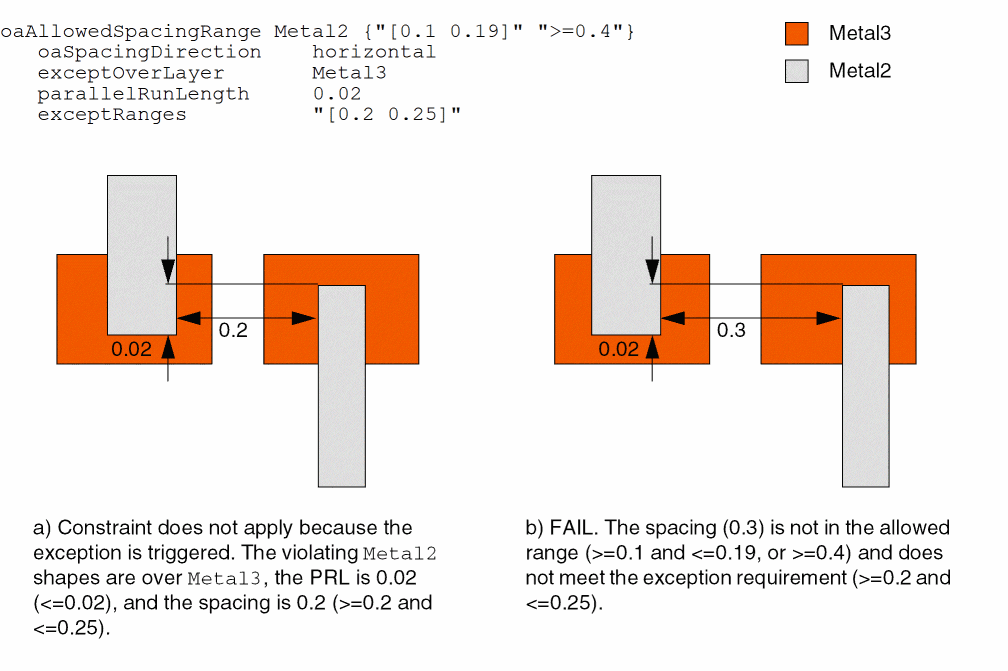
Example 4: oaAllowedSpacingRange with exceptOverLayer, parallelRunLength, and exceptRanges
set_constraint_parameter -name exceptRanges -RangeArrayValue {[0.2 0.25]}
set_constraint_parameter -name parallelRunLength -Value 0.02
set_constraint_parameter -name exceptOverLayer -LayerValue Metal3
set_constraint_parameter -name oaSpacingDirection -StringAsIntValue \
  horizontalDirection
set_layer_constraint -constraint oaAllowedSpacingRange \
  -layer Metal2 -RangeArrayValue {"[0.1 0.19]" ">=0.4"}
Sets the allowed horizontal spacing between shapes on Metal2 to be either greater than or equal to 0.1 and less than or equal to 0.19, or greater than or equal to 0.4, except when all of the following conditions are met:
-
The violating
Metal2shapes overlapMetal3shapes. -
The parallel run length between
Metal2shapes is less than or equal to 0.02. -
The
Metal2spacing is greater than or equal to 0.2 and less than or equal to 0.25.
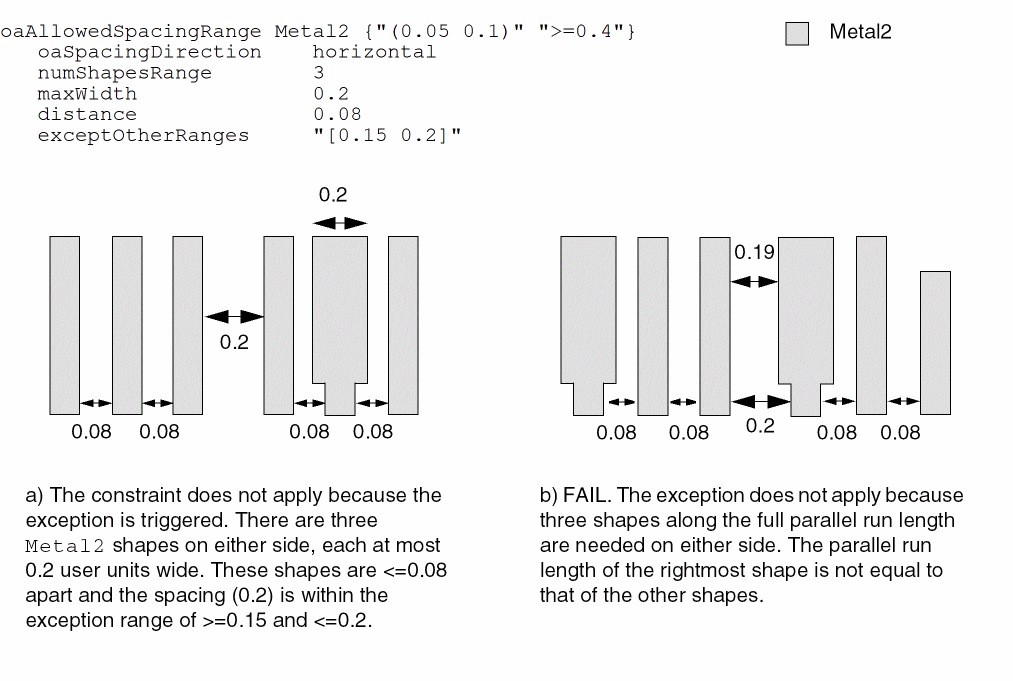
Example 5: oaAllowedSpacingRange with numShapesRange, maxWidth, distance, and exceptOtherRanges
set_constraint_parameter -name exceptOtherRanges -RangeArrayValue {[0.15 0.2]}
set_constraint_parameter -name distance -Value 0.08
set_constraint_parameter -name maxWidth -Value 0.2
set_constraint_parameter -name numShapesRange -RangeValue 3
set_constraint_parameter -name oaSpacingDirection -StringAsIntValue \
  horizontalDirection
set_layer_constraint -constraint oaAllowedSpacingRange \
  -layer Metal2 -RangeArrayValue {"[0.05 0.1]" ">=0.4"}
Sets the allowed Metal2 horizontal spacing to be either greater than or equal to 0.05 and less than or equal to 0.1, or greater than or equal to 0.4, except when all of the following conditions are met:
-
There are three
Metal2shapes more than 0.08 user units apart on both sides of the spacing violation with full parallel run length, each less than 0.2 user units wide. -
The spacing is greater than or equal to 0.15 and less than or equal to 0.2 user units. Illustration for oaAllowedSpacingRange with numShapesRange, maxWidth, distance, and exceptOtherRanges
Related Topics
Return to top