
allowedSpacingRanges (One layer)
spacings( ( allowedSpacingRangestx_layer['sameMask | 'diffMask] ['mask1 | 'mask2 | 'mask3] ['exceptWidthEdge] ['widthf_width] ['jointEOLWidthRangesg_jointEOLWidthRanges] ['horizontal | 'vertical] ['widthRanges (g_widthRanges)] ['exceptOverLayertx_exceptOverLayer'overLayerPrlf_prl'overLayerWidthRanges (g_overLayerWidthRanges) ] ['exceptNumShapesg_exceptNumShapeRange'numShapeDistancef_distance'numShapeWidthRanges (g_numShapeWidthRanges) ['numShapeMaxWidthf_maxWidth] ] ['stepSizef_stepSize['stepRangeg_stepRange]] ['overLayertx_overLayer] ['insideLayers (tx_layer1 tx_layer2 … tx_layerN) ['insidePurposes (t_purpose1 t_purpose2 … t_purposeN)] | 'outsideLayers (tx_layer1 tx_layer2 … tx_layerN) ['outsidePurposes (t_purpose1 t_purpose2 … t_purposeN)] ] (g_ranges) )
) ;spacings
spacingTables( ( allowedSpacingRangestx_layer(( "width" nil nil ["width" nil nil] ) ['sameMask | 'diffMask] ['mask1 | 'mask2 | 'mask3] ['exceptWidthEdge] ['width f_width] ['jointEOLWidthRangesg_jointEOLWidthRanges] ['parallelRunLengthTable] ['horizontal | 'vertical] ['widthRanges (g_widthRanges)] ['exceptOverLayertx_exceptOverLayer'overLayerPrlf_prl'overLayerWidthRanges (g_overLayerWidthRanges) ] ['exceptNumShapes g_exceptNumShapeRange 'numShapeDistancef_distance'numShapeWidthRanges (g_numShapeWidthRanges) ] ['insideLayers (tx_layer1 tx_layer2 … tx_layerN) ['insidePurposes (t_purpose1 t_purpose2 … t_purposeN)] | 'outsideLayers (tx_layer1 tx_layer2 … tx_layerN) ['outsidePurposes (t_purpose1 t_purpose2 … t_purposeN)] ] [f_default] ) (g_table) )
) ;spacingTables
Specifies a set of allowed spacing ranges between two shapes on a layer. Spacing can be independent of the width of the shapes, dependent on the width of one shape, or dependent on the width of both shapes.
The following three conditions define the bounding criteria for the constraint. At least one of these conditions must be specified to limit the bounds of the constraint:
-
The constraint value range must be closed on the right-hand side, for example, "
<x",(x,y), or[x,y]. -
The
'overLayerparameter must be specified, so that spacing is checked only as far as the "over layer" shape is present. -
The
'stepRangeparameter must be specified, so that the limit for discrete spacing checks is defined.
Values
|
The layer on which the constraint is applied. Type: String (layer and purpose names) or Integer (layer number) |
|
|
The allowed spacing ranges specified as follows:
Type: Floating-point values specifying a |
|
|
The format of a 1-D table row is as follows: where, f_width is the width of the wider of the two shapes and f_spacing is the spacing allowed when the width is greater than or equal to the corresponding index.
If
'parallelRunLengthTable is specified, the 1-D table is indexed on the parallel run length, instead of width.The format of a 2-D table is as follows:
where, f_width1 and f_width2 represent the widths of the two shapes and f_spacing is the spacing allowed when both widths are greater than or equal to the corresponding indexes. Type: A 1-D table specifying floating-point width (or parallel run length) and spacing values, or a 2-D table specifying floating-point width and spacing values |
|
Parameters
|
(Virtuoso Layout Suite EXL and higher tiers) The mask of the shapes to which this rule belongs to. |
|
|
(Virtuoso Advanced Node for Layout Only) The constraint does not apply to any edges of a square shape or to edges whose span is considered as the width of the shape. |
|
|
The constraint applies only if the width of both adjacent shapes is less than this value. |
|
|
(Virtuoso Layout Suite EXL and higher tiers) The constraint applies only for L or T joints having end-of-line width in specified ranges. |
|
|
The direction in which spacing is measured. If direction is not specified, spacing is measured in any direction. |
|
|
(Virtuoso Advanced Node for Layout Standard) The constraint applies only to shapes with width in this range.
Type: Floating-point values specifying a |
|
|
|
|
|
(Virtuoso Advanced Node for Layout Standard) The constraint does not apply if all of the following conditions are met:
|
|
|
|
|
|
(Virtuoso Advanced Node for Layout Standard) The constraint does not apply if all of the following conditions are met:
|
|
|
(Virtuoso Advanced Node for Layout Standard) The allowed spacings (Slegal) are restricted to the following values: where, Smin is the lower end of the range specified by stepRange and n>=0. If stepRange is not specified, Smin is the lower end of the constraint value. |
|
|
(Virtuoso Advanced Node for Layout Standard) The stepped spacing specified with
Type: Floating-point values specifying a |
|
|
(Virtuoso Advanced Node for Layout Standard) The constraint applies only to those shapes that overlap a single shape on this layer. |
|
|
The spacing table is indexed on the parallel run length between two shapes, instead of on width. |
|
|
|
|
|
Determines if the constraint applies, based on the presence or absence of one or more layers.
For more information, see |
|
|
The |
|
|
The |
|
Examples
- Example 1: allowedSpacingRanges with horizontal, exceptOverLayer, overLayerPrl, and overLayerWidthRanges
- Example 2: allowedSpacingRanges with horizontal, exceptNumShapes, numShapeDistance, and numShapeWidthRanges
- Example 3: allowedSpacingRanges with horizontal, exceptNumShapes, numShapeDistance, numShapeWidthRanges, and numShapeMaxWidth
- Example 4: allowedSpacingRanges with vertical and stepSize
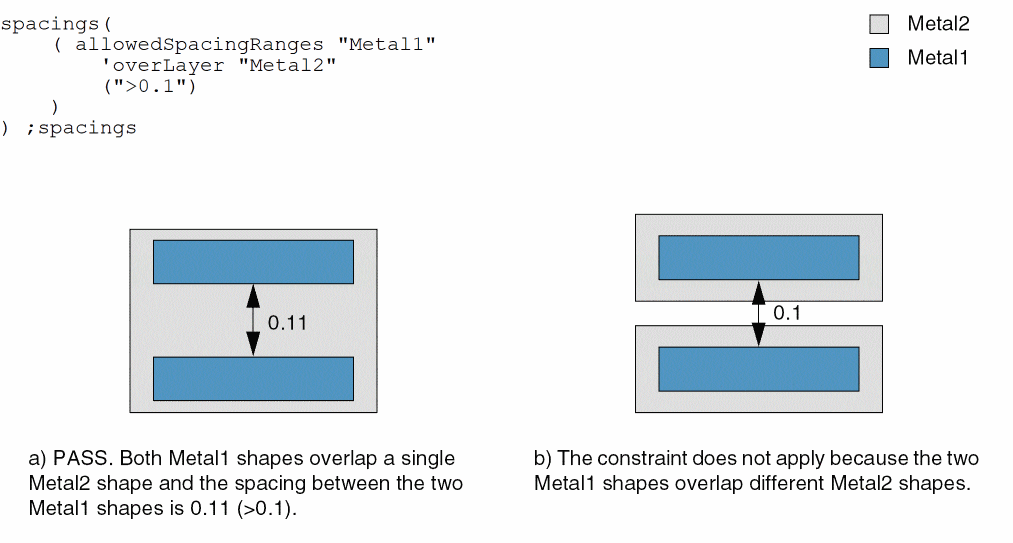
- Example 5: allowedSpacingRanges with overLayer
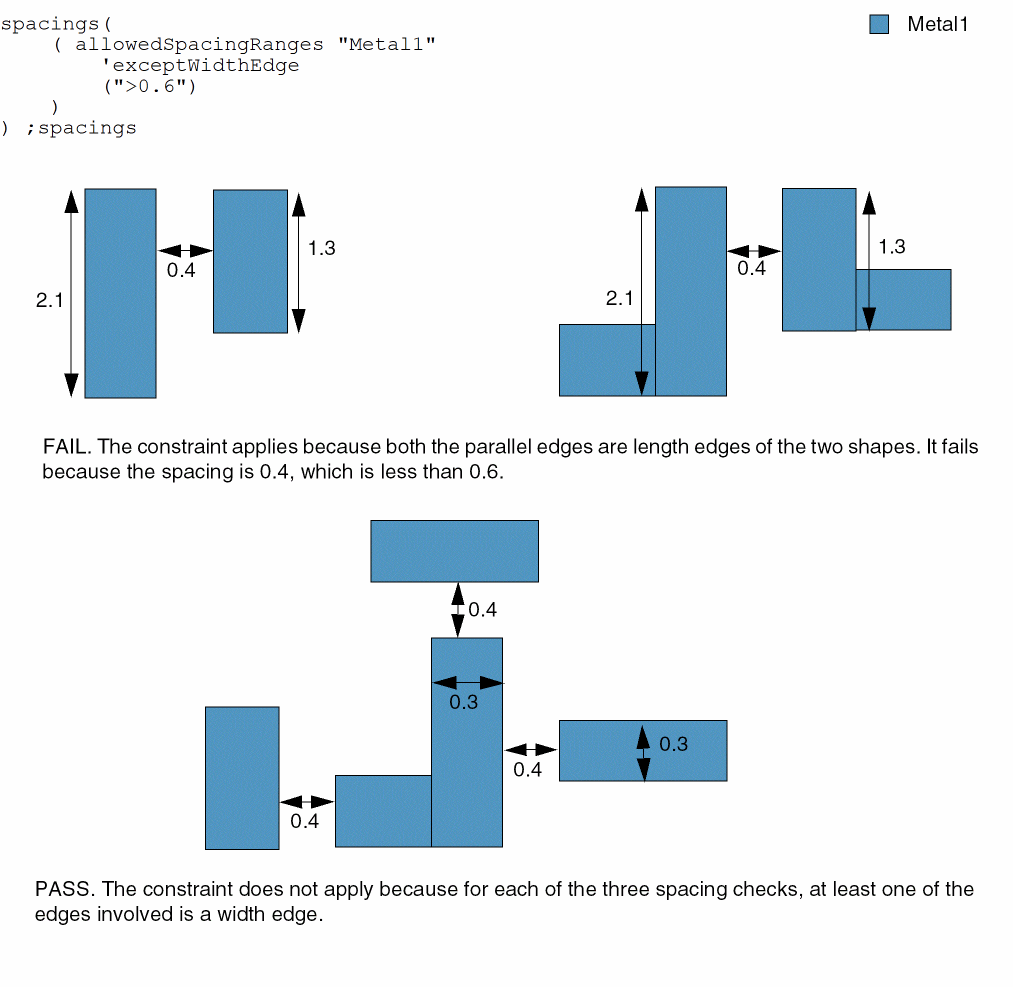
- Example 6: allowedSpacingRanges with exceptWidthEdge
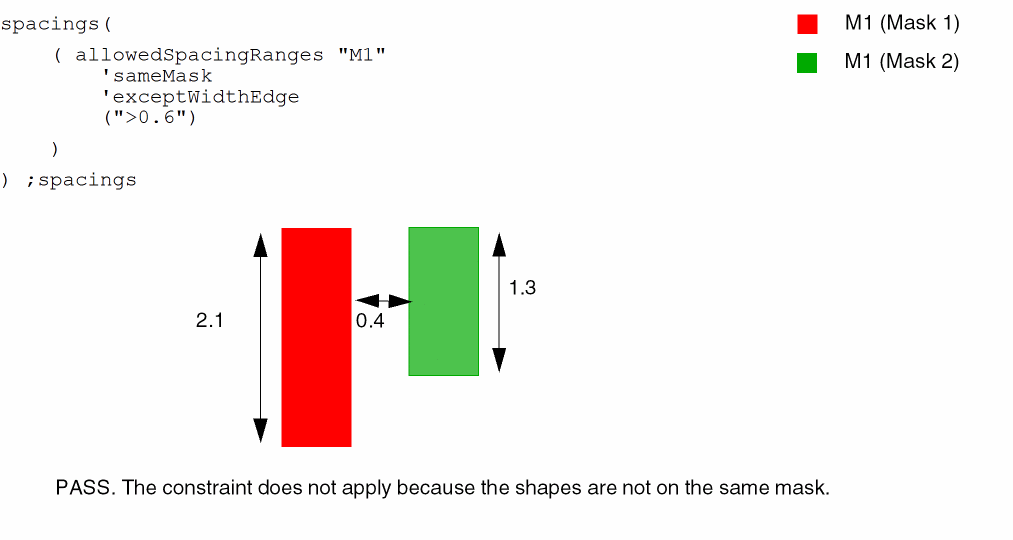
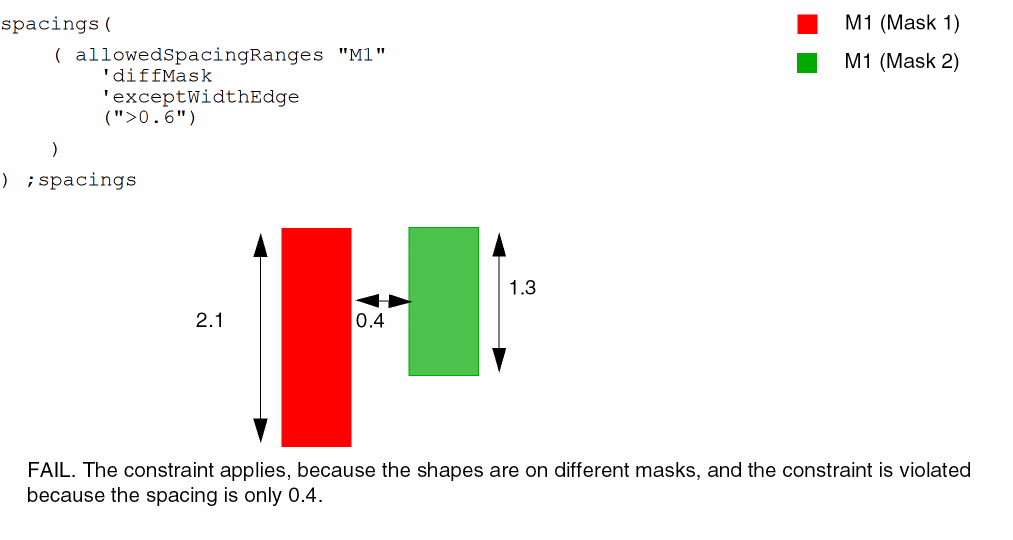
- Example 7: allowedSpacingRanges with sameMask and diffMask
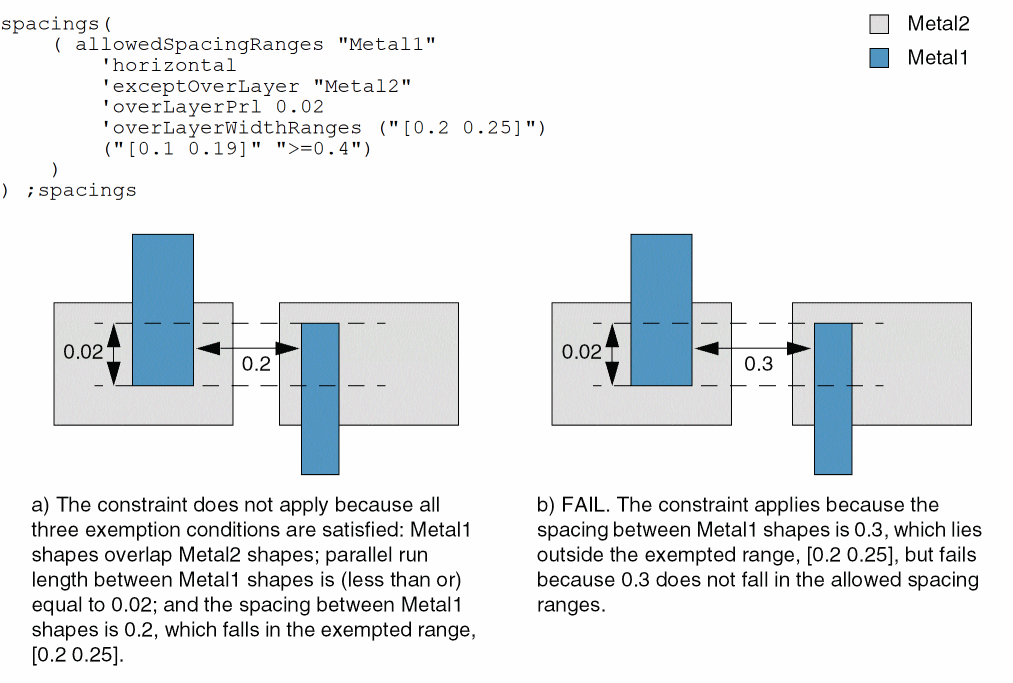
Example 1: allowedSpacingRanges with horizontal, exceptOverLayer, overLayerPrl, and overLayerWidthRanges
The horizontal spacing between two Metal1 shapes must be greater than or equal to 0.1 and less than or equal to 0.19 or greater than or equal to 0.4 except when all of the following conditions are met:
- The shapes overlap Metal2 shapes.
- The parallel run length between Metal1 shapes is less than or equal to 0.02.
-
The spacing between Metal1 shapes is greater than or equal to 0.2 and less than or equal to 0.25.
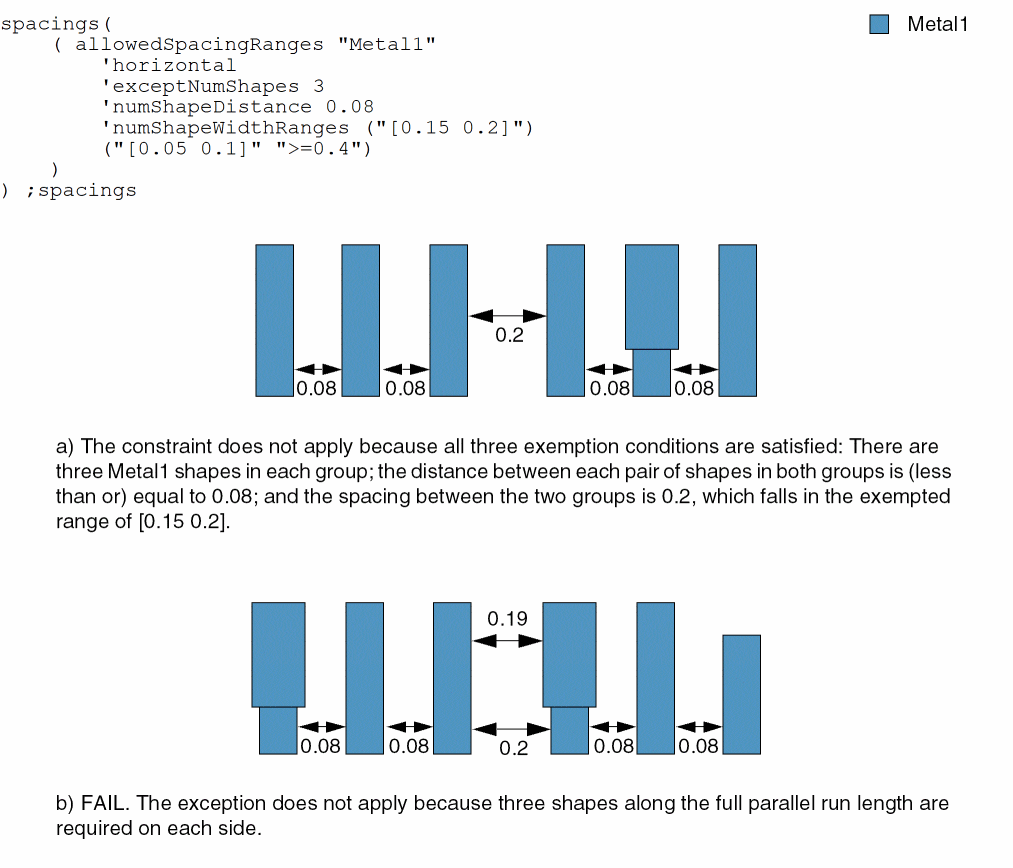
Example 2: allowedSpacingRanges with horizontal, exceptNumShapes, numShapeDistance, and numShapeWidthRanges
The horizontal spacing between two Metal1 shapes must be greater than or equal to 0.05 and less than or equal to 0.1 or greater than or equal to 0.4 except when all of the following conditions are met:
- The number of Metal1 shapes in a group is 3 or less.
- The distance between a pair of shapes in a group is less than or equal to 0.08.
-
The spacing between two groups of shapes is greater than or equal to 0.15 and less than or equal to 0.2.
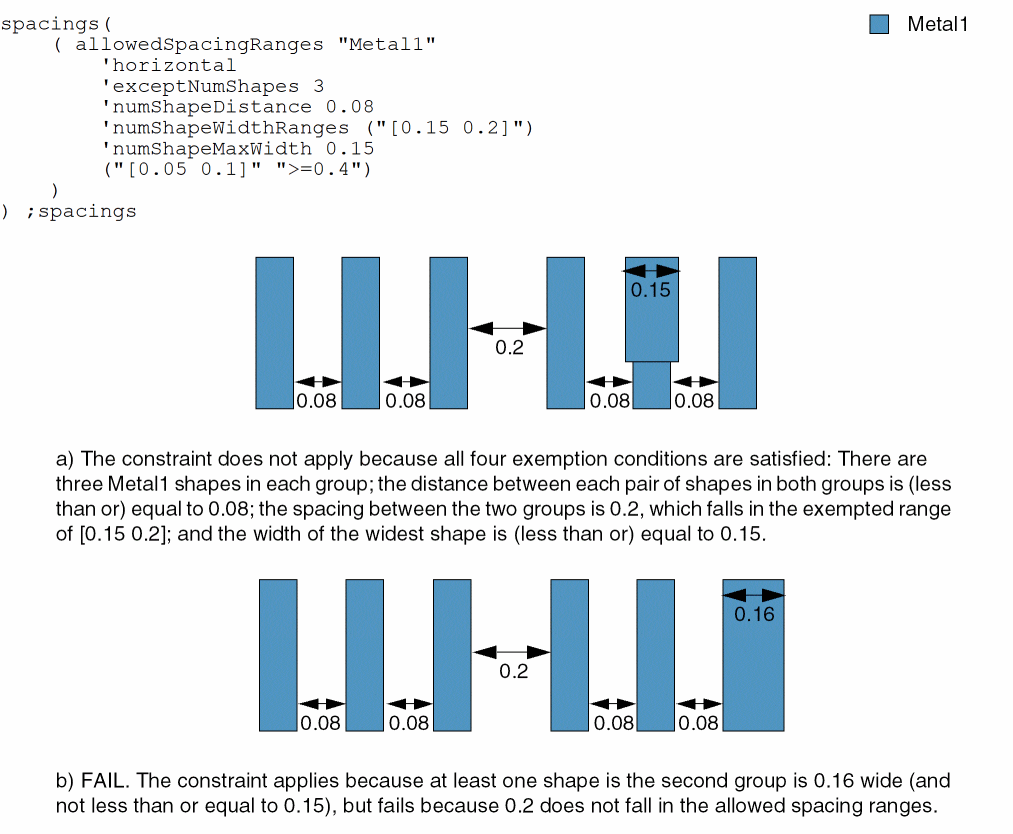
Example 3: allowedSpacingRanges with horizontal, exceptNumShapes, numShapeDistance, numShapeWidthRanges, and numShapeMaxWidth
The horizontal spacing between two Metal1 shapes must be greater than or equal to 0.05 and less than or equal to 0.1 or greater than or equal to 0.4 except when all of the following conditions are met:
- The number of Metal1 shapes in a group is 3 or less.
- The distance between a pair of shapes in a group is less than or equal to 0.08.
- The spacing between two groups of shapes is greater than or equal to 0.15 and less than or equal to 0.2.
-
The width of each shape in the group is less than or equal to 0.15.
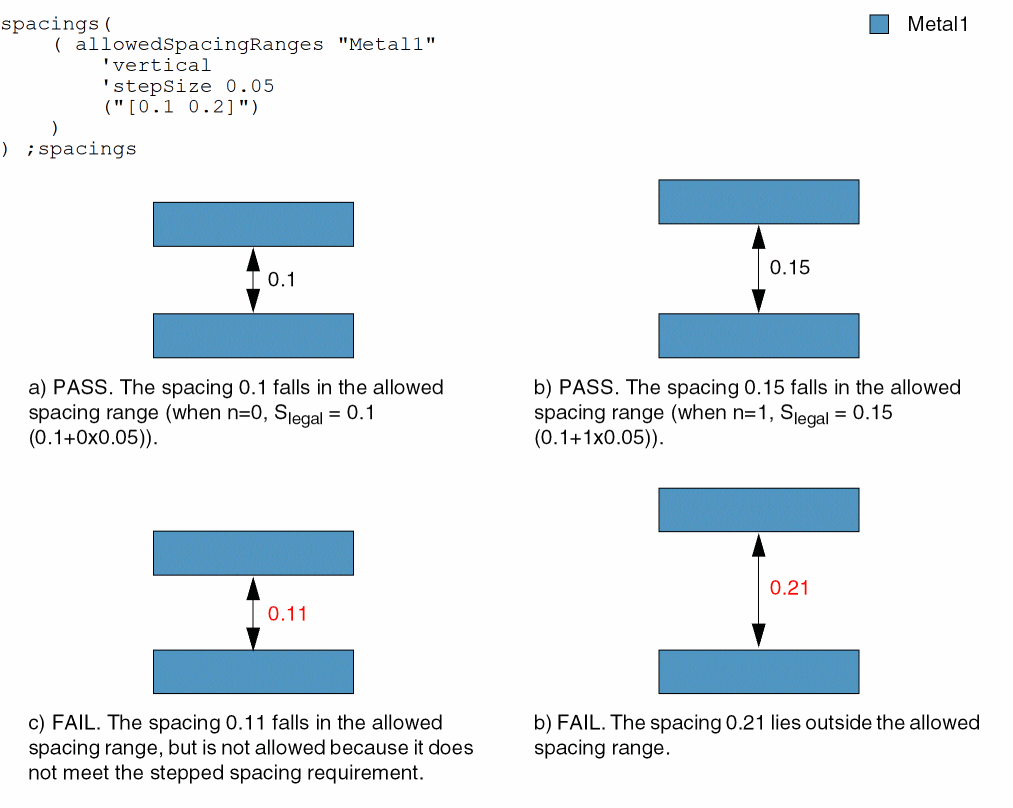
Example 4: allowedSpacingRanges with vertical and stepSize
The vertical spacing between two Metal1 shapes must be greater than or equal to 0.1 and less than or equal to 0.2. A legal spacing value is the sum of the lower bound of this spacing range (0.1) and a multiple of 0.05.
Example 5: allowedSpacingRanges with overLayer
The spacing between two Metal1 shapes must be greater than 0.1 if both shapes overlap a single Metal2 shape.
Example 6: allowedSpacingRanges with exceptWidthEdge
The spacing between two Metal1 shapes must be greater than 0.6 and parallel edges are length edges.
Example 7: allowedSpacingRanges with sameMask and diffMask
The spacing between two Metal1 shapes must be greater than 0.6 and parallel edges are length edges.
bumpMinSpacing
spacings( ( bumpMinSpacingtx_layer'widthf_widthg_spacing)
); spacings
(Virtuoso Layout Suite EXL and higher tiers) Specifies the bump to wire spacing if the width of the bump is greater than the bump width.
Values
|
The layer on which the constraint is applied. Type: String (layer and purpose names) or Integer (layer number) |
|
|
The minimum spacing between the bump and the wire on the specified layers. |
Parameters
|
Specifies the width of a bump to trigger the bump spacing. The constraint applies when the bump width is greater than f_width. |
Example
Specifies the bump to wire spacing.
spacings(
(bumpMinSpacing “RDL1” 'width 10
5.0)
) ;spacings
Return to top