
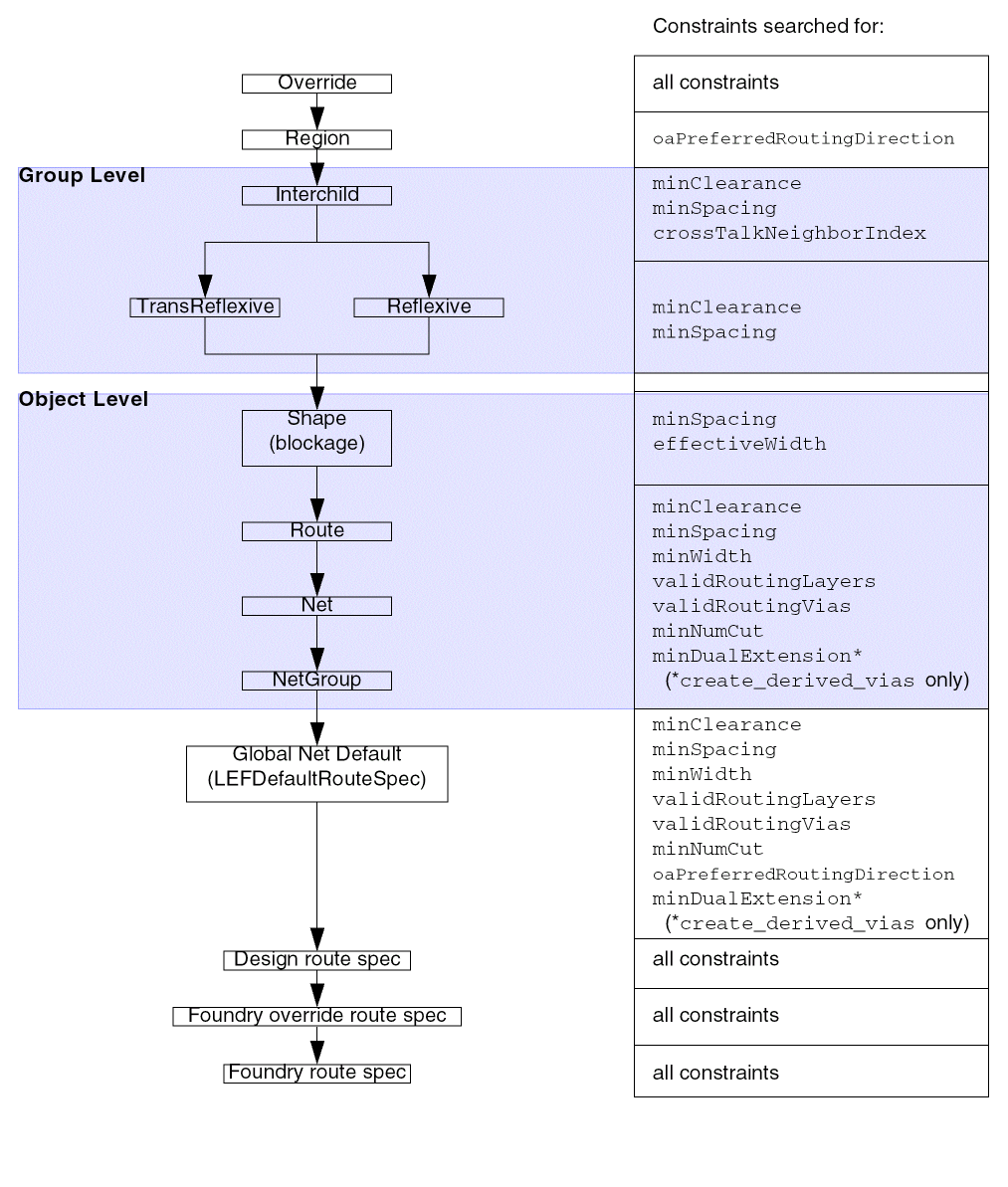
Simplified Constraint Search Hierarchy
There are two types of hierarchies that determine the value of a constraint for an object: Rule Spec Hierarchy and Object Hierarchy.
Rule Spec Hierarchy
If a constraint is not defined on a certain rule spec, that constraint might be defined by another rule spec in the fallback sequence. The rules system applies the fallback sequence to determine the constraint value to use.
Object Hierarchy
The object hierarchy first looks for the constraint in the object’s constraint group. If the constraint is not found, the search extends to the architecture of the object’s owners, in hierarchical order.
Virtuoso Space-based Router will search for all constraints in the Override, Design, and Foundry route specs, but in other levels of the hierarchy, only specific constraints are searched for, as shown in the following figure.
When setting constraints, apply the constraint to the highest level of hierarchy for which it is appropriate.
In addition to deciding the appropriate scope for your constraint in the object hierarchy, you must decide whether your constraint is application-specific. Application-specific constraints influence a particular application’s behavior, but might conflict with the requirements of another application.
For example, if you add an application-specific constraint to the Design default constraint group that limits the valid routing layers to Metal3, Metal4, and Metal5, your application might be required to route only Metal3, Metal4, and Metal5, but it is not reasonable to restrict all other applications to use only those layers.
Application-specific constraints should not be added to the built-in constraint groups, which apply to all applications. Instead, place your application-specific constraints into an application-specific constraint group and leave the application-specific constraint group unattached from any built-in constraint group, and the application can find it by name.
Override Rule Spec
At the highest level, if an override rule spec has been set , then all constraint values are taken from that rule spec. If the desired constraint does not exist in the override rule spec, then the search goes to the
Region
The
Group Level
The Group level applies only for constraints that are set in an InterChild, TransReflexive, or Reflexive constraint group for a group, typically a netGroup. InterChild constraints take precedence over the other two types.
Only the
If there are no groups defined or the constraint is not defined for a group constraint group, the search continues to the
Object Level
The Object level applies for the constraints that are assigned to blockage shapes, routes, nets, and netGroups, as shown in Simplified Constraint Search Hierarchy. At this level, the search begins with the object, then to the object’s parent, and so on, until the constraint is found. If the constraint is not found, the search goes to the
To apply a constraint to an object, the constraint is added to a specific constraint group that is assigned to the object as shown in the table below. The function of the constraint group determines how the constraint is used. For example, minSpacing on the shield group of a net specifies the spacing between the net and its parallel shields, whereas minSpacing on the inputtaper group for the same net specifies the spacing required when tapering the net to input pins. The minimum spacing for an unshielded net could be found in the default constraint group for the net.
| Object Type | Applicable Constraint Group(s) |
|---|---|
Global Net Default Route Spec
Only minSpacing, minWidth, validRoutingLayers, validRoutingVias, minNumCut, and oaPreferredRoutingDirection constraints are searched for in the Global net default route spec. In addition, minDualExtension from the Global net default route spec if the constraint is set.
If the desired constraint does not exist in or cannot be read from the Global net default route spec, the search goes to the
Design Rules
All constraints that are set in the Design route spec will be read. If the desired constraint does not exist in or cannot be read from the Design route spec, then the search goes to the
Foundry Override Rules
One constraint group can be identified as the Foundry Override route spec. When set like this, all constraints that are in that constraint group will be read. If the desired constraint does not exist in or cannot be read from the Foundry Override route spec, then the search goes to the
The assignment of a constraint group as the Foundry Override route spec is transient and cannot be saved. For more information, see
Foundry Rules
All constraints that are set in the Foundry route spec will be read.
Related Topics
Return to top