
Ignoring Components with no Schematic Counterpart
If your layout contains components (for example, template cells or dummy devices) with no schematic counterpart, you can have Check Against Source ignore them using the Properties used to ignore objects during check option on the Layout XL Parameters Options form. To do this:
-
Add a user-defined boolean property (for example,
ignoreDummyDeviceset tot) to the layout instance master, or selectively to each layout instance, to be ignored.
See Setting Layout XL Properties.
If you add the property to the master, each instance of that master that you create will be ignored by Check Against Source. - From the layout window menu bar, choose Options – Connectivity and choose the Parameters tab on the Connectivity form.
-
Check the radio button marked Properties used to ignore objects during check.
Environment Variable: propsUsedToIgnoreObjsForCheck -
Type in the property name string (for example,
ignoreDummyDevices) in the field next to the Add button, and click Add to add the property to the list of ignored properties.
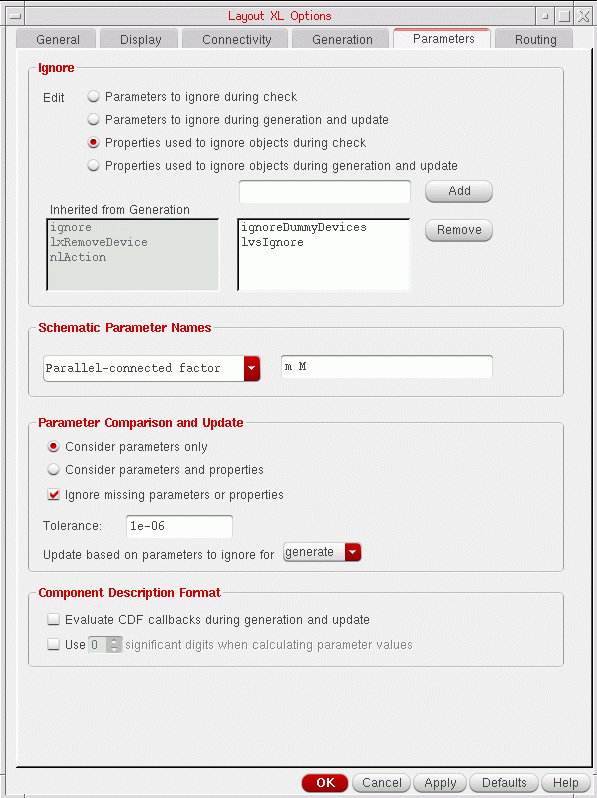
-
Click OK in the Connectivity form.
The next time you run Check Against Source, cellviews with the specified property will not be reported as mismatches.
Connectivity is traced as normal; that is, the pins on the dummy device are propagated to the top level and assume correct connectivity.
Related Topics
ignoreTermsWithNonRoutingLabels
Return to top