
Ignoring a Parameter on a Cellview
To ignore a specified cellview parameter:
- In the Configure Physical Hierarchy window, click the Cells tab.
-
Click the row containing the cell with the parameters you want to ignore.
The row is highlighted and the options in the Attributes pane are enabled. -
In the Parameters tab, type the name of any parameter to be ignored by layout generation in the Ignore for generation field.
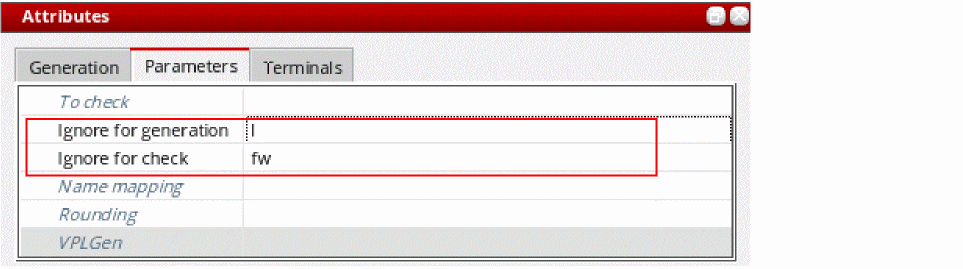
- Specify the name of any parameter to be ignored by Check Against Source in the Ignore for check field.
-
From the menu bar, choose File – Save to save the physical configuration view.
The settings are saved for all instances of the cell in question. The specified parameters are ignored the next time you update the layout view or the next time you run the Check Against Source command.
Related Topics
Ignoring a Parameter on an Instance or Occurrence.
Ignoring a Parameter on an Instance or Occurrence
To ignore a specified parameter on a single instance or occurrence:
- In the Configure Physical Hierarchy window, click the Instances tab.
-
Click the row containing the instance with the parameters you want to ignore.
The row is highlighted and the options in the Attributes pane are enabled. - Do one of the following.
-
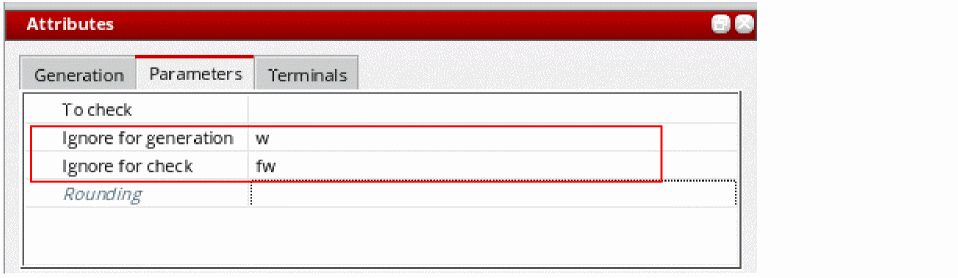
In the Parameters tab, type the name of the parameter to be ignored by layout generation in the Ignore for generation field and press
Return.
-
Type the name of the parameter to be ignored by Check Against Source in the Ignore for check field and press
Return.
The settings are made for the selected instance or occurrence. If you specified an occurrence mapping, the symbol is also changed to indicate this. -
From the menu bar, choose File – Save to save the physical configuration view.
The specified parameters are ignored the next time you update the layout view or the next time you run the Check Against Source command.

Related Topics
Instance Mode and Occurrence Mode
Return to top