
Updating Clone Families
The Update Clone Families form lets you manage the families of synchronized clones in your design. To see this form, choose Connectivity – Update – Clone Families.
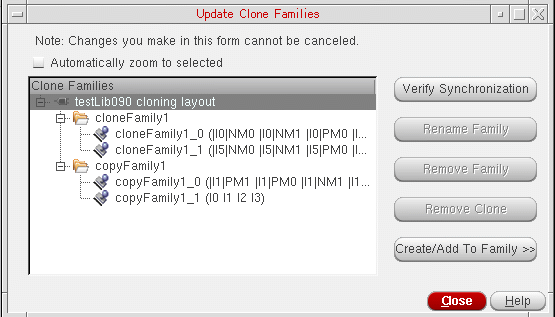
The entries in the form are highlighted depending on what is selected in the layout window. The updates you make in the layout window are reflected immediately in the Clone Families pane.
The Automatically zoom to selected option zooms in on the clone or clone family that is currently selected in the Clone Families pane, or on the layout group selected in the Layout groups pane .
Clicking on the top level fits the whole cellview in the layout window. If you select more than one layout group, the software zooms in on the bounding box that encloses the selected groups.
This option is considered only when you make the selection in the Update Clone Families form; selecting a synchronous clone in the canvas does not zoom the display to the selected clone or group.
For more information on the tasks you can perform in this form, see
- Verifying a Clone Family
- Removing a Clone from a Family
- Removing a Clone Family from Design
- Creating a New Clone Family
- Adding a Group to an Existing Family
Related Topics
Adding a Group to an Existing Family
Return to top