
generatePinsDisplayLimit
layoutXL generatePinsDisplayLimit int integer
Description
Specifies the maximum number of pins that are displayed in the I/O Pins tab of the Generate Layout Form and Update Components and Nets Form forms.
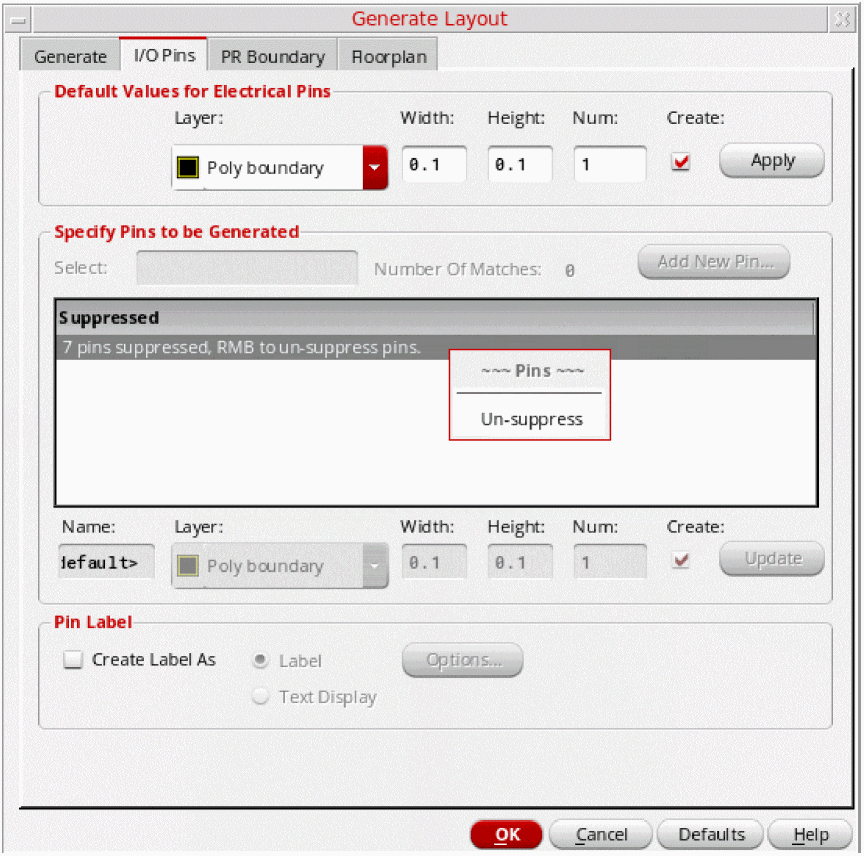
If the number of pins to be displayed is above the specified limit, the display of additional pins in the forms is suppressed and the form is updated to display the number of suppressed pins. A shortcut menu command, Un-suppress, is also enabled to allow the display of suppressed pins, if required, as shown in the figure below.
GUI Equivalent
|
Connectivity – Generate – All From Source – I/O Pins tab (Generate Layout Form) Connectivity – Update – Components And Nets – I/O Pins tab (Update Components and Nets Form) |
|
Examples
envGetVal("layoutXL" "generatePinsDisplayLimit")
envSetVal("layoutXL" "generatePinsDisplayLimit" 'int 550)
Related Topics
List of Layout XL Environment Variables
Return to top