
Set Pin Label Text Style Form
Use the Set Pin Label Text Style form to set the style of the labels used to annotate pins in the design window.
| Field | Description |
|---|---|
The default is off, which means that the software displays underscore characters ( 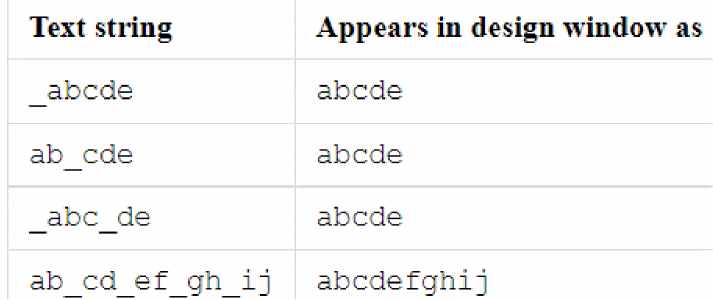 |
|
|
Sets the layer on which the labels are generated. Choose a layer from the cyclic field or select Same As Pin to create the label on the same layer as the pin with which it is associated.
Environment variables: |
|
|
Sets the layer purpose on which the labels appear. Choose a purpose from the cyclic field or select Same As Pin to create the label on the same layer purpose as the pin with which it is associated.
Environment variables: |
|
|
Sets the location of the label origin. The origin appears as a small square on the label when you place or select it. Choose from lowerLeft, centerLeft, upperLeft, lowerCenter, centerCenter, upperCenter, lowerRight, centerRight, and upperRight. |
|
|
Lets you specify the orientation of the labels.
Environment variable: |
Related Topics
Return to top