
permuteRule Property
permuteRule string t_permuteRule
Description
Makes the instance pins or terminals of a device permutable.
-
(p E1 E2)specifies thatE1andE2are permutable. -
(f E1 E2)specifies thatE1andE2are fixed (i.e., not permutable).
Alternatively, you can use the following syntax to same effect:
p (E1 E2)
f (E1 E2)
The permuteRule property can be defined on the layout or symbol master, in the CDF, or on the schematic or layout instance. Depending on where the permuteRule property is defined in a design, the rule that is used is based on the following precedence:
-
Look for the
autoPermutePinsproperty on the layout instance. If the property is set tofalse, do not permute. -
Look for the permute rule in CDF to get the instance CDF for the layout instance. Search for the
permuteRuleCDF parameter. If the parameter is present and not an empty string, return the value. Else, search insimInfoandauLvs. If the parameter is present and not an empty string, return the value. -
Find the schematic instance this layout instance is bound to and search for the
permuteRuleproperty on the schematic instance. If the parameter is present and not an empty string, return the value. Else, search for thepermuteRuleproperty on the master of the schematic instance. If the parameter is present and not an empty string, return that value. Else, search for thepermuteRuleproperty on the supermaster of the schematic instance. If the parameter is present and not an empty string, return the value.
Search for the permuteRule property on the layout instance. If the parameter is present and not an empty string, return the value. Else, search for the permuteRule property on the master of the layout instance. If the parameter is present and not an empty string, return that value. Else, search for the permuteRule property on the supermaster of the layout instance. If the parameter is present and not an empty string, return the value.
All pins that are not listed in the permuteRule property for a device are considered fixed. If you define the permuteRule property on a schematic symbol, that setting overrides any other rule defined in the layout for that instance.
You define the permuteRule in the Edit Component CDF form in either the Component Parameters section or the Simulation Information section. If it is defined in both sections, Layout XL uses the definition in the Component Parameters section.
After you add the permuteRule in the Edit Component CDF form, make sure that you run either of the following commands, for the permuteRule to take effect:
Alternatively, you can set the Update Connectivity Reference to None and then again set to the schematic for the property to take effect.
If you want Layout XL to permute pins automatically, switch on the Permute pins option in the Generation of the Connectivity form. If this option is switched off, you can only permute pins manually. Use the Disable Permutation constraint to prevent permutation for a selected instance. See Disabling Permutation for an Instance.
| Symbol master Add Property form | |
|---|---|
| Add CDF Parameter form | |
|---|---|
Examples
-
To specify that pins
E1andE2are permutable, use the followingpermuteRule.(p E1 E2)
-
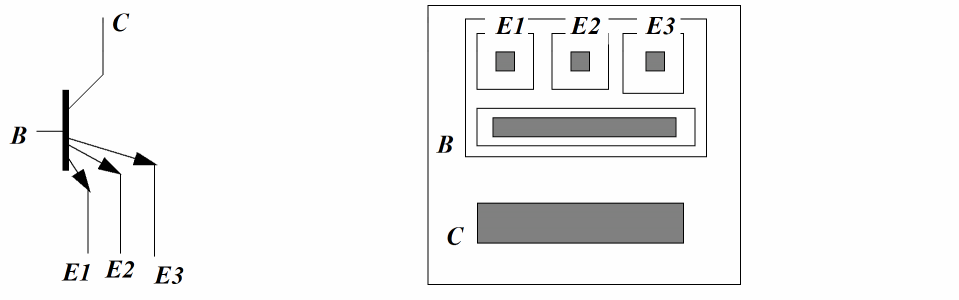
To specify that pins
E1,E2, andE3are permutable, use the followingpermuteRule.(p E1 E2 E3)
-
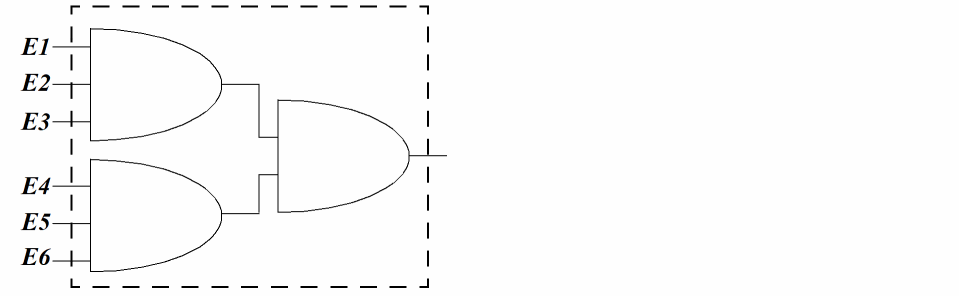
You can also specify a hierarchical
permuteRule. For example, the value below defines two sets of permutable pins (E1,E2,E3andE4,E5,E6)and specifies that the two sets are permutable with each other.(p (p E1 E2 E3) (p E4 E5 E6))
-
The following
permuteRulevalue defines two sets of permutable pins (E1,E2,E3andE4,E5,E6)and specifies that the two sets are not permutable with each other.(f (p E1 E2 E3) (p E4 E5 E6))
Here is a sample block of code to look for permuteRule for a given layout instance. If the value returned is an empty string, it implies no permute.
string findPermuteRule(dbInstId layInst) {
if (layInst->hasBoolProp("autoPermutePins", &pValue)) {
if (pValue == false) {
return "";
}
}
cdf = getInstCDF(layInst);
if (param = cdf->findParam(layInst, "permuteRule") {
if (param->valueNotEmptyString()) {
return param->value();
}
return ""
} else if (param = cdf->findParam(layInst,
"simInfo/auLvs/permuteRule")) {
// look for permuteRule property in CFD simInfo, under auLvs
if (param->valueNotEmptyString()) {
return param->value();
}
schInst = binder->findSchInst(layInst); // find schematic instance
this layout instance is bound to
if (schInst->hasStringProp("permuteRule", &pValue)) {
if (pValue->valeNotEmptyString()) {
return pValue;
}
}
schMaster = schInst->master;
if (schMaster->hasStringProp("permuteRule"), &pValue)) {
if(pValue->valueNotEmptyString()) {
return pValue;
}
}
schSuperMaster = schMaster->superMaster;
if (schSuperMaster->hasStringProp("permuteRule"), &pValue)) {
if(pValue->valueNotEmptyString()) {
return pValue;
}
}
if (layInst->hasStringProp("permuteRule", &pValue)) {
if (pValue->valeNotEmptyString()) {
return pValue;
}
}
layMaster = layInst->master;
if (layMaster->hasStringProp("permuteRule"), &pValue)) {
if(pValue->valueNotEmptyString()) {
return pValue;
}
}
laySuperMaster = layMaster->superMaster;
if (laySuperMaster->hasStringProp("permuteRule"), &pValue)) {
if(pValue->valueNotEmptyString()) {
return pValue;
}
}
return "";
}
Macros
To avoid entering long lists of permutable pins for the permuteRule property, use the following macro notations.
-
(f ALL), which means that all the pins in the cell are fixed -
(p ALL), which means that all the pins in the cell are permutable -
Range indications, where pins are numbered or sorted as in bus notations.
For example, the notation(p A<0:3> B<4:7>)
is equivalent to(p A<0> A<1> A<2> A<3> B<4> B<5> B<6> B<7>)
The notation(p (f A<0:3>) (f B<4:7>))
defines two sets of fixed pins (A<0:3>andB<4:7>) which are permutable with each other
You can also express range indications in descending order(p A<3:0> B<7:4>)
Related Topics
Disabling Permutation for an Instance
Return to top