
Point to Point Form
The following table describes the fields available in the Point to Point form.
| Field | Description |
|---|---|
|
Specifies a net name for the wire being created
Environment variable: |
|
|
This section lets you specify the width and layer for the wire that you want to create. |
|
|
Specifies the width of the wire to be created using point-to-point routing. Environment variable: enableWidthOverride |
|
|
Specifies the Top and Bottom layers to define the range of the valid routing layers. The specified layer range generally intersects the Pin Escape layer range. If you override the valid top or bottom layer, a color bar appears next to the layer cyclic field. Placing the cursor over the color bar displays the specified routing layer limit and the override information, 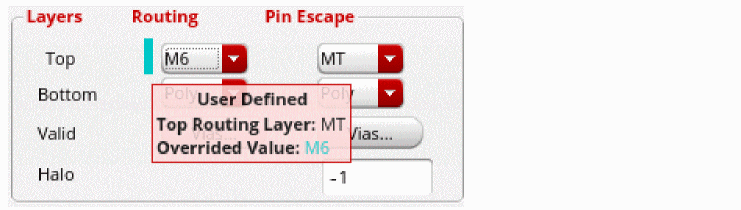 |
|
|
Specifies the Top and Bottom layers to define the layer range. You can use this field to override the |
|
|
Lets you select the vias to be used for creating and editing wires. Clicking the Vias button in the Routing column opens the Net tab in the Via Configuration form, and clicking the Vias button in the Pin Escape column opens the Pin Escape tab in the Vias Configuration form. The Pin Escape tab in the Vias Configuration form display the valid standard and custom vias from the application default constraint group. |
|
|
Specifies the |
|
|
Uses the exact digitized points to create routing between two given points. |
|
|
Uses the shortest route for connecting points and may also use pre-existing wires for creating the route. Environment variable: p2pSeedStyle |
Related topics
Return to top