
Session Windows and Workspaces
A session window appears when you first open a cellview for design editing. Each session window maintains its own set of workspaces. As such, you can have two session windows of the schematic editor that have two different workspaces. You might have one session window that is a schematic view with one workspace while another session window is a schematic view with a different workspace.
You can switch between session windows using Alt+Tab.
Also, changing the selected workspace in one session window does not affect the workspace in another session window, even if the same cellview appears in both session windows.
Tabs in a Session Window
You can have one or more cellviews open on one or more tabs in a session window. For example, you might have three tabs on which you have the schematic and symbol views of your NAND2 cell and the layout view of your AMPLIFIER cell open in the same session window. You select which cellview appears in the foreground of your session window by clicking on the corresponding tab header.
When you select different tabs in your session window to toggle between different cellviews of the same cell or other cells, the workspace changes to present window components that are relevant to the current view type. Only those menus, toolbars, and assistant panes that are relevant to the application corresponding to the current tab appear.
- If you are currently using the schematic editor, you can switch from one schematic view to another and the same workspace applies: You see the same assistant panes and toolbars. The content of the assistant panes reflects the schematic cellview you are viewing.
- If you switch from a schematic cellview tab to a layout cellview tab, the workspace for the layout application appears in the session window.
You can have several tabs in your session window, each running a different application. Only one tab is considered to be active at any one time.
When a session window does have multiple tabs, the tab order can be changed by dragging and dropping a particular tab into a new position, moving it from left-to-right or right-to-left as required.
You can switch between tabs using the Ctrl+Tab keybinding
Tab Pop-Up Menu Options
If you right click over a tab, a pop-up (context) menu gets displayed.
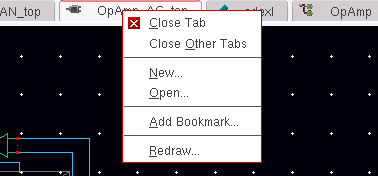
| Option | Description |
|---|---|
Related Topics
Opening a Cellview from the CIW
Return to top