
Calculating Metal Layer Density
You can generate metal density information for abstracts in LEF 5.8. The density value in LEF helps in verifying metal density fabrication rules early in the design cycle without having to replace the abstracts with the layouts. This information in LEF can reduce the memory requirements and increase the speed of metal fill tools and aid these tools to analyze and fix the designs using abstracts.
To calculate the metal layer density:
-
Choose Flow – Abstract and click the Density tab in the Running step Abstract for the selected cell(s) form.
The options on this tab provide specifications to Abstract Generator for calculating metal density (in percentage) for macros.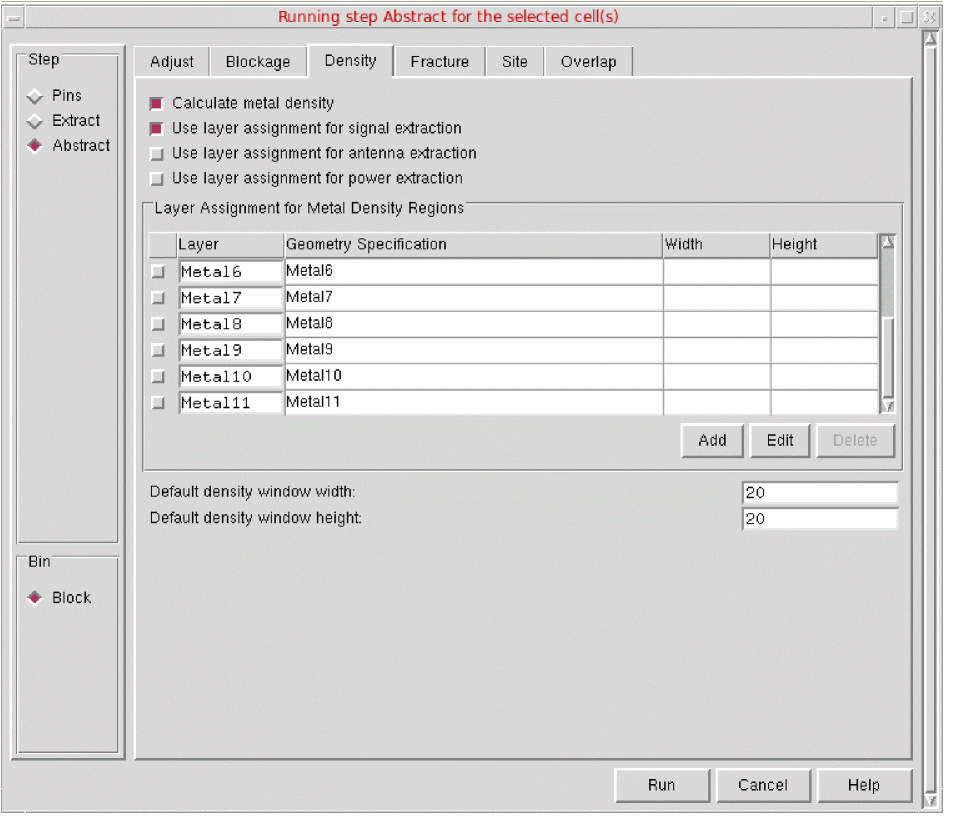
-
Select Calculate metal density to specify that metal density information is to be generated for the selected cell(s).
Now, you can specify the details to enable Abstract Generator in determining the metal layers and metal geometries for which density calculation needs to be performed. - You can use the same metal layers and their corresponding geometry specifications as you would have specified for signal nets, power nets, or antenna data extraction in the Extract step. To do this, select one of the following options on the Density tab:
- You can specify a different set of geometry specifications for metal layers by using the Layer Assignment for Metal Density Regions table. To use the geometry specifications from this table, ensure that none of the three layer assignment options is selected.
- Use the following fields to specify the same width and height value for all the layers:
- Click Run.
Related Topics
Return to top