
Automatic Pin Stretching
Abstract Generator sometimes requires to make the pin geometry larger than the settings you have specified. This feature is known as automatic pin stretching and is used in circumstances where cutting a window around a pin would remove some geometry (obstruction) that touches the pin, potentially letting the router route too close to the cut-out geometry. See the example below.
Automatic pin stretching searches for geometry only to the Maximum depth of hierarchy as specified in the Extract step’s Signal or Power tab. The default depth is 32.
This is an example of a situation in which pin stretching occurs. The example also illustrates the reasons why pin stretching occurs.
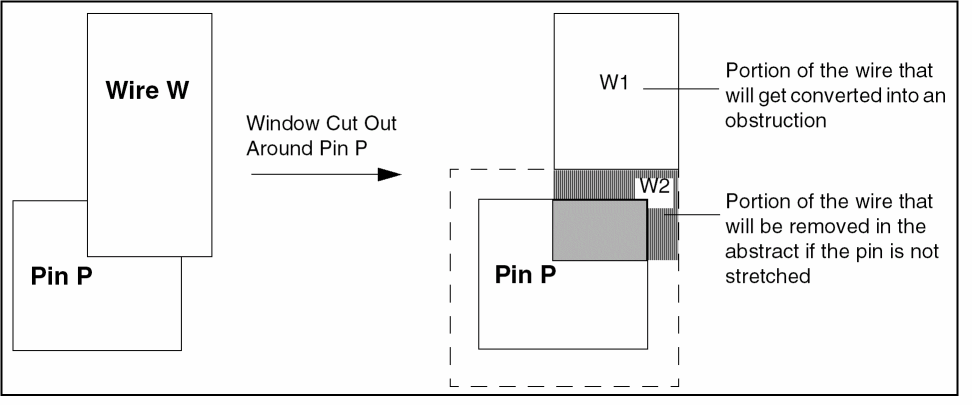
The following figure shows the wire geometry W touching the Pin P. When a window is cut out around Pin P, the wire geometry that touches the pin at the right edge, W2, is totally removed in the abstract. W1 part of the wire geometry becomes an obstruction. The W2 wire geometry cannot also be converted into an obstruction because it covers the area in which a window has already been cut out around Pin P.
The figure below shows both the outcomes when Pin P is either stretched (B) or not stretched (A) towards the right side. In A, when the pin is not stretched, the removed wire geometry is not represented in the abstract. So it is possible for the router to route a wire within the minimum separation distance to the right side of Pin P. This can lead to spacing violation with the W2 portion of the original wire when the abstract is replaced with the pin and wire geometries in the layout.
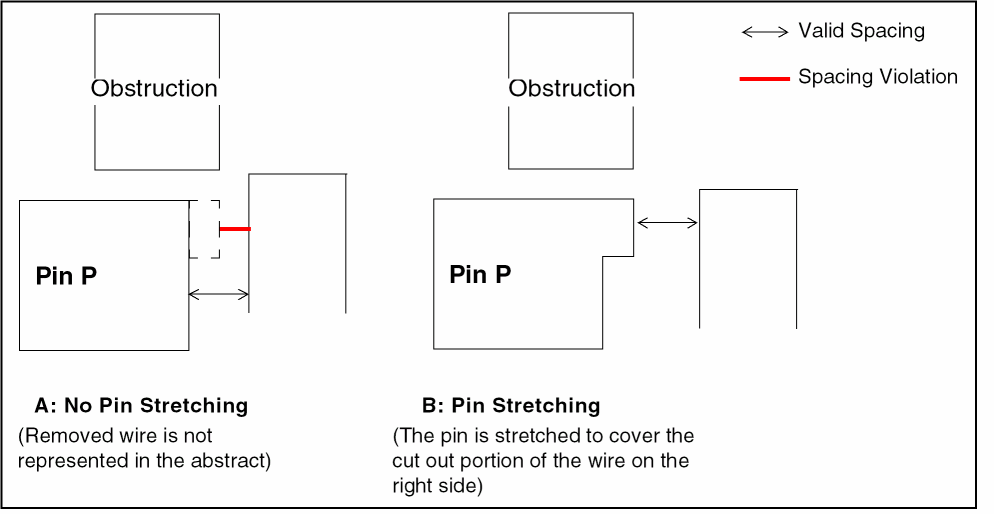
Therefore, the W2 wire geometry must be represented in the abstract somehow. In this situation, the pin is automatically stretched to the right to cover the portion of the wire that cannot be turned into an obstruction (W2). Since the resultant stretched pin includes the wire geometry, the router will now space away a new wire away appropriately from the W2 wire geometry. This is shown in B in the figure above.
There is no need to extend Pin P vertically above because even when the window is cut out around the pin, there is still a piece of the wire (W1) that is converted into an obstruction above Pin P. Therefore, unless the cut out around the pin is large, the space between Pin P and the new obstruction will not be large enough for the router to route unrelated wiring through.
By default, pin stretching occurs automatically whenever a window cut out around a pin removes some geometry touching the pin. If you want, you can disable pin stretching by setting the Cut Same value to 0 and deselecting the Cut window around pins large enough to drop via option.
Modifying Blockage Geometry in the Abstract View
Return to top