
Dynamic Abstract Generation Use Model
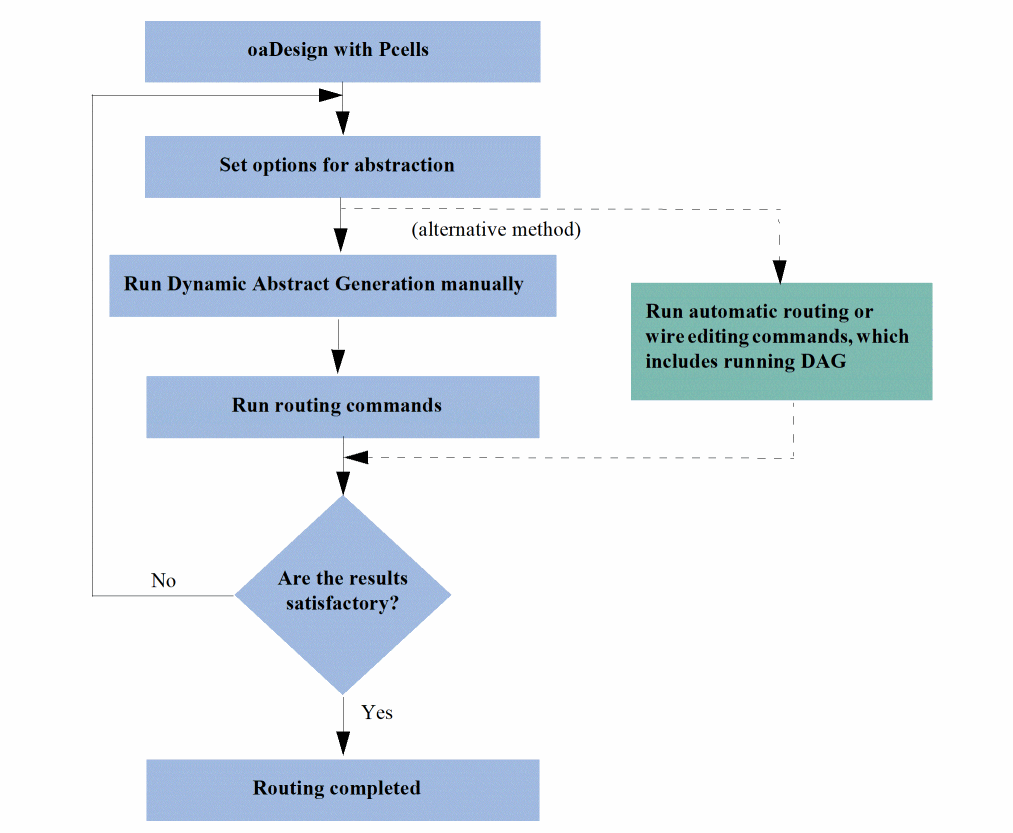
In an OpenAccess design that contains Pcells, you can run Dynamic Abstract Generation manually by using the commands that can be accessed from the following three locations:
- Tools – Dynamic Abstract Generation for Pcells
- Navigator assistant (by using the context-sensitive menu). For example, you can use the Navigator assistant to run Dynamic Abstract Generation for Module Generator (Modgen) instances. To do this, select a Modgen instance in the Navigator assistant and select Dynamic Abstract – Abstract Pcells from the context-sensitive menu.
- Layout canvas (by using the context-sensitive menu)
You can create abstracts for all the Pcells in the design or for only the selected Pcells, and then run the routing or wire editing commands. To create abstracts, you use either the default options or specify your own abstraction rules in the Abstract Pcells form.
When you run the automatic routing or wire editing commands, Dynamic Abstract Generation is run in the background for all the Pcell instances based on the predefined abstraction rules.
If the routing results are satisfactory, the routing process is complete. Otherwise, you can modify the abstraction rules, such as modify layer information for blockages, as required and run the process until satisfactory results are obtained.
The following flow diagram illustrates the Dynamic Abstract Generation process.
By default, all Pcells are marked for abstraction. If a Pcell is unmarked for abstraction, the Pcell needs to be marked again for abstraction.
Related Topics
Marking or Unmarking Pcells for Abstraction
Return to top