
minQuadrupleExtension
spacingTables( ( minQuadrupleExtensiontx_layer1 tx_layer2(( "width" nil nil ) ['cutClass {f_width| (f_widthf_length) |t_name}] ['allSides ['useMaxWidth | 'useMinWidth | 'withinFirstWidth] ] ['horizontal | 'vertical] ['mask1 | 'mask2 | 'mask3] ['directionalExtension] ['otherLayertx_otherLayer['parallelWithinTableg_paraWithinTable] ['otherMask1 | 'otherMask2 | 'otherMask3] | 'trimLayertx_trimLayer['trimLengthTableg_trimLengthTable] |'exactZerog_exactZeroTable['includeAbuttedTableg_includeAbuttedTable] ] ['otherWithinWidthTableg_otherWithinWidthTable{'otherWithinWidthHorizontal |'otherWithinWidthVertical} ['otherSideTableg_otherSideTable] ['exceptMetalOverlap] ] ['lineEndGapOnlyTableg_lineEndGapOnlyTable] ['mustUseTableg_mustUseTable] ['lengthTableg_lengthTable] ['insideLayers (tx_layer3 tx_layer4 … tx_layerN) ['insidePurposes (t_purpose1 t_purpose2 … t_purposeN)] | 'outsideLayers (tx_layer3 tx_layer4 … tx_layerN) ['outsidePurposes (t_purpose1 t_purpose2 … t_purposeN)] ] [f_default] ) (g_table) )
) ;spacingTables
Specifies the minimum extension of a shape with the specified minimum width on layer1 past a shape on layer2. The extension of a shape on layer1 can have up to four different values, applicable to the four edges of the layer2 shape, which is typically a square or a rectangle. The first two extensions apply to one pair of opposite edges, for example, top and bottom, or left and right, and the other two extensions apply to the other pair of opposite edges.
When layer1 is a non-via layer and layer2 a via layer, an enclosure check is done; layer2 when expanded by constraint values should be enclosed by layer1 in this case. When both layers are non-via layers, an extension check is done from the inner edge of layer1 to the outer edge of layer2.
Optionally, if either of the two extension sets is asymmetric, that is, extension1 is not equal to extension2, or extension3 is not equal to extension4, the smallest of the four extension values must be met on all four sides of the layer2 shape, including the corners. Additionally, in this case, the extensions apply to the minimum width layer1 shape that the layer2 shape touches or overlaps. If both extension sets are symmetric, that is, extension1 equals extension2 and extension3 equals extension4, the specified extensions apply to the maximum width layer1 shape that the layer2 shape overlaps or touches.
The minQuadrupleExtension constraint can be set to apply only in a certain direction. In this case, the extensions in the specified direction must meet the first constraint-value-pair, and the extensions in the perpendicular direction must meet the second constraint-value-pair.
However, if 'directionalExtension is specified, the first two extension values are applied on the short edges of a rectangular via cut, while the last two extension values are applied on the long edges of the rectangular via cut.
If 'parallelWithinTable is specified, the constraint applies only if there exists a layer1 (metal) neighbor on at least one side of the via cut at a distance less than paraWithin from it and has common parallel run length greater than or equal to paraLength with it (that is, overlaps or is inside a dotted search window shown in the figure below).
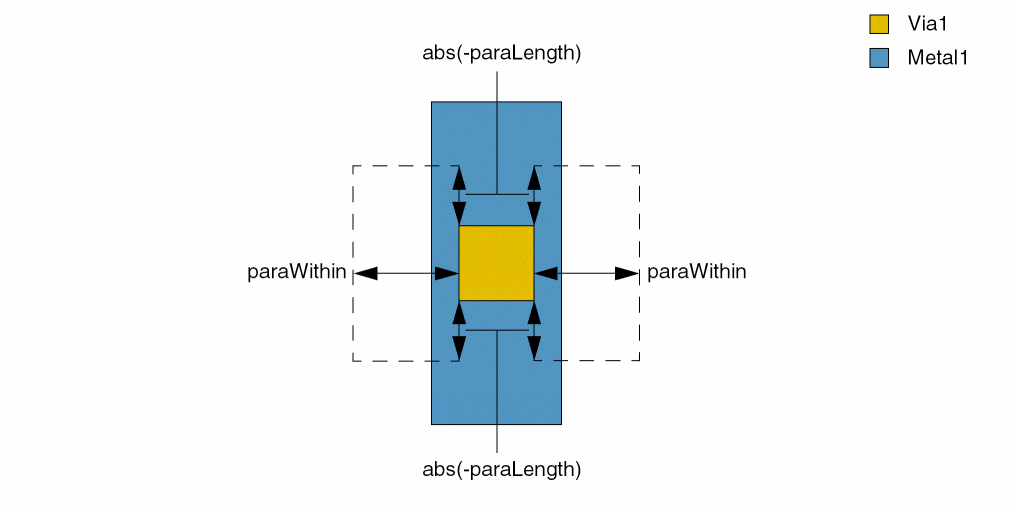
An OR constraint group should contain settings for only the same constraint, with different parameters. If any of the settings is satisfied, the constraint requirement is met. An exception is made for minQuadrupleExtension, minOppExtension, and minExtensionDistance constraints, which can be bound together in an OR group, and if any of these constraints is satisfied, the extension requirement is met.
Values
Parameters
|
The cut class to which the constraint applies, specified by width, by width and length, or by name (as defined in a cutClasses constraint). |
|
|
If either of the extension sets is asymmetric, the smallest of the four extension values must be met on all sides of the cut shape, including the corners. |
|
|
(Virtuoso Advanced Node for Layout Only) The width of the widest metal shape that the cut shape overlaps is used to look up the extension requirement. |
|
|
(Virtuoso Advanced Node for Layout Only) The width of the narrowest metal shape that the cut shape overlaps is used to look up the extension requirement. |
|
|
(Virtuoso Advanced Node for Layout Only) The enclosure required by the first width value specified in the table applies only if the via cut is completely within a wire that satisfies this width. Otherwise, the width of the wire that the via cut touches or overlaps is used to look up the enclosure value. |
|
|
The first extension pair is measured in the given direction; the second extension pair is measured in the perpendicular direction. If direction is not specified, the extension pairs are measured in any direction. |
|
|
(Virtuoso Advanced Node for Layout Only) The constraint applies only to the shapes on the specified mask. |
|
|
(Virtuoso Advanced Node for Layout Only) The first two extension values are applied on the short edges of a rectangular via cut, while the last two extension values are applied on the long edges of a rectangular via cut. |
|
|
(Virtuoso Advanced Node for Layout Only) The layer against which the width must be checked. However, extension values still apply on the metal to which the constraint applies. |
|
|
(Virtuoso Advanced Node for Layout Only) The constraint applies only if there exists a layer1 (metal) neighbor on at least one side of the via cut at a distance less than f_paraWithin from it and has common parallel run length greater than or equal to f_paraLength with it. The format of a row in paraWithinTable is as follows:
where, f_width is the width of the enclosing metal shape and f_paraLength and f_paraWithin are the values that apply when width is greater than or equal to f_width. Type: A 1-D table indexed on width, specifying corresponding floating-point parallel run length and distance values |
|
|
(Virtuoso Layout Suite EXL and higher tiers) The constraint applies to this mask on otherLayer. |
|
|
(Virtuoso Layout Suite EXL and higher tiers) Specifies that if any of the given extension values is equal to zero, the enclosures must be exactly zero on the given sides and more than or equal to the non-zero extension values on the other sides. |
|
|
(Virtuoso Advanced Node for Layout Only) The table format specified with this parameter must exactly match the table format of the constraint value. In a set of extension values, the first number can be 1 or 0. The value 1 specifies that a cut abutted to a wide wire needs to meet the wide wire extension. The value 0 indicates that the parameter does not apply to this extension. |
|
|
|
|
|
(Virtuoso Layout Suite EXL and higher tiers) The corresponding extension applies only if there is a neighbor wire with width greater than the first value and within a distance given by the second value. The distance is measured in the specified direction ( The table format specified must match the table format of the constraint value. In each set of four numbers corresponding to a set of extensions, the first value is the width of the other wire and the second value is the within search distance of the other wire. |
|
|
(Virtuoso Layout Suite EXL and higher tiers) The table format specified with this parameter must exactly match the format of the constraint value. For a given extension tuple, if the |
|
|
(Virtuoso Layout Suite EXL and higher tiers) Specifies that the extension requirements specified in the |
|
|
(Virtuoso Advanced Node for Layout Only) The extension value must be satisfied at the line-end that a trim shape on this layer overlaps. |
|
|
(Virtuoso Advanced Node for Layout Only) The constraint applies only if the length of the trim shape is greater than or equal to the first given value in the trimLengthTable table, which has the following format:
For each constraint value in table, which comprises a set of four extension values, specify two lists with two f_trimLength values each, of which only the first f_trimLength value applies and the rest are ignored. As a result, all four f_trimLength values in the set can be the same. For a detailed representation, see Example 7: minQuadrupleExtension with trimLayer and trimLengthTable.
Type: A 1-D table indexed on width, specifying corresponding floating-point length value for the trim shape. |
|
|
(Virtuoso Layout Suite EXL and higher tiers) The constraint value corresponding to this table entry applies only if the lineEndGap constraint condition on this layer is met. The table format specified must match the table format of the constraint value.
Each constraint value corresponds to two pairs of numbers in this table. The default is 0 for all numbers. The |
|
|
(Virtuoso Layout Suite EXL and higher tiers) Specifies if the first value is 1, the corresponding extension set needs to be met and all other extension sets for the same width are ignored. |
|
|
(Virtuoso Layout Suite EXL and higher tiers) Specifies if the first value is 1, the corresponding extension set only applies if the span length of the wire containing the cut is greater than or equal to the second value. |
|
|
|
|
|
Determines if the constraint applies, based on the presence or absence of one or more layers.
For more information, see |
|
|
The |
|
|
The |
|
Examples
- Example 1: minQuadrupleExtension with horizontal
- Example 2: minQuadrupleExtension with allSides and minSum
- Example 3: minQuadrupleExtension with otherLayer
- Example 4: minQuadrupleExtension with exactZero
- Example 5: minQuadrupleExtension with maxLength
- Example 6: minQuadrupleExtension with allSides and withinFirstWidth
- Example 7: minQuadrupleExtension with trimLayer and trimLengthTable
- Example 8: minQuadrupleExtension with includeAbuttedTable
- Example 9: minQuadrupleExtension with otherWithinWidthTable
- Example 10: minQuadrupleExtension in an OR group
- Example 11: minQuadrupleExtension with metal versus non-via layers
- Example 12: minQuadrupleExtension with lineEndGapOnlyTable
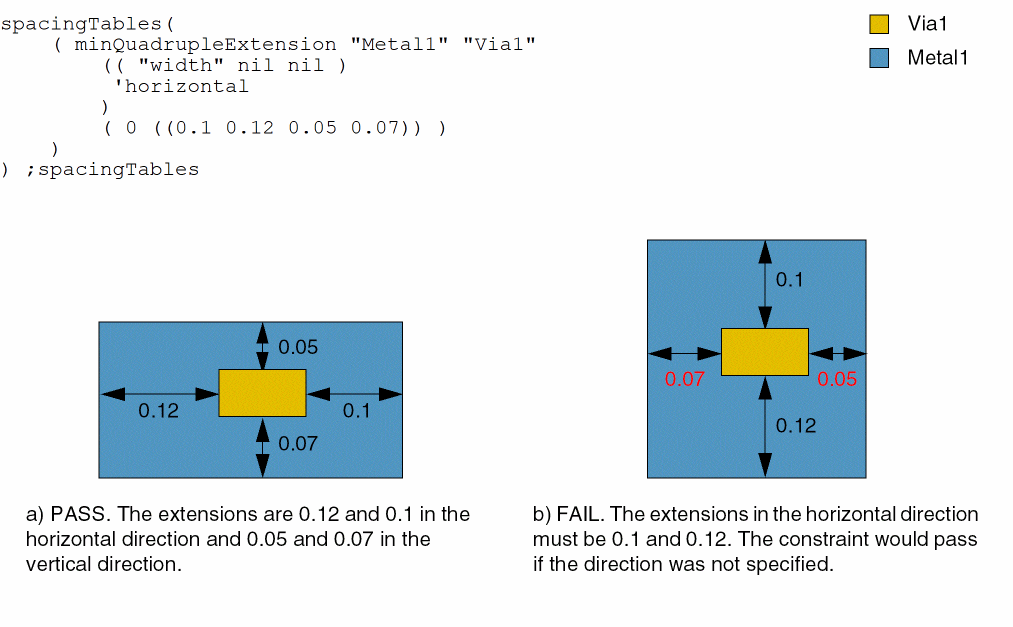
Example 1: minQuadrupleExtension with horizontal
The extensions must be 0.1 and 0.12, measured in the horizontal direction, and 0.05 and 0.07, measured in the vertical direction.
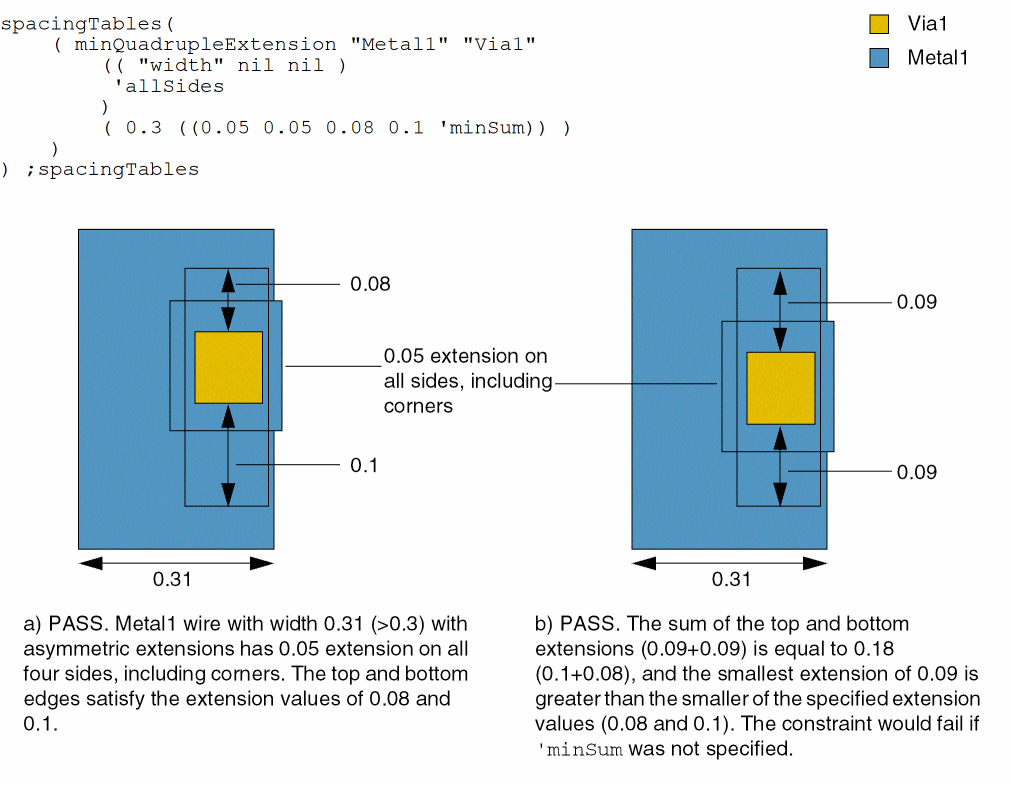
Example 2: minQuadrupleExtension with allSides and minSum
A Metal1 shape with width greater than or equal to 0.3 must have a minimum extension of 0.05 on all four sides, including the corners. The extensions of two opposite sides must either be 0.08 and 0.1, or their sum must be greater than or equal to 0.18 and the smaller of the two extensions must be greater than or equal to 0.08.
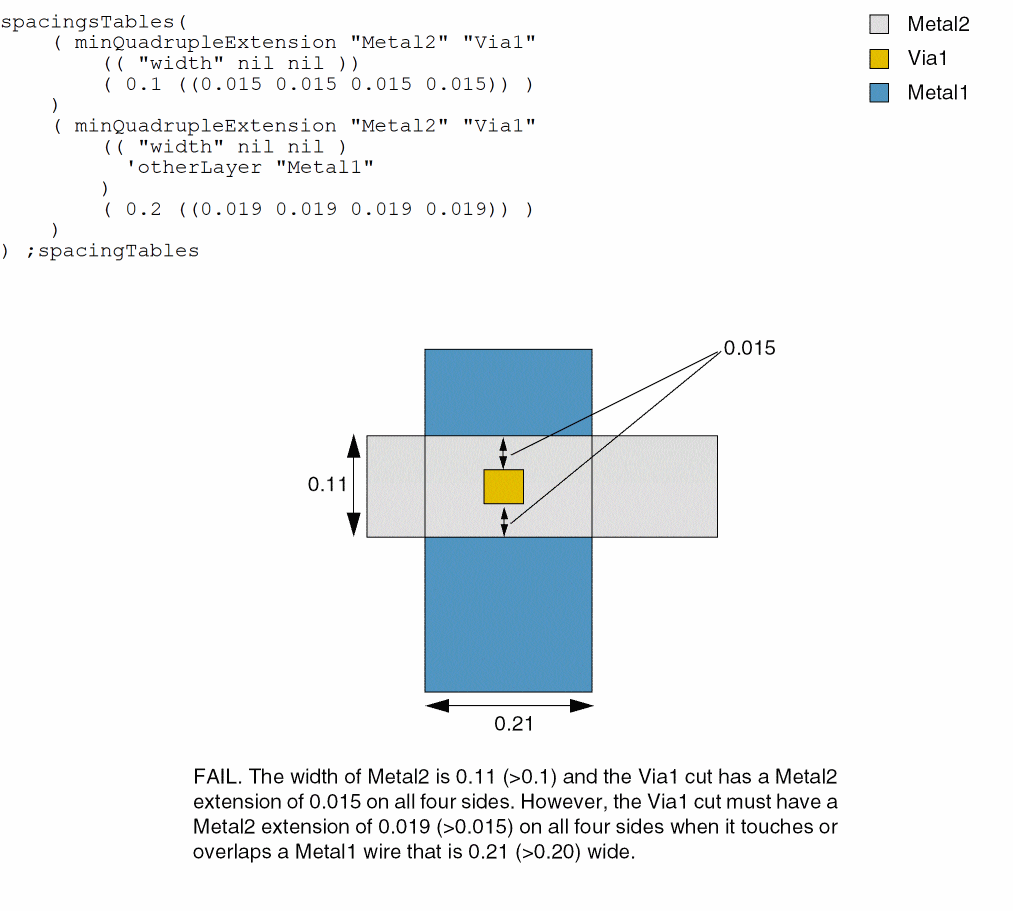
Example 3: minQuadrupleExtension with otherLayer
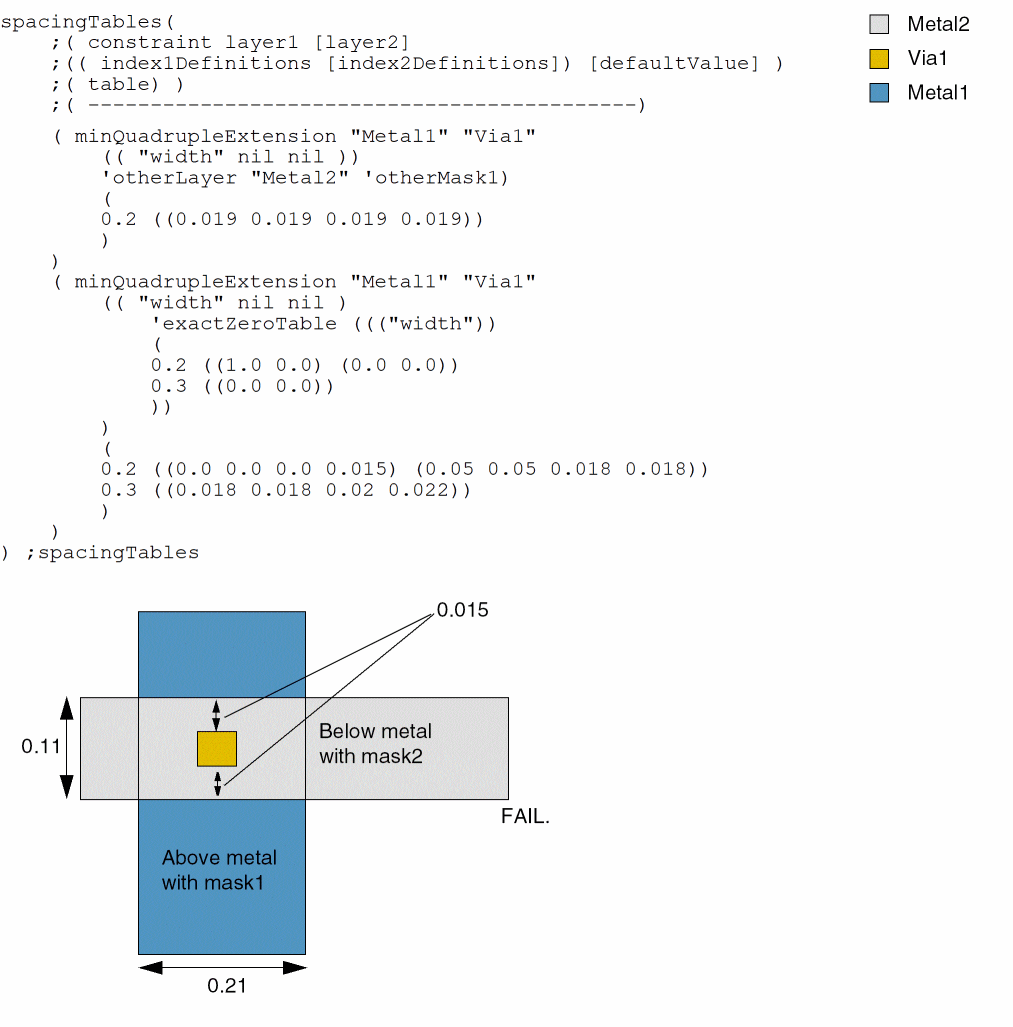
Via1 via cuts must have Metal2 extensions of at least 0.015 on all four sides when the Metal2 wire is greater than or equal to 0.1 wide.
Via1 via cuts must have Metal2 extensions of at least 0.019 on all four sides when the cut overlaps or touches a Metal1 wire that is greater than or equal to 0.2 wide.
Example 4: minQuadrupleExtension with exactZero
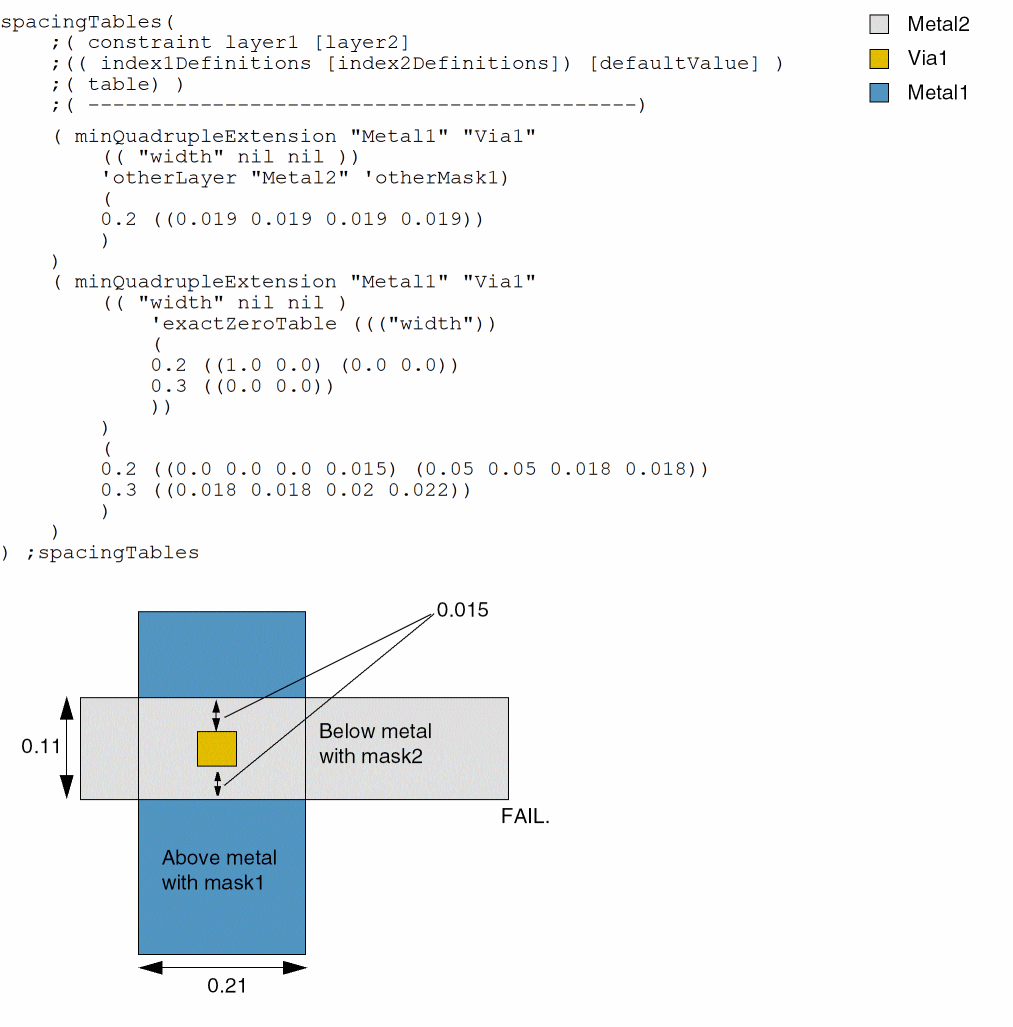
Example 5: minQuadrupleExtension with maxLength
A Metal1 wire with length less than or equal to 0.05 must have a minimum extension of 0.012 on a pair of opposite edges of a Via1 via cut. If the length of the wire is greater than 0.05, the extension must be at least 0.015.
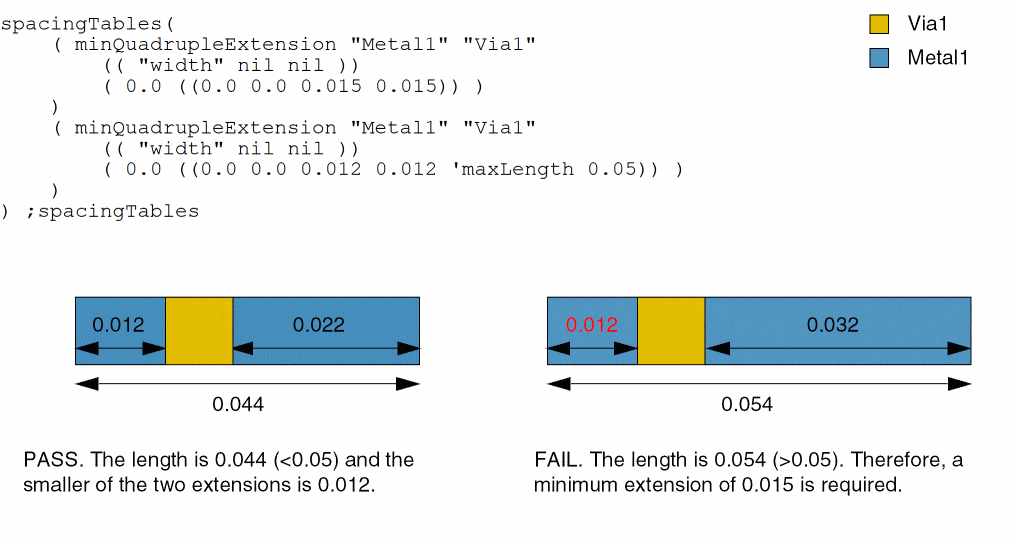
Example 6: minQuadrupleExtension with allSides and withinFirstWidth
A Metal1 wire must have an extension of (0.020 0.015) on two opposite sides of a Via1 via cut that is completely within the wire.
If the via cut is not completely within the wire with width 0.020 and the width of the Metal1 wire that it overlaps is greater than or equal to 0.024, the wire must have a minimum extension of 0.001 on all four sides of the via cut, including the corners. Additionally, the extensions on two opposite sides of the via cut must be (0.020 0.015).
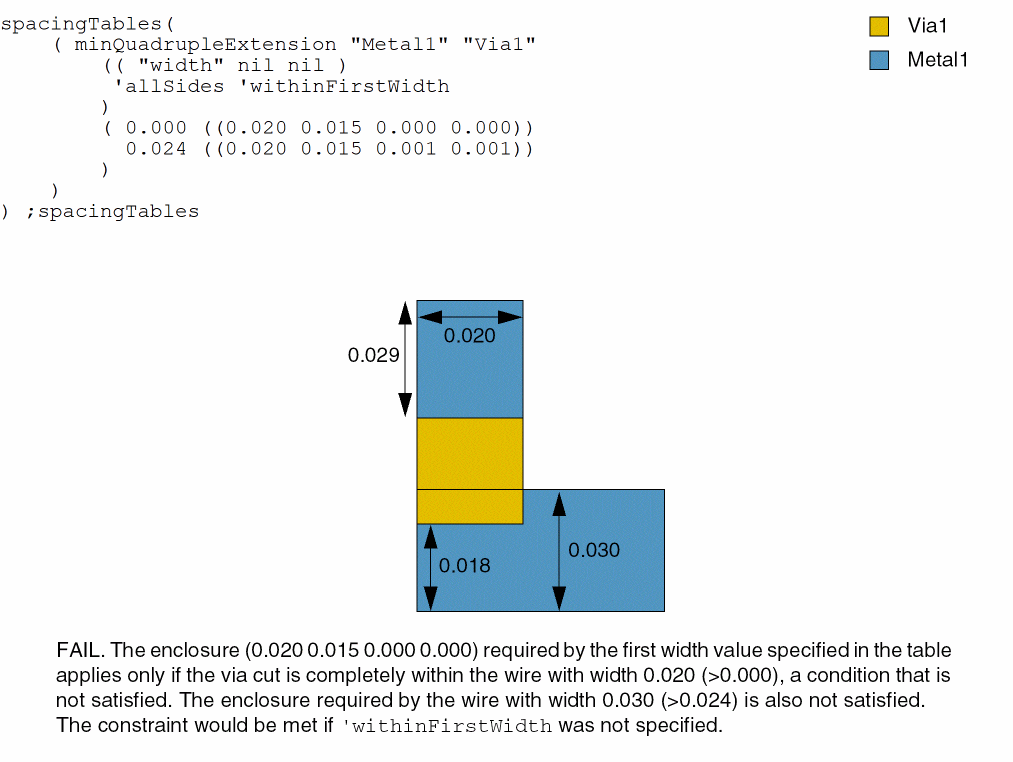
Example 7: minQuadrupleExtension with trimLayer and trimLengthTable
A Metal1 wire, which is overlapped by a TrimMetal1 shape with length greater than or equal to 0.08, must satisfy a minimum extension requirement of 0.02 on two opposite sides of a Via1 via shape. The check applies only to the two outermost wires in the given set.
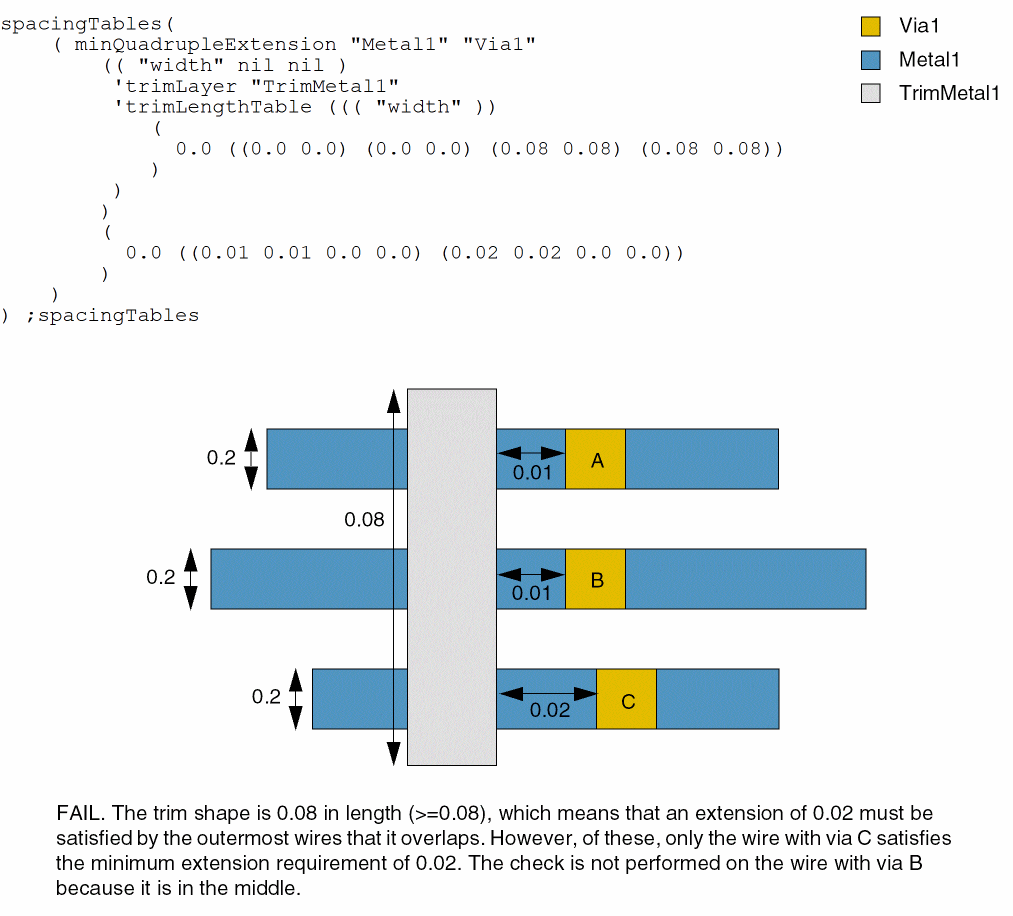
Example 8: minQuadrupleExtension with includeAbuttedTable
In this example, if a cut abuts a wire that is 0.2 wide, the extension values (0.0 0.0 0.0 0.15) need to be met.
spacingTables(
     ;( constraint         layer1          [layer2]
  ;   (( index1Definitions    [index2Defintions]) [defaultValue] )
  ;   ( table) )
  ;( --------------------------------------------)
  ( minQuadrupleExtension "Metal1" "Via1"
   (( "width" nil nil )
    'includeAbuttedTable ((("width"))
    (
    0.0 ((0.0 0.0) (0.0 0.0))
    0.2 ((1.0 0.0) (0.0 0.0) (0.0 0.0) (0.0 0.0))
    0.3 ((0.0 0.0) (0.0 0.0))
    ))
   )
   (
   0.0 ((0.0 0.0 0.0 0.013))
   0.2 ((0.0 0.0 0.0 0.015) (0.05 0.05 0.018 0.018))
   0.3 ((0.018 0.018 0.02 0.022))
   )
  )
) ;spacingTables
Example 9: minQuadrupleExtension with otherWithinWidthTable
For width less than or equal to 0.2, the extension value (0.0 0.0 0.015 0.015) applies only if there is a neighbor wire of width more than 0.05 within 0.07 measured in the horizontal direction. In addition, the extension in the horizontal distance opposite the neighbor wire needs to be at least 0.018.
spacingTables(
     ;( constraint         layer1          [layer2]
  ;   (( index1Definitions    [index2Defintions]) [defaultValue] )
  ;   ( table) )
  ;( --------------------------------------------)
  ( minQuadrupleExtension "Metal1" "Via1"
   (( "width" nil nil )
    'otherWithinWidthTable ((("width"))
    (
    0.0 ((0.0 0.0) (0.0 0.0))
    0.2 ((0.05 0.07) (0.0 0.0) (0.0 0.0) (0.0 0.0))
    0.3 ((0.0 0.0) (0.0 0.0))
    ))
    'otherWithinWidthHorizontal
    'otherSideTable ((("width"))
    (
    0.0 ((0.0 0.0) (0.0 0.0))
    0.2 ((0.018 0.0) (0.0 0.0) (0.0 0.0) (0.0 0.0))
    0.3 ((0.0 0.0) (0.0 0.0))
    ))
   )
   (
   0.0 ((0.0 0.0 0.0 0.013))
   0.2 ((0.0 0.0 0.015 0.015) (0.05 0.05 0.018 0.018))
   0.3 ((0.018 0.018 0.02 0.022))
               )
  )
) ;spacingTables
Example 10: minQuadrupleExtension in an OR group
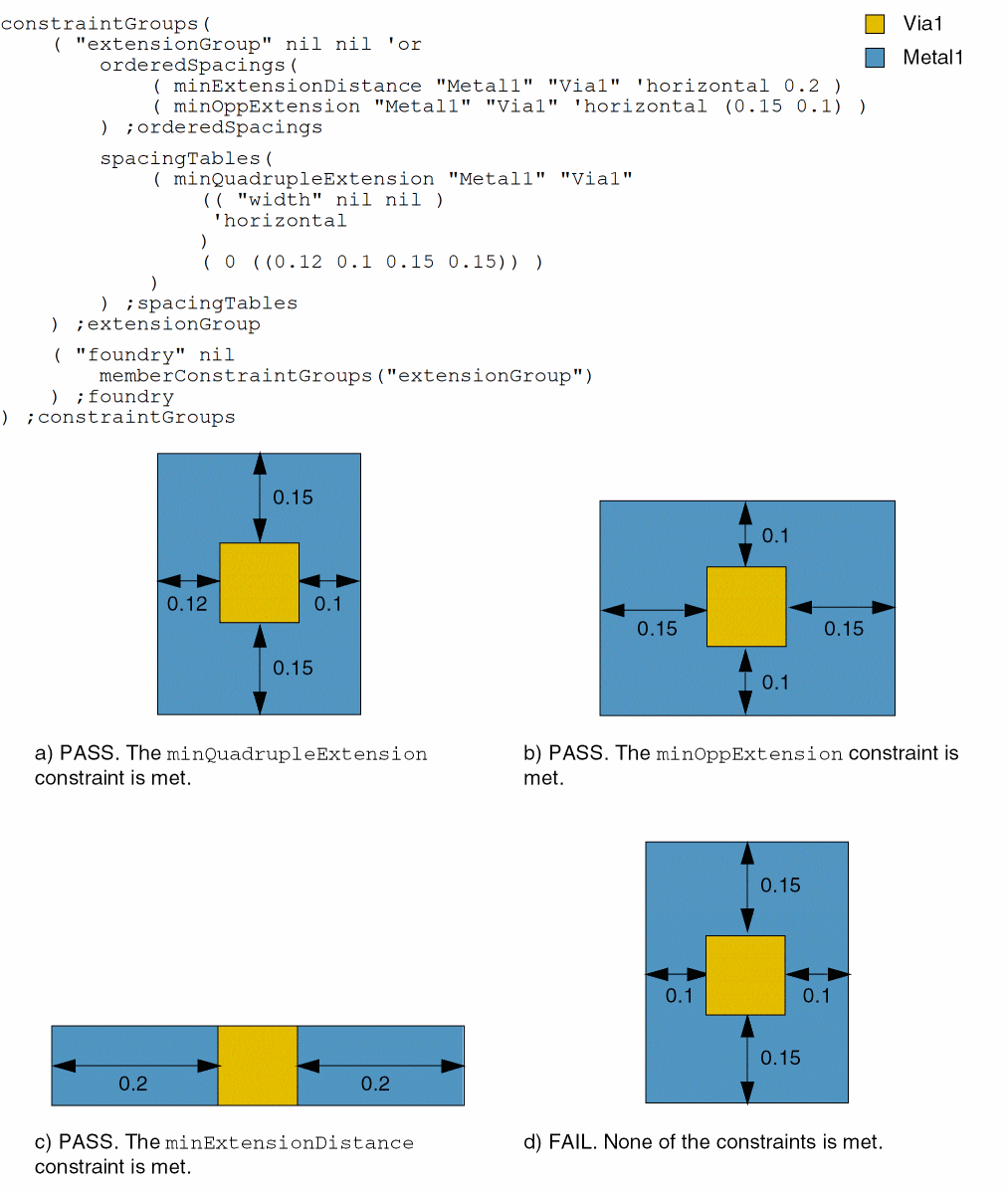
The minExtensionDistance, minOppExtension, and minQuadrupleExtension constraints are semantically connected and can be grouped in an OR constraint group. As a result, only one constraint in the constraint group needs to be satisfied, as illustrated in this example.
minExtensionDistance
Value = 0.2
Spacing Direction = horizontal
minOppExtension
Value = (0.15 0.1)
Spacing Direction = horizontal
minQuadrupleExtension
Width = 0 –> ( (0.12 0.1) (0.15 0.15) )
Spacing Direction = horizontal
Example 11: minQuadrupleExtension with metal versus non-via layers
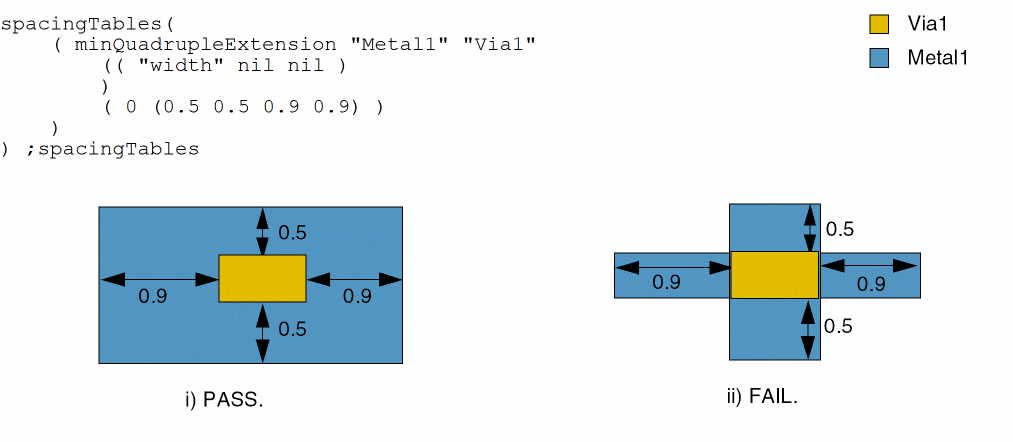
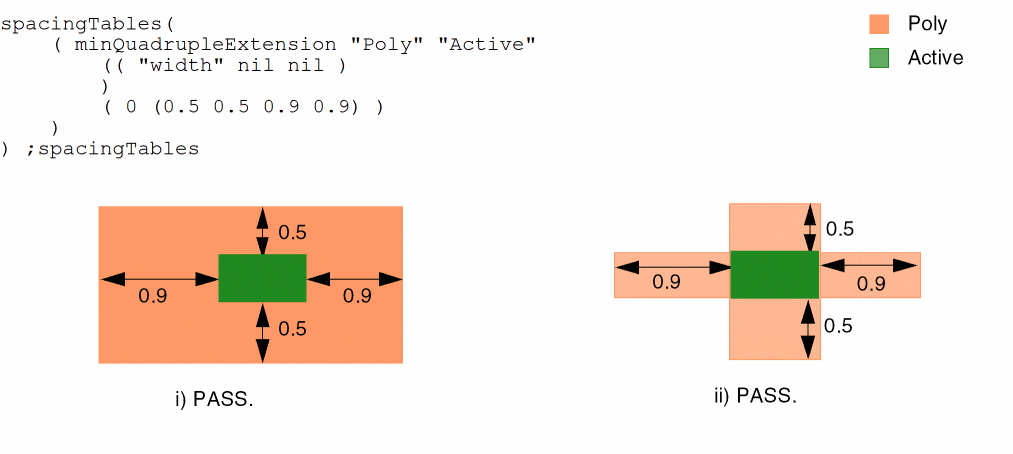
This example illustrates the difference between how the constraint applies differently depending on the nature of the two layers.
a. Enclosures are used when the constraint is applied between metal and cut layers. The layer2 shape must be fully enclosed on all four sides.
b. Extensions are used when the constraint is applied between device layers or metal over non-via extension. Only the side edges of the layer2 shape must be enclosed.
Example 12: minQuadrupleExtension with lineEndGapOnlyTable
The first extension set for width 0.2 applies only if the lineEndGap condition for Metal1 is met.
spacingTables(
...
( minQuadrupleExtension "Metal1" "Via1"
(( "width" nil nil )
'lineEndGapOnlyTable ((("width"))
(
0.0 ((0.0 0.0) (0.0 0.0))
0.2 ((1.0 0.0) (0.0 0.0) (0.0 0.0) (0.0 0.0))
0.3 ((0.0 0.0) (0.0 0.0))
))
)
(
0.0 ((0.0 0.0 0.0 0.013))
0.2 ((0.0 0.0 0.015 0.015) (0.05 0.05 0.018 0.018))
0.3 ((0.018 0.018 0.02 0.022))
)
;spacingTables
Return to top