
allowedWidthRanges
spacings( ( allowedWidthRangestx_layer['lengthf_length] ['orthogonal] ['horizontal | 'vertical | 'measureHorizontal | 'measureVertical] ['stepSizef_stepSize['stepRangeg_range]] ['exceptOverlapf_exceptOverlap] ['mask1 | 'mask2 | 'mask3] ['insideLayers (tx_layer1tx_layer2…tx_layerN) ['insidePurposes (t_purpose1t_purpose2…t_purposeN)] | 'outsideLayers (tx_layer1tx_layer2…tx_layerN) ['outsidePurposes (t_purpose1t_purpose2…t_purposeN)] ] (g_ranges) )
) ;spacings
Specifies the allowed width values for shapes on a layer. Polygon shapes are broken down into rectangles and the shorter dimension of each rectangle is checked against the allowed width values.
Consider two partially overlapping shapes and the area considered for merging.
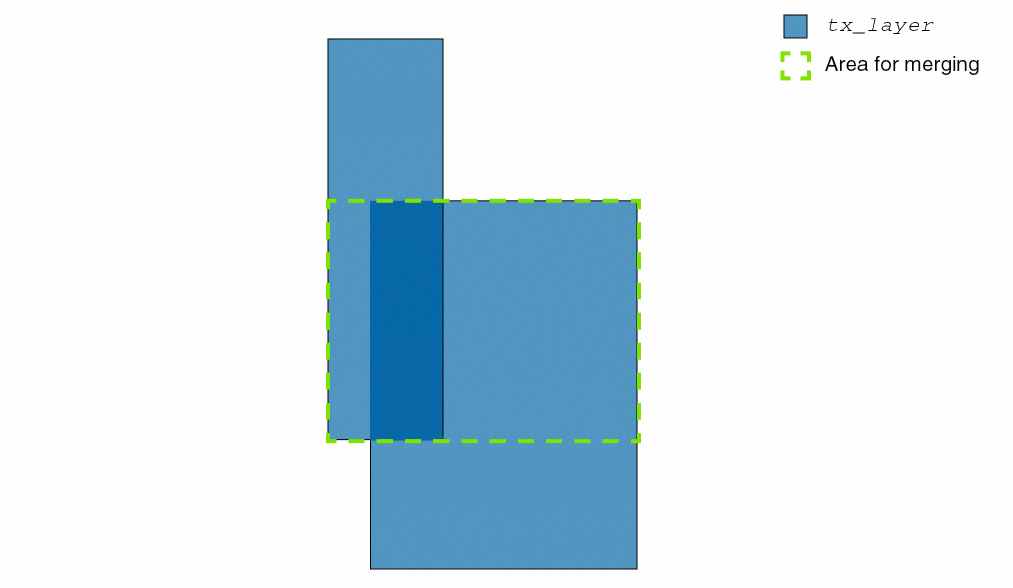
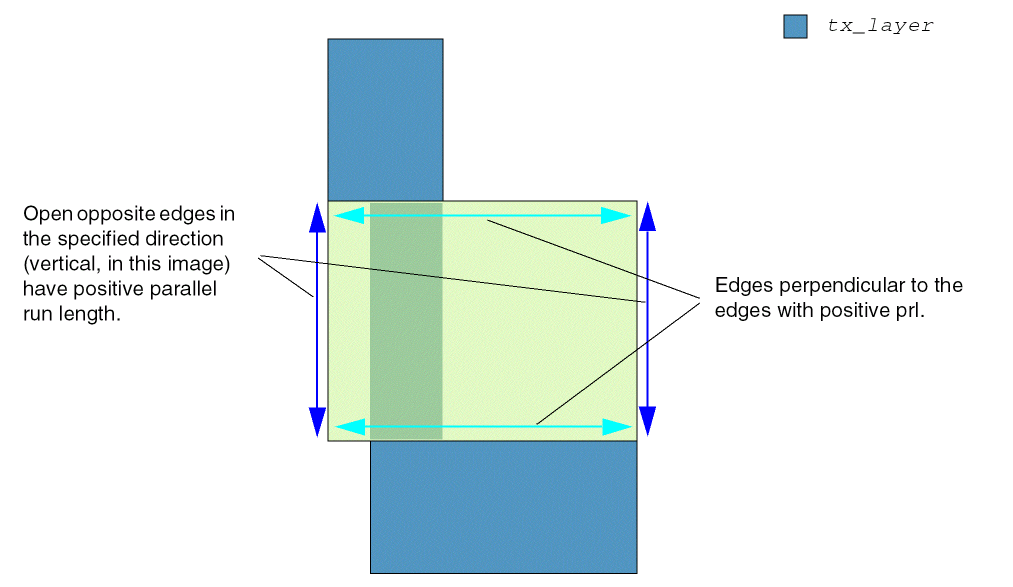
The constraint checks if the open opposite edges in the specified direction have positive parallel run length and the constraint is applied perpendicular to these edges.
Values
|
The layer on which the constraint is applied. Type: String (layer and purpose names) or Integer (layer number) |
|
|
Type: Floating-point values specifying width |
Parameters
|
The constraint applies only if the length of the shape is greater than or equal this value. |
|
|
The distance between two inside corners of a rectilinear shape measured in the direction orthogonal to the direction specified for the constraint must be greater than or equal to the smallest specified width value. |
|
|
|
|
|
The parameters
(Virtuoso Advanced Node for Layout Standard) If |
|
|
(Virtuoso Advanced Node for Layout Standard) The allowed widths (Wlegal) are restricted to the following values: where, Wlb is the lower bound of the range specified by stepRange and n>=0. If stepRange is not specified, Wlb is the lower bound of the constraint value. |
|
|
(Virtuoso Advanced Node for Layout Standard) The stepped width specified with
Type: Floating-point values specifying a width |
|
|
(Virtuoso Layout Suite EXL and higher tiers) The constraint does not apply to merged areas whose overlap length is less than or equal to this value. The overlap length of the merged area is measured in the direction of the wires, which is perpendicular to the width of the wires. Both merging wires must be in the same direction. |
|
|
(Virtuoso Layout Suite EXL and higher tiers) The mask of the shapes to which this rule belongs to. |
|
|
|
|
|
Determines if the constraint applies, based on the presence or absence of one or more layers.
For more information, see |
|
|
The |
|
|
The |
|
Examples
- Example 1: allowedWidthRanges
- Example 2: allowedWidthRanges with vertical and orthogonal
- Example 3: allowedWidthRanges with measureVertical and stepSize
- Example 4: allowedWidthRanges with stepSize and stepRange
- Example 5: allowedWidthRanges with measureVertical and measureHorizontal
- Example 6: allowedWidthRanges with vertical and horizontal
- Example 7: allowedWidthRanges with exceptOverlap
Example 1: allowedWidthRanges
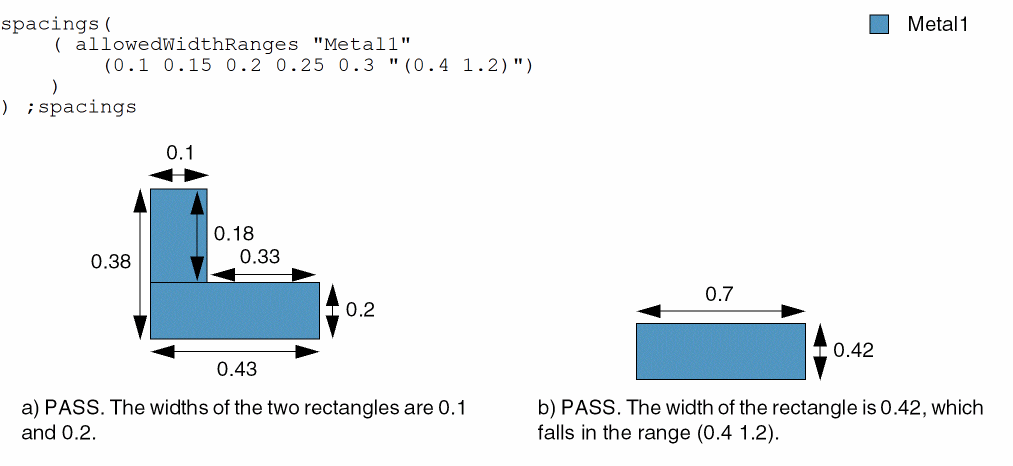
The allowed widths for shapes on Metal1 are 0.1, 0.15, 0.2, 0.25, and 0.3. Additionally, the width of a shape can be greater than 0.4 and less than 1.2.
Example 2: allowedWidthRanges with vertical and orthogonal
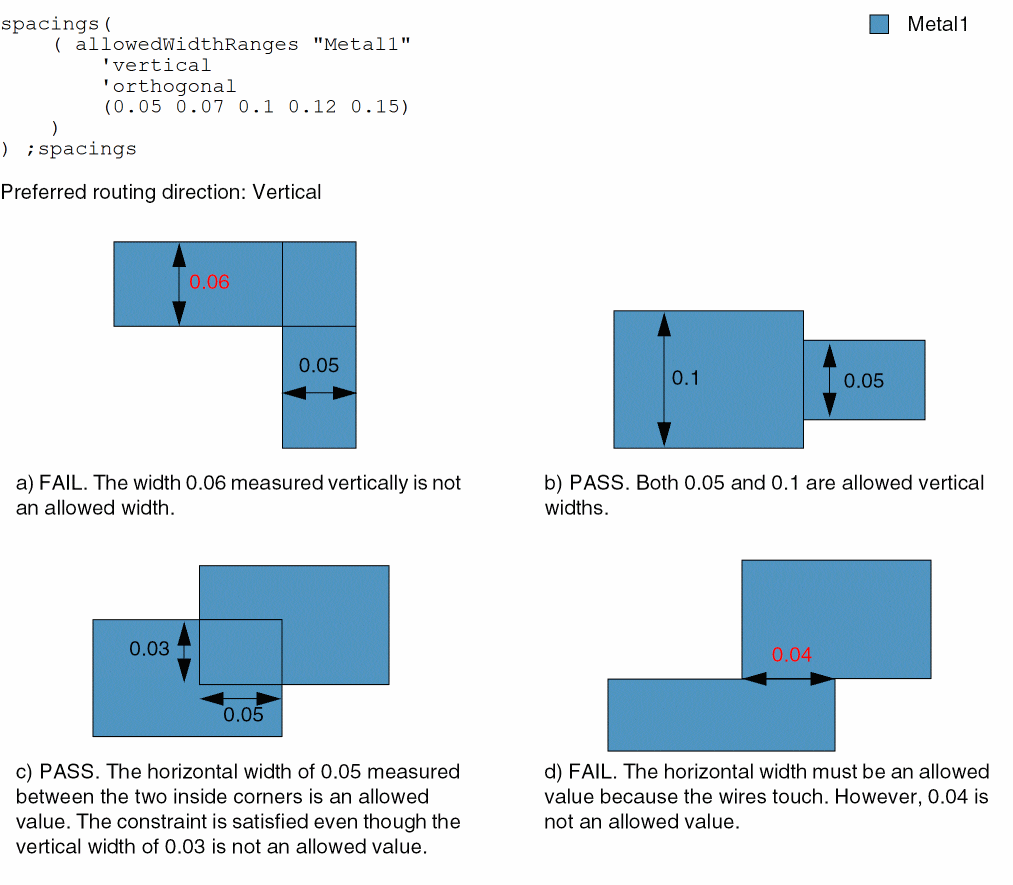
The vertical width of a wire must be equal to 0.05, 0.07, 0.1, 0.12, or 0.15. If two wires overlap or touch, the horizontal distance between two inside corners of the wires must be greater than or equal to 0.05.
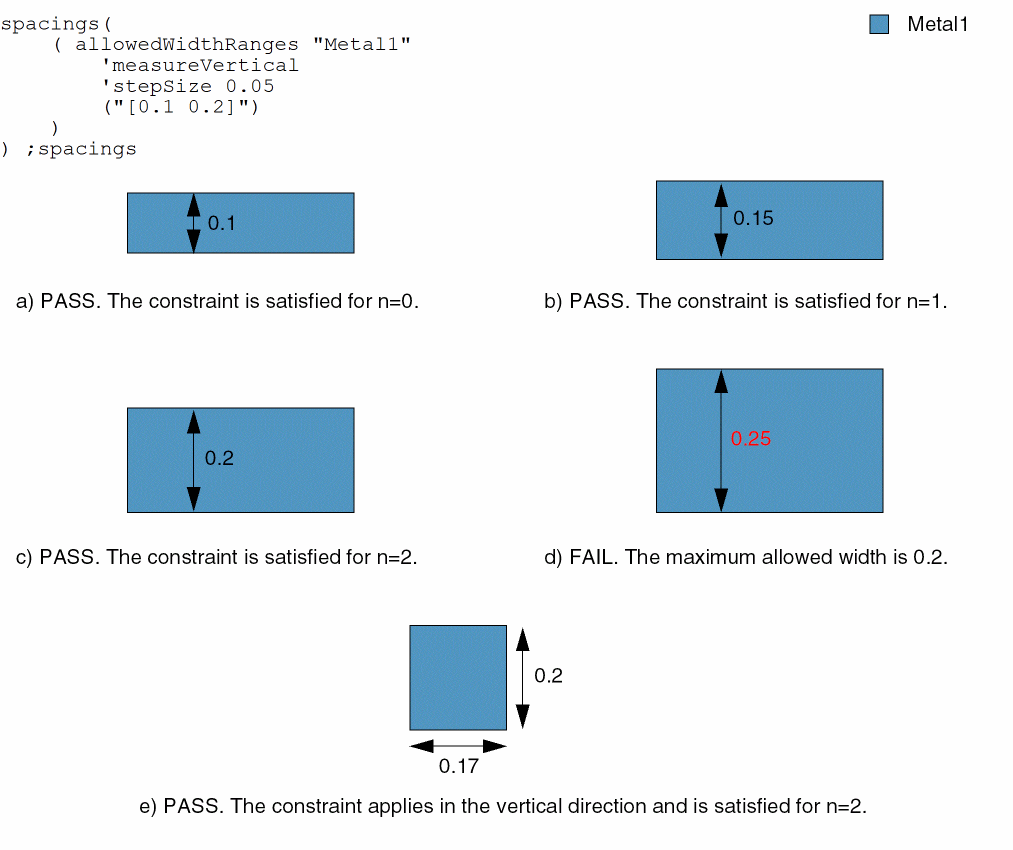
Example 3: allowedWidthRanges with measureVertical and stepSize
The vertical width of a wire must be greater than or equal to 0.1 and less than or equal to 0.2. A legal width value is also the sum of the lower bound of this width range (0.1) and a multiple of 0.05.
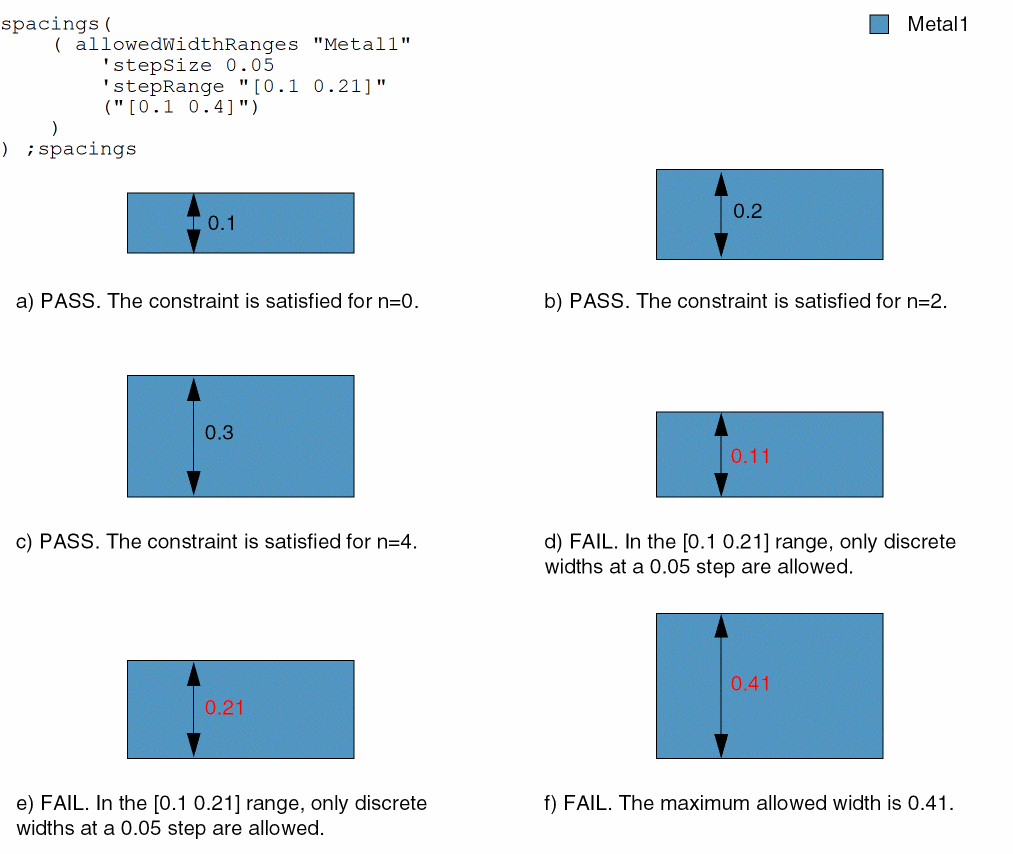
Example 4: allowedWidthRanges with stepSize and stepRange
The vertical width of a wire must be greater than or equal to 0.1 and less than or equal to 0.4. A legal width value is also the sum of the lower bound of this width range (0.1) and a multiple of 0.05. For widths greater than or equal to 0.1 and less than or equal to 0.21, only discrete widths at a 0.05 step are allowed.
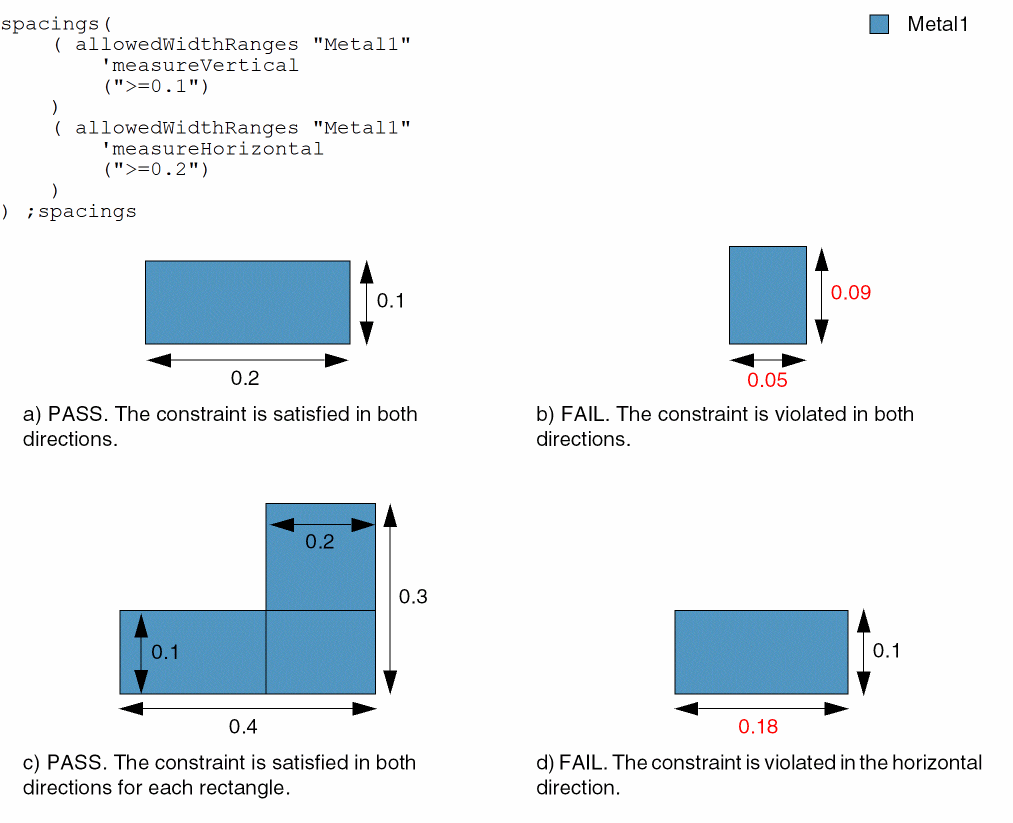
Example 5: allowedWidthRanges with measureVertical and measureHorizontal
Two allowedWidthRanges constraints are defined in an AND constraint group. A check is performed in the specified direction, regardless of whether this direction is the width or length of the shape.
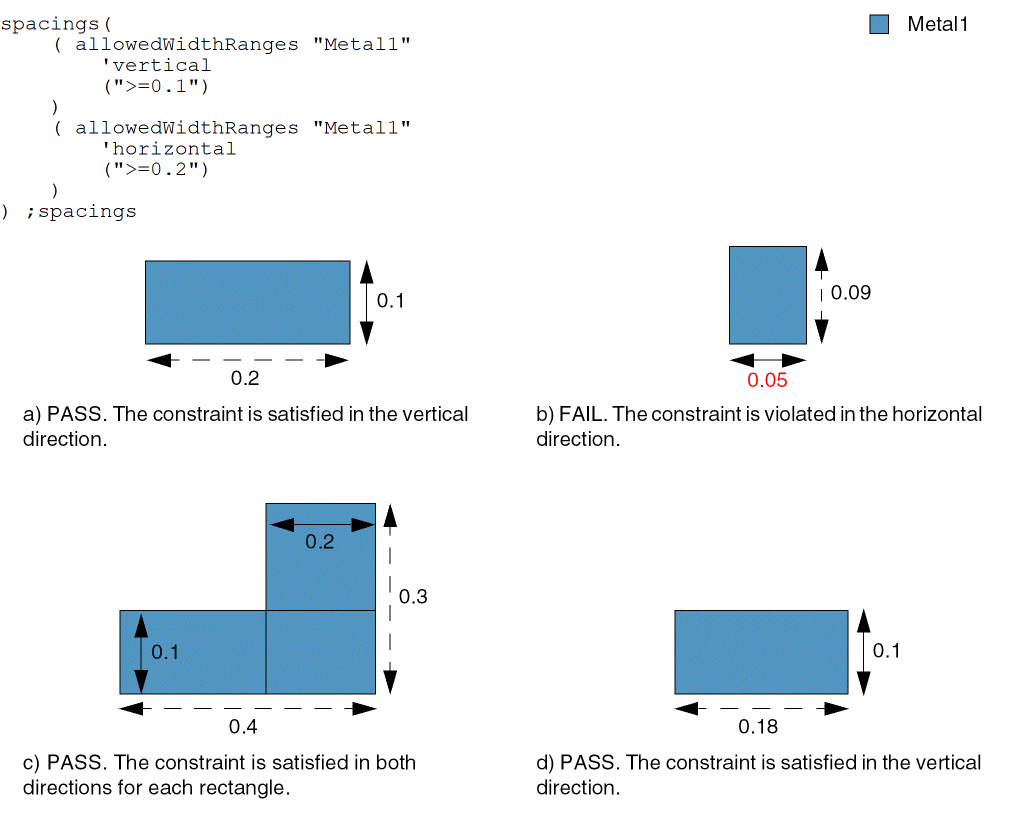
Example 6: allowedWidthRanges with vertical and horizontal
Two allowedWidthRanges constraints are defined in an AND constraint group. A check is performed in the specified direction for the shape width, which is the shorter of the two dimensions. A check is not performed on the length represented by the dashed arrows.
Example 7: allowedWidthRanges with exceptOverlap
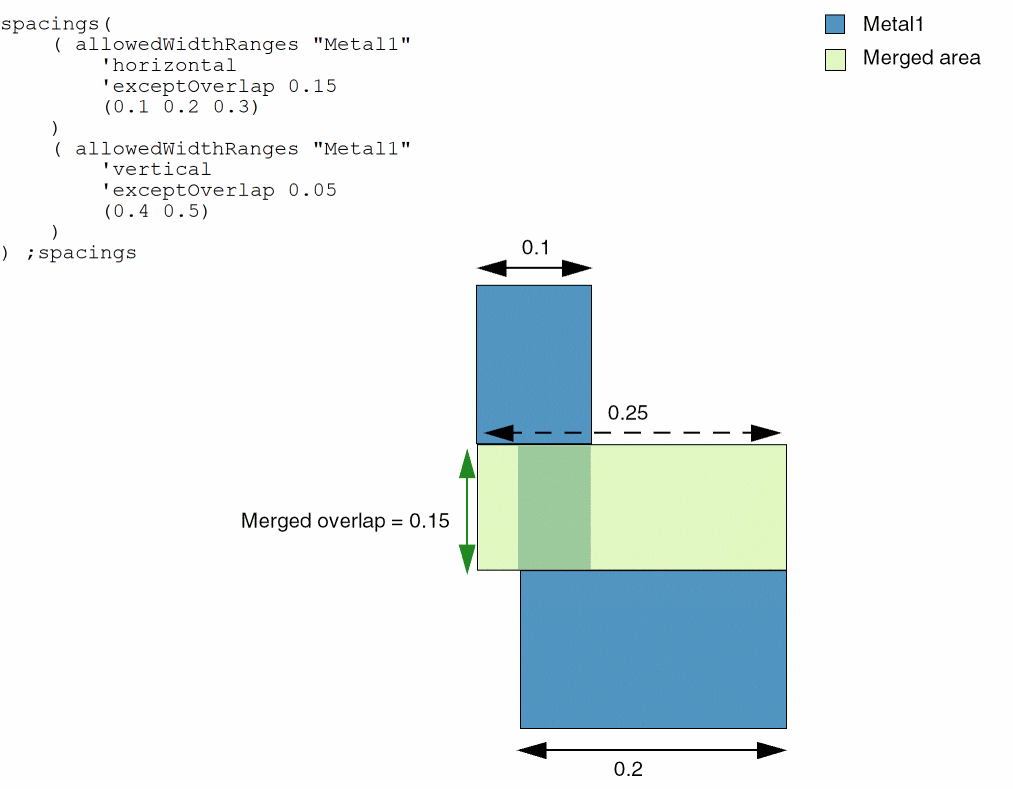
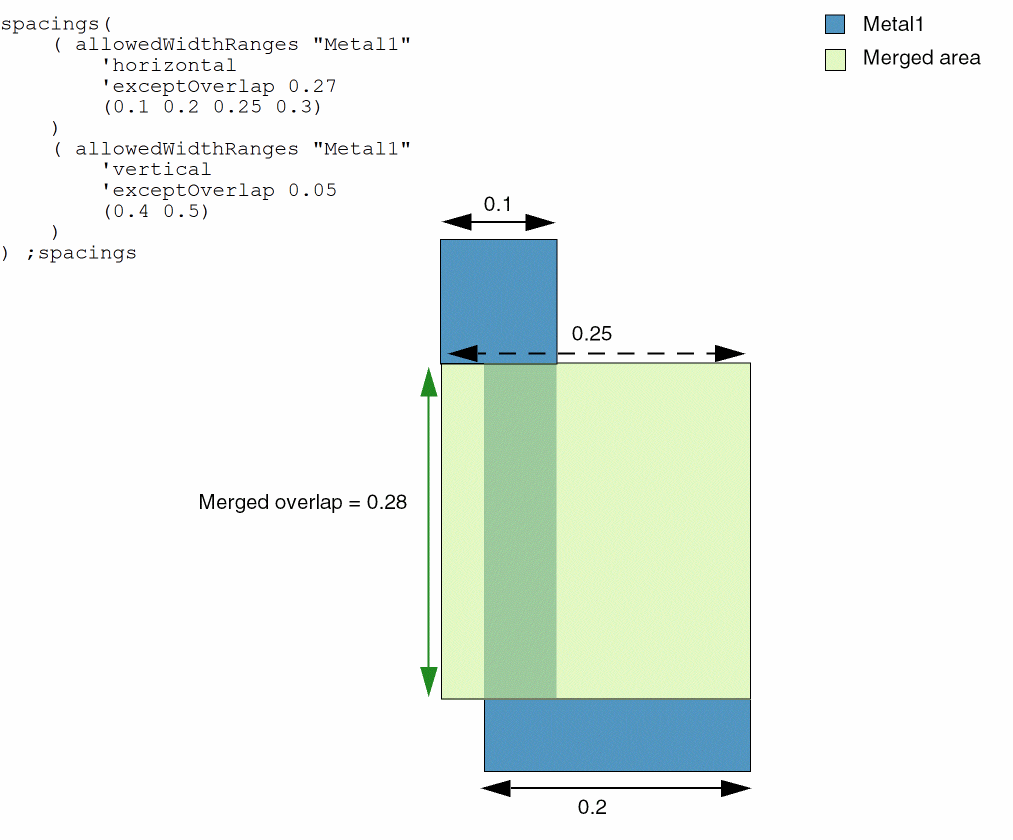
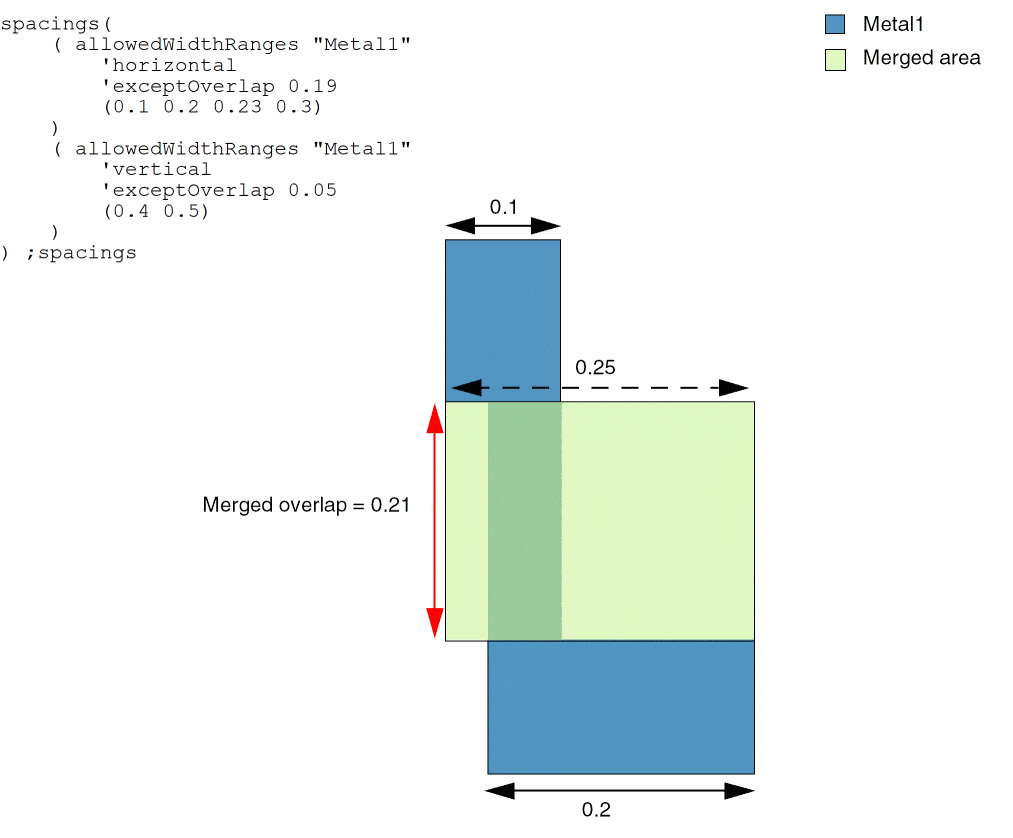
Consider the following cases where two allowedWidthRanges constraints are defined in an AND constraint group. A check is performed in the specified direction for the shape width that is the shorter of the two dimensions. A check is not performed on the length represented by the dashed arrows. The constraints do not apply to merged areas whose overlap length is less than or equal to the exceptOverlap value.
In the following case, the constraint passes with or without the exceptOverlap parameter. The merged overlap value is 0.15, which is equal to the exceptOverlap value, 0.15.
In the following case, the constraint passes. The merged overlap value is 0.28, which is more than the exceptOverlap value, 0.27.
In the following case, the constraint fails. The merged overlap value is 0.21, which is more than the exceptOverlap value, 0.19.
Return to top