
allowedBetweenNeighborWidthRanges
spacings( ( allowedBetweenNeighborWidthRangestx_layer(( "width" nil nil "width" nil nil ) {'horizontal | 'vertical} 'distanceWithinf_distanceWithin['physicalMask] ['overrideWidths (f_overrideTable)] ['widthRanges (g_widthRanges)] ['sidewallf_sidewall] ) (g_table) )
) ;spacings
(Virtuoso Advanced Node for Layout Only) Specifies the allowed width ranges for a shape, using a 2-D table indexed by the width of the neighboring shapes.
Values
|
The layer on which the constraint is applied. Type: String (layer and purpose names) or Integer (layer number) |
|
|
The allowed width ranges for a shape, indexed by the width of the neighboring shapes.
Type: A 2-D table specifying floating-point width values and the allowed width |
|
Parameters
|
The constraint applies only if the distance between the two neighboring shapes is less than or equal to this value. |
|
|
The constraint applies only if the neighboring shapes are on a physical mask. This parameter can be used only if the constraint is specified on a layer with two or more masks. |
|
|
Used to selectively override the constraint value for specific pairs of neighboring shape widths. The table is not interpolated. Instead, a lookup is performed only on the specified rows and columns. |
|
|
The constraint applies to neighboring shapes with widths in the specified range.
Type: Floating-point values specifying a |
|
|
The distance to a neighboring shape must be equal to this value. |
|
Examples
- Example 1: allowedBetweenNeighborWidthRanges with vertical, distanceWithin, and widthRanges
- Example 2: allowedBetweenNeighborWidthRanges with vertical, distanceWithin, overrideWidths, and widthRanges
Example 1: allowedBetweenNeighborWidthRanges with vertical, distanceWithin, and widthRanges
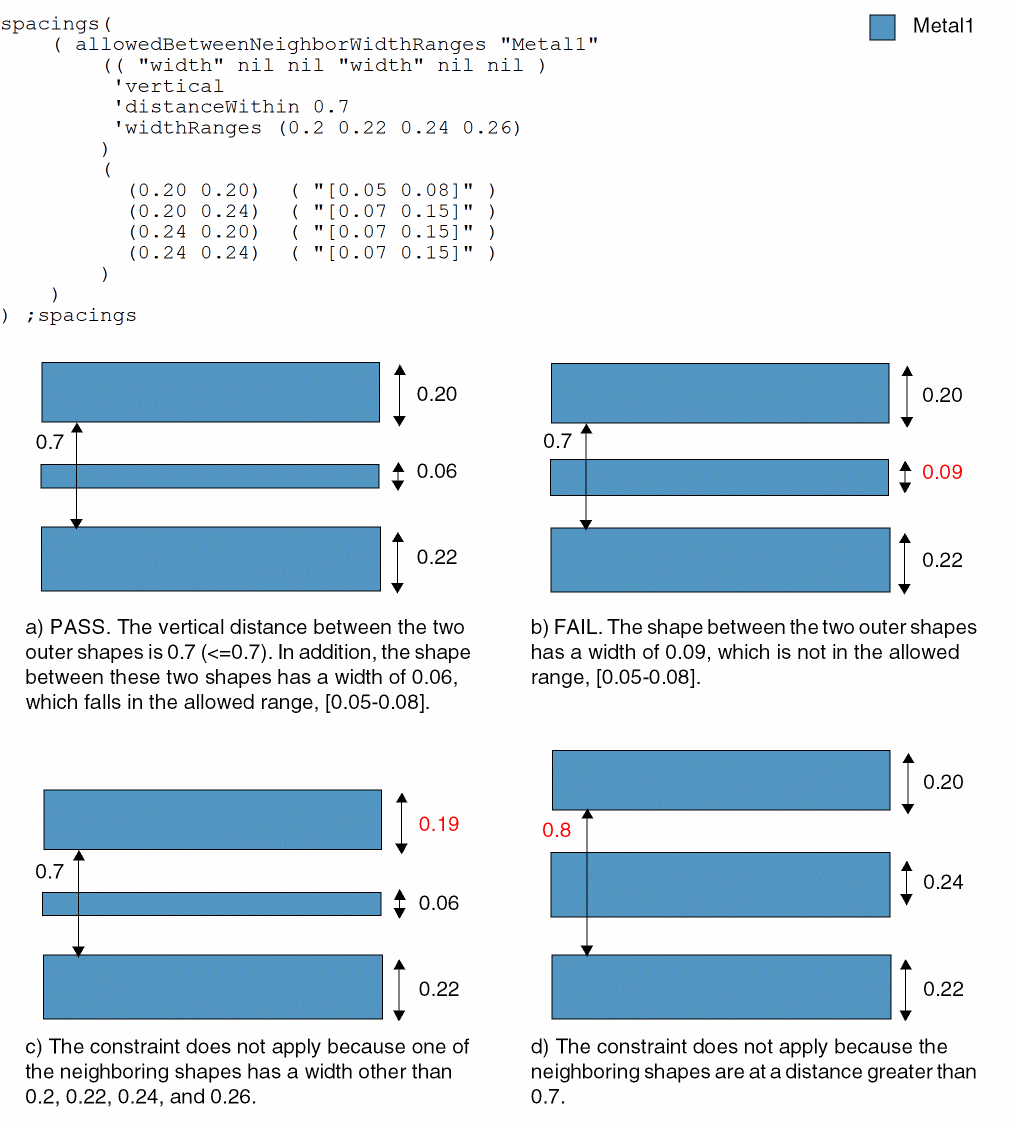
The constraint applies when the following conditions are met:
-
The distance between the two outer shapes is 0.7 or less and the widths of the two neighboring shapes are in the list specified by
'widthRanges. - All widths are measured in the vertical direction.
-
If both neighboring shapes have width less than 0.24, the width of the middle shape must be greater than or equal to 0.05 and less than or equal to 0.08.
Example 2: allowedBetweenNeighborWidthRanges with vertical, distanceWithin, overrideWidths, and widthRanges
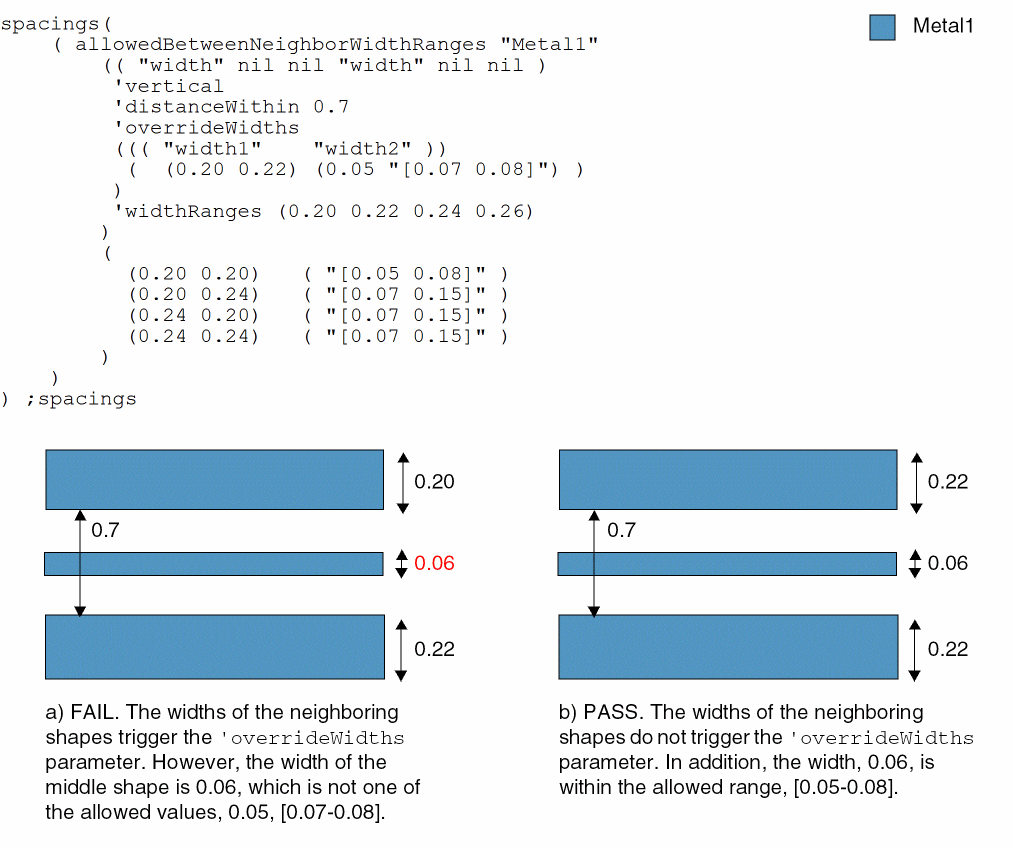
The constraint applies when the following conditions are met:
-
The distance between the two outer shapes is 0.7 or less and the widths of the two neighboring shapes are in the list specified by
'widthRanges. - All widths are measured in the vertical direction.
- If both neighboring shapes have width less than 0.24, the width of the middle shape must be greater than or equal to 0.05 and less than or equal to 0.08.
-
If the widths of the two outer shapes are 0.2 and 0.22, the width of the middle shape must be equal to 0.05 or greater than or equal to 0.07, but less than or equal to 0.08.
Return to top