
minSideSpacing (One layer)
spacings( ( minSideSpacingtx_layer['otherLayertx_otherLayer['cutClass {f_width| (f_widthf_length) |t_name}] ['cutWithing_within] ] ['shortSideToShortSide | 'shortSideToLongSide | 'shortSideToAnySide | 'longSideToLongSide | 'longSideToAnySide | 'anySideToAnySide ] ['prlf_prl| 'prlRangeg_prlRange] ['exactAlignedSpacingRange] ['sameMask] ['cornerEuclidian] ['facingEdges] ['widthRanges (g_widthRanges)] ['lengthRanges (g_lengthRanges)] ['otherWidthRanges (g_otherWidthRanges)] ['otherLengthRanges (g_otherLengthRanges)] ['horizontal | 'vertical] ['deltaVoltagef_voltage] ['exceptSpacingRangesl_exceptSpacingRanges] ['otherFacingEdgeRangeg_fRange['facingEdgeHorizontal | 'facingEdgeVertical] ['insideLayers (tx_layer1 tx_layer2 … tx_layerN) ['insidePurposes (t_purpose1 t_purpose2 … t_purposeN)] | 'outsideLayers (tx_layer1 tx_layer2 … tx_layerN) ['outsidePurposes (t_purpose1 t_purpose2 … t_purposeN)] ] ['exceptIntersectLayers (tx_layer1 tx_layer2 … tx_layerN) ['widthDifff_widthDiff] ['orthogonalPair] ['mask1 | 'mask2 | 'mask3] ['widthHorizontal | 'widthVertical]f_spacing)
) ;spacings
(Virtuoso Advanced Node for Layout Standard) Specifies the minimum spacing between two shapes on a layer based on which side of the first shape faces which side of the second shape ("other" shape). Sides can be of type short, long, or any.
If the parallel run length between the shapes is less than zero, spacing can optionally be measured corner-to-corner using Euclidean measure type. By default, spacing is measured using Manhattan measure type.
Values
|
The layer on which the constraint is applied. Type: String (layer and purpose names) or Integer (layer number) |
|
|
The spacing between the shapes must be greater than or equal to this value. |
Parameters
|
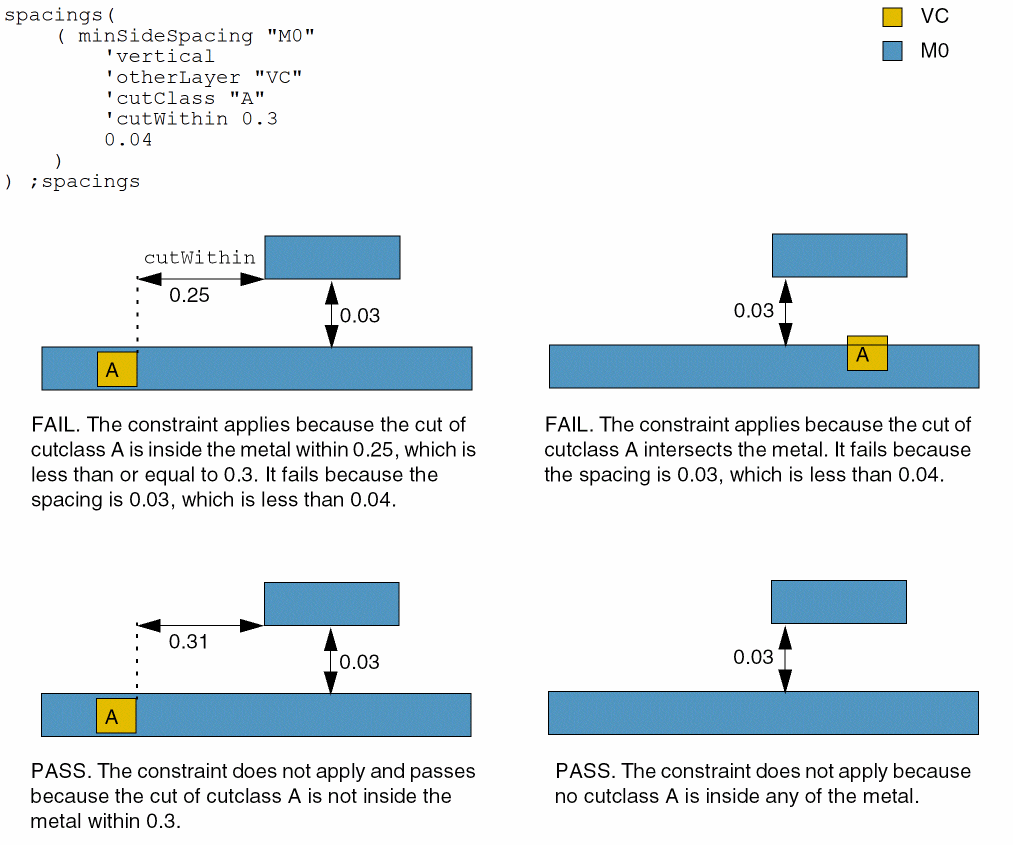
(Virtuoso Layout Suite EXL and higher tiers) The constraint applies to the specified cut layer that is inside the metal layer. |
|
|
(Virtuoso Layout Suite EXL and higher tiers) The constraint applies only when tx_otherLayer is of the specified cut class size. The cut class is specified by width, by width and length, or by name (as defined in a cutClasses constraint). |
|
|
(Virtuoso Layout Suite EXL and higher tiers) The constraint applies only if tx_otherLayer is within the specified distance. The default value is 0. The distance is measured in the direction orthogonal to the spacing direction. |
|
|
|
|
|
The sides between which spacing is measured.
|
|
|
The constraint applies only if the parallel run length between the two sides is greater than this value. |
|
|
(Virtuoso Advanced Node for Layout Only) The constraint applies only if the parallel run length between the two sides falls in this range.
Type: Floating-point values specifying a |
|
|
(Virtuoso Advanced Node for Layout Only) The spacing between the exactly aligned shapes can be in this range as an exception, but only for positive values of the |
|
|
(Virtuoso Advanced Node for Layout Only) The constraint applies only between shapes on the same mask. |
|
|
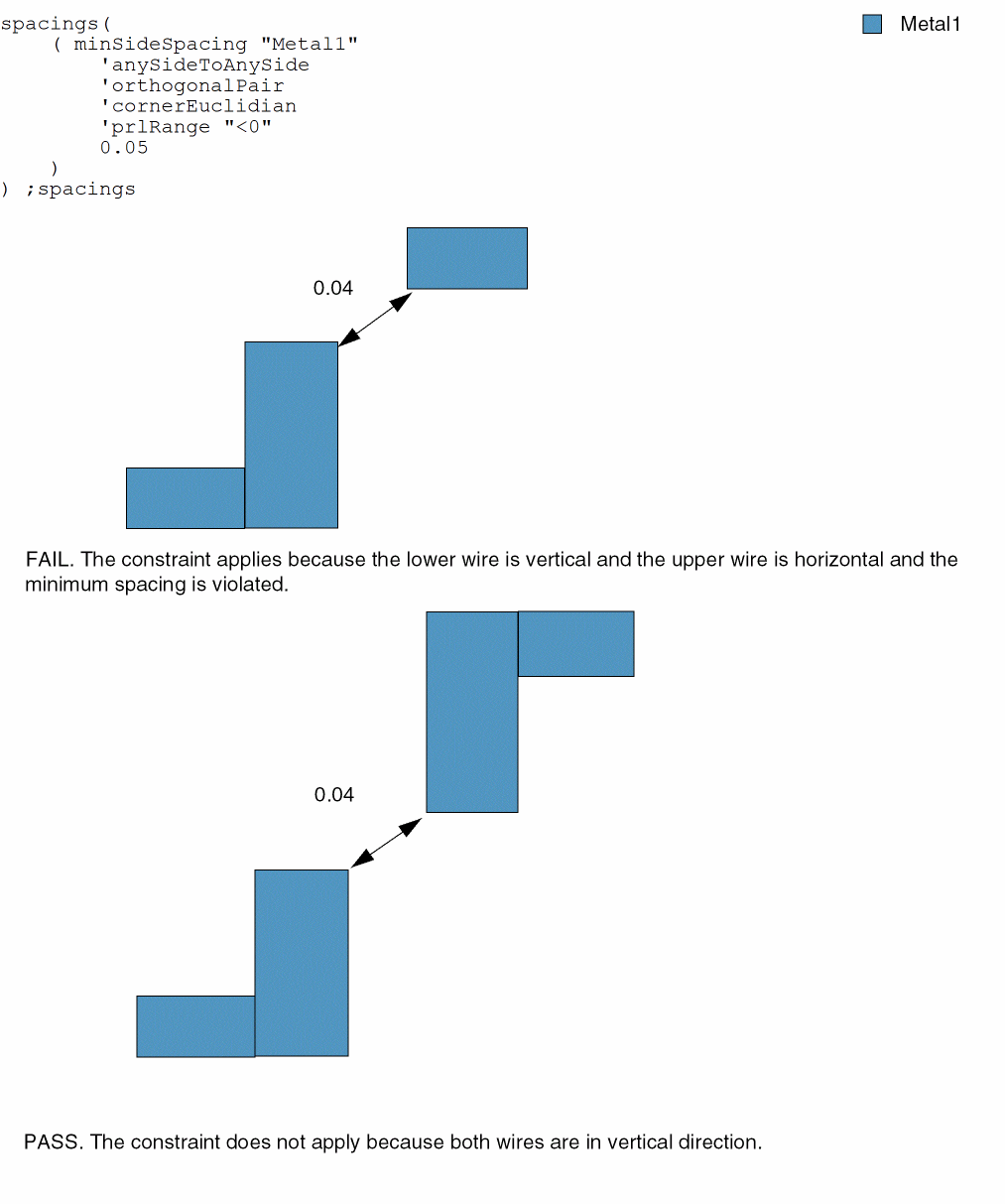
(Virtuoso Advanced Node for Layout Only) The corner-to-corner spacing (when the parallel run length is less than zero) between shapes is measured using Euclidean measurement type (the spacing halo has rounded corners). |
|
|
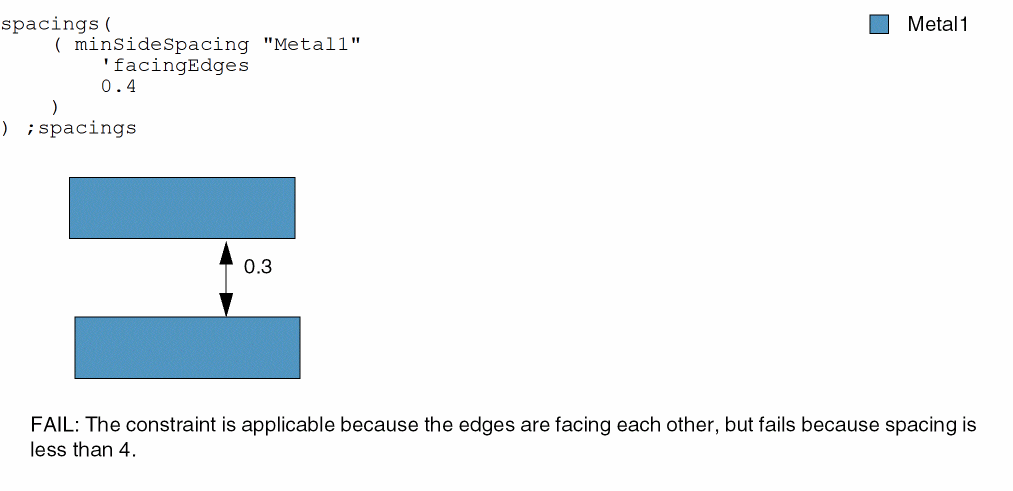
(Virtuoso Advanced Node for Layout Only) The constraint applies only if they face each other and there is no obstruction between edges. |
|
|
The constraint applies only if the width of the first shape falls in one of these ranges.
Type: Floating-point values specifying a |
|
|
(Virtuoso Advanced Node for Layout Only) The constraint applies only if the length of the first shape falls in one of these ranges.
Type: Floating-point values specifying a |
|
|
The constraint applies only if the width of the other shape falls in one of these ranges.
Type: Floating-point values specifying a |
|
|
(Virtuoso Advanced Node for Layout Only) The constraint applies only if the length of the other shape falls in one of these ranges.
Type: Floating-point values specifying a |
|
|
The direction in which spacing is measured. If direction is not specified, spacing is measured in any direction. |
|
|
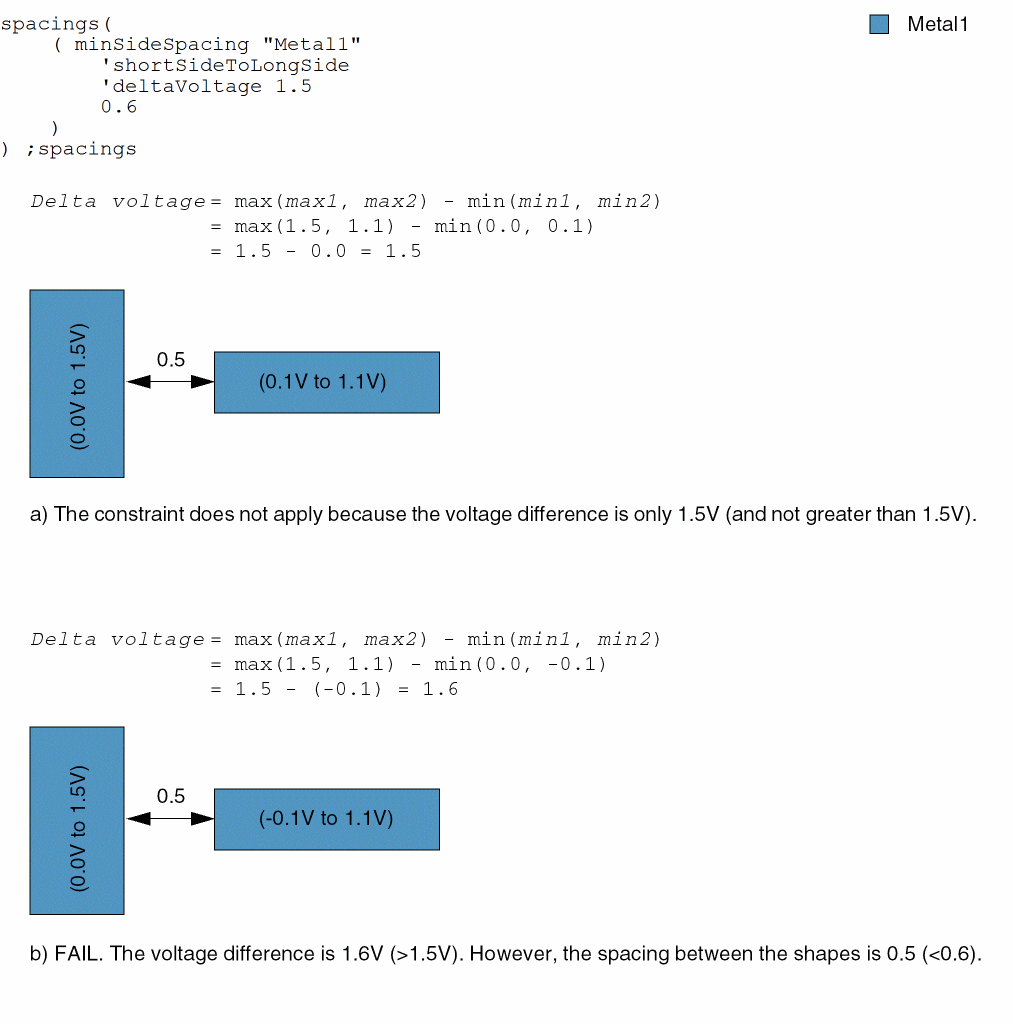
The constraint applies only if the maximum voltage difference between the two shapes is greater than this value.
Delta voltage |
|
|
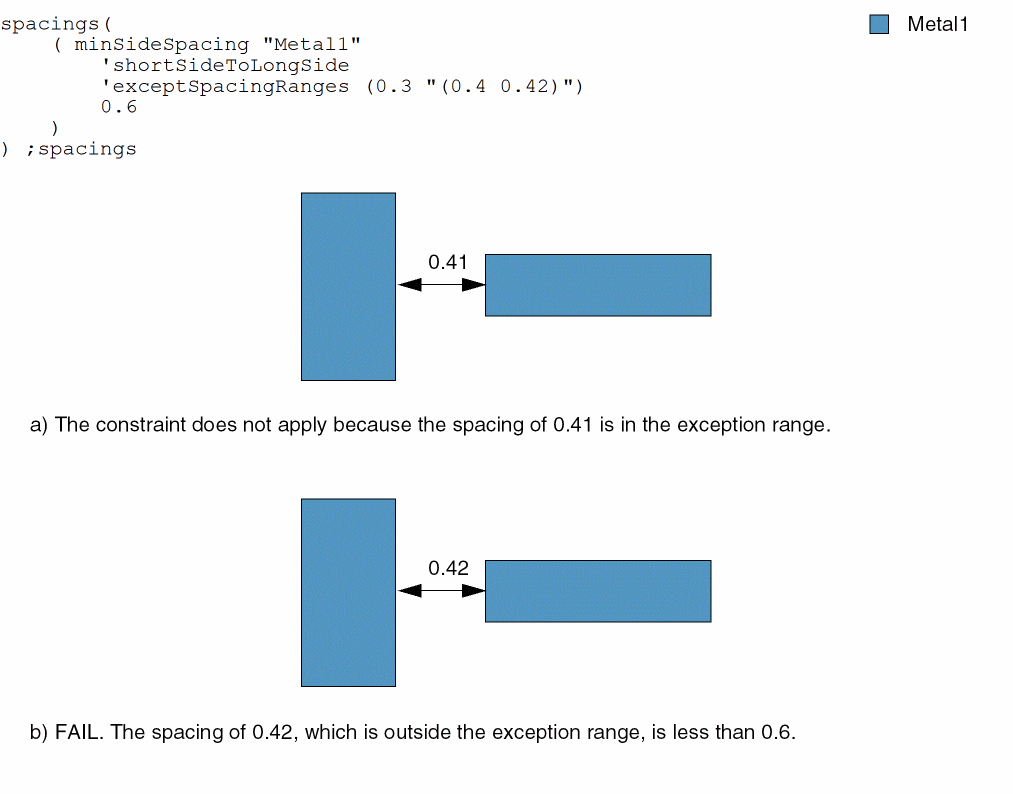
The constraint does not apply if the spacing between the shapes is in this range.
Type: A list of floating-point spacing |
|
|
|
|
|
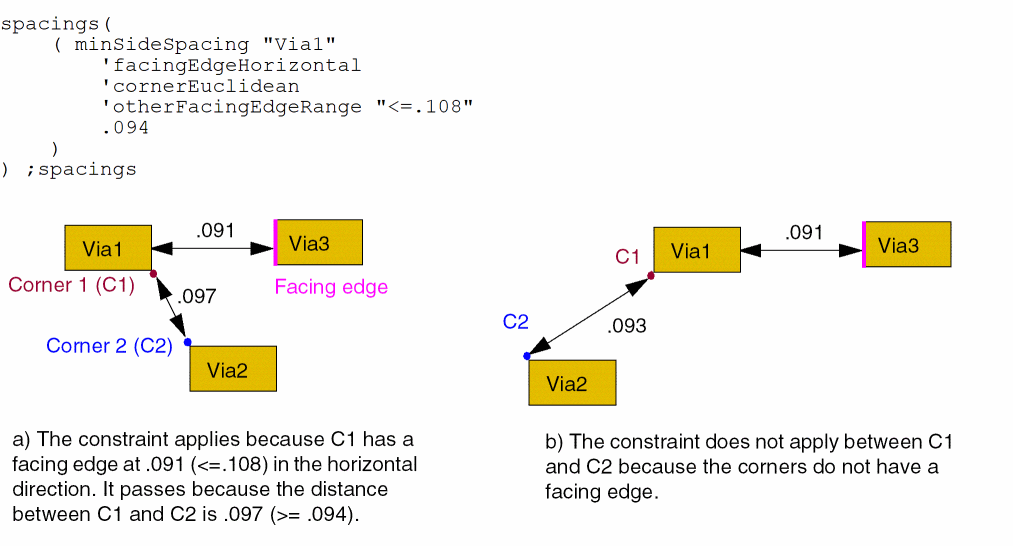
(Virtuoso Advanced Node for Layout Only) The constraint applies only if one of the two corners has a facing edge within the specified range and direction. You cannot specify a value greater than or equal to the specified range value. |
|
|
|
|
|
Determines if the constraint applies, based on the presence or absence of one or more layers.
For more information, see |
|
|
The |
|
|
The |
|
|
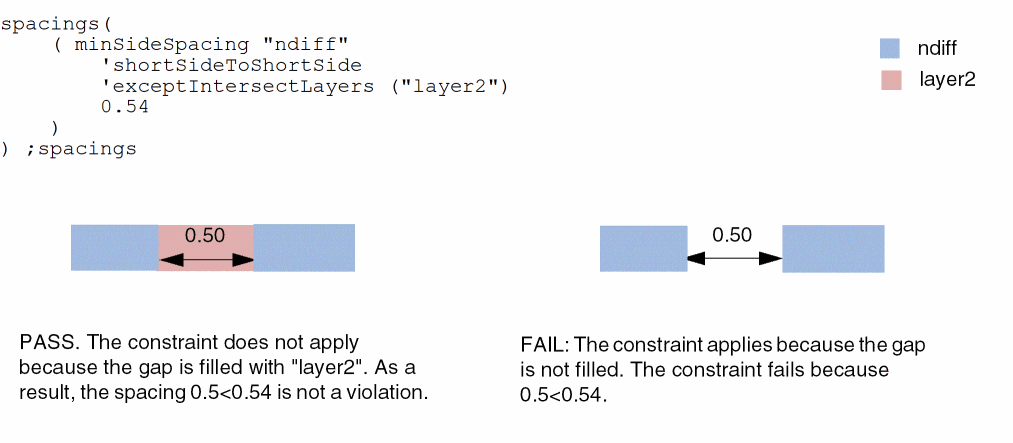
(Virtuoso Layout Suite EXL and higher tiers) The constraint does not apply if the spacing gap is covered by shapes on one of the specified layers. |
|
|
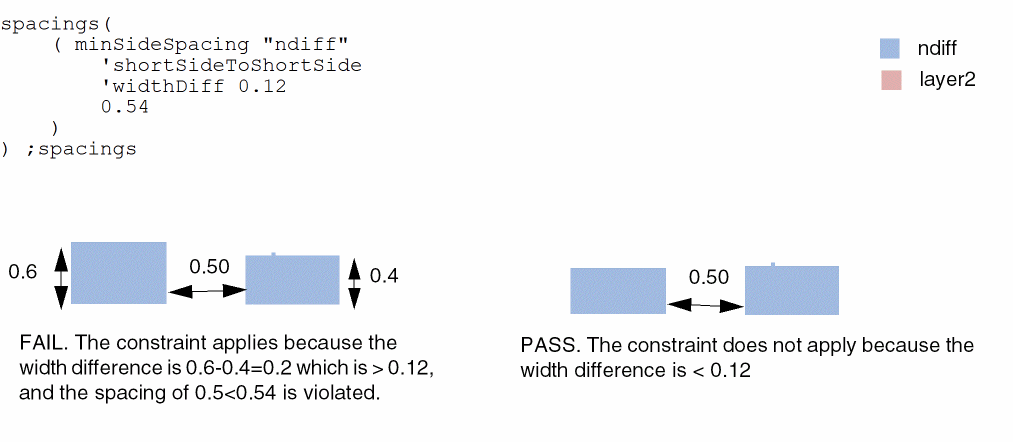
(Virtuoso Layout Suite EXL and higher tiers) The constraint applies only if the width difference of the shapes is greater than the specified value. |
|
|
(Virtuoso Layout Suite EXL and higher tiers) The constraint applies only to the shapes in orthogonal directions. This parameter is applicable only for shapes with negative parallel run length. |
|
|
(Virtuoso Layout Suite EXL and higher tiers) The constraint applies only to shapes on the specified mask. |
|
|
(Virtuoso Advanced Node for Layout Only) The direction in which the
By default, when this parameter is not used, then the smaller dimension is used for |
|
Examples
- Example 1: minSideSpacing with shortSideToShortSide, prl, widthRanges, and otherWidthRanges
- Example 2: minSideSpacing with shortSideToLongSide and deltaVoltage
- Example 3: minSideSpacing with shortSideToLongSide and exceptSpacingRanges
- Example 4: minSideSpacing with facingEdges
- Example 5: minSideSpacing with otherFacingEdgeRange
- Example 6: minSideSpacing with otherLayer
- Example 7: minSideSpacing with exceptIntersectLayers
- Example 8: minSideSpacing with widthDiff
- Example 9: minSideSpacing with orthogonalPair
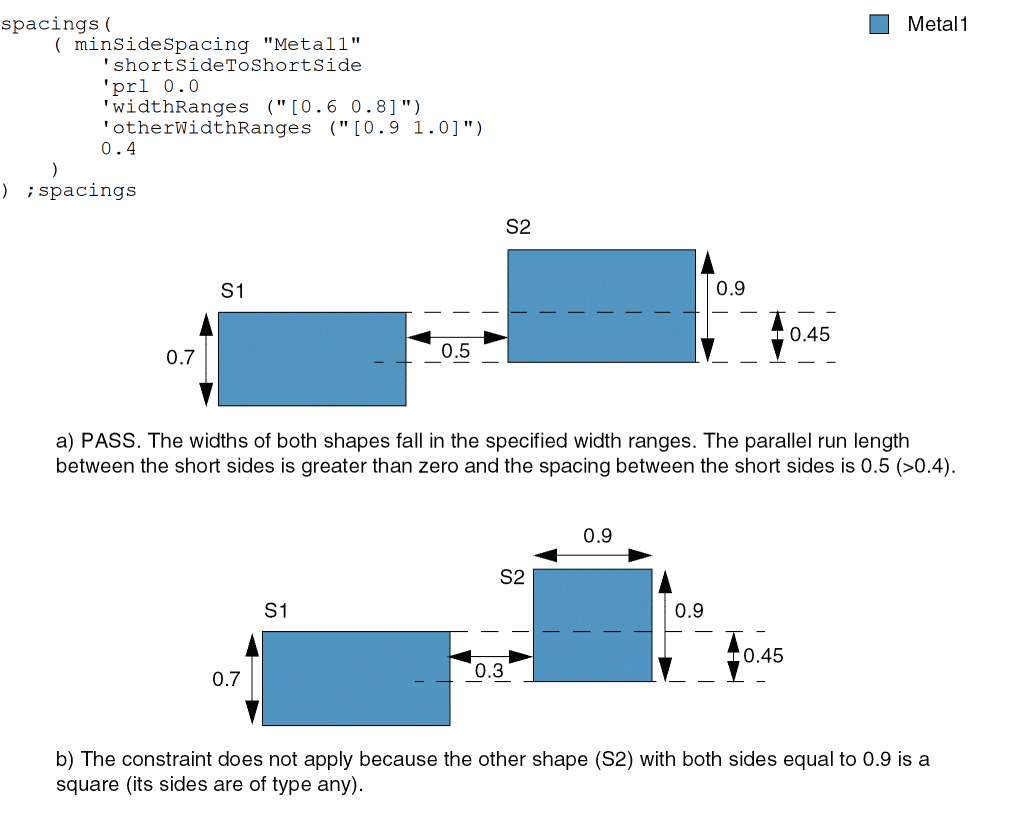
Example 1: minSideSpacing with shortSideToShortSide, prl, widthRanges, and otherWidthRanges
The spacing between the short sides of shapes S1 and S2 must be greater than or equal to 0.4 if the following conditions are met:
- The width of S1 is greater than or equal to 0.6 and less than or equal to 0.8.
- The width of S2 is greater than or equal to 0.9 and less than or equal to 1.0.
-
The parallel run length between the sides is greater than 0.
Example 2: minSideSpacing with shortSideToLongSide and deltaVoltage
The spacing between a long side and a short side of two adjacent Metal1 shapes must be greater than or equal to 0.6 if the delta voltage between the shapes is greater than 1.5.
Example 3: minSideSpacing with shortSideToLongSide and exceptSpacingRanges
The spacing between a long side and a short side of two adjacent Metal1 shapes must be greater than or equal to 0.6. The constraint does not apply if the spacing is equal to 0.3 or greater than 0.4 and less than 0.42.
Example 4: minSideSpacing with facingEdges
The constraint applies only if edges are facing and the spacing is 0.4 or greater.
Example 5: minSideSpacing with otherFacingEdgeRange
The constraint applies only if the edges are facing and the spacing is 0.094 or greater.
Example 6: minSideSpacing with otherLayer
The spacing between M0 and VC must not exceed 0.04 with the given cutClass and cutWithin values.
Example 7: minSideSpacing with exceptIntersectLayers
Example 8: minSideSpacing with widthDiff
Example 9: minSideSpacing with orthogonalPair
Return to top