
minSideSpacing (Two layers)
orderedSpacings( ( minSideSpacingtx_layer1tx_layer2['shortSideToShortSide | 'shortSideToLongSide | 'shortSideToAnySide | 'longSideToLongSide | 'longSideToAnySide ] ['widthRanges (g_ranges)] ['otherWidthRanges (g_otherRanges)] ['horizontal | 'vertical] ['exceptOverlapf_exceptOverlap| 'exceptExactOverlapf_exceptExactOverlap] ['cornerEuclidian] ['mask1 | 'mask2 | 'mask3] ['otherMask1 | 'otherMask2 | 'otherMask3] ['insideLayers (tx_layer3tx_layer4…tx_layerN) ['insidePurposes (t_purpose1t_purpose2…t_purposeN)] | 'outsideLayers (tx_layer3tx_layer4…tx_layerN) ['outsidePurposes (t_purpose1t_purpose2…t_purposeN)] ] ['deltaVoltagef_voltage] ['prlf_prl| 'prlRangeg_prlRange]f_spacing)
) ;orderedSpacings
(Virtuoso Advanced Node for Layout Standard) Specifies the minimum spacing between two shapes on two different layers based on which side of the layer1 shape faces which side of the layer2 shape. Sides can be of type short, long, or any.
If the parallel run length between the shapes is less than zero, spacing can optionally be measured corner-to-corner using Euclidean measure type. By default, spacing is measured using Manhattan measure type.
Values
|
The spacing between the shapes must be greater than or equal to this value. |
Parameters
|
|
|
|
The sides between which spacing is measured.
|
|
|
The constraint applies only if the width of the layer1 shape falls in one of these ranges.
Type: Floating-point values specifying a |
|
|
The constraint applies only if the width of the layer2 shape falls in one of these ranges.
Type: Floating-point values specifying a |
|
|
The direction in which spacing is measured. If direction is not specified, spacing is measured in any direction. |
|
|
|
|
|
|
|
(Virtuoso Advanced Node for Layout Only) The corner-to-corner spacing (when parallel run length is less than zero) between shapes is measured using Euclidean measure type (the spacing halo has rounded corners). |
|
|
(Virtuoso Advanced Node for Layout Only) The constraint applies to this mask on layer1. |
|
|
(Virtuoso Advanced Node for Layout Only) The constraint applies to this mask on layer2. |
|
|
|
|
|
Determines if the constraint applies, based on the presence or absence of one or more layers.
For more information, see |
|
|
The |
|
|
The |
|
|
(Virtuoso Advanced Node for Layout Only) The constraint applies if both the cut shape and the metal shape have voltages and the delta voltage between the layer1 shape and the layer2 shape is greater than this value. |
|
|
The constraint applies only if the parallel run length between the two sides is greater than this value. |
|
|
(Virtuoso Advanced Node for Layout Only) The constraint applies only if the parallel run length between the two sides falls in this range.
Type: Floating-point values specifying a |
|
Examples
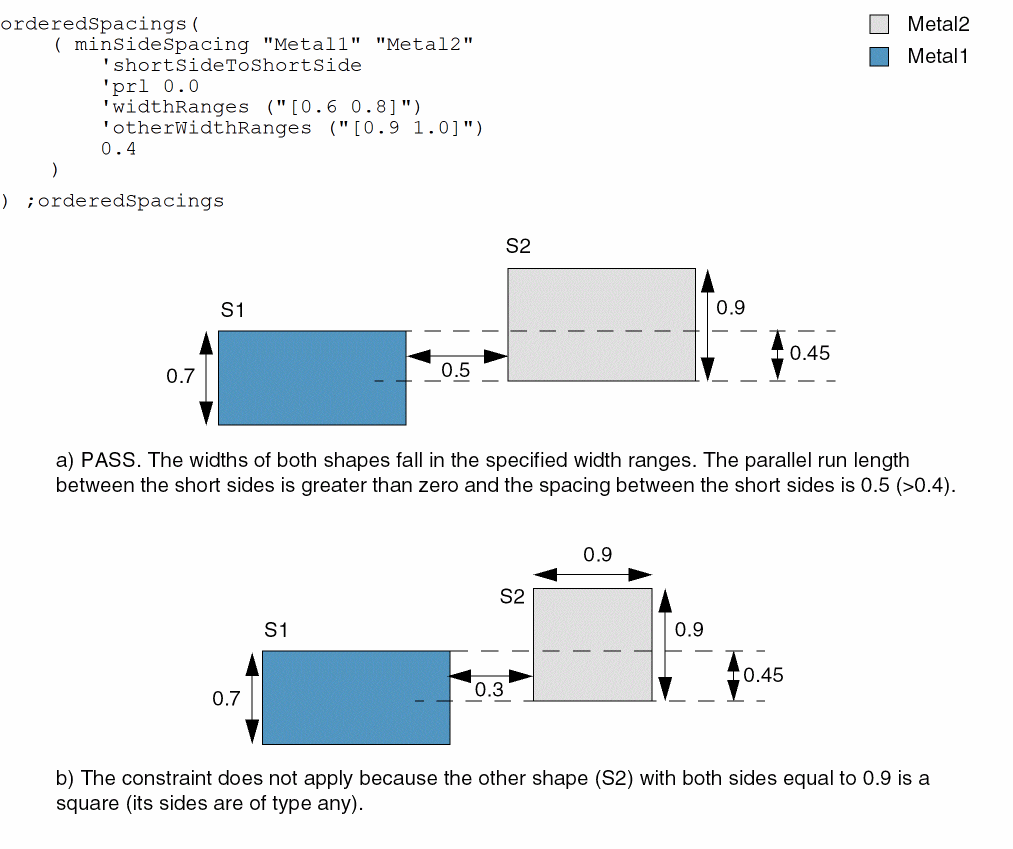
- Example 1: minSideSpacing with shortSideToShortSide, prl, widthRanges, and otherWidthRanges
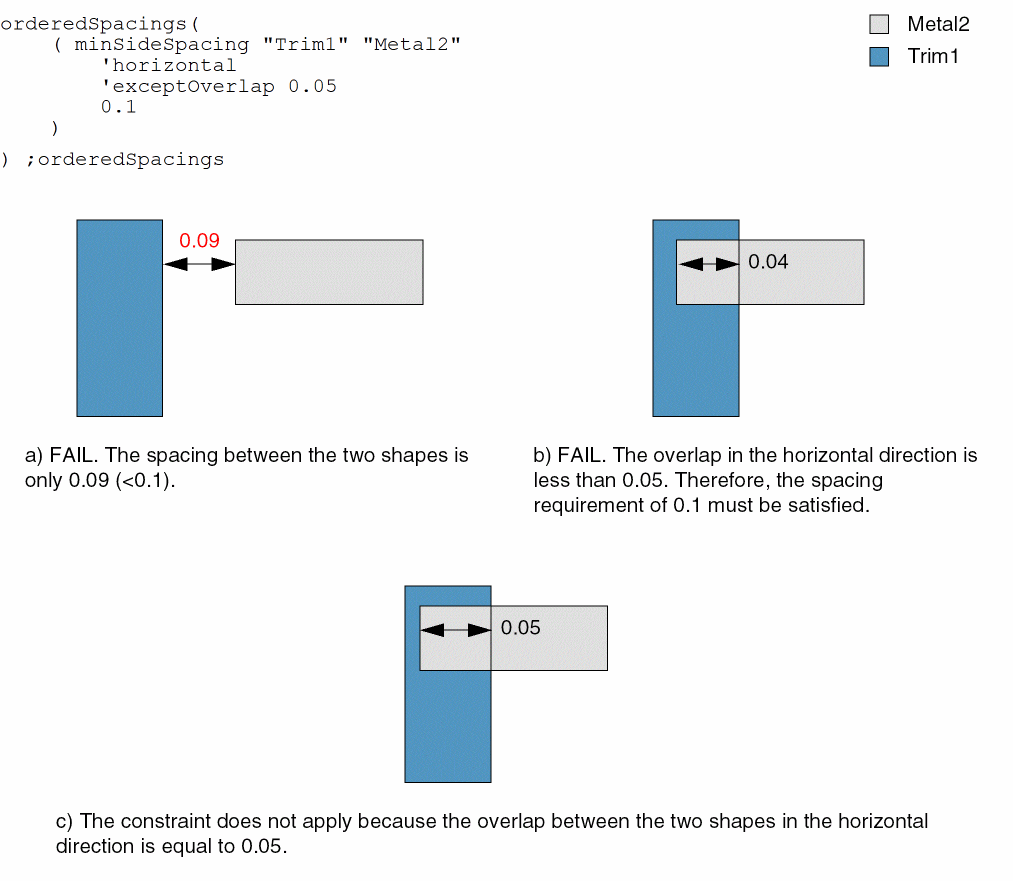
- Example 2a: minSideSpacing with exceptOverlap
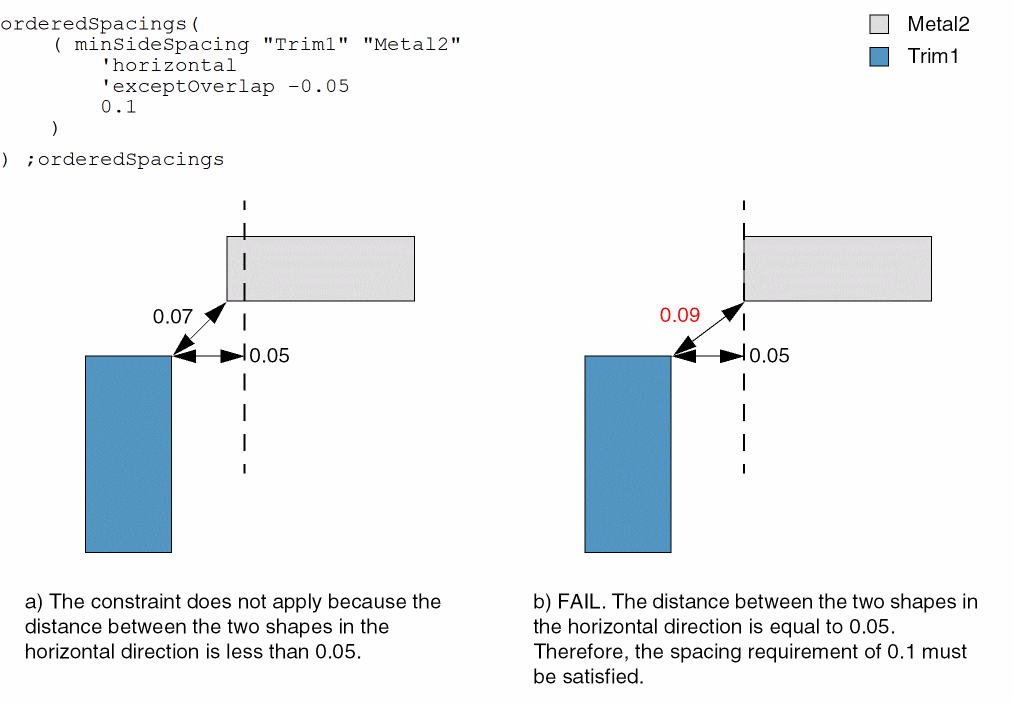
- Example 2b: minSideSpacing with exceptOverlap
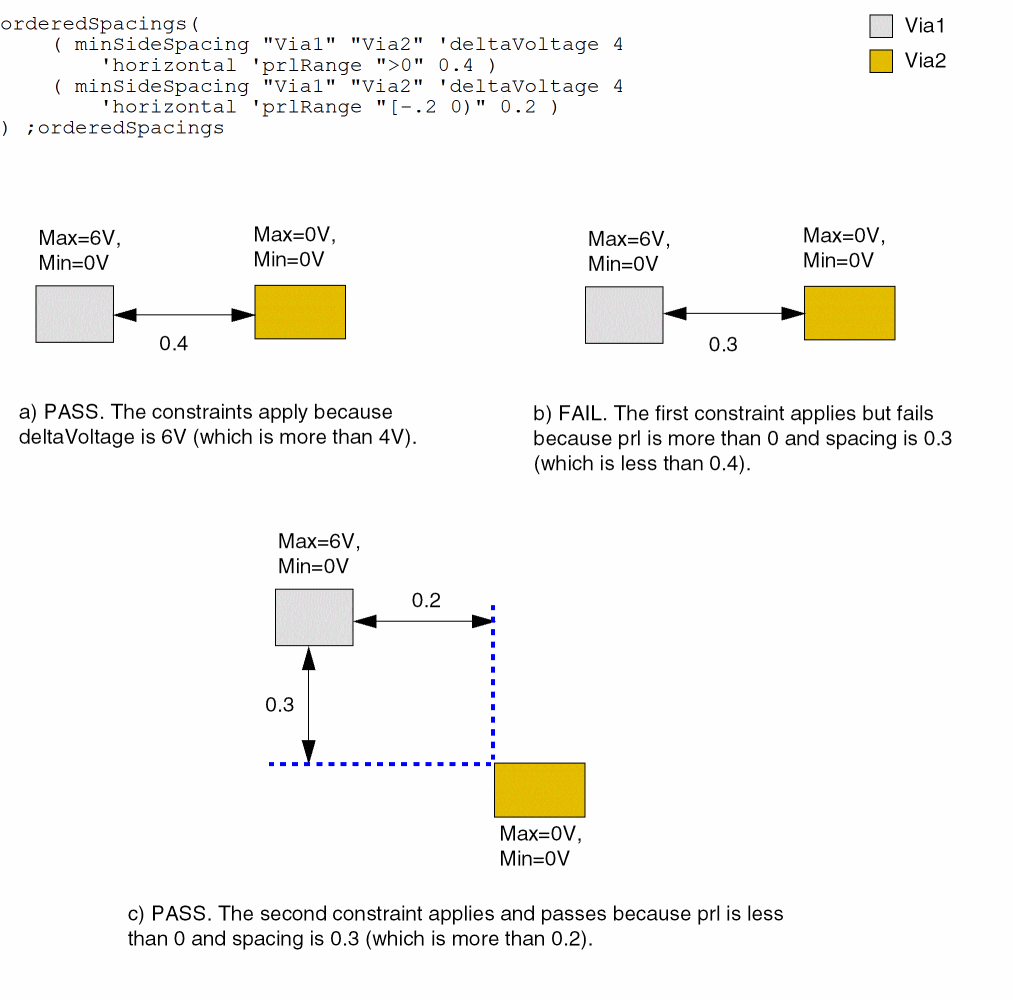
- Example 3: minSideSpacing with deltaVoltage and prlRange
Example 1: minSideSpacing with shortSideToShortSide, prl, widthRanges, and otherWidthRanges
The spacing between the short sides of shapes S1 and S2 must be greater than or equal to 0.4 if the following conditions are met:
- The width of S1 is greater than or equal to 0.6 and less than or equal to 0.8.
- The width of S2 is greater than or equal to 0.9 and less than or equal to 1.0.
-
The parallel run length between the sides is greater than 0.
Example 2a: minSideSpacing with exceptOverlap
The spacing between Trim1 and Metal2 shapes must be at least 0.1, except when the horizontal overlap between the two shapes is greater than or equal to 0.05.
Example 2b: minSideSpacing with exceptOverlap
The spacing between Trim1 and Metal2 shapes must be at least 0.1, except when the horizontal distance between the two shapes is less than 0.05.
Example 3: minSideSpacing with deltaVoltage and prlRange
The spacing between two vias can be specified separately for different parallel run lengths and voltage differences as illustrated in this example.
Return to top