
minSpacing (Two layers)
spacings( ( minSpacingtx_layer1tx_layer2['orthogonalSpacingf_orthoSpacing] ['horizontal | 'vertical] ['overlapNotAllowed] ['crossingAllowed] ['cornerAllowed] ['lengthf_length] ['exceptSameMetal] ['insideLayers (tx_layer4tx_layer5…tx_layerN) ['insidePurposes (t_purpose1t_purpose2…t_purposeN)] | 'outsideLayers (tx_layer4tx_layer5…tx_layerN) ['outsidePurposes (t_purpose1t_purpose2…t_purposeN)]f_spacing['manhattan] ['coincidentAllowed] )
) ;spacings
spacingTables( ( minSpacingtx_layer1tx_layer2(( "width" nil nil "width" nil nil ) ['horizontal | 'vertical] ['overlapNotAllowed] ['crossingAllowed] [f_default] ) (g_table) ['manhattan] ) ( minSpacingtx_layer1tx_layer2(( "width" nil nil "length" nil nil ) ['horizontal | 'vertical] ['overlapNotAllowed] ['crossingAllowed] [f_default] ) (g_table) ['manhattan] ) ( minSpacingtx_layer1tx_layer2(( "twoWidths" nil nil "length" nil nil ) ['horizontal | 'vertical] ['overlapNotAllowed] ['crossingAllowed] [f_default] ) (g_table) ['manhattan] )
) ;spacingTables
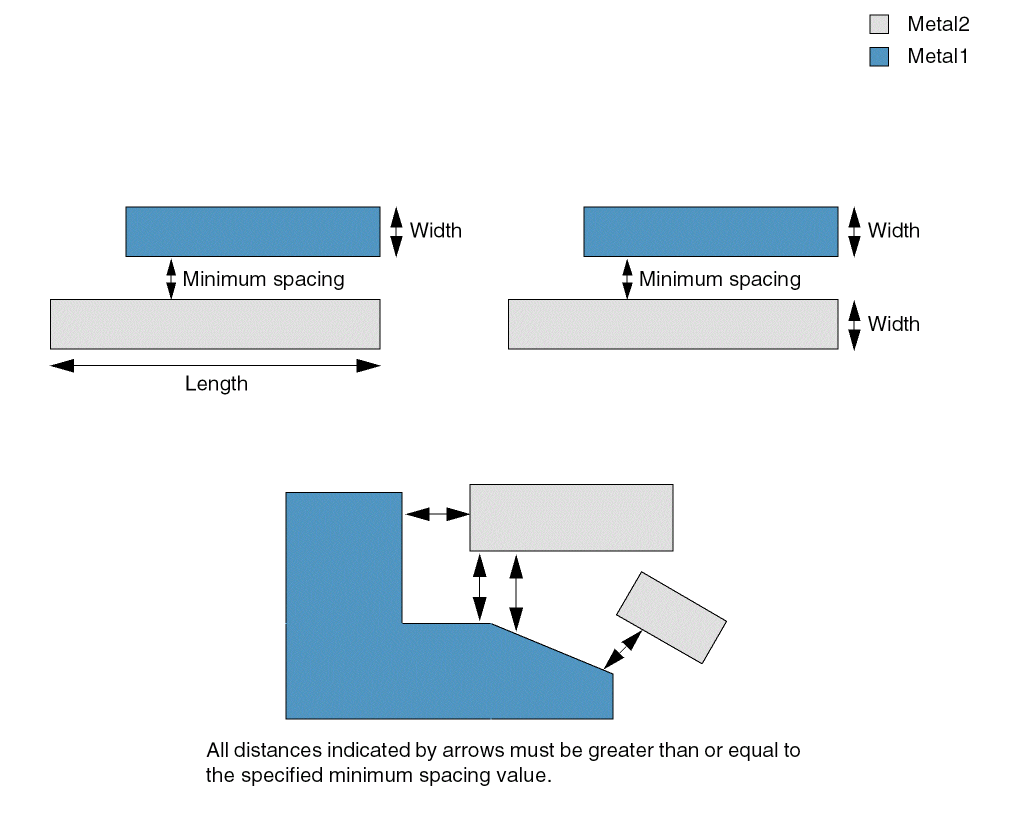
Specifies the minimum edge-to-edge spacing required between two adjacent, non-intersecting shapes on two different layers. The required spacing can be dependent on the direction in which the spacing is measured, on the width of both the shapes or on the width of the shapes and the parallel run length between them.
The figures below illustrate how the constraint is applied:
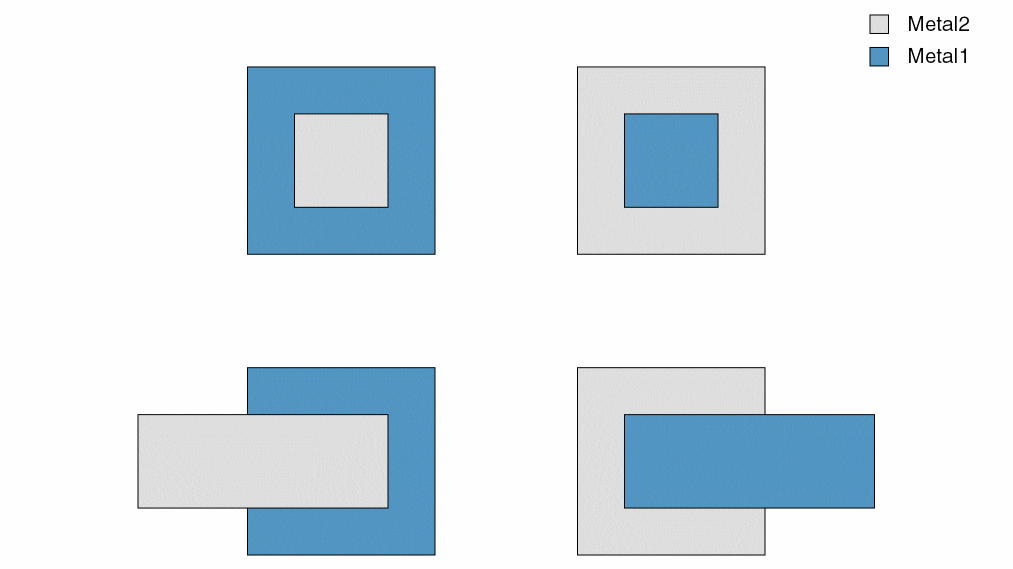
The constraint does not apply in the scenarios illustrated by the figures below:
For some processes, the minimum spacing between a cut shape on one layer and a metal shape on a second layer on a different net is measured using a more complex method called orthogonal spacing. If the shapes are on the same net and orthogonal spacing is specified, the constraint does not apply.
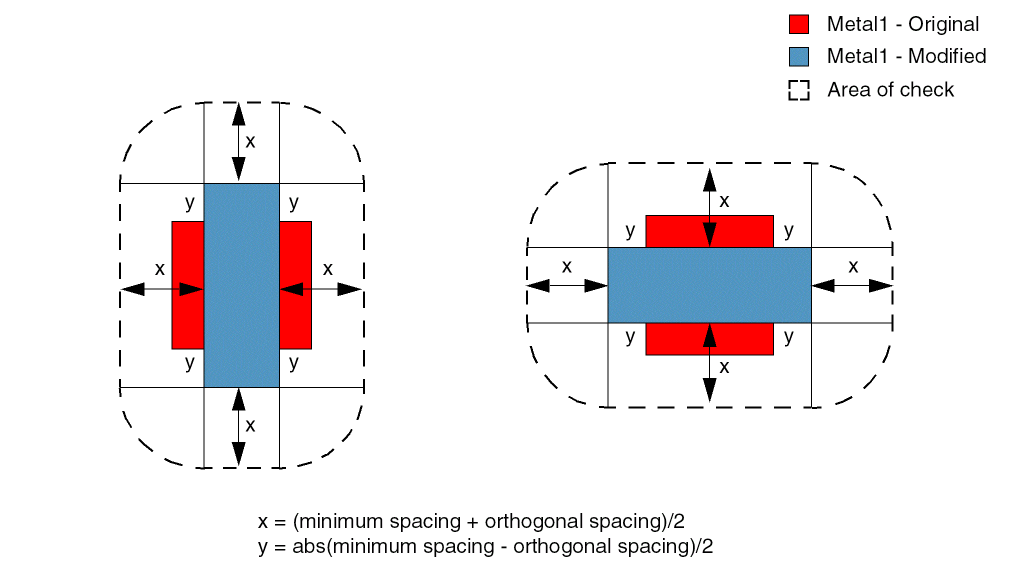
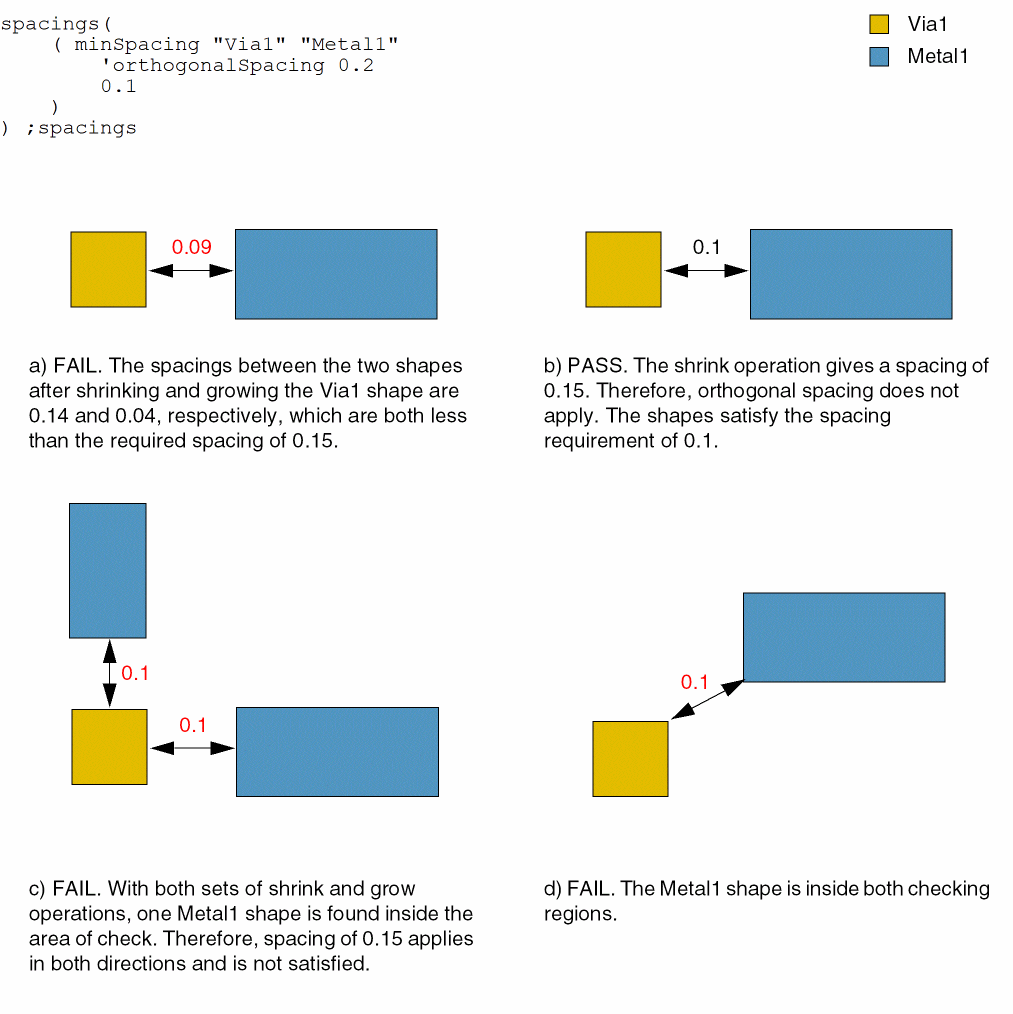
The minimum orthogonal spacing check is determined by the following method: A pair of opposite sides of the layer1 shape is grown by a distance equal to abs(minimum spacing - orthogonal spacing)/2, denoted by "y" in the figure below. Similarly, the other pair of opposite sides of the layer1 shape is shrunk by the same distance. The minimum required spacing between the modified layer1 shape and the layer2 shape is given by (minimum spacing + orthogonal spacing)/2, denoted by "x" in the figure below.
The spacing check is then repeated by shrinking the edges that were previously grown and growing the edges that were previously shrunk. The constraint is violated only if the layer2 shape is found in the gray region of check shown in the figure below.
Values
Parameters
|
The different-net clearance between objects on a cut layer and objects on a routing layer must be equal to this value. |
|
|
The direction in which the constraint applies. If direction is not specified, the constraint applies in any direction. |
|
|
(Virtuoso Advanced Node for Layout Standard) Shapes are not allowed to overlap. Otherwise, same-net shapes can overlap. |
|
|
(Virtuoso Advanced Node for Layout Only) The constraint does not apply to crossing shapes. |
|
|
(Virtuoso Advanced Node for Layout Only) The constraint does not apply if the corners of the two shapes touch. |
|
|
(Virtuoso Layout Suite EXL and higher tiers) The constraint applies only to shapes with length less than this value. |
|
|
(Virtuoso Layout Suite EXL and higher tiers) The constraint does not apply to contiguous same-metal shapes. |
|
|
|
|
|
(Virtuoso Layout Suite EXL and higher tiers) Determines if the constraint applies, based on the presence or absence of one or more layers.
For more information, see |
|
|
|
|
|
(Virtuoso Layout Suite EXL and higher tiers) Limits the |
|
|
The constraint uses Manhattan distance, which allows a larger spacing at the corners. |
|
|
The spacing value to be used when no table entry applies or is specified (using g_table). Ensure that the default spacing value is sufficiently large to represent all missing spacing values in the table. Ideally, it should be greater than or equal to the largest specified spacing in the table. |
|
|
The edges the two shapes can coincide. Otherwise, the shapes must meet the spacing requirement. |
|
Examples
- Example 1: minSpacing with vertical
- Example 2: minSpacing with orthogonalSpacing
- Example 3: minSpacing with crossingAllowed
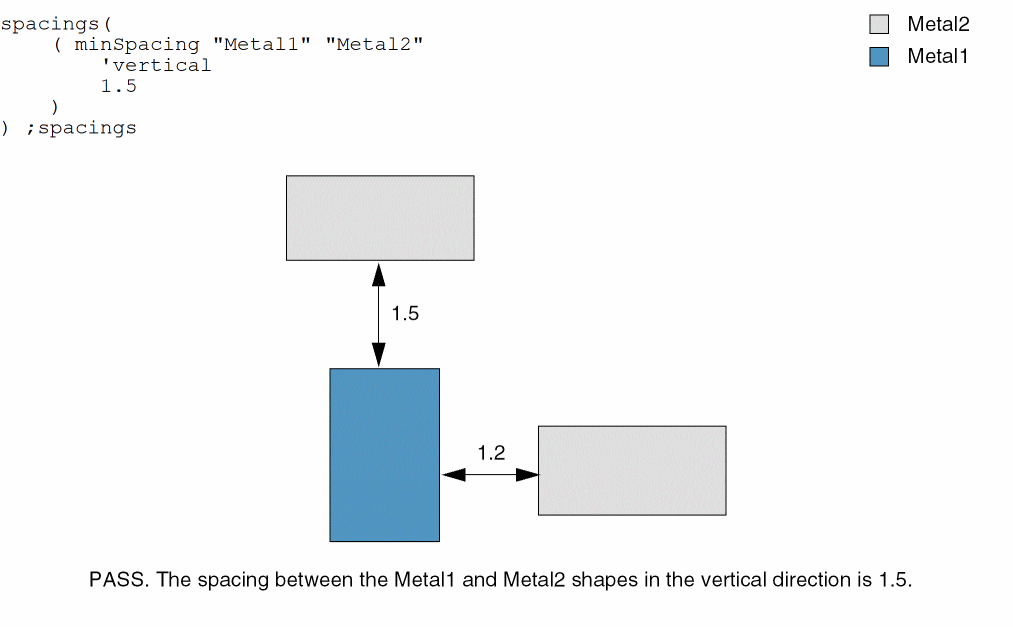
Example 1: minSpacing with vertical
The vertical spacing between Metal1 and Metal2 shapes must be at least 1.5.
Example 2: minSpacing with orthogonalSpacing
The spacing between Via1 and Metal1 shapes must be at least 0.1. Orthogonal spacing specified is 0.2, which means that Via1 shapes are grown and shrunk by 0.05 ((0.2 - 0.1)/2 = 0.05) and the spacing required in this case is 0.15 ((0.2 + 0.1)/2 = 0.15).
Example 3: minSpacing with crossingAllowed
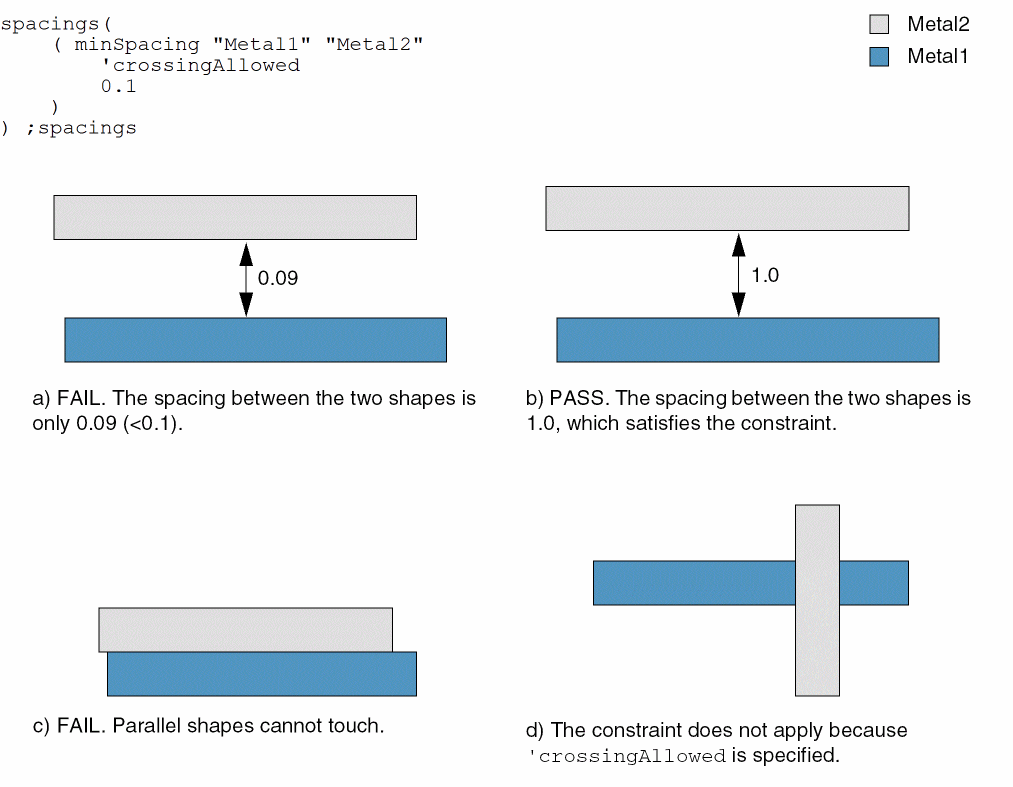
The spacing between Metal1 and Metal2 shapes must be at least 0.1. The constraint does not apply to crossing wires.
Return to top