
allowedCutClass
spacingTables( ( allowedCutClasstx_cutLayer(( "width" nil nil "width" nil nil ) ['minVoltagef_minVoltage] ['maxVoltagef_maxVoltage] 'cutClass {f_width| (f_widthf_length) |t_name} ['lowerLayertx_lowerLayer['lowerMask1 |'lowerMask2 |'lowerMask3]] ['upperLayertx_upperLayer['upperMask1 |'upperMask2 |'upperMask3]] ['horizontalLowerDir | 'verticalLowerDir] ['horizontalUpperDir | 'verticalUpperDir] ['insideLayers (tx_layer1tx_layer2…tx_layerN) ['insidePurposes (t_purpose1t_purpose2…t_purposeN)] | 'outsideLayers (tx_layer1tx_layer2…tx_layerN) ['outsidePurposes (t_purpose1t_purpose2…t_purposeN)] ]x_default) (g_table) )
) ;spacingTables
(Virtuoso Advanced Node for Layout Standard) Specifies whether a cut class on the given cut layer is allowed between shapes of certain widths. If lowerLayer and upperLayer are not specified, the viaDefs for the cut layer are used to determine the lower and upper layers.
allowedCutClass constraint need not be defined.Values
Parameters
|
(Virtuoso Advanced Node for Layout Only) The constraint applies only if the voltage on the shape is greater than or equal to this value. |
|
|
(Virtuoso Advanced Node for Layout Only) The constraint applies only if the voltage on the shape is less than this value. |
|
|
The cut class to which the constraint applies, specified by width, by width and length, or by name (as defined in a cutClasses constraint). |
|
|
The metal layer below the cut layer. If not specified, the default stack is used to determine the lower metal layer. |
|
|
(Virtuoso Layout Suite EXL and higher tiers) The constraint applies only for the specified color mask shapes of the lower metal layer. |
|
|
The metal layer above the cut layer. If not specified, the default stack is used to determine the upper metal layer. |
|
|
(Virtuoso Layout Suite EXL and higher tiers) The constraint applies only for the specified color mask shapes of the upper metal layer. |
|
|
The direction of the shape on the lower layer. The direction is determined by the wider dimension of the shape. |
|
|
The direction of the shape on the upper layer. The direction is determined by the wider dimension of the shape. |
|
|
|
|
|
Determines whether the constraint applies, based on the presence or absence of one or more layers.
For more information, see |
|
|
The |
|
|
The |
|
|
This determines whether cuts are allowed ( |
|
Examples
- Example 1: allowedCutClass with cutClass, lowerLayer, upperLayer, horizontalLowerDir, and horizontalUpperDir
- Example 2: allowedCutClass with cutClass, lowerLayer, and upperLayer
- Example 3: allowedCutClass with minVoltage and maxVoltage
Example 1: allowedCutClass with cutClass, lowerLayer, upperLayer, horizontalLowerDir, and horizontalUpperDir
A 0.2x0.4 cut class is allowed between Metal1 and Metal2 wires if the following conditions are met:
spacingTables(
    ( allowedCutClass "Via2"
     (( "width" nil nil "width" nil nil )
   'cutClass (0.2 0.4)
   'lowerLayer "Metal1"
   'upperLayer "Metal2"
   'horizontalLowerDir
   'horizontalUpperDir
  )
  (
   (0.0  0.0)  0
   (0.1  0.1)  1
  )
 )
) ;spacingTables
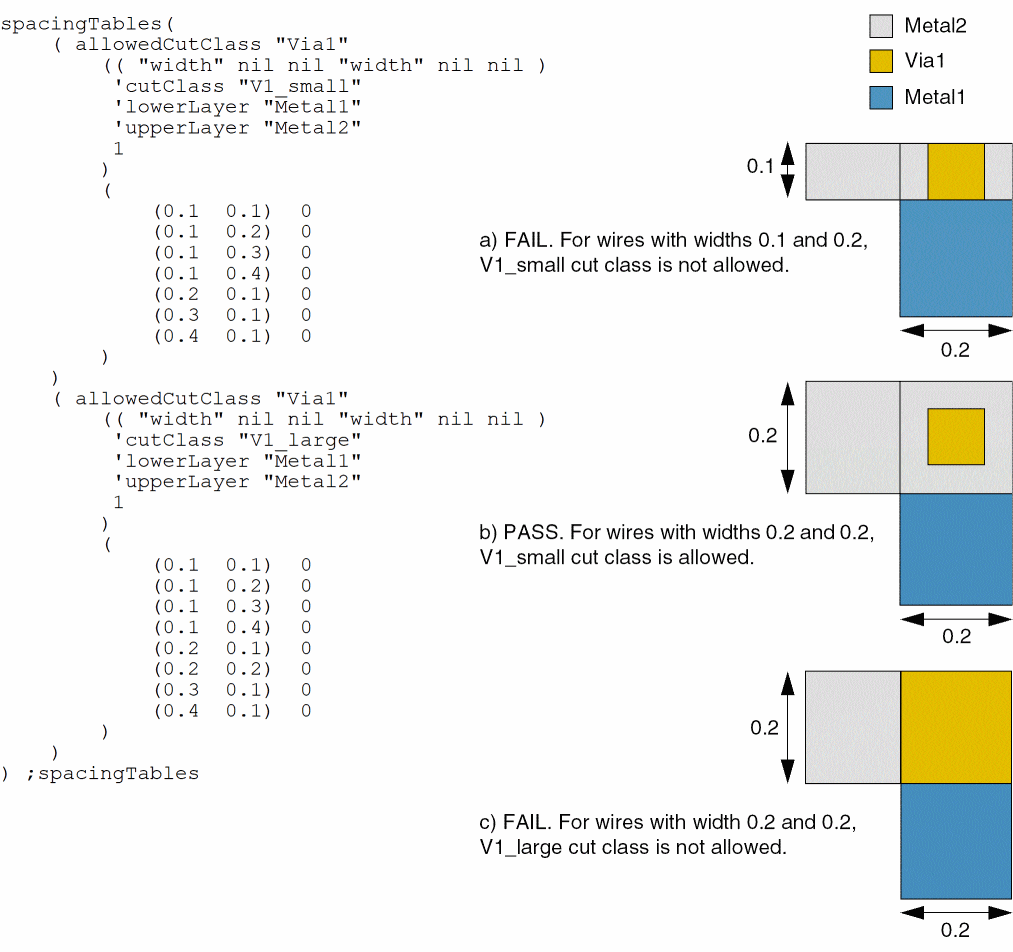
Example 2: allowedCutClass with cutClass, lowerLayer, and upperLayer
- The V1_small cut class is not allowed between Metal1 and Metal2 wires if one or both wires are greater than or equal to 0.1 wide.
-
The V1_large cut class is not allowed between Metal1 and Metal2 wires if one or both wires are 0.1 wide or if both wires are greater than or equal to 0.2 wide.
Example 3: allowedCutClass with minVoltage and maxVoltage
When voltage is greater than or equal to 0.1 and less than 0.5, the first constraint applies. When voltage is greater than or equal to 0.5 and less than 0.9, the second constraint applies.
( "allowedCutClassCG" nil nil 'and
spacingTables(
  (allowedCutClass "Via1"
   (("width" nil nil "width" nil nil)
   'minVoltage  0.1
   'maxVoltage  0.5
   'cutClass (0.1 0.2)
   'lowerLayer "Metal1"
   'upperLayer "Metal2"
   1 )
   (
     (0 0.1) 0 )
   )
  )
  (allowedCutClass "Via1"
   (("width" nil nil "width" nil nil)
   'minVoltage  0.5
   'maxVoltage  0.9
   'cutClass (0.08 0.16)
   'lowerLayer "Metal1"
   'upperLayer "Metal2"
   1 )
   (
     (0 0.1) 0 )
   )
  )
 );spacingTables
)
Return to top