
forbiddenCutClassSpacingRange
spacings( ( forbiddenCutClassSpacingRangetx_layer'cutClass {f_width| (f_widthf_length) |t_name} ['layertx_metalLayer['mask1 | 'mask2 | 'mask3] ['layerWidthf_layerWidth] 'paraLengthf_paraLength'withinf_within] ['sameMask] ['shortEdge | 'longEdge] ['vertical | 'horizontal] ['cutClassPrlg_cutClassPrl| 'allCuts]g_range)
) ;spacings
(Virtuoso Advanced Node for Layout Standard) Specifies that the spacing between two cut shapes of the specified cut class on the specified layer cannot fall in the specified range.
In some processes, this spacing restriction applies in addition to the normal cut-class-specific rules. In some cases, this additional spacing restriction applies only to the spacing between the short or long edges of two cut shapes of a rectangular cut class with parallel run length greater than zero, or between an edge of a rectangular cut shape and any edge of a cut shape of the specified cut class if the parallel run length between the two shapes is greater than the specified value.
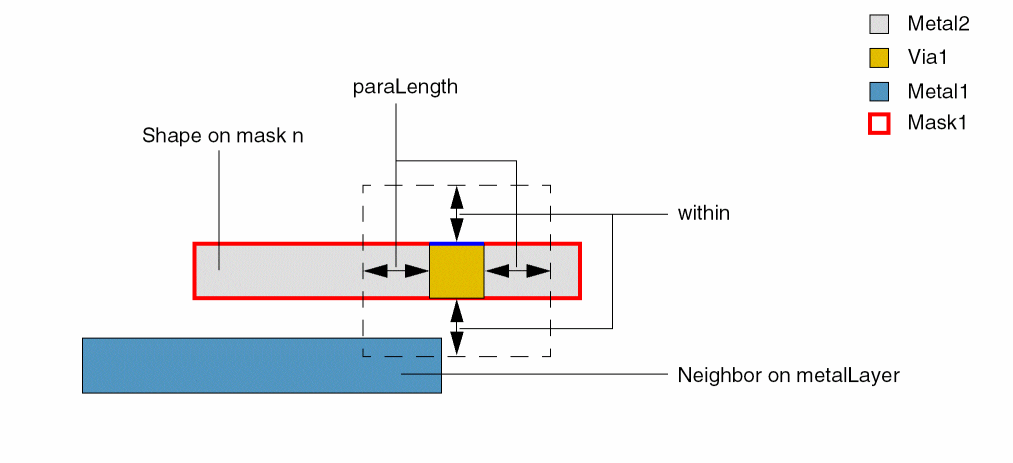
If a neighboring metal shape is present on metalLayer on one side of the cut shape of the specified cut class, the constraint applies on the other side of the cut shape (the blue edge shown in the figure below) provided the following conditions are met:
- The parallel run length between the two metal shapes—the metal shape that encloses the cut shape and the metal neighbor—is greater than or equal to paraLength.
- The distance between the cut shape and the metal neighbor is less than within.
Optionally, if the mask type is specified, the constraint applies only to cut shapes enclosed by metal shapes on that mask.
Values
|
The layer on which the constraint is applied. Type: String (layer and purpose names) or Integer (layer number) |
|
|
The forbidden spacing range is specified using the format: where, f_min <= spacing <= f_max
Type: Floating-point values specifying a |
Parameters
|
The cut class to which the constraint applies, specified by width, by width and length, or by name (as defined in a cutClasses constraint). |
|
|
(Virtuoso Advanced Node for Layout Only) The constraint applies only if the cut shape has a metal neighbor on this layer on one side. |
|
|
(Virtuoso Advanced Node for Layout Only) The constraint applies only if the cut shape is enclosed by a metal shape on the specified mask and has a metal neighbor on one side. |
|
|
(Virtuoso Advanced Node for Layout Only) The constraint applies only if the width of the metal neighbor is less than or equal to this value. |
|
|
(Virtuoso Advanced Node for Layout Only) The constraint applies only if the parallel run length between the two metal shapes—the metal shape that encloses the cut shape and the metal neighbor—is greater than or equal to this value. |
|
|
(Virtuoso Advanced Node for Layout Only) The constraint applies only if the distance between the cut shape and the metal neighbor is less than this value. |
|
|
(Virtuoso Advanced Node for Layout Only) The constraint applies only between same-mask cut shapes of the specified cut class. |
|
|
The edges to which the constraint applies.
|
|
|
The constraint applies between a rectangular cut shape and another cut shape of the cut class specified with this parameter if the two cut shapes have parallel run length greater than this value. If the specified parallel run length is negative, the edge of the rectangular cut shape is extended in both directions by the absolute value of the specified parallel run length, and the constraint applies between the extended edge and any neighboring cut edge of the specified cut class. The value of the parameter is defined as follows: |
|
|
(Virtuoso Advanced Node for Layout Only) The constraint applies between a cut shape of the specified cut class and a cut shape of any other cut class. |
|
Examples
- Example 1: forbiddenCutClassSpacingRange with shortEdge
- Example 2: forbiddenCutClassSpacingRange with cutClassPrl
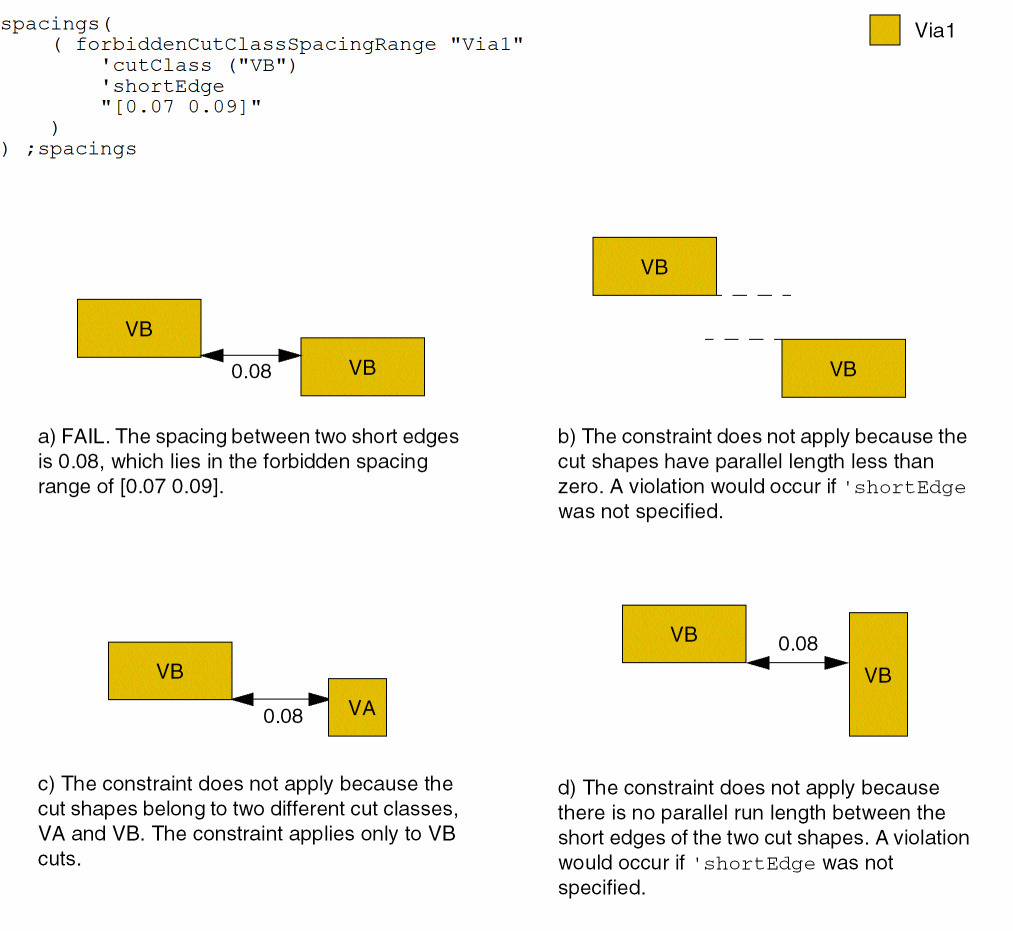
Example 1: forbiddenCutClassSpacingRange with shortEdge
The spacing between the short edges of two VB cut shapes on layer Via1 must not be greater than or equal to 0.07 and less than or equal to 0.09 if the cut shapes have parallel run length greater than zero.
Example 2: forbiddenCutClassSpacingRange with cutClassPrl
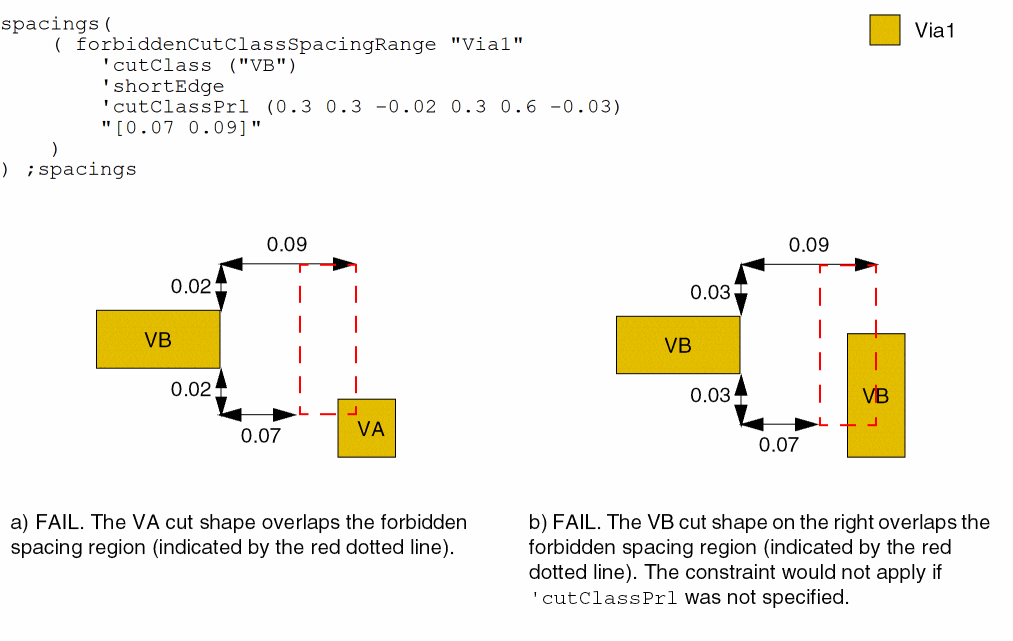
The spacing between the short edge of a VB cut shape to any edge of a VA or VB cut on layer Via1 must not be greater than or equal to 0.07 and less than or equal to 0.09. The spacing applies when the parallel run length between VA and VB cut shapes is greater than -0.02 and between two VB shapes is greater than -0.03.
Return to top