
maxViaStack
spacings( ( maxViaStack ['lowerLayertx_lowerLayer] ['upperLayertx_upperLayer] ['noSingleCut] ['oneSameMetalf_cutWithin] ['minMultiCutx_numCut] ['lowCutSizeWithin | 'withinLayerNamel_layerNames'withinListl_withinValues['centerToCenterListl_centerToCenterValues] | 'layertx_layerName'dualWithin (f_belowWithin f_aboveWithin) ] ['exceptIndividualAreaf_individualArea'exceptSumAreaf_sumArea|'exceptMaxAreal_metalLayerNamesAndAreas|'areaRatiol_areaRatio] ['exceptPGNet] |'exceptPGRouteTopologyListl_PGShapeTypeNames] ['exceptCutClassListl_cutClassNames] ['excludeEqualx_value] ['noViaListl_viaNames] ['noCutClassListl_cutClassNames] ['sameNetOnly] ['exceptExtensionLayerListl_layer'exceptExtensionMetalListl_metal'exceptExtensionValueListl_value'exceptExtensionDirectionListl_direction] ['insideLayers (tx_layer1tx_layer2…tx_layerN) ['insidePurposes (t_purpose1t_purpose2…t_purposeN)] |'outsideLayers (tx_layer1tx_layer2…tx_layerN) ['outsidePurposes (t_purpose1t_purpose2…t_purposeN)]]x_stackLimit)
) ;spacings
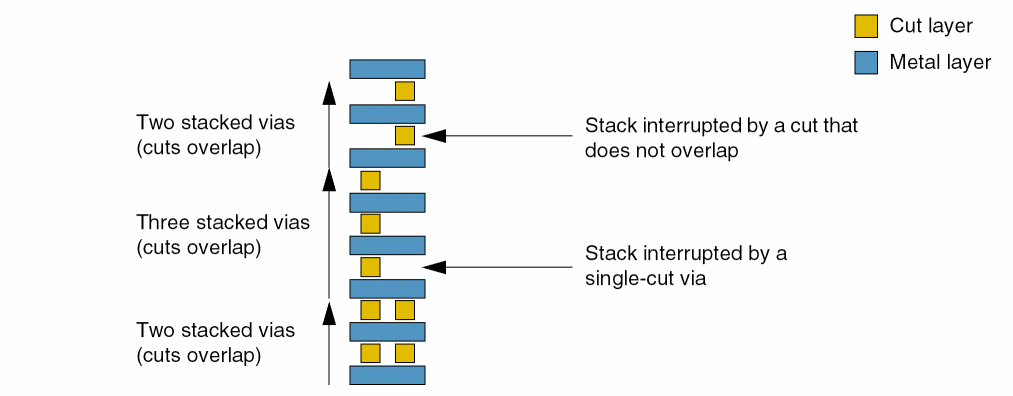
Sets the maximum allowed number of continuous stacked vias. A via is considered to be in a stack with another via if a cut in one via partially or completely overlaps a cut in another via. The number of vias in a continuous stack must not exceed the number specified by this constraint.
The figure below illustrates a via stack.
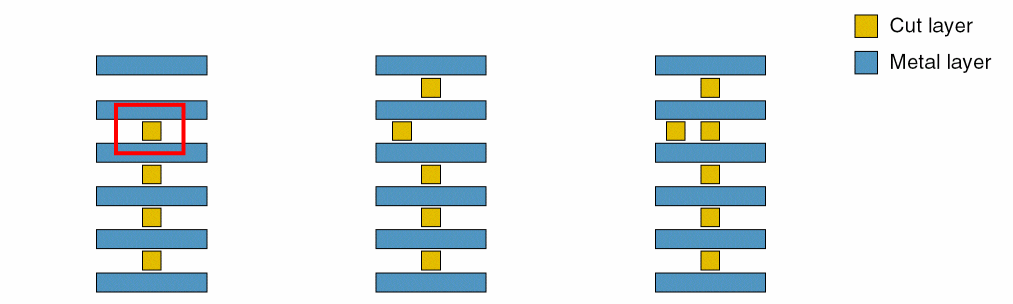
In the first example below, if the via stacking limit is set to 3, the leftmost figure violates the constraint because the number of stacked vias is 4 (>3).
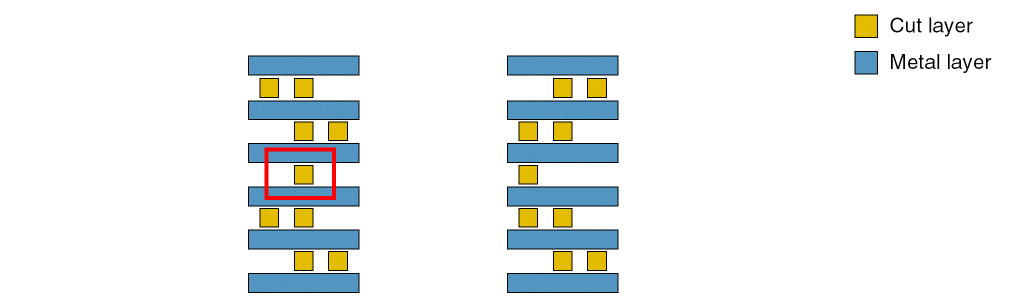
In the second example below, if the via stacking limit is set to 3 and 'noSingleCut is specified, the figure on the left violates the constraint because a single-cut via is not allowed in a stack that is taller than 3.
Values
Parameters
|
The two together specify a range of layers to which the constraint applies. If this range is not specified, the constraint applies to all layers. The specified layers must all be metal layers. |
|
|
This parameter specifies whether stacked vias can be single-cut or if they must be multiple-cut. |
|
|
(Virtuoso Layout Suite EXL and higher tiers) This parameter specifies that the cuts within the specified value that share at least one common metal are considered as multiple cuts. |
|
|
(Virtuoso Advanced Node for Layout Standard) This parameter specifies the minimum number of cuts to be considered as a multicut. The default value is 2. |
|
|
It is a stacked via if the upper adjacent layer cut is within the minimum cut size specified on the lower cut layer (as defined in a cutClasses or minWidth constraint). |
|
|
(Virtuoso Advanced Node for Layout Only) It is a stacked via if the upper adjacent layer cut is within the distance specified by
The number of layer names specified using Type: A list of layer names and a list of floating-point distance values. |
|
|
(Virtuoso Layout Suite EXL and higher tiers) This parameter specifies that the distances in |
|
|
|
|
|
(Virtuoso Advanced Node for Layout Only) The constraint applies if all cuts below tx_layerName are within f_belowWithin and all cuts above tx_layerName are within f_aboveWithin. Type: A layer name and a pair of floating-point distance values. |
|
|
The constraint does not apply if the metal shape containing a stacked via has an area greater than or equal to this value on a layer other than the bottommost and topmost metal layers. |
|
|
The constraint does not apply if the union sum of the metal shapes containing a stacked via on layers other than the bottommost and topmost metal layers is greater than or equal to this value. |
|
|
(Virtuoso Layout Suite EXL and higher tiers) Specifies an exemption when the area on the specified metal layer is less than the specified area on any specified metal layers.The first value for each entry in the list is a metal layer and the second value is the area. |
|
|
(Virtuoso Layout Suite EXL and higher tiers) Specifies the area conditions to trigger the rule. Each list entry has three values. The first value specifies a cut layer, the second value specifies the area on that cut layer must be less than or equal to the specified value, and the third value specifies the area of the above or below cut layer or area of the current layer should be greater than the specified value. |
|
|
(Virtuoso Advanced Node for Layout Only) The constraint does not apply to power and ground nets. |
|
|
(Virtuoso Layout Suite EXL and higher tiers) Specifies the list of shape types, which the rule is exempted if all the PG cuts belong to the given types. |
|
|
(Virtuoso Advanced Node for Layout Only) Any vias belonging to the given cut class on the given layer would interrupt a stack as if the vias did not exist for this rule. Each list entry includes a cut layer and two values indicating the dimensions of a cut. |
|
|
(Virtuoso Layout Suite EXL and higher tiers) The cut should be inside the search window specified by |
|
|
(Virtuoso Advanced Node for Layout Only) This is a list of via names that cannot be used for stacking. The via list should be ordered from the lowest cut layer to the highest cut layer and must be in the range specified by
You can specify multiple sequences of via names, ordered from the lowest to the highest cut layer, separated using |
|
|
(Virtuoso Layout Suite EXL and higher tiers) This parameter specifies that the rule applies only on same-net vias. |
|
|
(Virtuoso Layout Suite EXL and higher tiers) Exempts all the cuts on the specified cut layers that have an extension on a metal layer specified using the |
|
|
(Virtuoso Layout Suite EXL and higher tiers) Exempts all the cuts on the specified cut layers in the |
|
|
(Virtuoso Layout Suite EXL and higher tiers) Exempts all the cuts on the specified cut layer in the |
|
|
(Virtuoso Layout Suite EXL and higher tiers) Exempts all the cuts on the specified cut layer in the |
|
|
|
|
|
(Virtuoso Layout Suite EXL and higher tiers) Determines if the constraint applies, based on the presence or absence of one or more layers.
For more information, see |
|
|
(Virtuoso Layout Suite EXL and higher tiers) The |
|
|
(Virtuoso Layout Suite EXL and higher tiers) The |
|
Examples
- Example 1: maxViaStack with withinLayerName and withinList
- Example 2: maxViaStack with noViaList
- Example 3: maxViaStack with noCutClassList
- Example 4: maxViaStack with exceptCutClassList
- Example 5: maxViaStack with dualWithin
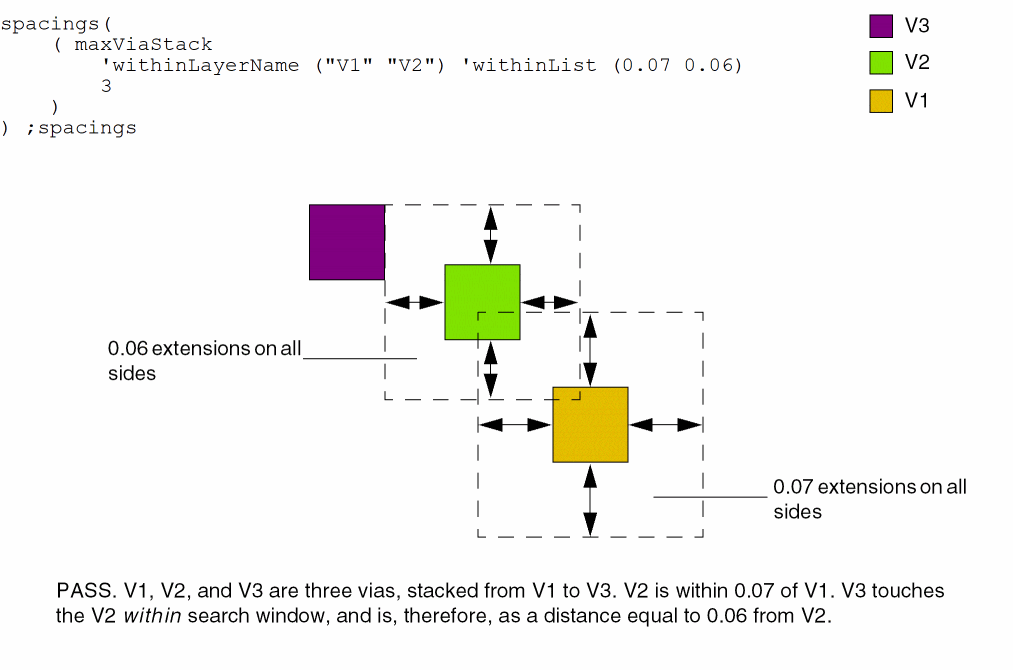
Example 1: maxViaStack with withinLayerName and withinList
The maximum number of vias in a stack can be three. V2 must be at a distance less than or equal to 0.07 from V1, and V3 must be a distance less than or equal to 0.06 from V2.
Example 2: maxViaStack with noViaList
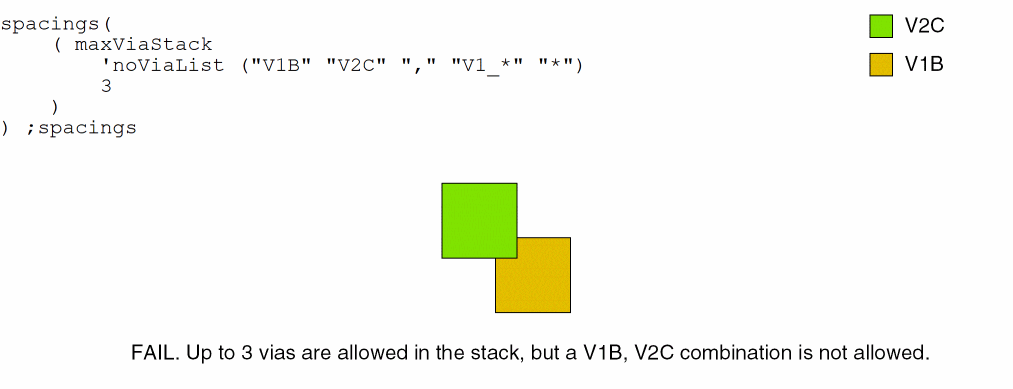
A V1B, V2C via combination is not allowed in a via stack that can contain a maximum of three vias.
The second sequence of via names illustrates how you can use a wildcard to specify via combinations that are not allowed in a via stack.
Example 3: maxViaStack with noCutClassList
The noCutClassList parameter here specifies that via stacks containing a cut class of either size 0.06x0.12 or 0.06x0.06 on layer V12 and size 0.06x0.06 on layer V23 are a violation, even if the stack does not exceed the maximum height of 5.
spacings(
    ( maxViaStack 'minMultiCut 3
     'noCutClassList ("V12 0.06 0.12" "V23 0.06 0.06" ","
   "V12 0.06 0.06" "V23 0.06 0.06")
 5)
) ;spacings
Example 4: maxViaStack with exceptCutClassList
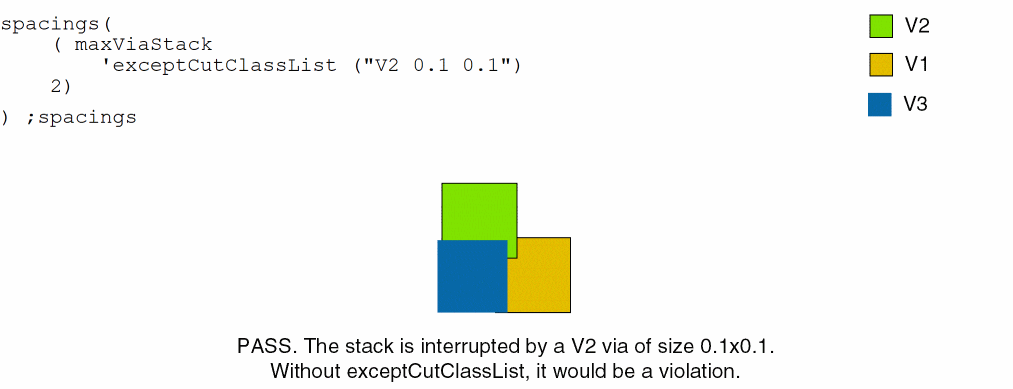
A maximum of 2 vias can be stacked in this case, but the stack is interrupted by a 0.1x0.1 cutClass on layer V2.
Example 5: maxViaStack with dualWithin
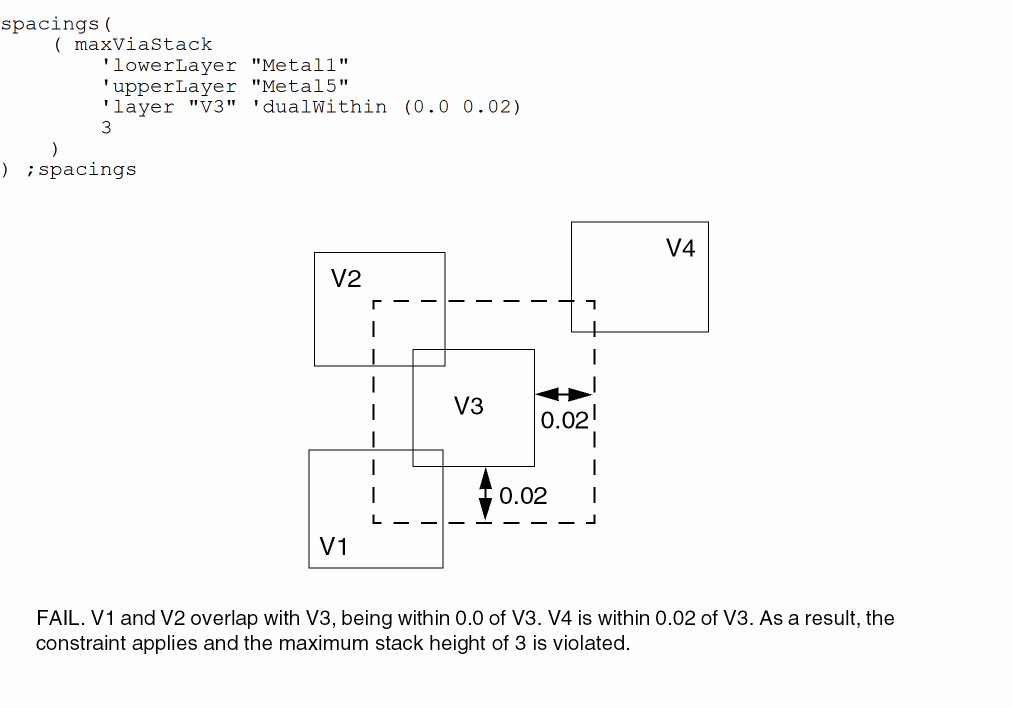
The constraint applies between Metal1 and Metal 5 only when all cuts are as specified by the dualWithin values, that is, when all via shapes below V3 are within 0.0 of the V3 shape and all via shapes above V3 are within 0.02 of the V3 shape.
Return to top