
minCutClassSpacing (Two layers)
spacingTables( ( minCutClassSpacingtx_cutLayer1 tx_cutLayer2(( "cutClass" (g_index…) nil "cutClass" (g_index…) nil) [['sameNet | 'sameMetal] | ['exceptSameNet]] ['spacingPrl (f_prlf_spacing)] ['centerToCenter] ['paraOverlapf_overlap] ['nonCutClassEdgeSpacing (f_length1 f_space1 f_length2 f_space2…)] ['cutClassProfile (( "cutClass" (g_index…) nil "cutClass" (g_index…) nil ) (g_cutClassProfileTable) ) ] ['nonZeroEnclosuretx_layer['minEnclosuref_minEnclosure] ] ['cutClassSizeBy ({f_size1 f_size2} …)] [f_default] ) (g_table) ['manhattan] )
) ;spacingTables
Specifies the spacing between cut shapes of the same or of different classes on two different layers. The spacing requirement depends on the size of the cut shape and on the edge—long or short—from which the spacing is measured.
Optional parameters determine whether spacing is measured center-to-center or edge-to-edge, whether the constraint applies to a certain connectivity type, and whether the constraint applies only if the cut shapes have a parallel run length greater than or equal to the specified value.
Values
|
The first cut layer on which the constraint is applied. Type: String (layer and purpose names) or Integer (layer number) |
|
|
The second cut layer on which the constraint is applied. Type: String (layer and purpose names) or Integer (layer number) |
|
|
This identifies the index for table. The format of g_index is as follows:
f_width |
|
|
The spacing between the long edges (sides) and/or short edges (ends) of cuts, of the same class or of different classes.
The
Type: A 2-D table specifying floating-point width or length and spacing values. |
|
Parameters
Examples
- Example 1: minCutClassSpacing with paraOverlap
- Example 2: minCutClassSpacing with cutClass, cutClassProfile, sameNet, and paraOverlap
- Example 3: minCutClassSpacing with cutClass and cutClassSizeBy
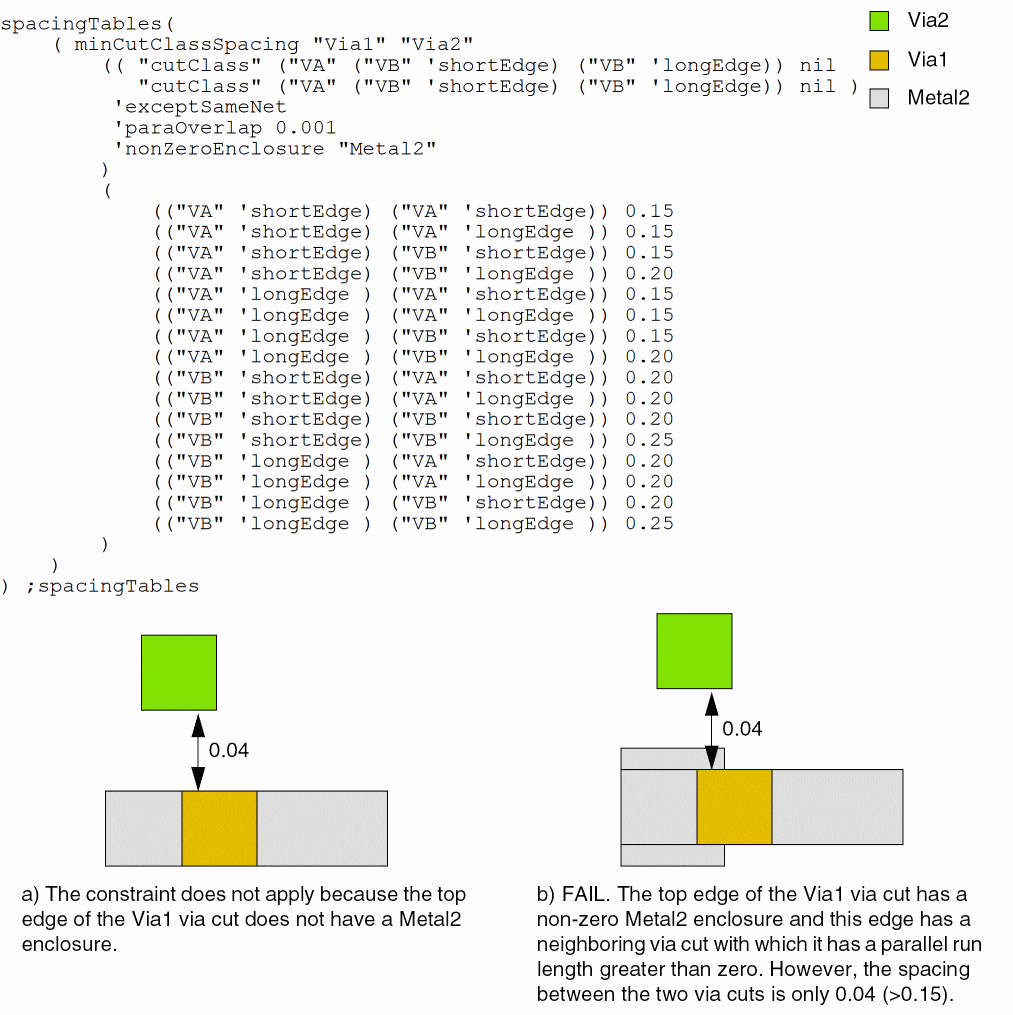
- Example 4: minCutClassSpacing with cutClass and nonZeroEnclosure
Example 1: minCutClassSpacing with paraOverlap
spacingTables(
     ( minCutClassSpacing "Via1" "Via2"
          (( "cutClass" ("VA" ("VB" 'shortEdge) ("VB" 'longEdge) "VC") nil
             "cutClass" ("VD" ("VE" 'shortEdge) ("VE" 'longEdge) "VF") nil )
           'paraOverlap 0.001
           0.15
          )
          (
            (("VA" 'shortEdge) ("VD" 'shortEdge)) (0.20 'centerToCenter)
            (("VA" 'shortEdge) ("VD" 'longEdge )) (0.20 'centerToCenter)
            (("VA" 'shortEdge) ("VE" 'shortEdge)) 0.30
            (("VA" 'shortEdge) ("VE" 'longEdge )) 0.15
            (("VA" 'shortEdge) ("VF" 'shortEdge)) 0.15
            (("VA" 'shortEdge) ("VF" 'longEdge )) 0.15
            (("VA" 'longEdge ) ("VD" 'shortEdge)) (0.20 'centerToCenter)
            (("VA" 'longEdge ) ("VD" 'longEdge )) (0.20 'centerToCenter)
            (("VA" 'longEdge ) ("VE" 'shortEdge)) 0.30
            (("VA" 'longEdge ) ("VE" 'longEdge )) 0.15
            (("VA" 'longEdge ) ("VF" 'shortEdge)) 0.15
            (("VA" 'longEdge ) ("VF" 'longEdge )) 0.15
            (("VB" 'shortEdge) ("VD" 'shortEdge)) 0.30
            (("VB" 'shortEdge) ("VD" 'longEdge )) 0.30
            (("VB" 'shortEdge) ("VE" 'shortEdge)) 0.40
            (("VB" 'shortEdge) ("VE" 'longEdge )) 0.40
            (("VB" 'shortEdge) ("VF" 'shortEdge)) 0.30
            (("VB" 'shortEdge) ("VF" 'longEdge )) 0.30
            (("VB" 'longEdge ) ("VD" 'shortEdge)) 0.15
            (("VB" 'longEdge ) ("VD" 'longEdge )) 0.15
            (("VB" 'longEdge ) ("VE" 'shortEdge)) 0.40
            (("VB" 'longEdge ) ("VE" 'longEdge )) 0.15
            (("VB" 'longEdge ) ("VF" 'shortEdge)) 0.15
            (("VB" 'longEdge ) ("VF" 'longEdge )) 0.15
            (("VC" 'shortEdge) ("VD" 'shortEdge)) 0.15
            (("VC" 'shortEdge) ("VD" 'longEdge )) 0.15
            (("VC" 'shortEdge) ("VE" 'shortEdge)) 0.30
            (("VC" 'shortEdge) ("VE" 'longEdge )) 0.15
            (("VC" 'shortEdge) ("VF" 'shortEdge)) (0.50 'centerToCenter)
            (("VC" 'shortEdge) ("VF" 'longEdge )) (0.50 'centerToCenter)
            (("VC" 'longEdge ) ("VD" 'shortEdge)) 0.15
            (("VC" 'longEdge ) ("VD" 'longEdge )) 0.15
            (("VC" 'longEdge ) ("VE" 'shortEdge)) 0.30
            (("VC" 'longEdge ) ("VE" 'longEdge )) 0.15
            (("VC" 'longEdge ) ("VF" 'shortEdge)) (0.50 'centerToCenter)
            (("VC" 'longEdge ) ("VF" 'longEdge )) (0.50 'centerToCenter)
          )
     )
) ;spacingTables
To find the spacing between a VA via cut (0.3x0.3) and the short edge of a VE via cut (0.4x0.6):
- First, traverse the list of ordered row indexes to locate the entries that correspond to cut class VA.
-
Then, traverse the list of ordered column indexes to locate the entry that matches
"VE" 'shortEdge.
Example 2: minCutClassSpacing with cutClass, cutClassProfile, sameNet, and paraOverlap
spacingTables(
    ( minCutClassSpacing     "Via1" "Via2"
     (( "cutClass" ("VD" ("VE" 'longEdge) ("VE" 'shortEdge) "VF") nil
     "cutClass" ("V2D" ("V2E" 'shortEdge) ("V2E" 'longEdge) "V2F") nil )
   'sameNet
   'paraOverlap 0.001
   'cutClassProfile
   (( "cutClass" (("VE" 'shortEdge) ("VE"  'longEdge)) nil
      "cutClass" ("V2D" ("V2E" 'shortEdge)  ("V2E" 'longEdge) "V2F")  nil
    )
    (
    (("VE" 'shortEdge) ("V2D" 'shortEdge)) 0.02
    (("VE" 'shortEdge) ("V2D" 'longEdge )) 0.02
    (("VE" 'shortEdge) ("V2E" 'shortEdge)) 0.00
    (("VE" 'shortEdge) ("V2E" 'longEdge )) 0.00
    (("VE" 'shortEdge) ("V2F" 'shortEdge)) 0.02
    (("VE" 'shortEdge) ("V2F" 'longEdge )) 0.02
    (("VE" 'longEdge ) ("V2D" 'shortEdge)) 0.00
    (("VE" 'longEdge ) ("V2D" 'longEdge )) 0.00
    (("VE" 'longEdge ) ("V2E" 'shortEdge)) 0.00
    (("VE" 'longEdge ) ("V2E" 'longEdge )) 0.02
    (("VE" 'longEdge ) ("V2F" 'shortEdge)) 0.00
    (("VE" 'longEdge ) ("V2F" 'longEdge )) 0.00
    )
   )
   0.15
  )
  (
   (("VD" 'shortEdge) ("V2D" 'shortEdge)) 0.2
   (("VD" 'shortEdge) ("V2D" 'longEdge )) 0.2
   (("VD" 'shortEdge) ("V2E" 'shortEdge)) 0.3
   (("VD" 'longEdge ) ("V2D" 'shortEdge)) 0.2
   (("VD" 'longEdge ) ("V2D" 'longEdge )) 0.2
   (("VD" 'longEdge ) ("V2E" 'shortEdge)) 0.3
   (("VE" 'longEdge ) ("V2E" 'shortEdge)) 0.4
   (("VE" 'shortEdge) ("V2D" 'shortEdge)) 0.3
   (("VE" 'shortEdge) ("V2D" 'longEdge )) 0.3
   (("VE" 'shortEdge) ("V2E" 'shortEdge)) 0.4
   (("VE" 'shortEdge) ("V2E" 'longEdge )) 0.4
   (("VE" 'shortEdge) ("V2F" 'shortEdge)) 0.3
   (("VE" 'shortEdge) ("V2F" 'longEdge )) 0.3
   (("VF" 'shortEdge) ("V2E" 'shortEdge)) 0.3
   (("VF" 'shortEdge) ("V2F" 'shortEdge)) 0.5
   (("VF" 'shortEdge) ("V2F" 'longEdge )) 0.5
   (("VF" 'longEdge ) ("V2E" 'shortEdge)) 0.3
   (("VF" 'longEdge ) ("V2F" 'shortEdge)) 0.5
   (("VF" 'longEdge ) ("V2F" 'longEdge )) 0.5
  )
 )
) ;spacingTables
The 'cutClassProfile parameter uses its own 2-D table, as shown below:
For square cuts, V2D and V2F, the LE ('longEdge) and SE ('shortEdge) entries must be equal, and for rectangular cuts, only LE/LE and SE/SE entries are valid. Therefore, the two entries in italics are ignored. Additionally, only the dimensions of rectangular cut shapes are used to index rows.
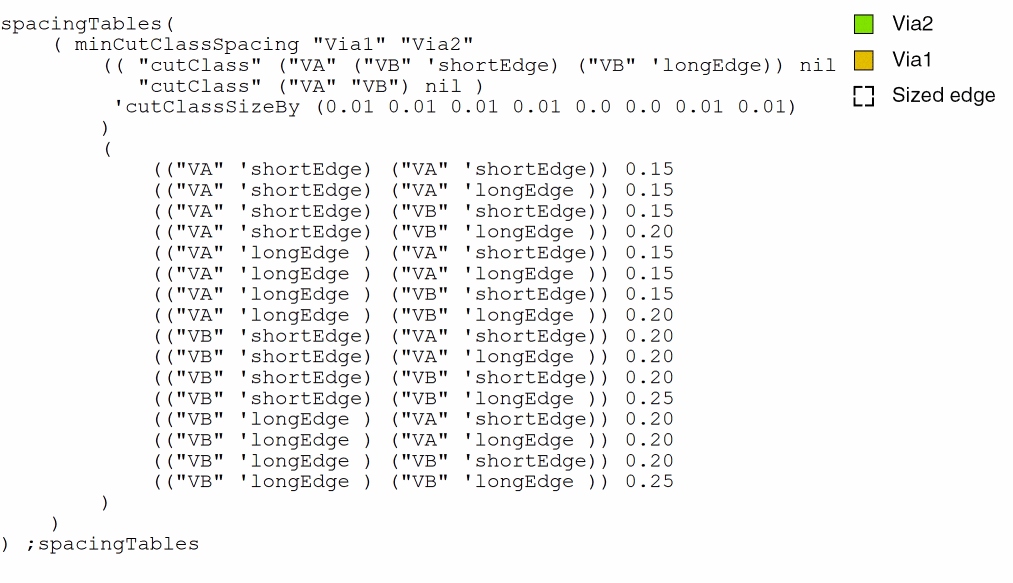
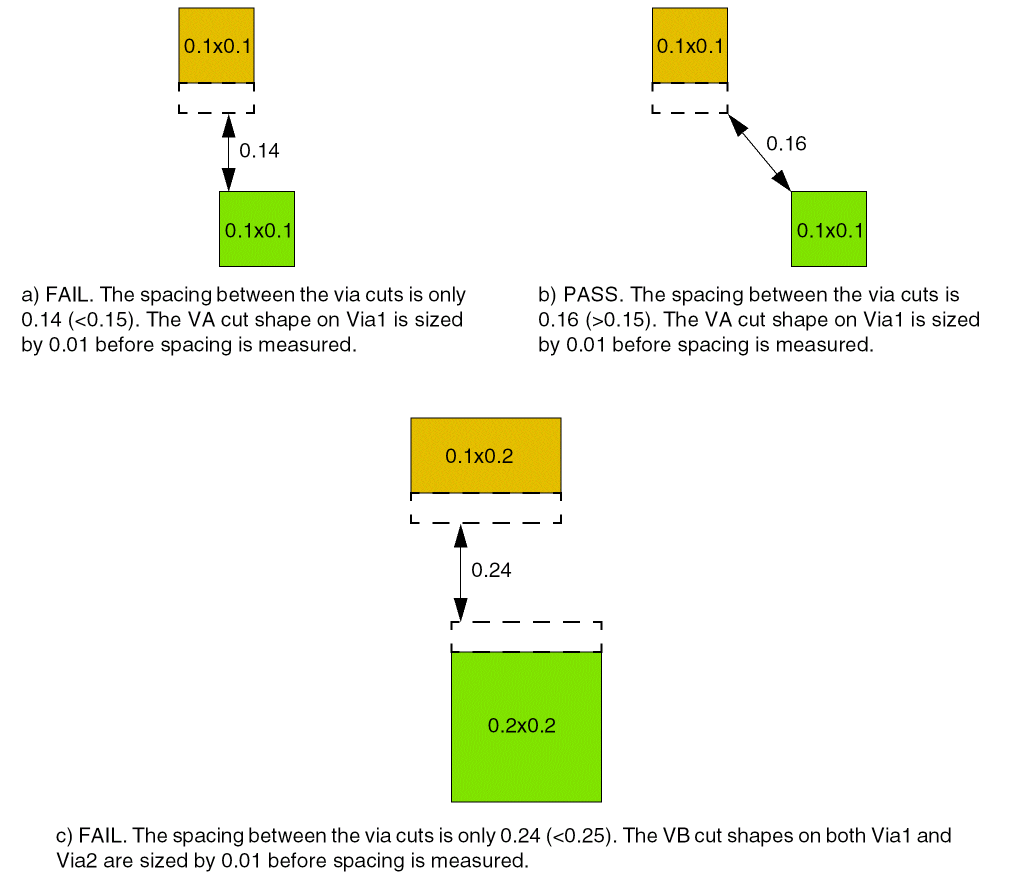
Example 3: minCutClassSpacing with cutClass and cutClassSizeBy
The spacing between cut shapes on layers Via1 and Via2 is defined as follows:
The 'cutClassSizeBy value applied to various cut edges is as follows:
Example 4: minCutClassSpacing with cutClass and nonZeroEnclosure
The constraint applies only if the Via1 via cut has non-zero Metal2 enclosure.
Return to top