
minCutClassSpacing (One layer)
spacingTables( ( minCutClassSpacingtx_cutLayer(( "cutClass" (g_index…) nil "cutClass" (g_index…) nil ) ['sameNet | 'sameMetal | 'sameVia] ['sameMask] ['bothNegativePrls] ['exactAligned ((f_width|t_namef_spacing) …)] ['horizonal | 'vertical] ['paraOverlapf_overlap['horizontalOverlap | 'verticalOverlap] ] ['nonCutClassEdgeSpacing (f_length1f_space1f_length2f_space2…)] ['cutClassProfile (( "cutClass" (g_index…) nil "cutClass" (g_index…) nil ) (g_cutClassProfileTable) ) ] ['insideLayers (tx_layer1tx_layer2…tx_layerN) ['insidePurposes (t_purpose1t_purpose2…t_purposeN)] | 'outsideLayers (tx_layer1tx_layer2…tx_layerN) ['outsidePurposes (t_purpose1t_purpose2…t_purposeN)] ] [f_default] ) (g_table) ['manhattan] )
) ;spacingTables
Specifies the spacing between cut shapes of the same or of different classes on a layer. The spacing requirement depends on the size of the cut shape and on the edge—long or short—from which the spacing is measured.
Optional parameters determine whether spacing is measured center-to-center or edge-to-edge, whether the constraint applies to a certain connectivity type, and whether the constraint applies only if the cut shapes have a parallel run length greater than or equal to the specified value.
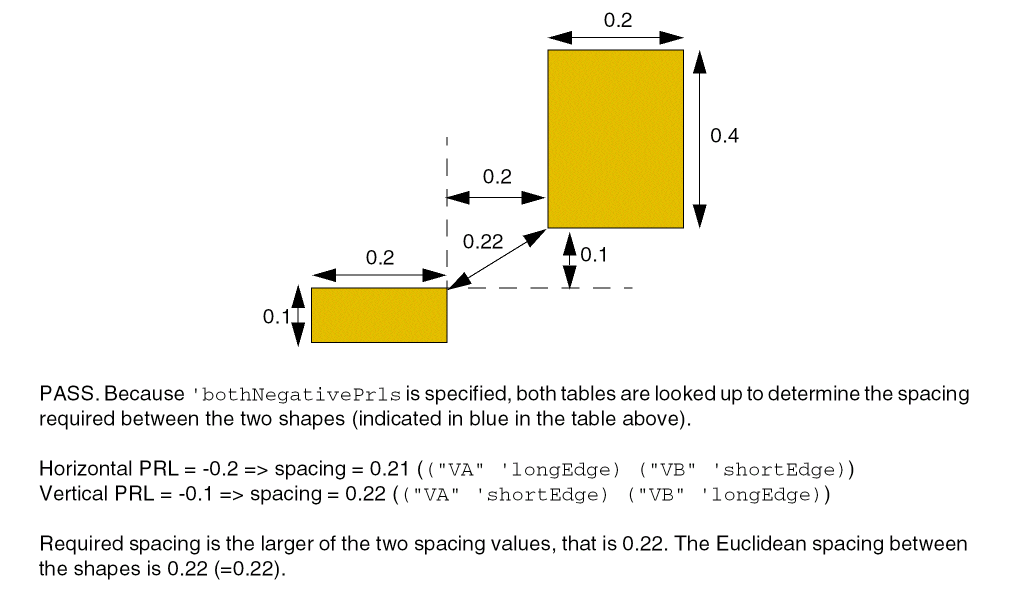
The optional 'bothNegativePrls parameter determines how parallel run lengths less than zero are handled.
Values
|
The cut layer on which the constraint is applied. Type: String (layer and purpose names) or Integer (layer number) |
|
|
This identifies the index for table. The format of g_index is as follows:
f_width |
|
|
The spacing between the long edges (sides) and/or short edges (ends) of cuts, of the same class or of different classes.
The
Type: A 2-D table specifying floating-point width or length and spacing values |
|
Parameters
|
The connectivity type. If connectivity type is not specified, the constraint applies to any connectivity type, including any two via cuts on the same cut layer with no common metal or net.
|
|
|
The spacing is measured center-to-center. Otherwise, the spacing is measured edge-to-edge. |
|
|
(Virtuoso Advanced Node for Layout Standard) The constraint applies only to via cuts on the same mask. |
|
|
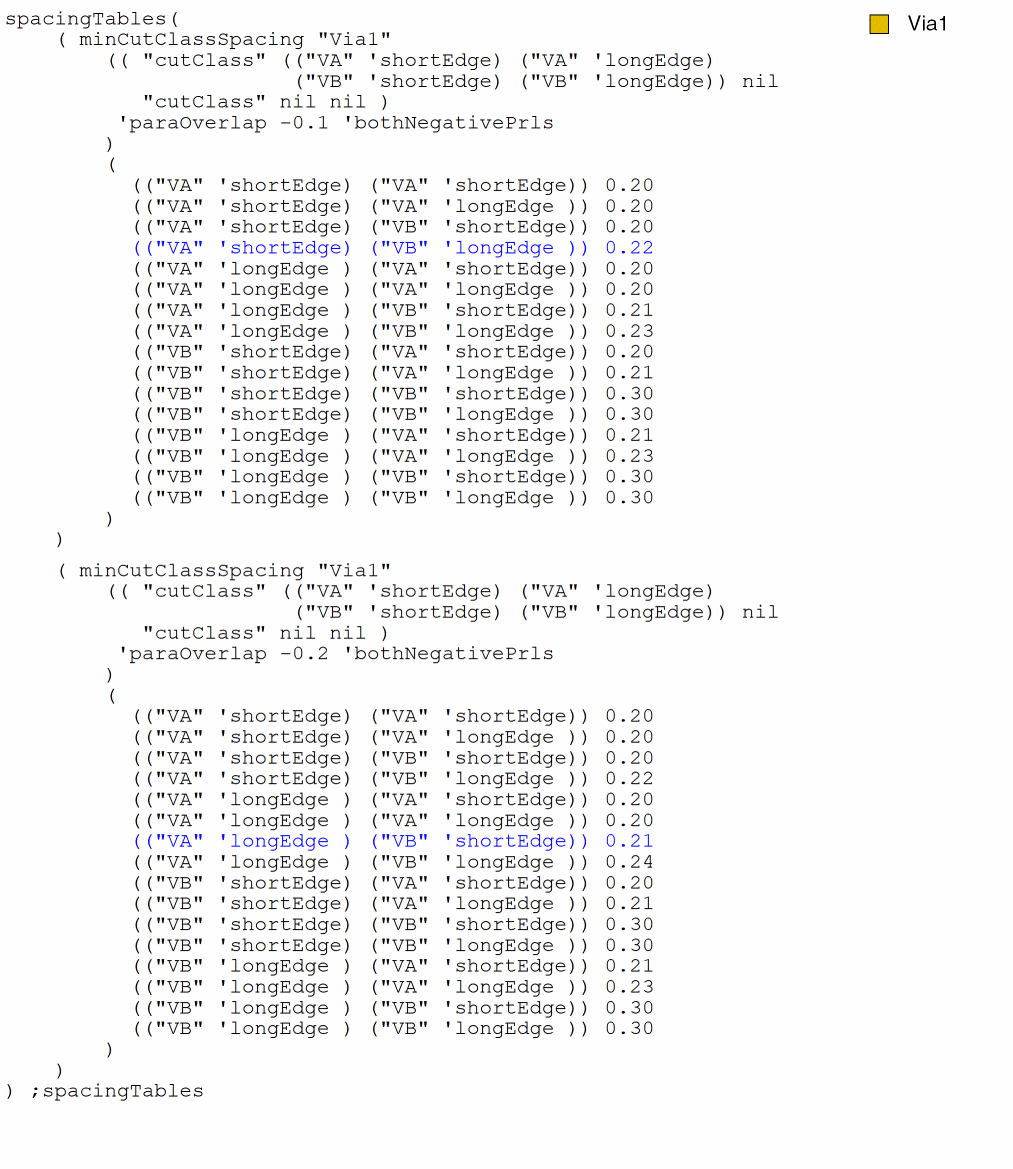
(Virtuoso Advanced Node for Layout Standard) If the parallel run length between the cut shapes is less than zero, this parameter allows both horizontal and vertical offsets between the cut shapes to be used as parallel run lengths. When this parameter is specified, two separate checks are performed using the two offset values. If horizontal offset is used as the parallel run length, required spacing is looked up by taking into account the vertical edges facing each other, and when vertical offset is used as the parallel run length, required spacing is looked up by taking into account the horizontal edges facing each other. The maximum of the spacing values thus obtained is the required spacing. If this parameter is not specified, the smaller of the two offsets is considered as the parallel run length and spacing is looked up using this value. Because the edges that are facing each other cannot be determined, the maximum of the four possible spacing values is compared with the Euclidean spacing. |
|
|
The spacing between square cut shapes with the specified width or between cut shapes that belong to the specified cut class must be greater than or equal to this value if the cut shapes are exactly aligned, vertically or horizontally. |
|
|
The direction in which the constraint applies. If direction is not specified, the constraint applies in any direction. |
|
|
The constraint applies only if the parallel run length (prl) between the cut shapes is greater than or equal to this value. Positive and negative values are allowed.
If multiple overlap (prl) Use constraint value for overlap |
|
|
(Virtuoso Advanced Node for Layout Only) The direction in which parallel run length is measured. By default, parallel run length is measured in any direction. |
|
|
|
|
|
The cut shapes with the specified dimensions or class are expanded by a value equal to extension before spacing is measured. The table has the following format:
This value is applied only if the parallel run length between the cut shapes is less than or equal to zero. Type: A 2-D table specifying floating-point width or length values and the value by which the cut shapes need to be expanded. |
|
|
(ICADVM20.1 Only–95512) The spacing between a cut shape and a non-cut-class shape, such as a blockage, of length length1 must be greater than or equal to space1. |
|
|
|
|
|
Determines if the constraint applies, based on the presence or absence of one or more layers.
For more information, see |
|
|
The |
|
|
The |
|
|
The constraint uses Manhattan distance, which allows a larger spacing at the corners. |
|
Examples
- Example 1: minCutClassSpacing with paraOverlap
- Example 2: minCutClassSpacing with paraOverlap and cutClassProfile
- Example 3: minCutClassSpacing without bothNegativePrls
- Example 4: minCutClassSpacing with bothNegativePrls
Example 1: minCutClassSpacing with paraOverlap
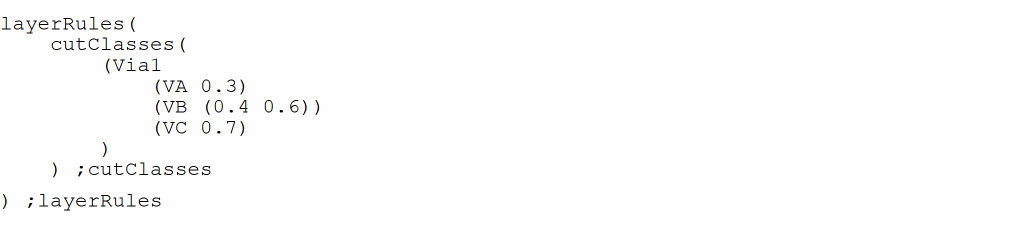
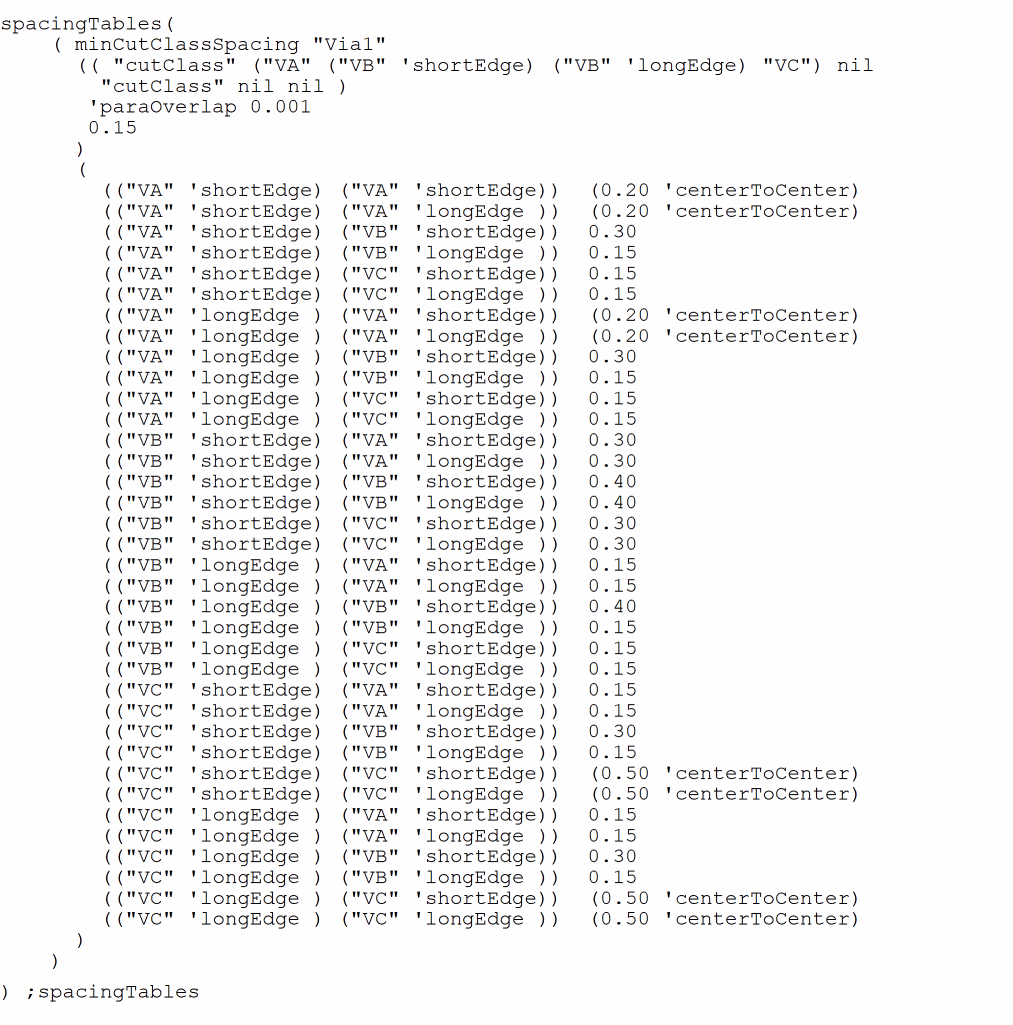
Three cut classes are defined on Via1: VA, VB, and VC. The spacing required between cut shapes of different cut classes is as follows:
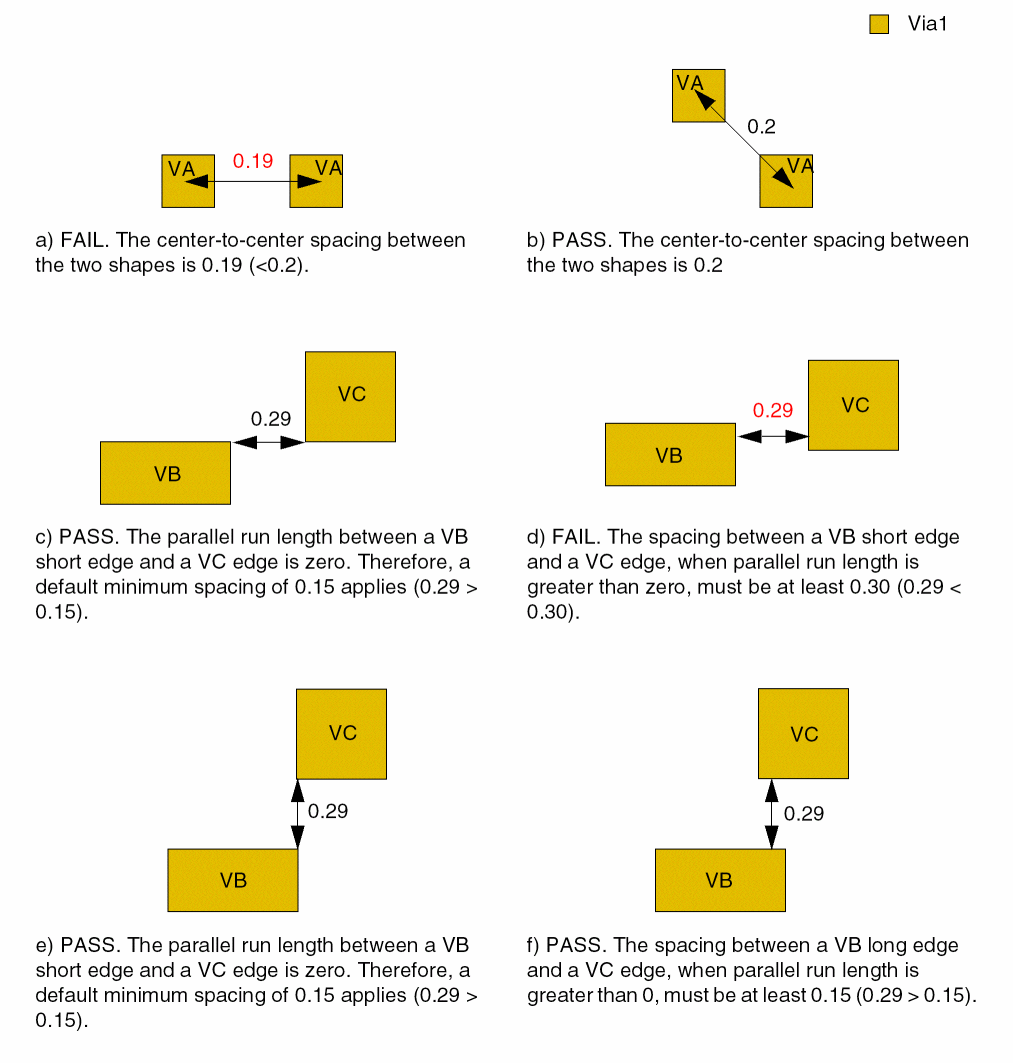
- Center-to-center spacing between two VA via cuts is 0.20.
- Edge-to-edge spacing between the short edge of a VB via cut and a VA or VC via cut if parallel run length is greater than zero is 0.30.
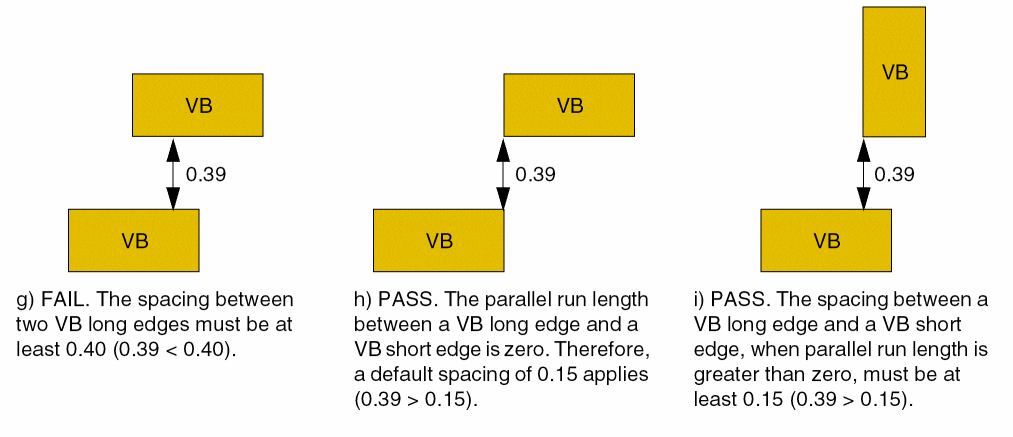
- Edge-to-edge spacing between the short edge of a VB via cut and an edge of another VB via cut if parallel run length is greater than zero is 0.40.
- Center-to-center spacing between two VC via cuts is 0.50.
For the rest of the combinations, a default spacing of 0.15 applies.
Example 2: minCutClassSpacing with paraOverlap and cutClassProfile
Three cut classes are defined on Via1: VA, VB, and VC. The minCutClassSpacing constraint is defined as follows for shapes of these cut classes:
spacingTables(
    ( minCutClassSpacing "Via1"
      (( "cutClass" ("VA" ("VB" 'shortEdge) ("VB" 'longEdge) "VC")  nil
         "cutClass"   nil  nil  )
       'paraOverlap 0
       'cutClassProfile
      (( "cutClass" (("VB" 'shortEdge) ("VB" 'longEdge)) nil
      "cutClass" ("VA" ("VB" 'shortEdge) ("VB" 'longEdge) "VC") nil )
      (
     (("VB" 'shortEdge) ("VA" 'shortEdge))  0.02
     (("VB" 'shortEdge) ("VA" 'longEdge ))  0.02
     (("VB" 'shortEdge) ("VB" 'shortEdge))  0.0
     (("VB" 'shortEdge) ("VB" 'longEdge ))  0.0
     (("VB" 'shortEdge) ("VC" 'shortEdge))  0.02
     (("VB" 'shortEdge) ("VC" 'longEdge ))  0.02

        (("VB" 'longEdge ) ("VA" 'shortEdge))  0.0
     (("VB" 'longEdge ) ("VA" 'longEdge ))  0.0
     (("VB" 'longEdge ) ("VB" 'shortEdge))  0.0
     (("VB" 'longEdge ) ("VB" 'longEdge ))  -0.02
     (("VB" 'longEdge ) ("VC" 'shortEdge))  0.0
     (("VB" 'longEdge ) ("VC" 'longEdge ))  0.0
      )
   )
    0.15 )
    (
     (("VA" 'shortEdge) ("VA" 'shortEdge))  (0.20 'centerToCenter)
     (("VA" 'shortEdge) ("VA" 'longEdge ))  (0.20 'centerToCenter)
     (("VA" 'shortEdge) ("VB" 'shortEdge))  0.30
     (("VA" 'shortEdge) ("VB" 'longEdge ))  0.15
     (("VA" 'shortEdge) ("VC" 'shortEdge))  0.15
     (("VA" 'shortEdge) ("VC" 'longEdge ))  0.15

        (("VA" 'longEdge ) ("VA" 'shortEdge))  (0.20 'centerToCenter)
        (("VA" 'longEdge ) ("VA" 'longEdge ))  (0.20 'centerToCenter)
        (("VA" 'longEdge ) ("VB" 'shortEdge))  0.30
        (("VA" 'longEdge ) ("VB" 'longEdge ))  0.15
        (("VA" 'longEdge ) ("VC" 'shortEdge))  0.15
        (("VA" 'longEdge ) ("VC" 'longEdge ))  0.15

        (("VB" 'shortEdge) ("VA" 'shortEdge))  0.30
        (("VB" 'shortEdge) ("VA" 'longEdge ))  0.30
        (("VB" 'shortEdge) ("VB" 'shortEdge))  0.40
        (("VB" 'shortEdge) ("VB" 'longEdge ))  0.40
        (("VB" 'shortEdge) ("VC" 'shortEdge))  0.30
        (("VB" 'shortEdge) ("VC" 'longEdge ))  0.30

        (("VB" 'longEdge ) ("VA" 'shortEdge))  0.15
        (("VB" 'longEdge ) ("VA" 'longEdge ))  0.15
        (("VB" 'longEdge ) ("VB" 'shortEdge))  0.40
        (("VB" 'longEdge ) ("VB" 'longEdge ))  0.15
        (("VB" 'longEdge ) ("VC" 'shortEdge))  0.15
        (("VB" 'longEdge ) ("VC" 'longEdge ))  0.15

        (("VC" 'shortEdge) ("VA" 'shortEdge))  0.15
        (("VC" 'shortEdge) ("VA" 'longEdge ))  0.15
        (("VC" 'shortEdge) ("VB" 'shortEdge))  0.30
        (("VC" 'shortEdge) ("VB" 'longEdge ))  0.15
        (("VC" 'shortEdge) ("VC" 'shortEdge))  (0.50 'centerToCenter)
        (("VC" 'shortEdge) ("VC" 'longEdge ))  (0.50 'centerToCenter)

        (("VC" 'longEdge ) ("VA" 'shortEdge))  0.15
        (("VC" 'longEdge ) ("VA" 'longEdge ))  0.15
        (("VC" 'longEdge ) ("VB" 'shortEdge))  0.30
        (("VC" 'longEdge ) ("VB" 'longEdge ))  0.15
        (("VC" 'longEdge ) ("VC" 'shortEdge))  (0.50 'centerToCenter)
        (("VC" 'longEdge ) ("VC" 'longEdge ))  (0.50 'centerToCenter)
       )
    )
) ;spacingTables
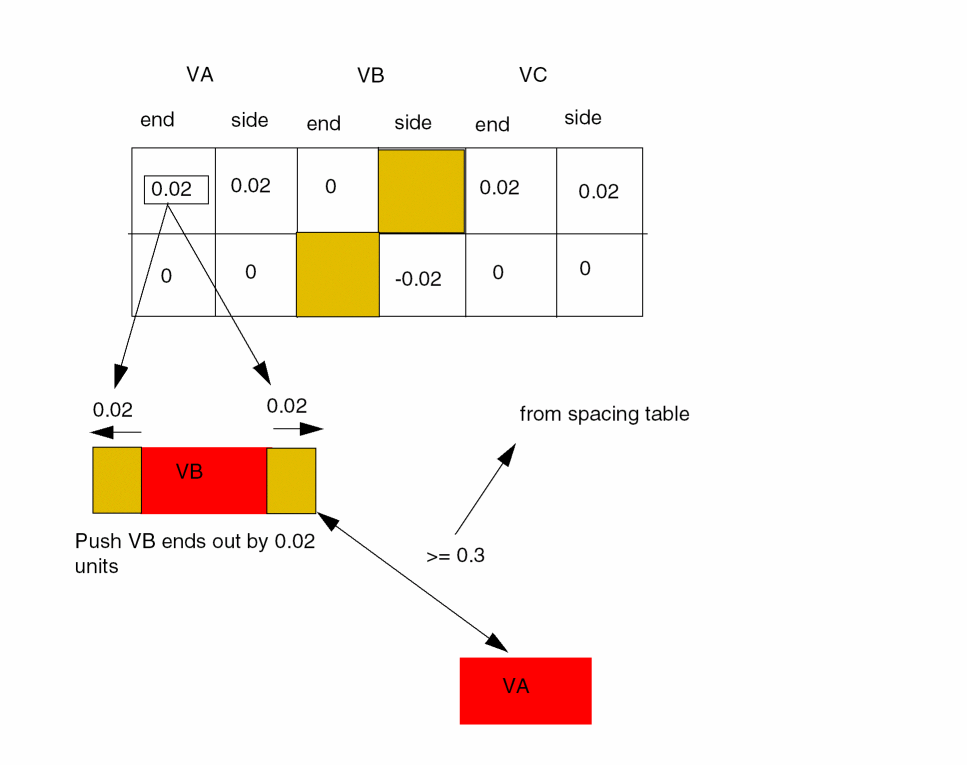
The 'cutClassProfile parameter uses its own 2-D table, as shown below:
For square cut shapes, VA and VC, the LE ('longEdge) and SE ('shortEdge) entries must be equal, and for rectangular cuts, only LE/LE and SE/SE entries are valid. Therefore, the two entries in italics are ignored. Additionally, only the dimensions of rectangular cut shapes are used to index rows.
Example 3: minCutClassSpacing without bothNegativePrls
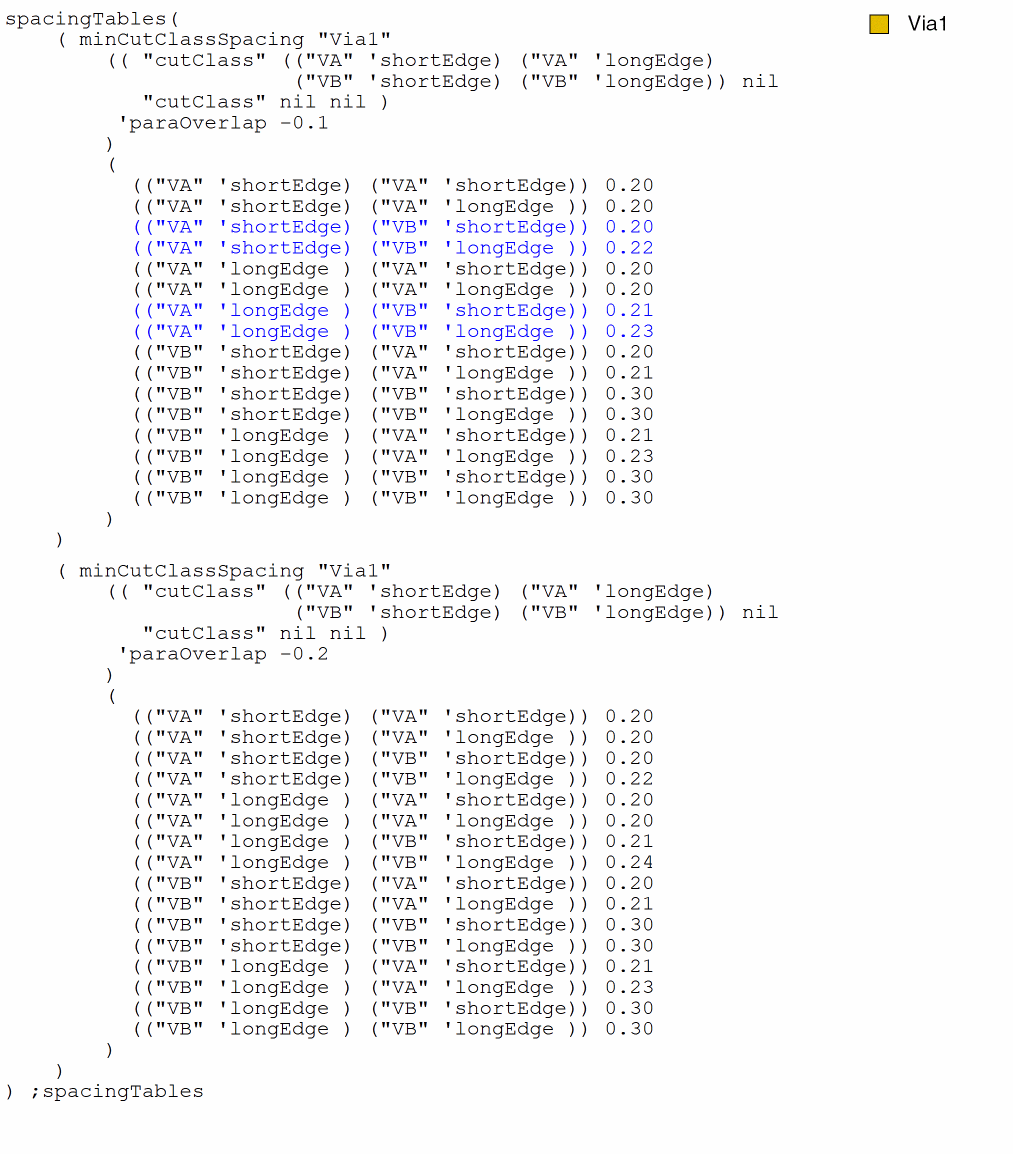
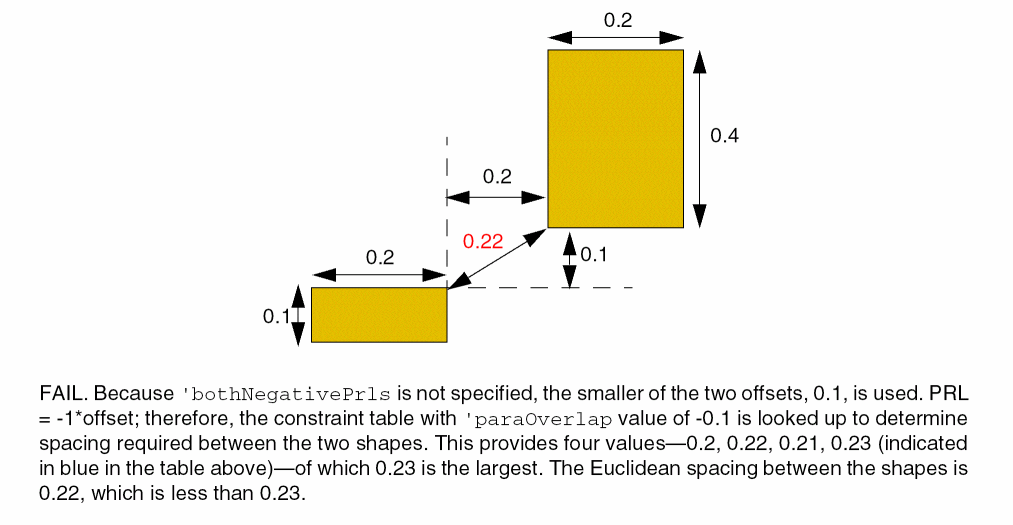
The spacing defined between two cut shapes of type VA (0.2x0.1) and VB (0.2x0.4) for parallel run length (PRL) -0.1 and -0.2 is as follows:
Example 4: minCutClassSpacing with bothNegativePrls
The spacing defined between two cut shapes of type VA (0.2x0.1) and VB (0.2x0.4) for parallel run length (PRL) -0.1 and -0.2 is as follows:
Return to top