
viaSpacing
spacings( ( viaSpacingtx_cutLayer['centerToCenter] ['sameNet | 'sameMetal | 'sameMetalOverlap | 'sameVia | 'sameMetalLayerg_sameMetalLayer] ['exceptSamePGNet] ['cutClass {f_width| (f_widthf_length) |t_name} ['sideParaOverlap] ['allCuts] ] [['exactAligned x_numAlignedCuts ['exactSpacing]] | ['noPrl ['horizontalEdge | 'verticalEdge]] | ['prl ['prlHorizontal | 'prlVertical] ['sameSide]] ] ['cutSizeRanges (f_xRangef_yRange) | 'cutSizeRanges (f_xRange1f_yRange1f_xRange2f_yRange2) ] ['exceptOppositeCornerNeighbors] ['twoCutsx_twoCuts['twoCutsSpacingg_twoCutsSpacing] ['sameNeighborCuts]] ['sameMask] ['minDistancef_lowDistance] ['exceptWithinf_exceptWithin] ['edgeExtensionf_edgeExtension'layerg_layer{'horizontal | 'vertical} ['metalMask1 | 'metalMask2 | 'metalMask3 | 'metalMask4] ['widthg_width] ['exceptLineEndGapg_exceptLineEndGap] ['anyCut] ['exceptSameMetalOverlap] ] 'numCutsx_numCuts'distancef_distance['insideLayers (tx_layer1tx_layer2…tx_layerN) ['insidePurposes (t_purpose1t_purpose2…t_purposeN)] | 'outsideLayers (tx_layer1tx_layer2…tx_layerN) ['outsidePurposes (t_purpose1t_purpose2…t_purposeN)] ]f_spacing)
) ;spacings
Specifies the required minimum spacing between adjacent via cuts. Many processes require a larger spacing between via cuts when a via cut has three or more adjacent via cuts. This ensures that geometries are not merged during fabrication.
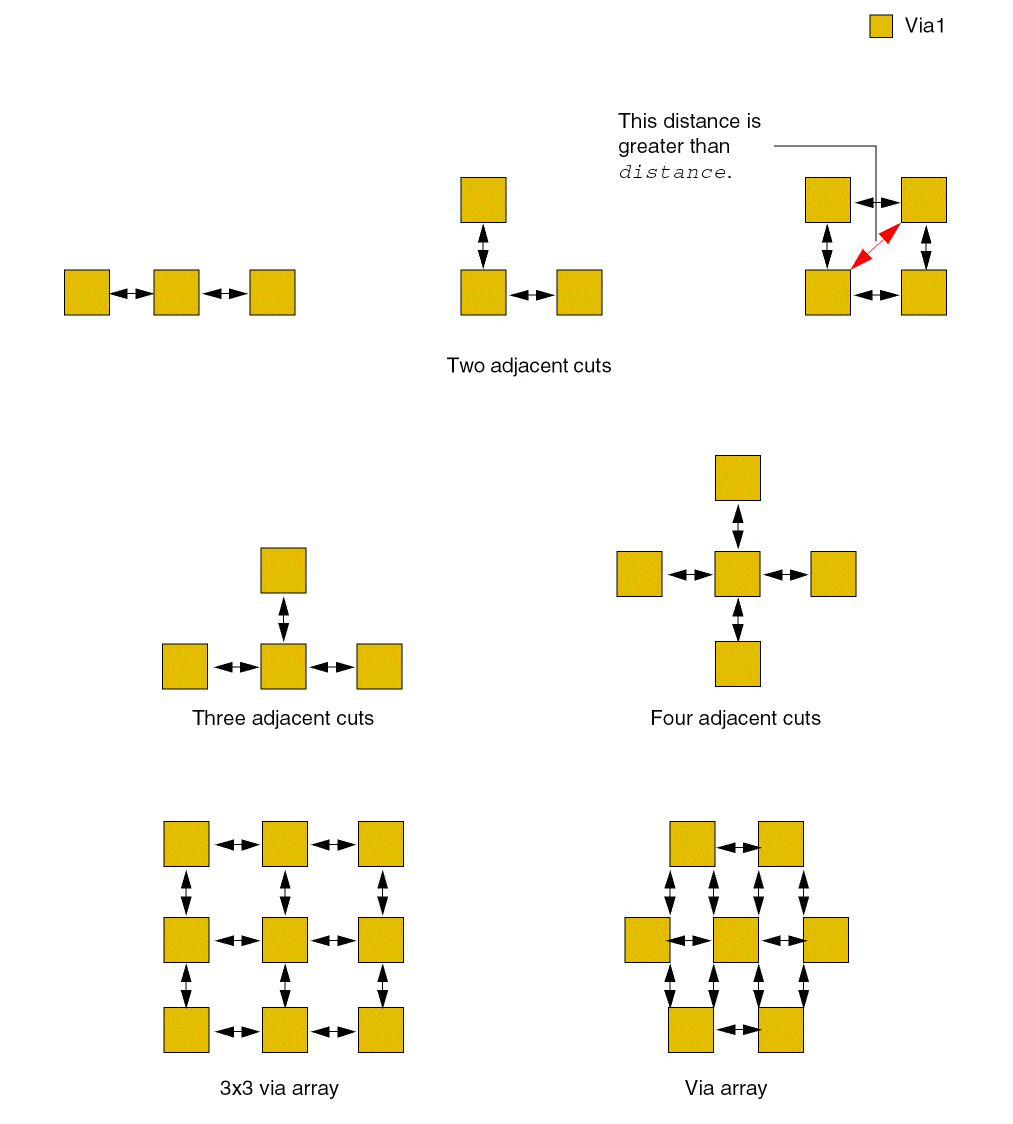
A pair of via cuts is considered adjacent if the distance between the via cuts in any direction is less than the specified distance value. This includes the distance measured along a 45-degree angle. Additionally, a via cut must have a certain minimum number of adjacent via cuts for the constraint to apply.
Optional parameters determine whether the spacing is measured center-to-center or edge-to-edge, whether the constraint applies to a certain connectivity type, and whether the constraint applies to via cuts on power and ground nets. In some processes, the constraint applies only if the via cuts have a parallel run length less than zero, and, in other processes, the constraint applies only if the via cuts are exactly aligned. You can also use this constraint to define the spacing for a cut class.
The following figures illustrate the concept of adjacency. The distance between two adjacent via cuts must be less than or equal to distance, denoted by the black arrows in the figures below:
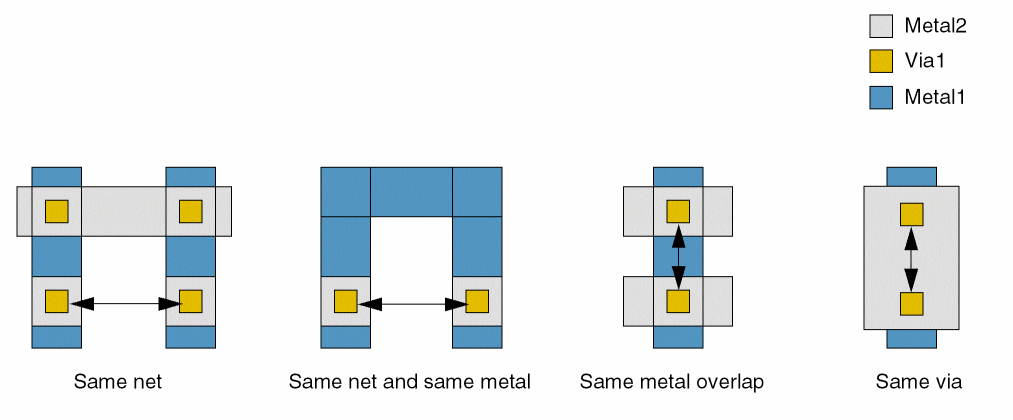
The following figures illustrate the different connectivity types:
Values
|
The layer on which the constraint is applied. Type: String (layer and purpose names) or Integer (layer number) |
|
Parameters
|
The spacing is measured center-to-center. Otherwise, the spacing is measured edge-to-edge. |
|
|
|
|
|
The connectivity type. If connectivity type is not specified, the constraint applies to any connectivity type, including any two cuts on the same cut layer with no common metal or net.
|
|
|
The constraint does not apply if the via cuts are on the same power or ground net. |
|
|
The cut class to which the constraint applies, specified by width, by width and length, or by name (as defined in a cutClasses constraint). |
|
|
The constraint applies only if the long edges of rectangular via cuts have parallel run length less than zero. |
|
|
(Virtuoso Advanced Node for Layout Standard) The neighboring via cuts can belong to any cut class. |
|
|
The constraint applies if a via cut has at least this many exactly aligned, horizontally and/or vertically, adjacent via cuts, or if the number of adjacent via cuts is greater than or equal to the number of via cuts specified with
The number of via cuts specified with this parameter must be greater than the number of via cuts specified with the |
|
|
The spacing between the exactly aligned via cuts must be equal to the constraint value. |
|
|
The constraint applies only between via cuts with parallel run length less than zero. |
|
|
(Virtuoso Layout Suite EXL and higher tiers) The direction of the cut with parallel run. |
|
|
(Virtuoso Layout Suite EXL and higher tiers) Specifies that the parallel run length (PRL) of two cuts is greater than the specified value. |
|
|
(Virtuoso Layout Suite EXL and higher tiers) Specifies the direction of the cut PRL. |
|
|
(Virtuoso Layout Suite EXL and higher tiers) Specifies that the neighbor cuts should be on the same side of the checking cut fulfilling extension specified in the |
|
|
|
|
|
(Virtuoso Advanced Node for Layout Standard) When two ranges, (xRange yRange), are specified, the constraint applies only if all the via cuts have xSpan in range xRange and ySpan in yRange. When four ranges, (xRange1 yRange1 xRange2 yRange2), are specified, the constraint applies only if the first via cut has xSpan in range xRange1 and ySpan in yRange1, and the adjacent via cuts have xSpan in range xRange2 and ySpan in yRange2. |
|
|
(Virtuoso Advanced Node for Layout Standard) The constraint does not apply if the adjacent via cuts are on opposite corners. |
|
|
(Virtuoso Advanced Node for Layout Standard) The constraint applies between two via cuts if each of these via cuts has this many adjacent via cuts, or if the number of adjacent via cuts is greater than or equal to the number of via cuts specified with
The number of via cuts specified with this parameter must be less than the number of via cuts specified with the |
|
|
(Virtuoso Advanced Node for Layout Only) The constraint applies only if the cuts specified with |
|
|
(Virtuoso Advanced Node for Layout Only) The via cuts that meet the |
|
|
(Virtuoso Advanced Node for Layout Only) The constraint applies only to via cuts on the same mask. |
|
|
(Virtuoso Advanced Node for Layout Only) The distance between two via cuts must be greater than or equal to this value and less than distance for the via cuts to qualify as adjacent via cuts. |
|
|
(Virtuoso Advanced Node for Layout Only) The constraint does not apply if all adjacent via cuts are at a distance less than this value. |
|
|
(Virtuoso Advanced Node for Layout Only) The constraint applies only if the via cut has an extension less than the given value. The extension must be in the direction specified by |
|
|
(Virtuoso Advanced Node for Layout Only) The constraint applies only for cuts on the specified layer. See also |
|
|
(Virtuoso Advanced Node for Layout Only) The constraint applies only if the extension is in the specified direction. See also |
|
|
(Virtuoso Layout Suite EXL and higher tiers) This parameter specifies on which metal mask, |
|
|
(Virtuoso Layout Suite EXL and higher tiers) The constraint applies only if a wire containing a cut that the extension condition is applied on has width less than or equal to g_width. |
|
|
(Virtuoso Layout Suite EXL and higher tiers) The f_edgeExtension value does not apply if the |
|
|
(Virtuoso Layout Suite EXL and higher tiers) Specifies that the extension condition is triggered on any triggering or neighbor cut. |
|
|
(Virtuoso Layout Suite EXL and higher tiers) Specifies that neighbor cuts sharing a common metal are counted as individual cuts. |
|
|
The constraint applies only if the number of adjacent via cuts is greater than or equal to this value.
If the number of via cuts is less than this value, the |
|
|
The constraint applies only if the distance between the via cuts is less than this value. All such via cuts are considered adjacent via cuts. |
|
|
|
|
|
Determines if the constraint applies, based on the presence or absence of one or more layers.
For more information, see |
|
|
The |
|
|
The |
|
Old Syntax
spacings( ( viaSpacingtx_cutLayerg_spacingDefinition) … )
g_spacingDefinition is specified as f_spacing or (x_numCuts f_distance f_spacing)
Example
spacings(
    ( viaSpacing "Via1" 0.5 )
 ( viaSpacing "Cont1" (3  1.5  1.0) )
) ;spacings
Examples
- Example 1: viaSpacing with centerToCenter and noPrl
- Example 2: viaSpacing with centerToCenter and exactAligned
- Example 3: viaSpacing with centerToCenter and twoCuts
- Example 4: viaSpacing with centerToCenter, twoCuts, and sameNeighborCuts
- Example 5: viaSpacing with cutClass and noPrl
- Example 6: viaSpacing with cutClass, allCuts, and noPrl
- Example 7: viaSpacing with cutClass and sideParaOverlap
- Example 8: viaSpacing with cutSizeRanges and noPrl
- Example 9: viaSpacing with cutSizeRanges and exceptOppositeCornerNeighbors
- Example 10: viaSpacing with exceptWithin, numCuts, and distance
- Example 11: viaSpacing with edgeExtension
- Example 12: viaSpacing with twoCutsSpacing
- Example 13: viaSpacing with width
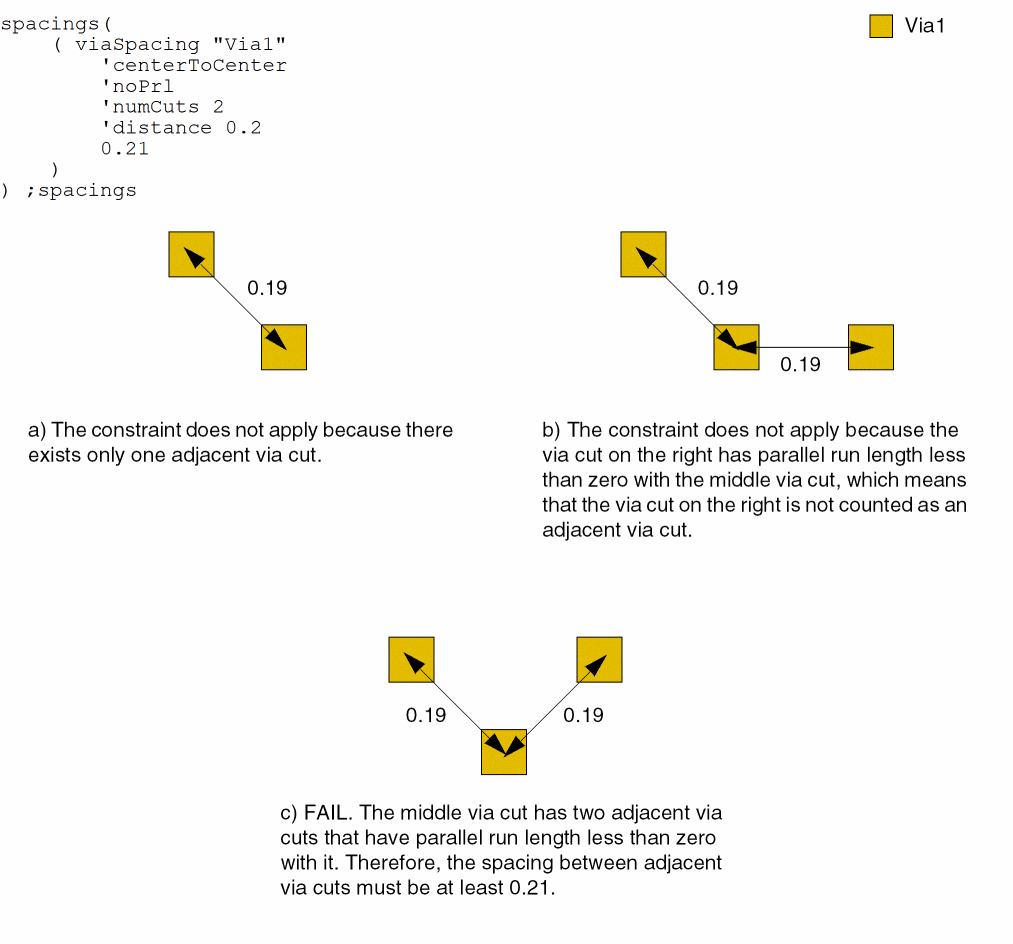
Example 1: viaSpacing with centerToCenter and noPrl
The center-to-center spacing between neighboring via cuts must be at least 0.21 if:
- A via cut has at least two neighboring via cuts less than 0.2 away.
-
The via cuts do not have a parallel overlap.
Example 2: viaSpacing with centerToCenter and exactAligned
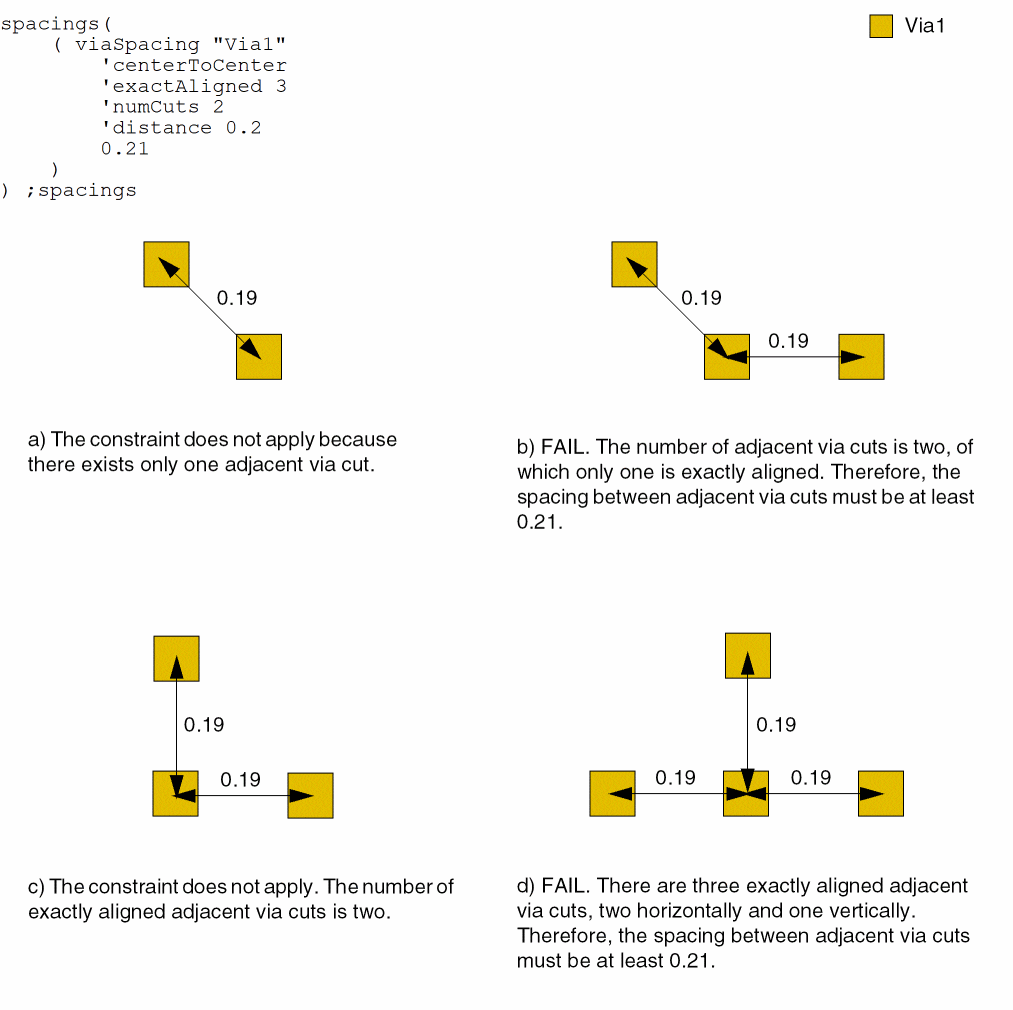
The center-to-center spacing between neighboring via cuts must be at least 0.21 if:
- A via cut has at least two neighboring via cuts less than 0.2 away, and at least one of these neighboring via cuts is not exactly aligned.
-
There exist three exactly aligned via cuts, horizontally and/or vertically.
Example 3: viaSpacing with centerToCenter and twoCuts
The center-to-center spacing between two neighboring via cuts must be at least 0.21 if each via cut has exactly two neighboring via cuts less than 0.2 away. Otherwise, there must be at least three adjacent via cuts.
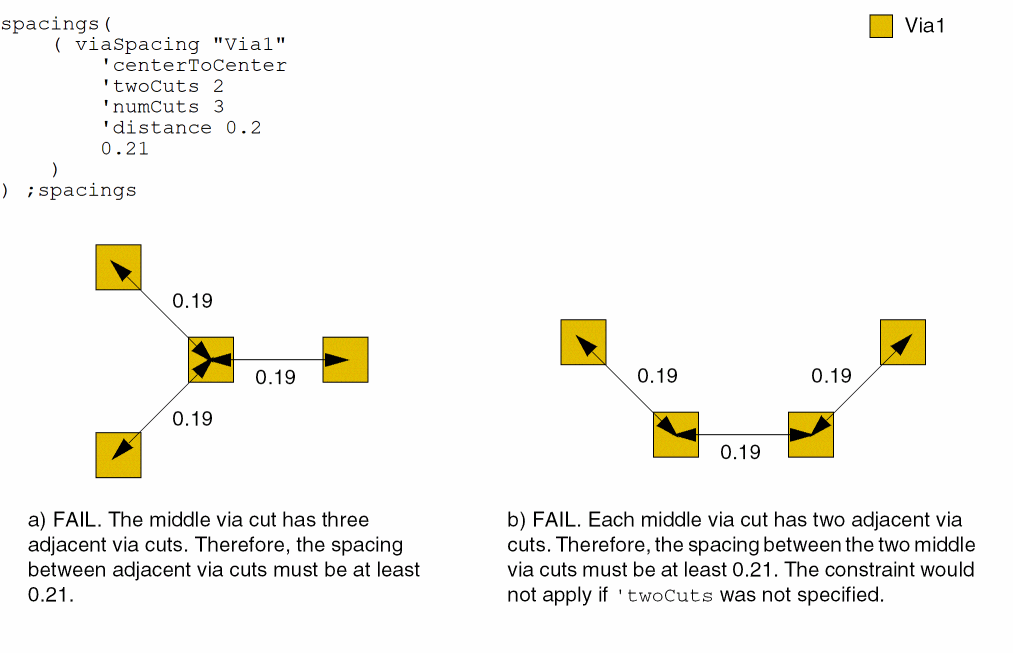
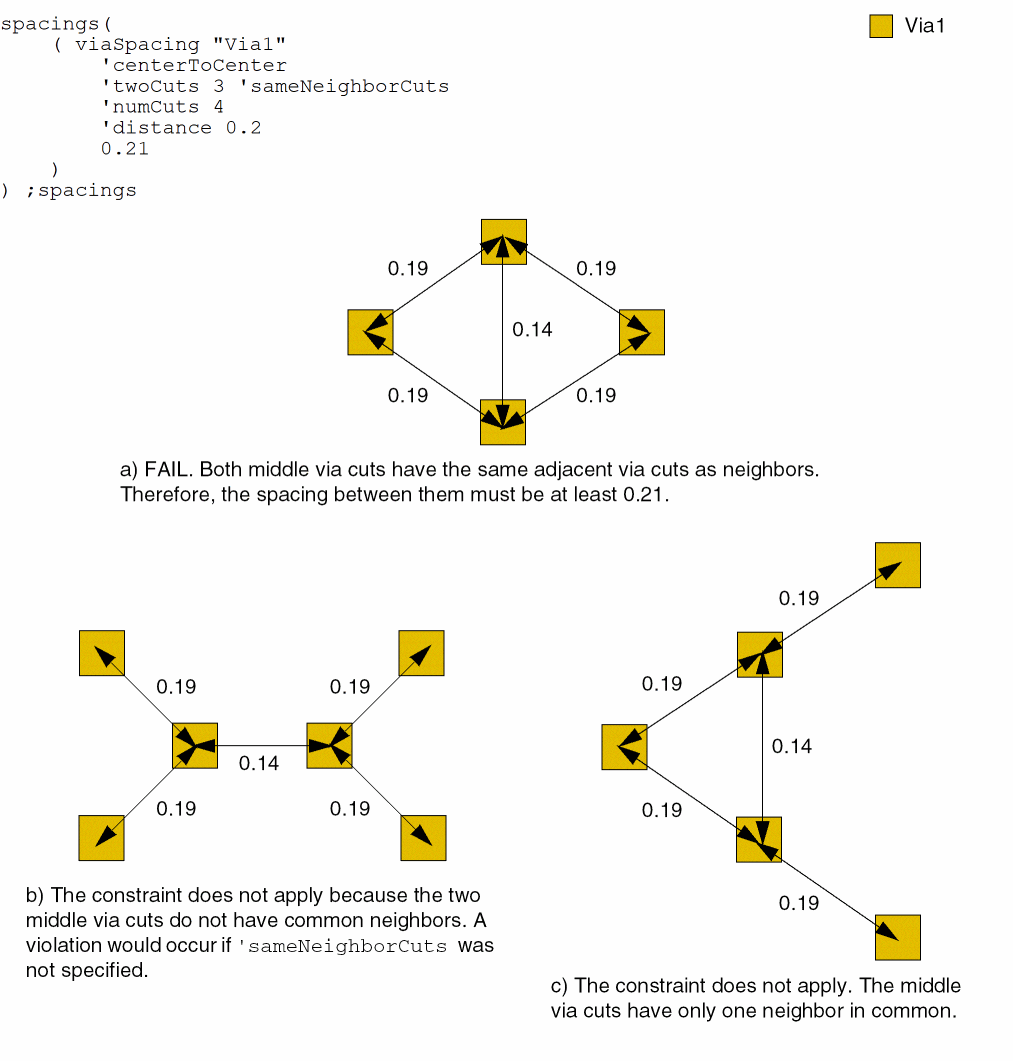
Example 4: viaSpacing with centerToCenter, twoCuts, and sameNeighborCuts
The center-to-center spacing between two neighboring via cuts must be at least 0.21 if each via cut has at least three common neighboring cuts less than 0.2 away. Otherwise, there must be at least four adjacent via cuts.
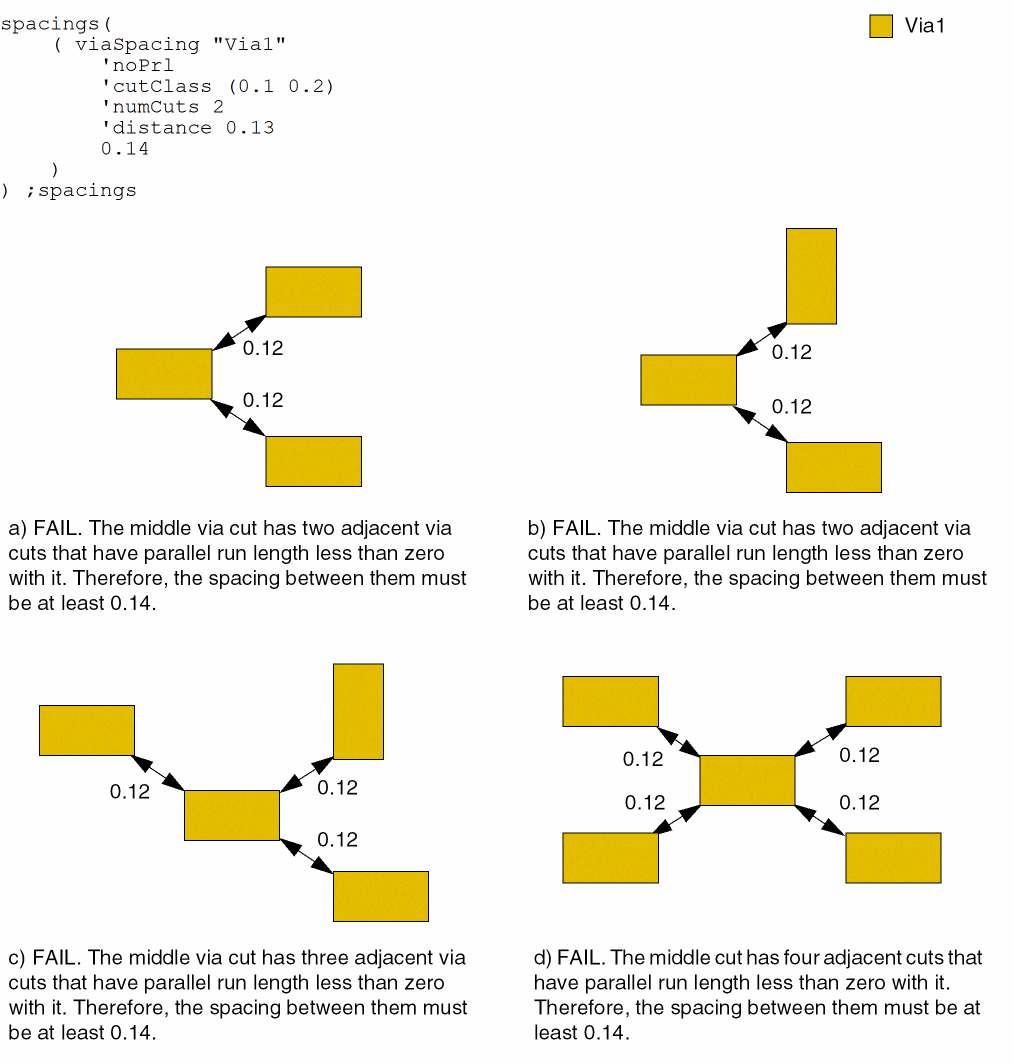
Example 5: viaSpacing with cutClass and noPrl
The edge-to-edge spacing between 0.1x0.2 via cuts must be at least 0.14 if:
- A via cut has at least two neighboring cuts at a distance less than 0.13 away.
-
The via cuts do not have a parallel overlap.
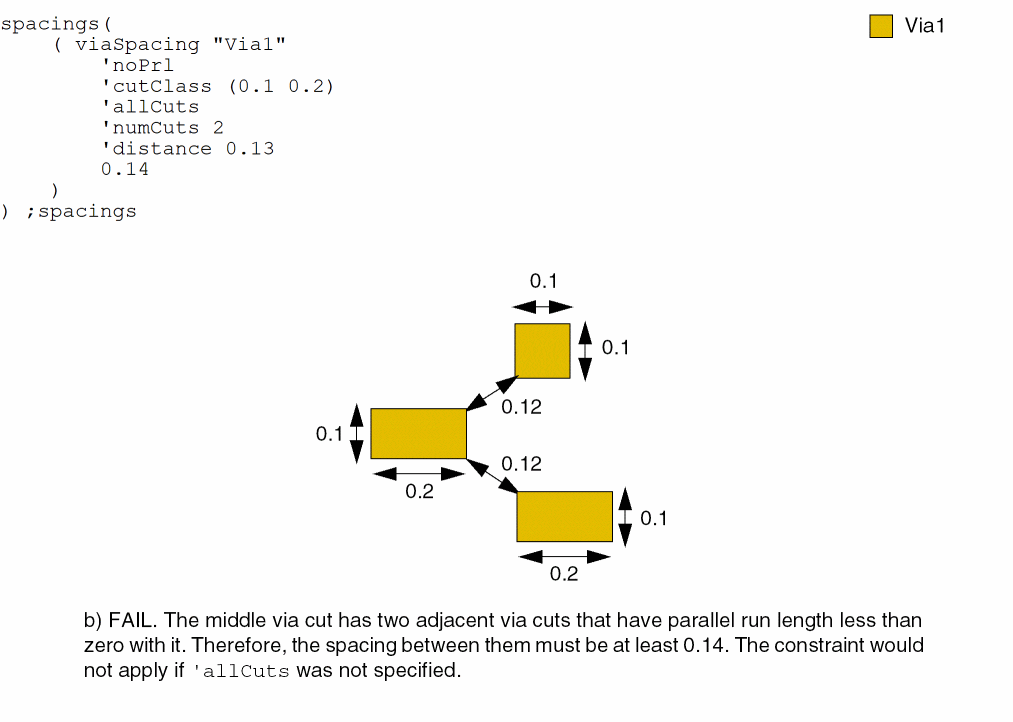
Example 6: viaSpacing with cutClass, allCuts, and noPrl
The edge-to-edge spacing between a 0.1x0.2 via cut and its neighboring via cuts must be at least 0.14 if:
- The via cut has at least two neighboring via cuts, with any dimensions, at a distance less than 0.13 away.
-
The via cuts do not have a parallel overlap.
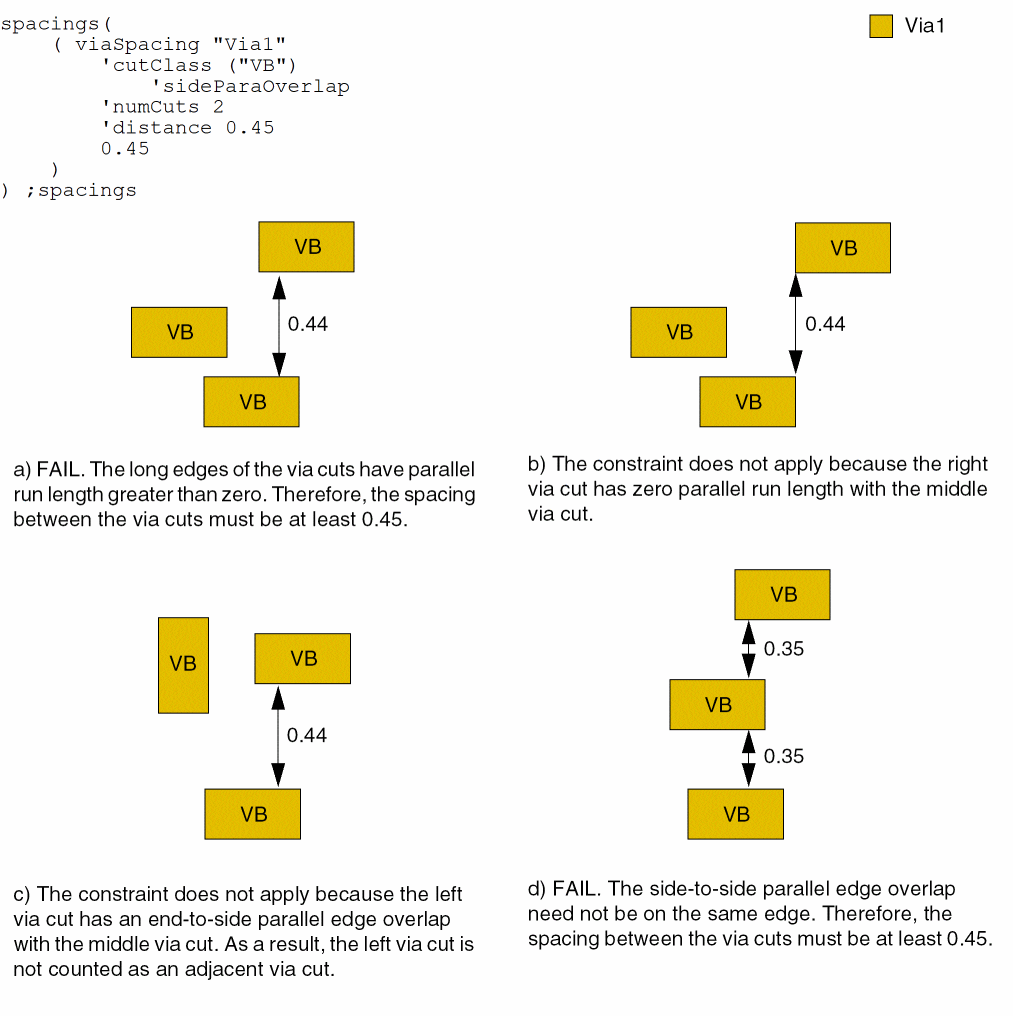
Example 7: viaSpacing with cutClass and sideParaOverlap
The edge-to-edge spacing between neighboring via cuts must be at least 0.45 if:
- A VB via cut has at least two neighboring VB via cuts less than 0.45 away.
-
The long edges of the via cuts do not have a parallel overlap.
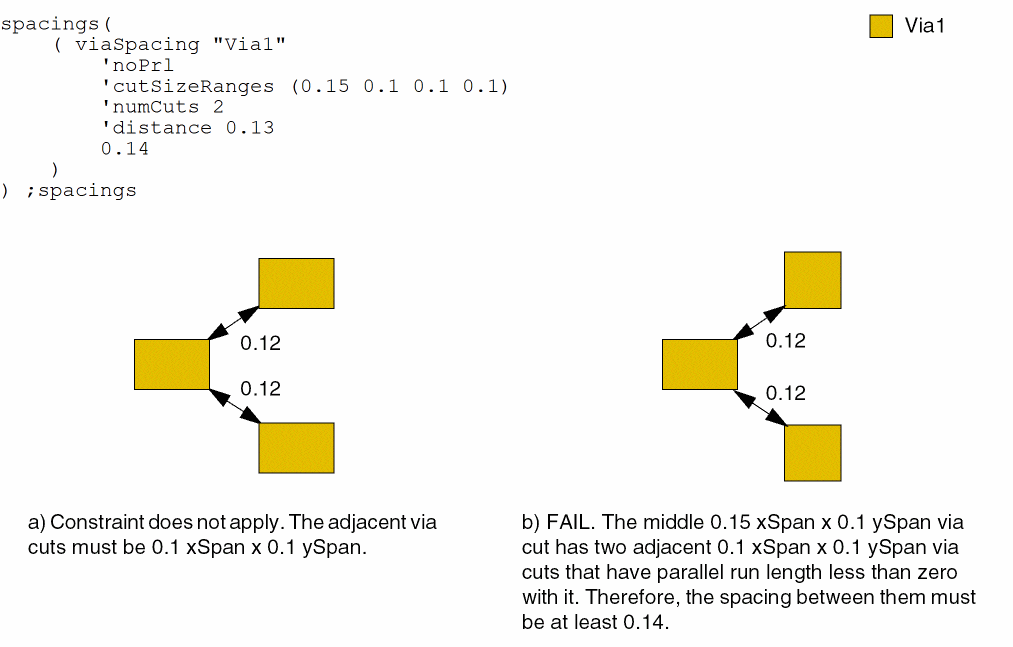
Example 8: viaSpacing with cutSizeRanges and noPrl
The edge-to-edge spacing between via cuts must be at least 0.14 if:
- The first via cut is 0.15 xSpan x 0.1 ySpan and the neighboring via cuts are 0.1 xSpan x 0.1 ySpan.
- The first via cut has at least two neighboring via cuts less than 0.13 away
-
The via cuts do not have a parallel overlap.
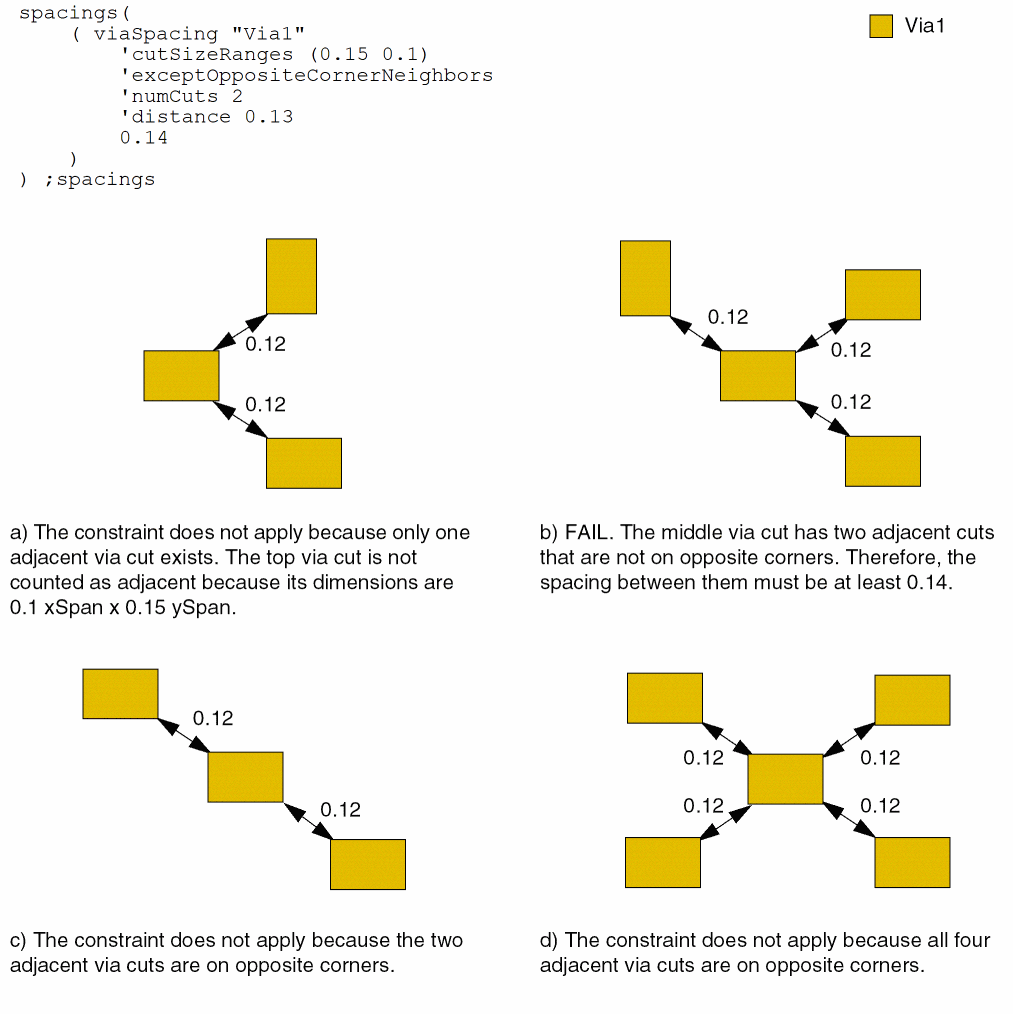
Example 9: viaSpacing with cutSizeRanges and exceptOppositeCornerNeighbors
The edge-to-edge spacing between via cuts must be at least 0.14 for 0.15 xSpan x 0.1 ySpan via cuts if:
- A via cut has at least two neighboring via cuts less than 0.13 away.
-
The adjacent via cuts are not on opposite corners.
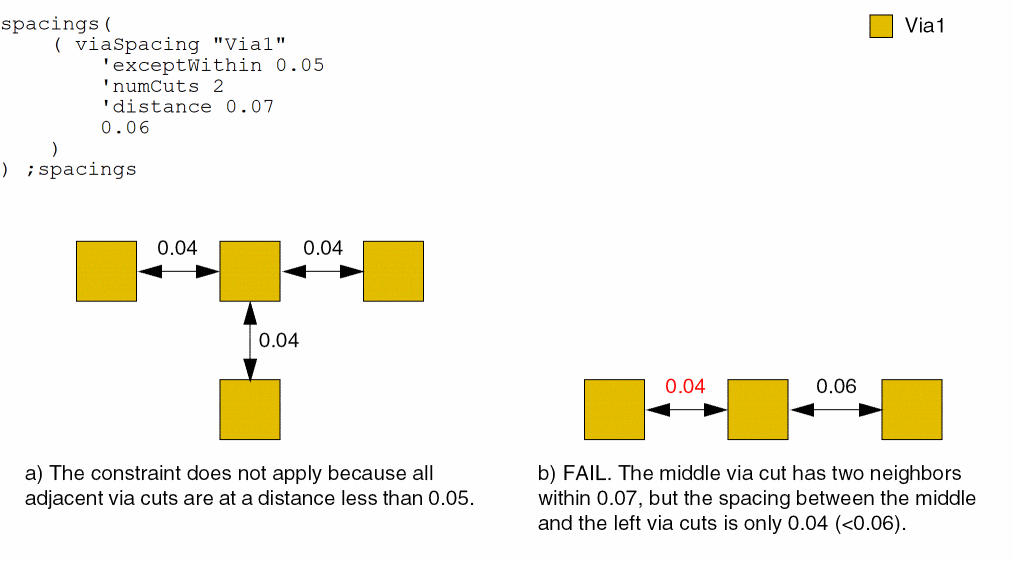
Example 10: viaSpacing with exceptWithin, numCuts, and distance
The edge-to-edge spacing between adjacent via cuts must be at least 0.06 if a via cut has two or more neighboring via cuts at a distance less than 0.07 away. The constraint does not apply if all adjacent via cuts are at a distance less than 0.05.
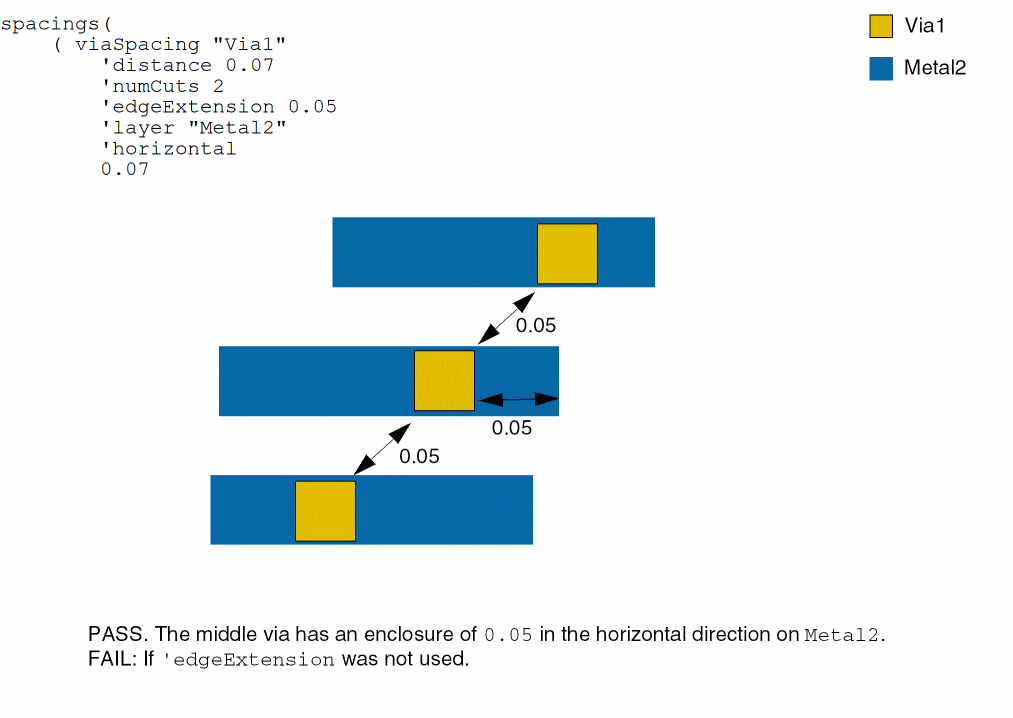
Example 11: viaSpacing with edgeExtension
The constraint applies only to cuts that have an extension of less than 0.05 in the horizontal direction on layer Metal2.
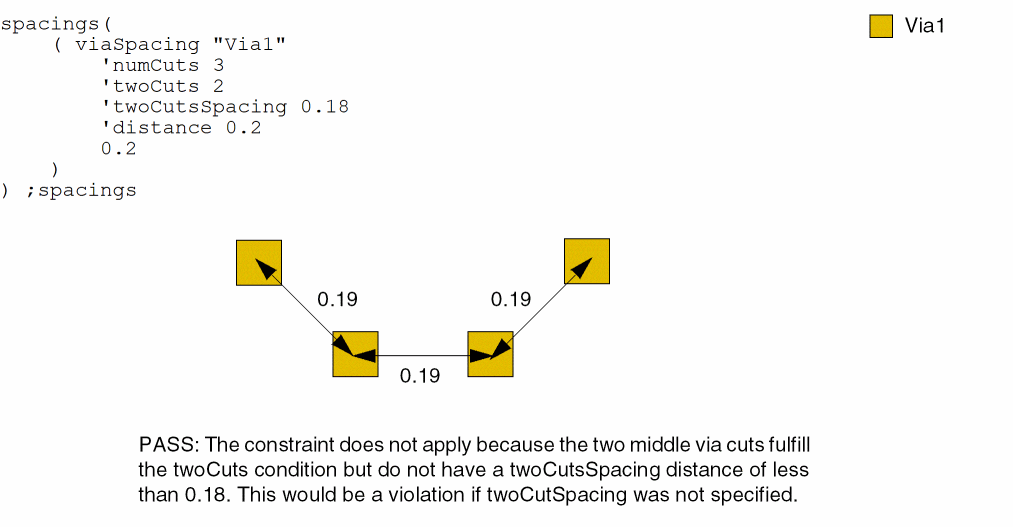
Example 12: viaSpacing with twoCutsSpacing
The spacing between two neighboring via cuts must be at least 0.2 if each via cut has at least 2 common neighboring cuts that are less than 0.2 away and have spacing less than 0.18. Otherwise, there must be at least 3 adjacent via cuts.
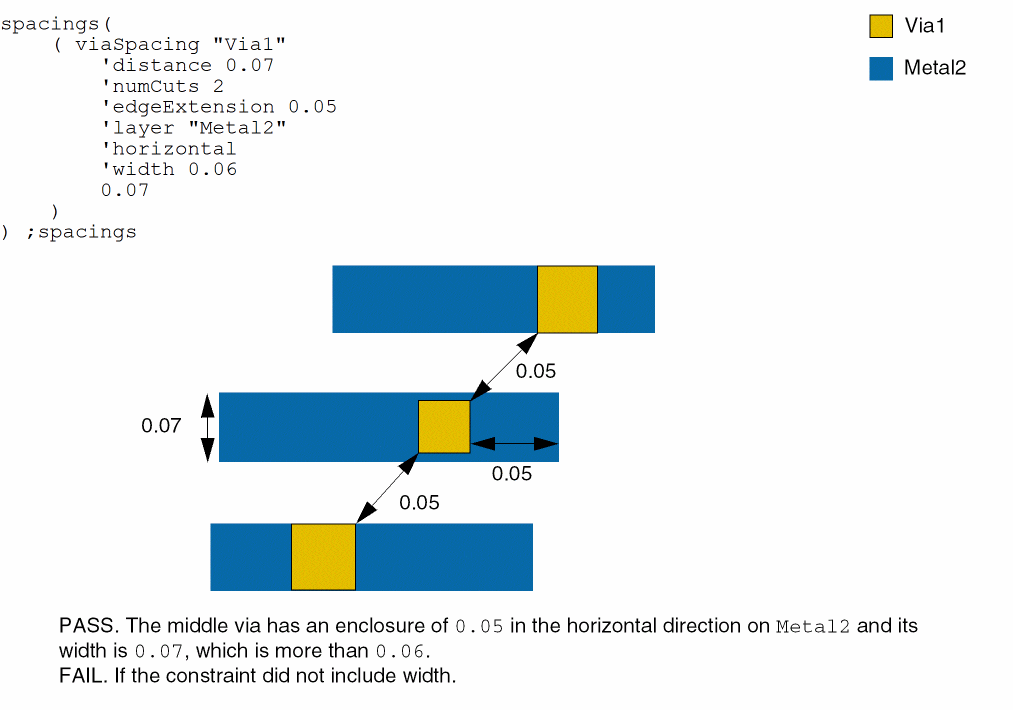
Example 13: viaSpacing with width
The constraint applies only to cuts that have an extension of less than 0.05 in the horizontal direction and width less than or equal to 0.06 on layer Metal2.
Return to top