
Adding Property Columns
The Hierarchy Editor, by default, lets you display and set all the simulation-control properties that are in the property dictionary. If you want to set a property that is not in the property dictionary, you can do so by creating a property column for it. You typically add properties that you use frequently with an application.
You should only add simulation-control properties that are understood by a Cadence application.
When you create a new property column, set the property on objects in your design, and then save the configuration, the new property column definition is added to the prop.cfg file in the configuration view. If a prop.cfg file does not exist, it is created.
The prop.cfg file is a property file created by the Hierarchy Editor in the configuration view. It stores the values of all properties that you set with the Hierarchy Editor. It also stores information about any property columns that you add.The prop.cfg file is read by applications that use the properties.
The next time that you display properties with the View – Properties command, the property column that you added is always displayed.
-
Choose Edit – Add Property Column.
The Add a Property Column dialog box appears.The Edit – Add Property Column command is only available if the View – Properties command is selected.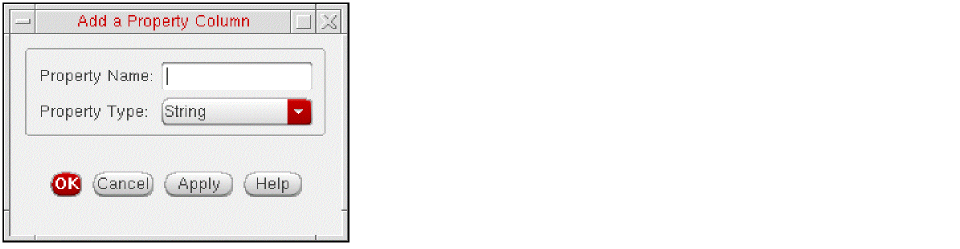
-
In the Property Name field, specify the name of the property for which you want to add a property column.
The name must match the property name that the application recognizes. -
In the Property Type field, select the property type from the pulldown menu. The following choices are available: String, Int, Double.
The Hierarchy Editor uses the property type you specify to do type-checking when the property is set. -
Click Apply to display the new property column or OK to display the new property column and close the dialog box.
The new property column is displayed. - Set the new property on objects in your design configuration.
- Choose File – Save to save your configuration.
If you create a new property column for a property but do not set the property on any objects in your configuration, the new property column definition is not saved when you save the configuration. For the new definition to be saved, the property must be set on at least one object in your configuration.
Related Topics
Properties Setting on the Design
Displaying Properties in Hierarchy Editor
Return to top