
B
Symbol and Simulation Library Generator
The Cadence® SKILL-based symbol and simulation library generator (S/SLG) is a library management program that generates symbol and simulation views. S/SLG generates a symbol in the library and defines the complete characterization of a symbol for use in computer-aided engineering applications.
This appendix describes the S/SLG commands and program and the library management SKILL functions used with S/SLG.
- Library Command File
- Running the Symbol and Simulation Library Generator
- Variables That Control Command Execution
- Properties That Modify Values
- Sample Library Command File
Library Command File
The library command file is one master text file that contains all text information in the library programming environment needed for S/SLG. Because this file is the only input to S/SLG, library editing becomes essentially text editing. You can generate symbol and simulation views after you create the library command file and run S/SLG.
- Add or delete properties in the symbol or simulation view
- Check for library consistency
- Backannotate objects in a schematic
- Specify timing parameters
Running the Symbol and Simulation Library Generator
You can run S/SLG in one of two environments:
Running the Symbol and Simulation Library Generator in the Cadence Graphic Environment
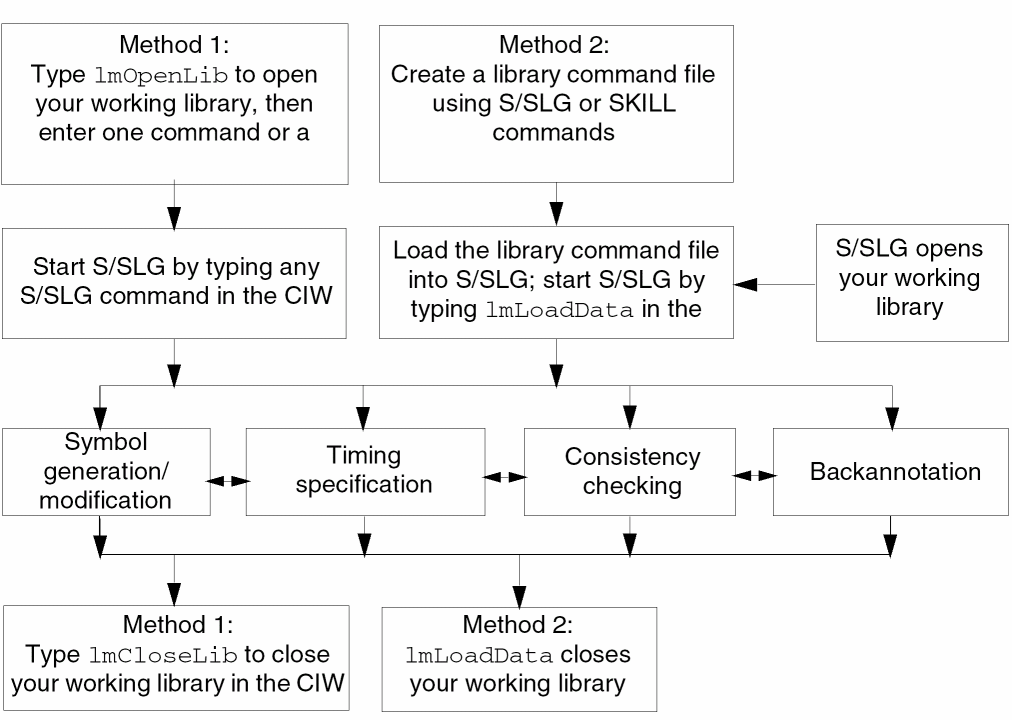
S/SLG is integrated into the Cadence graphic environment. If you want to do symbol generation or backannotation, you must run S/SLG in the Cadence graphic environment. Refer to Figure B-1 for an overview.
You can run S/SLG either by typing a function or a sequence of functions in the Command Interpreter Window (CIW) or by creating a library command file.
When you create a library command file that contains S/SLG commands or SKILL functions, each command or function runs sequentially. You can load the file where you plan to save your generated symbol into S/SLG.
To load your file while you run S/SLG,
-
In the CIW, type
lmLoadData(
wheremyFile.lmmyLib
lmLoadDataopens your working library, loads your library command file, then closes your working library when you complete running S/SLG.
myFile is your library command file.
myLib is your working library.
Output and Error Messages
An error ends execution. Output and error messages are displayed in the CIW during execution. An exit status of t indicates there are no output or error messages; nil indicates an error occurred. Error messages can be the result of syntax errors, insufficient arguments, or undefined parameters.
Figure B-1 Diagram of Running S/SLG in the Cadence Graphic Environment
Running the Symbol and Simulation Library Generator in the Cadence Nongraphic Environment
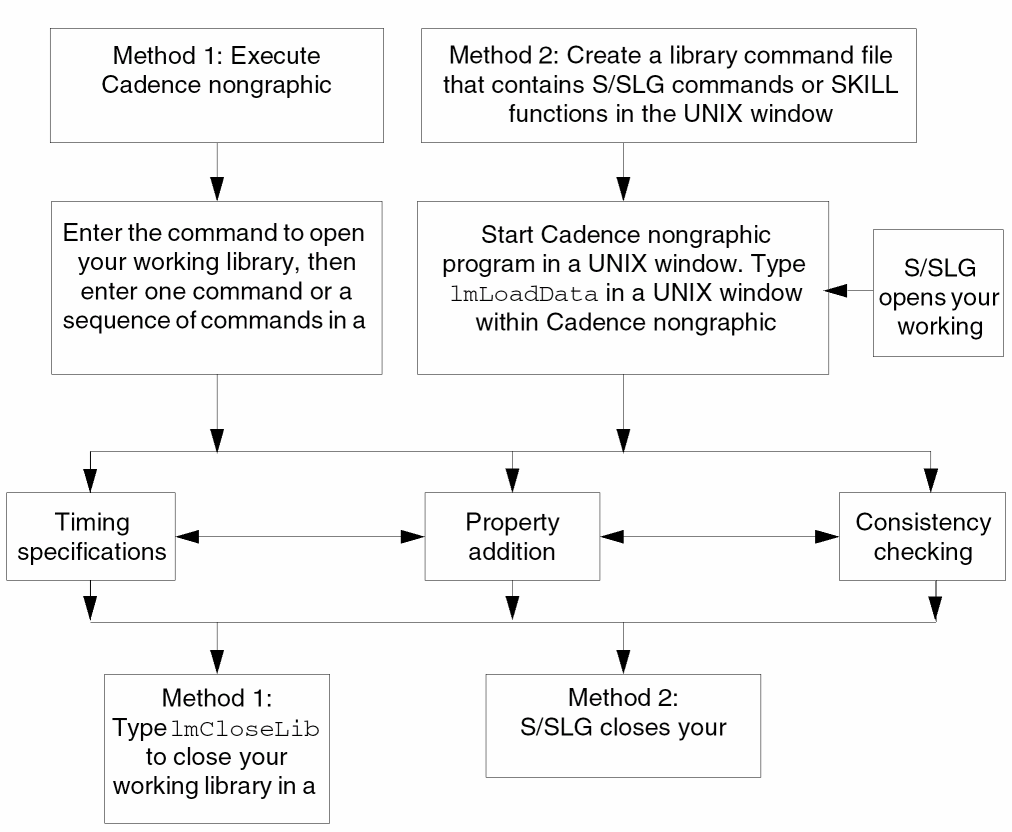
You can run S/SLG in the Cadence nongraphic environment in a UNIX window. For running functions other than lmDefCell, run S/SLG in a UNIX window to display the output quickly.
Run the Cadence nongraphic program in a UNIX window to start interactive library editing; then type an S/SLG command or SKILL function.
To load a library command file and run all functions sequentially,
-
In a UNIX window, type
lmL
whereoadData( "myFile.lm" "myLib" )
lmLoadDataopens your working library, loads your library command file, then closes your working library when you complete running S/SLG.
myFile is your library command file.
myLib is your working library.
Refer to Figure B-2 for an overview of the above processes.
Figure B-2 Diagram of Running S/SLG in the Cadence Nongraphic Environment
Output and Error Messages
Each function returns a running status. Output and error messages are displayed on the screen during execution. An exit status of t means that there are no output or error messages, and nil means an error occurred during execution. Error messages can be the result of syntax errors, insufficient arguments, or undefined parameters.
You can direct the output to a file and check it with a text editor, or you can check the output on the screen.
To direct output and error messages to a file, add the following to your library command file:
poport = outfile(filename)
errport = outfile(filename)
You can specify different files for storing the output or error messages, or you can specify the same file. If you want to store them in the same file, use the following command:
poport = errport = outfile(filename)
Variables That Control Command Execution
Predefined global variables control command execution that affect the modification of the database. The following table shows variables and how they control lm functions.
| Variable | Default | Use |
|---|---|---|
|
Controls |
||
|
Controls |
Properties That Modify Values
To modify the value of a view or terminal property in the Cadence environment, use the property list editor.
To delete a property, use lmDeleteViewProp or lmDeleteTermProp. Then use lmDefViewProp or lmDefTermProp in append mode to put the property with the desired value back into the database.
You can also use S/SLG commands and text editing. First, print all properties into a file. Then, edit the file by modifying the values of the target property and load the file into S/SLG to replace all original properties. Remember to set replaceViewProp to t or replaceTermProp to t. You can add parameters to the property values.
Sample Library Command File
The following example shows a text file containing several commands and variable settings. These commands and variables generate symbols, specify timing parameters, define cellview and terminal properties, and print cellview and terminal properties.
A semicolon ( ; ) indicates a comment line.
lmOpenLib( "myLib" "" "" "a" )
; library must be opened in append mode in order to execute
; subsequent commands, such as lmDefCell, lmDefViewProp. This
; command is redundant if you use lmLoadData to load this library
; command file.
;
symbolGen = t
; global variable setting
;
; cell description for SN74181
;
lmDefCell( "74181"
    ; input and output terminal names
    input( A0 A1 A2 A3 B0 B1 B2 B3 S0 S1 S2 S3 CIN_ M )
    output( F0 F1 F2 F3 AEQB COUT_ Y X )
    defsymbol(
        symbolProps(
            vendorName = "TI"
            partName = "SN74181"
            refDes = "U100"
        )
    )
; specify time delay for generating a timing view delayTable(
    ( CIN_ COUT_ 12:13 nonInvert )
    ( (A0 A1 A2 A3) COUT_ 35ns:33ns invert )
    ( (B0 B1 B2 B3) COUT_ 35ns:33ns nonInvert )
    ( CIN_ (F0 F1 F2 F3) 13ns:12ns )
    ( (A0 A1 A2 A3) Y 17ns:17ns nonInvert )
    ( (B0 B1 B2 B3) Y 17ns:17ns invert )
    ( (A0 A1 A2 A3) X 17ns:17ns nonInvert )
    ( (B0 B1 B2 B3) X 17ns:17ns invert )
    ( (A0 B0) F0 32ns:23ns )
    ( (A1 B1) F1 32ns:23ns )
    ( (A2 B2) F2 32ns:23ns )
    ( (A3 B3) F3 32ns:23ns )
    ( (A0 A1 A2 A3 B0 B1 B2 B3) AEQB 35ns:32ns )
)
; add properties into the symbol view
lmDefViewProp(
    timeAdded = time("Apr 1 10:00:00 2000")
    author = "John Smith"
    ; define properties for logic/fault simulation if
    ; used as function model
    simulation = proplist(
        NLPElementPostamble =nlpExpr("[@SILOS_FNx_Image]")
        Input_Pin_List = nlpExpr("[|A0] [|A1] [|A2]\
            [|A3] [|B0] [|B1] [|B2] [|B3] [|S0] [|S1] [|S2] \
            [|S3] [|CIN_] [|M]")
        Output_Pin_List = nlpExpr("[|F0] [|F1] [|F2] [|F3] \
            [|AEQB] [|COUT_] [|Y] [|X]")
        Pin_Net_Map = nlpExpr("\\n$ 8 [|F0]=F0 [|F1]=F1 \
            [|F2]=F2 [|F3]=F3 [|AEQB]=AEQB [|COUT_]=COUT_ \
            [|Y]=Y [|X]=X \
            [|A0]=A0 [|A1]=A1 [|A2]=A2 [|A3]=A3N[|B0]=B0 \
            [|B1]=B1 [|B2]=B2 [|B3]=B3 [|S0]=S0 [|S1]=S1 \
            [|S2]=S2 [|S3]=S3 [|CIN_]=CIN_ [|M]=M") \
        ; The value of Input_Pin_List Output_Pin_List and
        ; Pin_Net_Map should be put into one line of a text
        ; file. Here it is split into several lines for a more
        ; readable format.
        )
)
    ; define the characteristics of input/output current for
    ; terminals
    ; iol : low-level output current
    ; ioh : high-level output current
    ; iil : low-level input current
    ; iih : high-level input current
    ;
lmDefTermProp(
    ( output iol = 16mA )
    ( (F0 F1 F2 F3 COUT_ Y X) ioh = -800uA )
    ( AEQB ioh = 250uA )
    ( (A0 A1 A2 A3 B0 B1 B2 B3) iil = -4.8mA iih = 120uA )
    ( (S0 S1 S2 S3) iil = -6.4mA iih = 160uA )
    ( M iil = -1.6mA iih = 40uA )
    ( COUT_ iil = -8mA iih = 200uA )
    )
)
; cell description for TC4531BP - 12bit parity tree
; ignore symbol generation
symbolGen = nil
lmDefCell( "4531"
    ; input and output terminal names
    input( D0 D1 D2 D3 D4 D5 D6 D7 D8 D9 D10 D11\
    "ODD|EVEN" )
    output( Q )
    defsymbol(
        symbolProps(
            vendorName = "TOSHIBA"
            partName = "TC4531BP"
            refDes = "U200"
        )
    )
; specify time delay
delayTable(
    ( (D0 D1 D2 D3 D4 D5 D6 D7 D8 D9 D10 D11) 320ns:320ns )
    ( "ODD|EVEN" 210ns:210ns )
)
; add properties into the symbol view
lmDefViewProp(
    timeAdded = time("Apr 1 10:00:00 2000")
    author = "John Smith"
    ; define properties for logic/fault simulation
    ; if used as a function model
    simulation = proplist(
        NLPElementPostamble =
            nlpExpr("[@logic_FNx_Image]")
            Input_Pin_List = nlpExpr("[|D0] [|D1] [|D2] \
            [|D3] [|D4] [|D5] [|D6] [|D7] [|D8] [|D9] \
            [|D10] [|D11] [|ODD|EVEN]") \
        Output_Pin_List = nlpExpr("[|Q]") \
        Pin_Net_Map = nlpExpr("\\n$ 1 [|Q]=Q [|D0]=D0 \
            [|D1]=D1 [|D2]=D2 [|D3]=D3 [|D4]=D4 [|D5]=D5 \
            [|D6]=D6 [|D7]=D7 [|D8]=D8 [|D9]=D9 \
            [|D10]=D10 [|D11]=D11 [|ODD|EVEN]=ODD|EVEN")
        ; The value of Input_Pin_List and Pin_Net_Map
        ; should be put into one line of a text file. Here it
        ; is split into several lines for a more readable format
        )
    )
    ;
    ; define the characteristics of input/output current for
    ; terminals
    ; iol : low-level output current
    ; ioh : high-level output current
    ; iil : low-level input current
    ; iih : high-level input current
    ; VDD = 5V, VSS = 0V, 25C
    lmDefTermProp(
        ( output
            iol = 1.5 ; 1.5A
            ioh = -1.0 ; –1.0A
        )
        ( input
            iil = -0.01nA
            iih = 0.01nA
        )
    )
)
; append properties to the symbol of SN74181
replaceViewProp = nil
lmDefViewProp( "74181"
    vdd = 5
    date = time("Apr 1 12:00:00 2000")
)
; append properties to some terminals of the symbol of TC4531
replaceTermProp = nil
lmDefTermProp( "4531"
    ("ODD|EVEN"
    check = "odd or even parity"
    )
    (Q is = "only output"
    )
)
; print all properties of the symbol of SN74181 in the file
; prop.74181
lmPrintViewProp( "74181" symbol "prop.74181" )
; print all terminal properties of the symbol of TC4531BP in
; the file term.4531
lmPrintTermProp( "4531" symbol "term.4531" )
; replace the properties in the symbol of SN74169
replaceViewProp = t
lmDefViewProp( "74169" symbol
    userUnits = "userUnits"
    "DBUPerUU" = 1.0
    snapSpacing = 5
    screenGridSpacing = 10
    screenGridMultiple = 4
    displayExpanded? = yes
    type = "TTL"
    manufacturerID = "TI"
    partName = "1000"
)
; replace the terminal properties in the symbol of SN74169
replaceTermProp = t
lmDefTermProp( "74169" symbol
    (input
        iil = -2mA
        iih = 50uA
    )
    (output
        iol = 20mA
        ioh = -1mA
    )
)
; print the properties of symbol view for each cell in the current
; working library in the file sym.prop
lmPrintLibViewProp( symbol "sym.prop" )
; print the terminal properties of symbol view for each cell
; in the current working library in the term.prop file
lmPrintLibTermProp( symbol "term.prop" )
lmCloseLib
; this command is redundant if you use lmLoadData to load this
; command file.
Return to top