
C
Environment Variables
This appendix covers the environment variables that can be used to control and customize the characteristics and behavior of custom constraints. Refer to the List of Environment Variables section for a complete list of environment variables available for use.
For information about the environment variables specific to:
- Virtuoso Schematic Editor, refer to the Environment Variables chapter in the Virtuoso Schematic Editor User Guide.
- Virtuoso Layout Suite XL, refer to the Environment Variables chapter in the Virtuoso Layout Suite documentation.
Setting Environment Variables
You can set the environment variables in the following three ways:
- Within the .cdsenv File
- Within the .cdsinit File
- In the CIW
.cdsenv File
Add environment variables to the .cdsenv file when the settings should be applied while launching the Constraint Manager.
constraintenvironmentVariableNamedataTypevalue
constraint addParallelDevices boolean t
.cdsinit File
Like the .cdsenv file, the environment variable settings saved in the .cdsinit file get applied when you launch the Constraint Manager.
Use the envSetVal() command, which has the following syntax, to add environment variables to the .cdsinit file:
envSetVal("constraint" "environmentVariableName" 'dataTypevalue)
envSetVal("constraint" "addParallelDevices" 'boolean t)
string, enclose its value within double quotes.CIW
Use the envSetVal() command in the CIW to set an environment variable for the duration of the current session. The syntax is the same as described above for the .cdsinit file.
envSetVal() command in any Cadence SKILL file that you load.Displaying the Current Value of an Environment Variable
To determine the current value of any Constraint Manager environment variable, use the following syntax in the CIW.
envGetVal("constraint" "environmentVariableName")
List of Environment Variables
The following environment variables are available for use:
-
addParallelDevices
-
autoConstraintNotes
-
autoSelectTemplateConstraint
-
comanageConstraintView
-
comanageFollowModeOnDescend
-
comanageFollowModeOnOpen
-
consistencyFailureDefaultWarning
-
constraintMenuHistorySize
-
constraintNotesSyncOnDesignCheck
-
constraintNotesSyncOnDesignOpen
-
crossCoupleDiffPairRequireSourceNotSupply
-
crossHalo
-
currentMirrorIncludeDummies
-
defaultViewName
-
diffPairRequireSourceNotSupply
-
disableCICustomCGPopup
-
distanceMFactorExpansion
-
editTransferredTemplates
- highlightCPResults
- keepFigGroupMembersWithinSameCluster
-
matchedToIgnore
-
maxMatchesPerDevice
-
noteTooltipMaxCharWidth
-
noteTooltipMaxLines
-
purgeOnCloseCellView
-
restrictNetGroupMembership
-
updateConstraints
-
useOldComparisonReport
-
viewNameList
-
viewWithConfigCell
addParallelDevices
Syntax
constraint addParallelDevices boolean {t | nil}
In the .cdsinit file or the CIW:
envSetVal("constraint" "addParallelDevices" 'boolean {t | nil})
Description
Controls whether parallel devices should be included in the structures during structure matching.
Example
Set the following to include the parallel devices while matching expressions for captured structures:
envSetVal("constraint" "addParallelDevices" 'boolean t)
autoConstraintNotes
Syntax
constraint autoConstraintNotes boolean {t | nil}
In the .cdsinit file or the CIW:
envSetVal("constraint" "autoConstraintNotes" 'boolean {t | nil})
Description
Enables the automatic creation of constraint notes.
When you set this environment variable to t and create new constraints, the constraint notes automatically get added to the schematic, In addition, when you change or delete any constraint, the constraint notes get updated.
Example
Set the following to enable the feature to automatically add constraint notes to the schematic when constraints are added, updated, and deleted:
envSetVal("constraint" "autoConstraintNotes" 'boolean t)
autoSelectTemplateConstraint
Syntax
constraint autoSelectTemplateConstraint boolean {t | nil}
In the .cdsinit file or the CIW:
envSetVal("constraint" "autoSelectTemplateConstraint" 'boolean {t | nil})
Description
Restores the original behavior that existed in IC6.1.5 where on selecting a template in the Constraint Manager, the Constraint Property Editor displayed all the parameters of all the constraints contained within the template.
In IC6.1.6, the template parameters are defined within the template definition itself. Therefore, the template parameters, if there are any, are displayed with the template. If the template does not have any parameters, then no parameters are displayed.
t displays only template parameters and not the constraint parameters.Example
Set the following to display all parameters of all constraints associated with the selected template in the Constraint Property Editor:
envSetVal("constraint" "autoSelectTemplateConstraint" 'boolean t)
comanageConstraintView
Syntax
schematic comanageConstraintView boolean {t | nil}
In the .cdsinit file or the CIW:
envSetVal("schematic" "comanageConstraintView" 'boolean {t | nil})
Description
Controls whether the schematic and constraints views are co-managed or managed separately when specific schematic editor commands are used. When set to t, schematic and constraint views are co-managed. When set to nil, they are handled separately. The default is t. This feature is available only in Schematics XL.
This feature applies to the following commands
- Save, Save a Copy, Discard Edits, Check and Save, and Change Edit Mode, in the File menu.
- Check — Current Cellview
Applying the commands to both schematic and constraint views simultaneously, saves you having to use separate commands to perform the same operation on the two views.
If set to nil, the listed commands apply to the schematic view only. Changes to the constraint view are not applied and instead the Constraint Manager assistant options: Save Constraints, Save a Copy, Discard Edits, and Make Read Only must be used instead.
If set to t and changes have only been made to the constraint view, the File menu options, Save and Discard Edits are displayed with the suffix (Constraint).
Example
To manage the schematic and constraint views separately:
envSetVal("schematic" "comanageConstraintView" 'boolean nil)
comanageFollowModeOnDescend
Syntax
schematic comanageFollowModeOnDescend boolean {t | nil}
In the .cdsinit file or the CIW:
envSetVal("schematic" "comanageFollowModeOnDescend" 'boolean {t | nil})
Description
Controls the edit mode of the constraint view on descend edit through the hierarchy.
Setting the comanageFollowModeOnDescend and comanageConstraintView environment variables to t ensures that a sub-cell’s constraint view is opened in edit mode every time when you select the Edit – Hierarchy – Descend Edit menu option in Schematic XL to descend into the sub-cell from the top cell. However, with the Edit – Hierarchy – Descend Read menu option, the descended subcell's constraint view may not open in read mode if it was last opened for edit in the current session.
When this environment variable is set to nil, a sub-cell’s constraint view might not necessarily open in edit mode despite using the Edit – Hierarchy – Descend Edit menu option. The constraint view can change to read only if it was last opened in read mode in the current session. Also, when you are Working with Constraint Views in a Design-Managed Environment, the expected check-in and checkout behavior related to the edit mode operation is not followed for a constraint view.
comanageFollowModeOnOpen
Syntax
schematic comanageFollowModeOnOpen boolean {t | nil}
In the .cdsinit file or the CIW:
envSetVal("schematic" "comanageFollowModeOnOpen" 'boolean {t | nil})
Description
Controls whether the constraint view should be opened in editable or non-editable mode.
The default setting, t, of this environment variable mainly controls the edit mode of the constraint views when a top cell is opened in edit mode followed by its subcell. For example, if you open the Constraint Manager assistant for top cell, inv_top, in tandem with a subcell of this top cell, inv_sub. notice that the Constraint Manager assistant for INV_sub1 also opens in edit mode.
If this environment variable is set to nil and you access the constraint view of a sub cell in tandem with the editable cellview of its top cell, then the subcell's constraint view may open in non-editable mode. Also, when you are Working with Constraint Views in a Design-Managed Environment, the expected check-in and checkout behavior related to opening a constraint view is not followed.
consistencyFailureDefaultWarning
Syntax
constraint consistencyFailureDefaultWarning boolean {t | nil}
In the .cdsinit file or the CIW:
envSetVal("constraint" "consistencyFailureDefaultWarning" boolean {t | nil})
Description
Controls the display of system-generated warning messages for consistency failures. By default, this environment variable disables the display of system-generated messages for custom constraints and system constraints that have corresponding custom verification callback. To enable the display of such messages, set this environment variable to t.
Example
To enable the display of system-generated warning messages for consistency failures, set the following:
envSetVal("constraint" "consistencyFailureDefaultWarning" boolean t)
constraintMenuHistorySize
Syntax
constraint constraintMenuHistorySize int integer
In the .cdsinit file or the CIW:
envSetVal("constraint" "constraintMenuHistorySize" 'int integer)
Description
Sets the size of the constraint history displayed at the end of the Constraint Creation drop-down list, which is under the last horizontal line, in the Constraint Manager. The history is a list of the last N constraints created and gives you quick access to them.
If set to 0, the feature of maintaining the constraint history gets disabled.
Example
To maintain the last 7 records in the constraint history, set the following:
envSetVal("constraint" "constraintMenuHistorySize" 'int 7)
constraintNotesSyncOnDesignCheck
Syntax
constraint constraintNotesSyncOnDesignCheck boolean {t | nil}
In the .cdsinit file or the CIW:
envSetVal("constraint" "constraintNotesSyncOnDesignCheck" 'boolean {t | nil})
Description
Enables the automatic synchronization of constraint notes when the design is checked.
By default, this environment variable is set to nil. When you set this environment variable to t, the constraint notes get synchronized on design check.
For more information, see Setting Up Automatic Generation of Constraint Notes.
Example
To enable the feature to automatically synchronize the constraint notes when a design is checked, set the following:
envSetVal("constraint" "constraintNotesSyncOnDesignCheck" 'boolean t)
constraintNotesSyncOnDesignOpen
Syntax
constraint constraintNotesSyncOnDesignOpen boolean {t | nil}
In the .cdsinit file or the CIW:
envSetVal("constraint" "constraintNotesSyncOnDesignOpen" 'boolean {t | nil})
Description
Enables the automatic synchronization of constraint notes when the design is opened in edit mode.
By default, this environment variable is set to nil. Its setting to t causes the desired effect only when the environment variable has also been set to t to enable automatic creations of constraint notes.
When you set this environment variable and autoConstraintNotes to t, the constraint notes get synchronized on opening a design in edit mode.
For more information, see Setting Up Automatic Generation of Constraint Notes.
Example
To enable the feature to automatically synchronize the constraint notes on opening a design, set the following:
envSetVal("constraint" "constraintNotesSyncOnDesignOpen" 'boolean t)
crossCoupleDiffPairRequireSourceNotSupply
Syntax
constraint crossCoupleDiffPairRequireSourceNotSupply boolean {t | nil}
In the .cdsinit file or the CIW:
envSetVal("constraint" "crossCoupleDiffPairRequireSourceNotSupply"
'boolean {t | nil})
Description
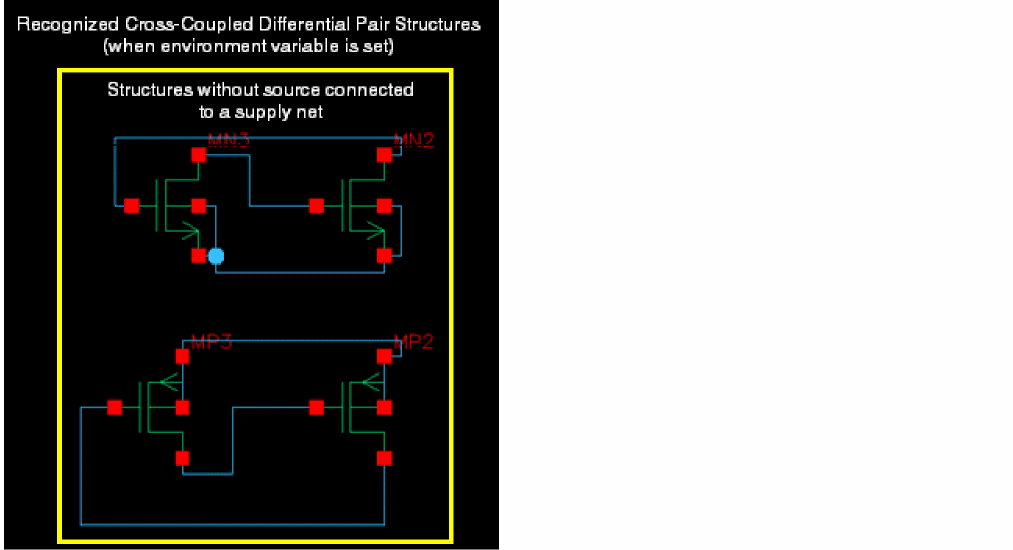
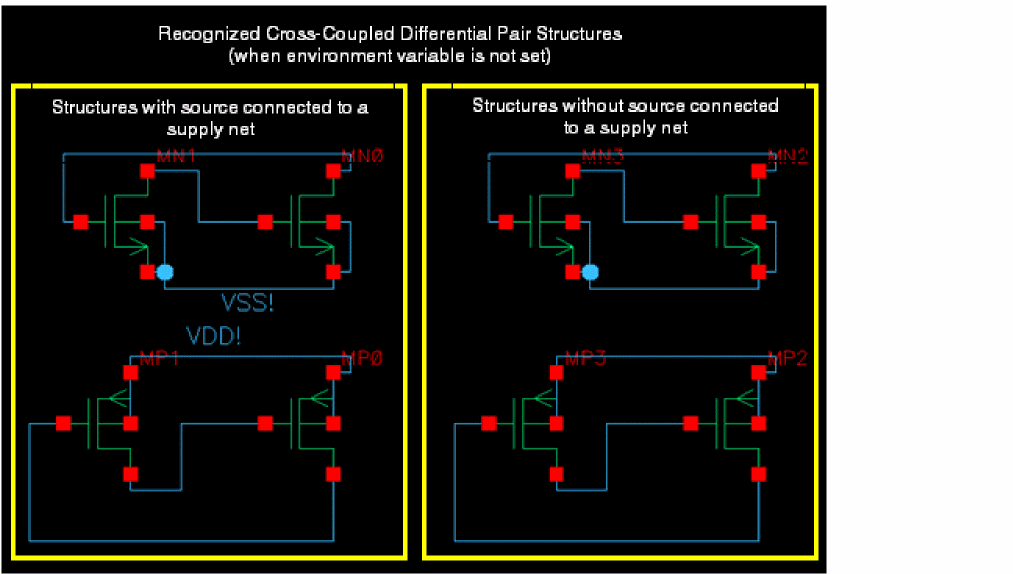
When this environment variable is set to t, a cross-coupled differential pair structure will be recognized only if the source connection of the structure is not connected to a supply net. Setting the environment variable to nil removes this restriction.
Example
When the crossCoupleDiffPairRequireSourceNotSupply environment variable is set, the following cross-coupled differential pair structures get recognized and listed on selecting the MOS Differential Pair - Cross Coupled finder from the Search for drop-down list box in the Circuit Prospector assistant:
However, when you set the following to remove the restriction on the recognition of the cross-coupled differential pair structures:
envSetVal("constraint" "crossCoupleDiffPairRequireSourceNotSupply" 'boolean nil)
the following structures can be recognized (note the two additional structures on the right):
crossHalo
Syntax
constraint crossHalo boolean {t | nil}
In the .cdsinit file or the CIW:
envSetVal("constraint" "crossHalo" 'boolean {t | nil})
Description
Controls the cross-selection of constraints between the schematic Constraint Manager and the layout Constraint Manager, as defined in the constraint partition. When set to t, the cross-selection is enabled. Setting the environment variable to nil disables the cross-selection.
The following caveats must be considered while using the crossHalo environment variable:
-
The Constraint Manager should be open in both schematic and layout.
- Corresponding constraints should be defined in both schematic and layout Constraint Manager and linked to the schematic and layout views.
For more information, refer to the Cross-Selection of Constraints Between Schematic and Layout Constraint Managers section.
Example
To disable the cross-selection of constraints, set the following:
envSetVal("constraint" "crossHalo" 'boolean nil)
currentMirrorIncludeDummies
Syntax
constraint currentMirrorIncludeDummies boolean {t | nil}
In the .cdsinit file or the CIW:
envSetVal("constraint" "currentMirrorIncludeDummies" 'boolean {t | nil})
Description
Controls whether dummy devices should also be recognized as part of the identified Current Mirror structure.
A dummy device has its source, drain, and bulk connected together and its gate connected to the gate of the reference device in the Current Mirror structure. By default, dummy devices are not included in the recognized Current Mirror structures. To allow dummy devices to be included, set this environment variable to t.
Example
To recognize the dummy devices as a part of the identified Current Mirror structure, set the following:
envSetVal("constraint" "currentMirrorIncludeDummies" 'boolean t)
defaultViewName
Syntax
constraint defaultViewName string "<userDefinedName>"
In the .cdsinit file or the CIW:
envSetVal("constraint" "defaultViewName" 'string "<userDefinedName>")
Description
Defines the name of the constraint view to use when opening Constraint Manager in a schematic. This default view name is also accessible by selecting Options from Save (Constraints), which is the first menu in the Constraint Manager toolbar when accessed from the schematic.
Example
To specify constraint2 as the default view name, set the following:
envSetVal("constraint" "defaultViewName" 'string "constraint2")
diffPairRequireSourceNotSupply
Syntax
constraint diffPairRequireSourceNotSupply boolean {t | nil}
In the .cdsinit file or the CIW:
envSetVal("constraint" "diffPairRequireSourceNotSupply" 'boolean {t | nil})
Description
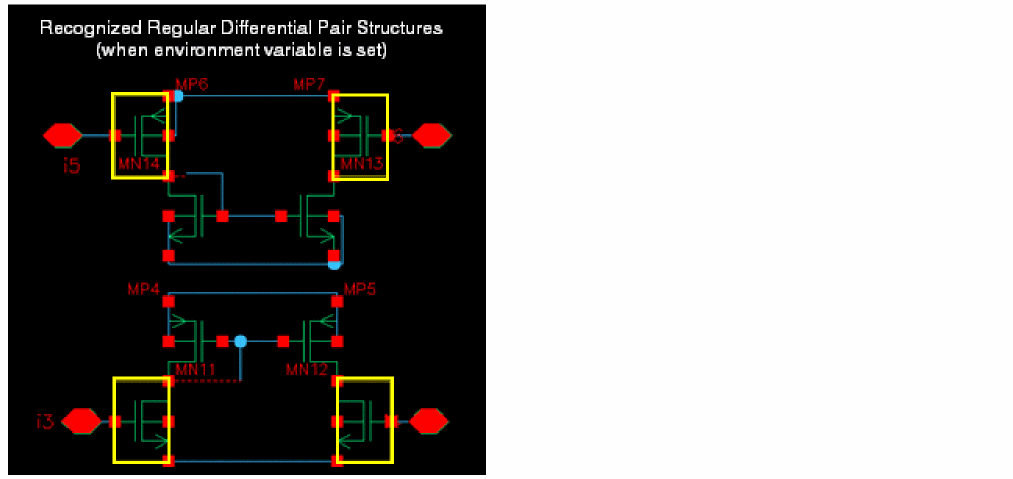
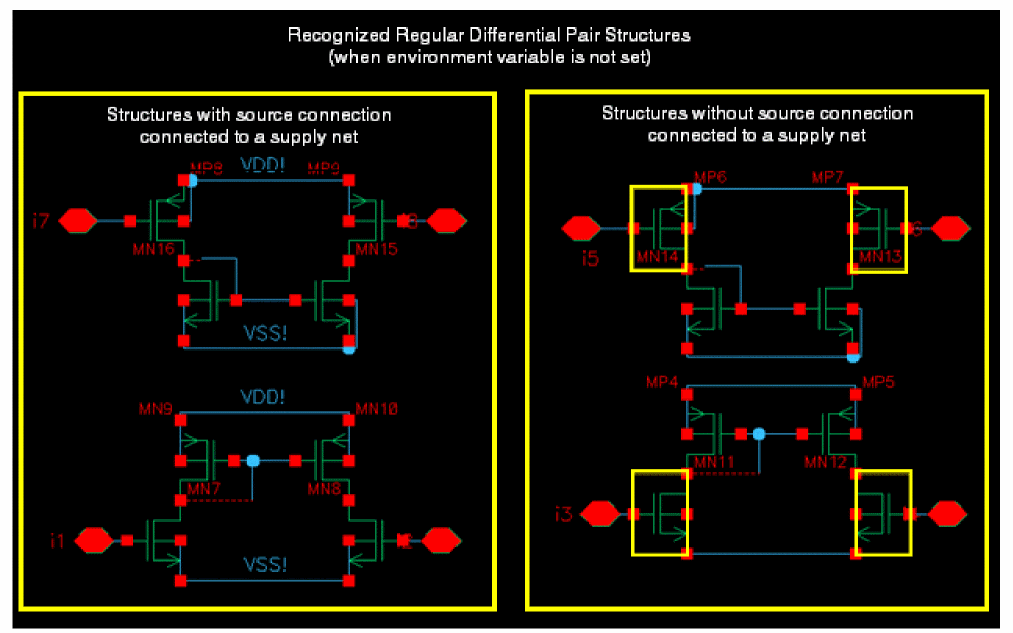
When this environment variable is set to t, a Differential Pair structure will be recognized only if the source connection of the structure is not connected to a supply net. Setting the environment variable to nil removes this restriction.
Example
When the diffPairRequireSourceNotSupply environment variable is set, the following differential pair structures get recognized and listed on selecting the MOS Differential Pair finder from the Search for drop-down list box in the Circuit Prospector assistant:
However, when you set the following to remove the restriction on the recognition of the differential pair structures:
envSetVal("constraint" "diffPairRequireSourceNotSupply" 'boolean nil)
the following structures can be recognized (note the two additional structures on the left):
disableCICustomCGPopup
Syntax
constraint disableCICustomCGPopup boolean {t | nil}
In the .cdsinit file or the CIW:
envSetVal("constraint" "disableCICustomCGPopup" 'boolean {t | nil})
Description
When value of any of Within Group, Default Group, or Group to Outside Group properties is changed from Custom to some default constraint groups value, the following warning message box appears that requires user input:
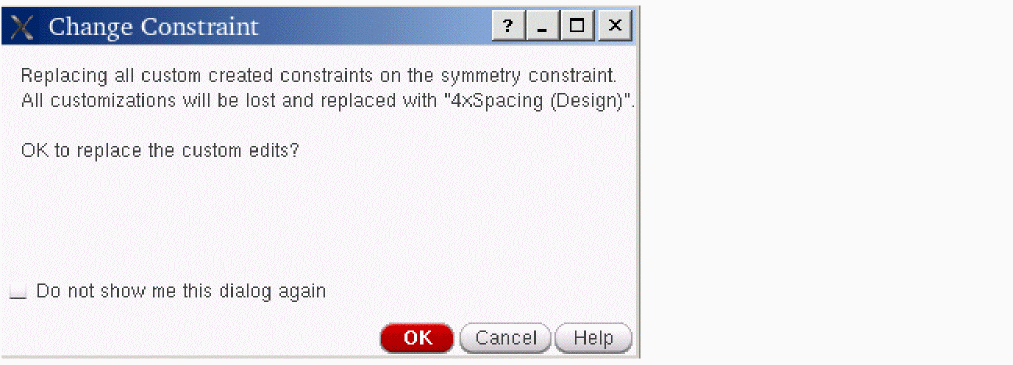
If the disableCICustomCGPopup environment variable is set to t, this message box does not appear and changes take place without the warning. So, setting this environment variable to t is equivalent to selecting the Do not show me this dialog again check box in the message box.
distanceMFactorExpansion
Syntax
constraint distanceMFactorExpansion string {"pair" | "firstToAll" | "symmetricPair"}
In the .cdsinit file or the CIW:
envSetVal("constraint" "distanceMFactorExpansion"
       'string {"pair" | "firstToAll" | "symmetricPair"})
Description
For constraints that have mfactored instances as members, this environment variable helps to identify how the members of corresponding constraints in layout should be created on transfer or update.
The distanceMFactorExpansion environment variable requires one of the following valid values based on the logic described for each:
|
For using this value, in a schematic constraint, you must have equal number of members and their corresponding mfactors. This means, if you have one member with three mfactors, the layout constraints will be created only if you have another member that also has three mfactors. |
|
|
For using this value, in a schematic constraint, the number of members and their mfactors need not be equal. For example, if you have a member with two mfactors and two other members with three mfactors each, only two constraint members will be created. |
|
|
For using this value, you must have equal number of members, but their corresponding mfactors need not be equal. The pairing for creating constraints will be done till the point the mfactors of the member with lowest number of mfactors is reached. The unpaired mfactors will be omitted from the constraint creation process. See the Example section below to understand how it works. |
Example
-
Suppose the schematic constraint,
Const_1, has two membersM1andM2, and the mfactor for both the members is3. So, if thedistanceMFactorExpansionenvironment variable is set topair, while representing constraints in layout on transfer or update, three corresponding constraints will be created with following members:
First Constraint Members:M1.1 M2.1
Second Constraint Members:M1.2 M2.2
Third Constraint Members:M1.3 M2.3 -
Suppose the schematic constraint,
Const_2, has three members:M1with mfactor2,M2with mfactor3, andM3with mfactor3. So, if thedistanceMFactorExpansionenvironment variable is set tofirstToAll, while representing constraints in layout on transfer or update, the two corresponding constraints will be created with following members:
First Constraint Members:M1.1 M2.1 M2.2 M2.3 M3.1 M3.2 M3.3
Second Constraint Members:M1.2 M2.1 M2.2 M2.3 M3.1 M3.2 M3.3 -
Suppose the schematic constraint,
Const_3, has two members:M1with mfactor2andM2with mfactor3. So, if thedistanceMFactorExpansionenvironment variable is set tosymmetricPair, while representing constraints in layout on transfer or update, the two corresponding constraints will be created with following members:
First Constraint Members:M1.1 M2.1
Second Constraint Members:M1.2 M2.2
The last mfactor,M2.3, of memberM2will be ignored because it does not have a corresponding mfactor available in memberM1.
editTransferredTemplates
Syntax
constraint editTransferredTemplates boolean {t | nil}
In the .cdsinit file or the CIW:
envSetVal("constraint" "editTransferredTemplates" 'boolean {t | nil})
Description
Makes all transferred templates editable or non-editable in one go.
Example
To make all transferred templates non-editable, set the following:
envSetVal("constraint" "editTransferredTemplates" 'boolean nil)
highlightCPResults
Syntax
constraint highlightCPResults boolean {t | nil}
In the .cdsinit file or the CIW:
envSetVal("constraint" "highlightCPResults" boolean {t | nil})
Description
Controls whether finder results are highlighted in the Circuit Prospector. If set to nil, the results are not highlighted. For cellviews with many results, you can improve speed by setting this variable to nil.
Example
Prevents finder results from being highlighted.
envSetVal("constraint" "highlightCPResults" boolean nil)
keepFigGroupMembersWithinSameCluster
Syntax
constraint keepFigGroupMembersWithinSameCluster boolean {t | nil}
In the .cdsinit file or the CIW:
envSetVal("constraint" "keepFigGroupMembersWithinSameCluster" boolean {t | nil})
Description
Prevents figGroup members from becoming part of multiple constraints. If set to nil, figGroup members can be part of multiple constraints.
Example
Lets figGroup members be part of multiple constraints.
envSetVal("constraint" "keepFigGroupMembersWithinSameCluster" boolean nil)
matchedToIgnore
Syntax
constraint matchedToIgnore string "<list_of_param_names>"
In the .cdsinit file or the CIW:
envSetVal("constraint" "matchedToIgnore" 'string "<list_of_param_names>")
Description
Specifies the names of parameters that should be ignored by the Matched Parameters constraint check and in Constraint-Aware Editing Mode. The value is a list of parameter names separated by spaces.
Different parameter names may be specified for matchedToIgnore in Schematic XL and Layout XL.
Default Value: "" (null string)
Example
envSetVal(constraint matchedToIgnore 'string "param1 param2")
envSetVal(schematic matchedToIgnore 'string "param1 param2")
Schematic XL looks for a non-empty schematic matchedToIgnore value and, if found, uses it. Otherwise, it uses the more general constraint matchedToIgnore value.
envSetVal(layoutXL matchedToIgnore 'string "param1 param2")
Layout XL, similar to Schematic XL, uses layoutXL matchedToIgnore variable if it is non-empty. Otherwise, it uses the more general constraint matchedToIgnore value.
maxMatchesPerDevice
Syntax
constraint maxMatchesPerDevice int <integer>
In the .cdsinit file or the CIW:
envSetVal("constraint" "maxMatchesPerDevice" 'int <integer>)
Description
Controls the maximum number of matches that a device can appear in when the Circuit Prospector structure finders are run. For example, Diff Pair and Current Mirror.
Example
To ensure maximum 4 matches per device appear when the Circuit Prospector structure finders are run, set the following:
envSetVal("constraint" "maxMatchesPerDevice" 'int 4)
noteTooltipMaxCharWidth
Syntax
constraint noteTooltipMaxCharWidth int <integer>
In the .cdsinit file or the CIW:
envSetVal("constraint" "noteTooltipMaxCharWidth" 'int <integer>)
Description
Controls the maximum number of characters that can appear in the line width of a tooltip displayed for the Constraint Notes.
Example
To ensure that maximum 50 characters can appear in a line width of a constraint note’s tooltip, set the following:
envSetVal("constraint" "noteTooltipMaxCharWidth" 'int 50)
noteTooltipMaxLines
Syntax
constraint noteTooltipMaxLines int <integer>
In the .cdsinit file or the CIW:
envSetVal("constraint" "noteTooltipMaxLines" 'int <integer>)
Description
Controls the maximum number of lines that should be displayed in a tooltip for the available Constraint Notes.
Example
To ensure that maximum 15 lines appear in a constraint note’s tooltip, set the following:
envSetVal("constraint" "noteTooltipMaxLines" 'int 15)
purgeOnCloseCellView
Syntax
constraint purgeOnCloseCellView boolean {t | nil}
In the .cdsinit file or the CIW:
envSetVal("constraint" "purgeOnCloseCellView" 'boolean {t | nil})
Description
If set to t , then on purging a schematic, the associated constraint view is also purged. If set to nil, the associated constraint view is not purged on purging the schematic.
Example
To purge only the schematic and not the associated constraint view, set the following.
envSetVal("constraint" "purgeOnCloseCellView" 'boolean nil)
restrictNetGroupMembership
Syntax
constraint restrictNetGroupMembership boolean {t | nil}
In the .cdsinit file or the CIW:
envSetVal("constraint" "restrictNetGroupMembership" 'boolean {t | nil})
Description
If set to t, then while performing consistency checks for the netGroup type constraints, it is made sure that no member of the constraint being checked is part of any other netGroup including its own type.
- For Diff Pair, Matched Length, and Strand, this member consistency check only verifies that no members should be part of the same constraint type.
- For Net Class and Net Bus, this member consistency check verifies that no members should be part of Net Class or Net Bus type constraints.
- For Net Symmetry, there are no such member consistency checks.
updateConstraints
Syntax
constraint updateConstraints cyclic {automatic | selected | none}
In the .cdsinit file or the CIW:
envSetVal("constraint" "updateConstraints" 'cyclic {automatic | selected | none})
Description
Controls the use model of the Update Schematic/Layout Constraints options. The following values can be set with updateConstraints:
Example
The updateConstraints variable can be set as follows:
-
In
.cdsenv:envGetVal("constraint" "updateConstraints" 'cyclic "automatic")
-
In
.cdsinitor the CIW:envGetVal("constraint" "updateConstraints" 'cyclic)
envSetVal("constraint" "updateConstraints" 'cyclic "selected")
useOldComparisonReport
Syntax
constraint useOldComparisonReport boolean {t | nil}
In the .cdsinit file or the CIW:
envSetVal("constraint" "useOldComparisonReport" 'boolean {t | nil})
Description
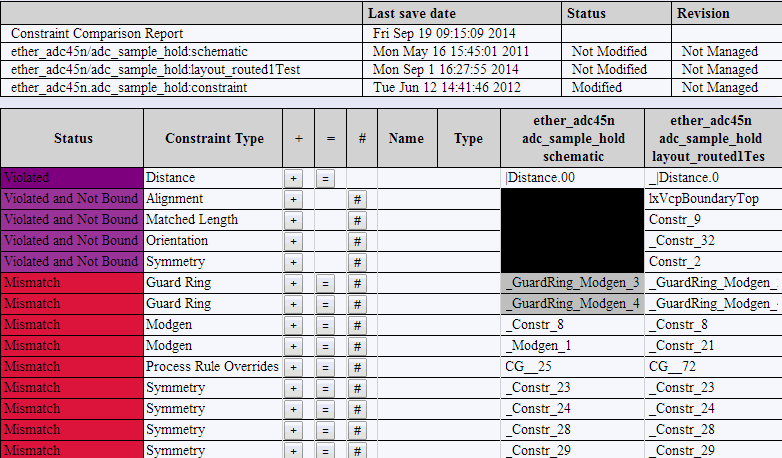
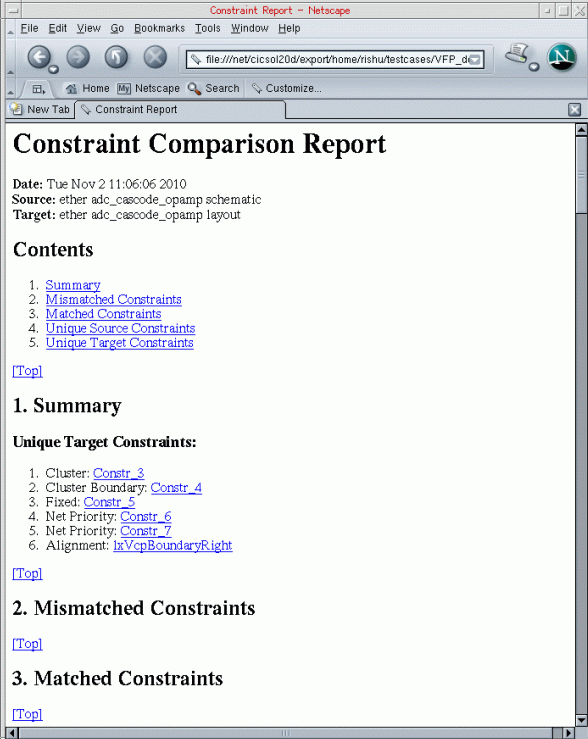
Specifies to load the old format of the Constraint Comparison Report instead of the new default format introduced in IC6.1.6 ISR9 and ICADV12.1 ISR11.
By default, the useOldComparisonReport environment variable is set to nil. As a result, when you click the Constraint Comparison Report ( ) button from the Constraint Manager assistant toolbar in Layout XL, the system launches a web browser and loads a report of the following format that compares the constraints existing in the current Schematic XL and Layout XL views.
However, if you prefer the old report format shown below or your existing test cases use it, you can switch back to the old comparison report by setting the useOldComparisonReport environment variable to t.
viewNameList
Syntax
constraint viewNameList string "<list_of_view_names>"
In the .cdsinit file or the CIW:
envSetVal("constraint" "viewNameList" 'string "<list_of_view_names>")
Description
Specifies a list of constraint view names. Use this environment variable in one of the following conditions:
- The schematic was not opened with a config or physConfig file.
- The config or physConfig file does not have a constraint view list.
Default Value: "" (null string)
Example
The following sets the constraint and constraint2 as the view names:
envSetVal("constraint" "viewNameList" 'string "constraint constraint2")
Alternatively, you can use any one of the following:
constraint viewNameList 'string "constraint constraint2"
constraint defaultViewName 'string "constraint"
viewWithConfigCell
Syntax
constraint viewWithConfigCell boolean {t | nil}
In the .cdsinit file or the CIW:
envSetVal("constraint" "viewWithConfigCell" 'boolean {t | nil})
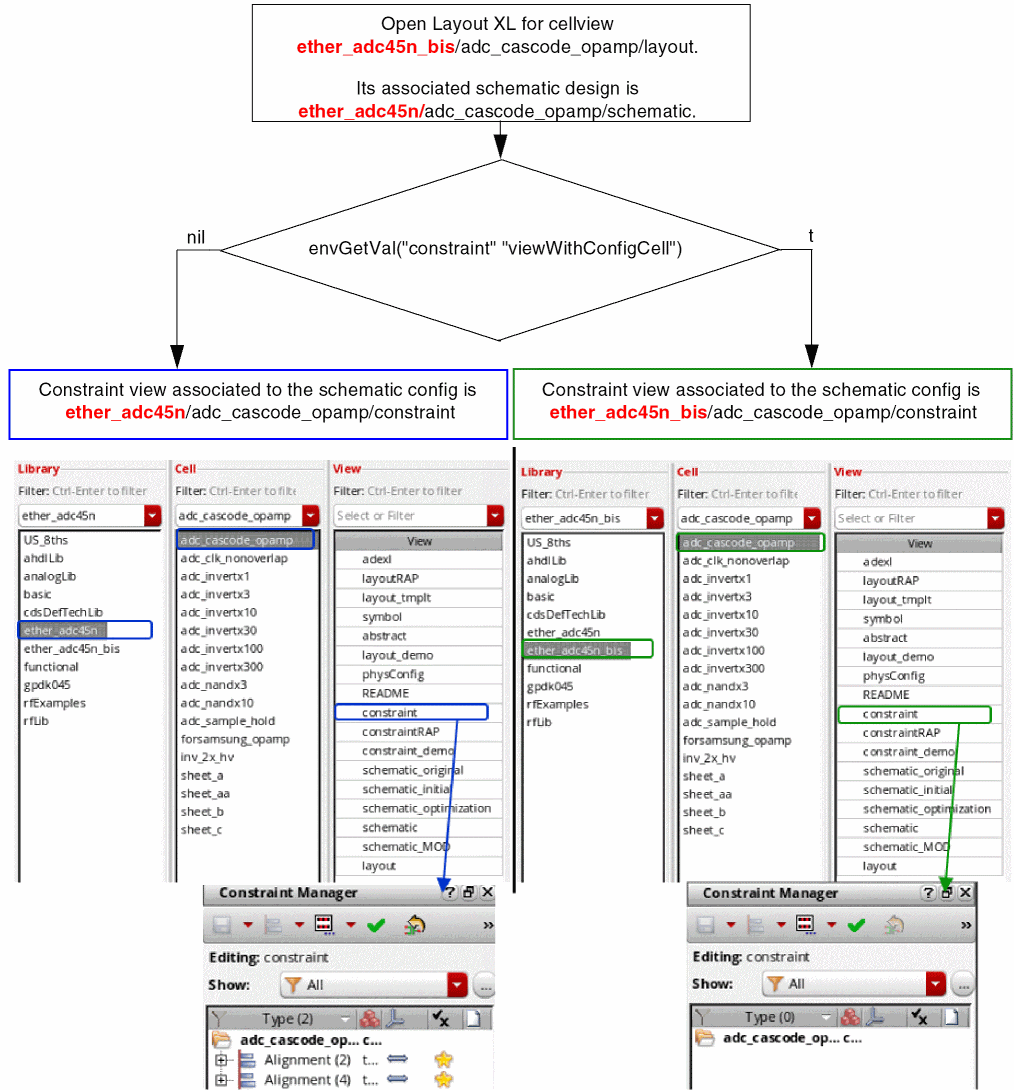
Description
Controls which constraint view out of the following should be used:
-
the constraint view located in the same library directory as the schematic view.
OR - the constraint view located in the same library directory as the physConfig view.
If the schematic and layout views are in the same library directory, setting of this variable does not have any impact. The Boolean value set for the viewWithConfigCell environment variable is of importance only when the schematic and layout views are located in different libraries and are bound to a physConfig view.
Example
To ensure that the constraint view is stored with the config cell, set the following:
envSetVal("constraint" "viewWithConfigCell" 'boolean t)
The following figure shows which constraint view is used based on the status of the viewWithConfigCell environment variable:
Return to top