
14.1 Overview
The technology libraries of an OpenAccess database can comprise one or multiple files. In other words, the technology information (layers, layerRules, vias, constraintGroups) about a specific process and metal stack can be spread across multiple tech files. This approach is called an Incremental Technology Database (ITDB). The incremental approach is preferred to a single tech file because of the following advantages:
- The libraries can be made more specific. The baseTech file can contain the process information, design rules, and the data specific to Virtuoso users. Another tech file can contain the technology data specific to a standard cell library. This tech file is primarily used by Innovus™ Implementation System.
- In an Incremental Technology Database, it is possible to make changes in one library without having to modify the baseTech library. For example, a new via or constraint group can be added to a library for Innovus.
- Different tech files can be maintained by different teams. For example, one can be maintained by the digital team and another by the analog team.
This chapter focuses on different methods for defining vias in the OpenAccess libraries for use in interoperable flows by both Virtuoso and Innovus. These include customViaDefs, standardViaDefs, and standardViaVariants.
14.2 Types of Via Definitions
The vias found in a traditional LEF file are fixed or custom vias and used by NanoRoute, the router in Innovus, to implement signal nets. A LEF file can also contain VIARULE vias, which are primarily used by Innovus’s special route (sroute) router to create the via arrays used in power routing. When a LEF file is converted into an OpenAccess tech file, the fixed or custom vias are converted to customViaDefs and VIARULE vias are converted to standardViaDefs in the tech file.
A standardViaVariant is an OpenAccess-specific method to create a fixed via from a standardViaDef based on user specifications.
14.2.1 Custom Vias or customViaDefs
In the LEF format, a fixed or custom via would read as follows:
VIA M11_M10_1x2_VH_S DEFAULT
LAYER Metal10 ;
RECT -0.105 -0.49 0.105 0.13 ;
LAYER Via10 ;
RECT -0.09 -0.45 0.09 -0.27 ;
RECT -0.09 -0.09 0.09 0.09 ;
LAYER Metal11 ;
RECT -0.14 -0.48 0.14 0.12 ;
END M11_M10_1x2_VH_S
In the OpenAccess format, the via would have a cellview that is created during lef2oa translation of the LEF file containing the vias. Therefore, the OpenAccess tech file only points the software to the cellview. Notice there are no dimensions in the customViaDefs in the tech file.
customViaDefs(
;( viaDefName libName cellName viewName layer1 layer2 resistancePerCut)
;( ---------- ------- -------- -------- ------ ------ ----------------)
( M11_M10_1x2_VH_S gsclib045 M11_M10_1x2_VH_S via Metal10 Metal11 0.0)
( M11_M10_1x2_VH_N gsclib045 M11_M10_1x2_VH_N via Metal10 Metal11 0.0)
( M11_M10_2x1_VH_W gsclib045 M11_M10_2x1_VH_W via Metal10 Metal11 0.0)
( M11_M10_2x1_VH_E gsclib045 M11_M10_2x1_VH_E via Metal10 Metal11 0.0)
( M11_M10_M_SH gsclib045 M11_M10_M_SH via Metal10 Metal11 0.0)
( M11_M10_M_NH gsclib045 M11_M10_M_NH via Metal10 Metal11 0.0)
)
14.2.2 VIARULE or standardViaDefs
The VIARULE vias from the LEF file are converted to standardViaDefs in the OpenAccess tech file. standardViaDefs are the foundation for parameterized vias used by routers such as Virtuoso Space-based Router (VSR). standardViaDefs are basically the rules or parameters that tell VSR how to construct a DRC-correct via. It could be a single-cut square via, rectangular via, or multiple flavors of double-cut vias.
The LEF format:
VIARULE M2_M1 GENERATE DEFAULT
LAYER Metal1 ;
ENCLOSURE 0.005 0.03 ;
LAYER Metal2 ;
ENCLOSURE 0.005 0.03 ;
LAYER Via1 ;
RECT -0.035 -0.035 0.035 0.035 ;
SPACING 0.14 BY 0.14 ;
RESISTANCE 5 ;
END M2_M1
The OpenAccess format:
standardViaDefs(
;( viaDefName layer1 layer2 (cutLayer cutWidth cutHeight [resistancePerCut])
; (cutRows cutCol (cutSpace))
; (layer1Enc) (layer2Enc) (layer1Offset) (layer2Offset) (origOffset)
; [implant1 (implant1Enc) [implant2 (implant2Enc) [well/substrate]]])
;( -------------------------------------------------------------------------- )
( M2_M1 Metal1 Metal2 ("Via1" 0.07 0.07 5.0)
(1 1 (0.07 0.07))
(0.005 0.03) (0.005 0.03) (0.0 0.0) (0.0 0.0) (0.0 0.0)
)
)
14.2.3 standardViaVariants
A standardViaVariant is a fixed via that is created from a standardViaDef based on user specifications. standardViaVariants are useful in situations where the software, whether in Virtuoso or Innovus, does not create by default the required type of via. A standardViaVariant is similar to a customViaDef in that both are based on user specifications. However, unlike a customViaDef, a standardViaVariant is not added to the technology library (no cellview) and therefore does not need to be maintained like a customViaDef. When a standardViaVariant is employed, its parameters are stored in the design library and not in the technology library.
standardViaVariants(
;( viaVariantName viaDefName (cutLayer cutWidth cutHeight)
; (cutRows cutCol (cutSpace))
; (layer1Enc) (layer2Enc) (layer1Offset) (layer2Offset) (origOffset)
; (implant1Enc) (implant2Enc) (cut_pattern) )
;( -------------------------------------------------------------------------- )
;this is a shifted 2-cut via to increase 2-cut ratio for a few specific std-cells pins
( M2_M1_shifted_DH_x M2_M1 ("via" 0.26 0.26)
(2 1 (0.26 0.26))
(0.04 0.06) (0.11 0.11) (0.0 0.0) (0.0 0.0) (0.17 0.0)
(0.0 0.0) (0.0 0.0) ((1))
)
( M2_M1_shifted_DH_x19 M2_M1 ("via" 0.26 0.26)
(2 1 (0.26 0.26))
(0.04 0.06) (0.11 0.11) (0.0 0.0) (0.0 0.0) (0.17 0.12)
(0.0 0.0) (0.0 0.0) ((1))
)
( M2_M1_shifted_DH_x19ny M2_M1 ("via" 0.26 0.26)
(2 1 (0.26 0.26))
(0.04 0.06) (0.11 0.11) (0.0 0.0) (0.0 0.0) (0.17 -0.12)
(0.0 0.0) (0.0 0.0) ((1))
)
);standardViaVariants
Innovus provides the ability to create a set of vias based on standardViaDefs. This potentially eliminates the need for customViaDefs and the overhead they can incur. Some design teams do not like to maintain custom vias and would like the tools to employ only the vias that enhance routability. In Innovus, you can create a set of vias to be used in that session by using the following commands:
setGenerateViaMode -auto true
generateVias
setGenerateViaMode -auto true is recommended so that you do not have to issue the genereteVias command after the design is initialized for each session. If you are debugging or testing out standardViaDefs, you can turn off automatic via generation and execute the following command right after the design is initialized:
generateVias
14.3 How Tools Find and Use Vias
It is important to know how the Cadence software finds and utilizes some or all of the above vias. ConstraintGroups (CGs) in the tech file, such as the LEFDefaultRouteSpec (LDRS), guide the tools in determining which vias to use.
Note: You can use the following command to specify the specific constraint group you want to use in case of ITDB:
set init_oa_default_rule {LEFDefaultRouteSpec_gpdk045}
The following OpenAccess tech file example contains a validVia list. In this example, the library specifies a combination of standardViaDefs and customViaDefs to be available to Innovus. The list of standardViaDefs is optional.
constraintGroups(
;( group [override] )
;( ----- ---------- )
( "LEFDefaultRouteSpec_gsclib045" nil "LEFDefaultRouteSpec"
interconnect(
( validLayers (Metal1 Metal2 Metal3 Metal4 Metal5 Metal6 Metal7 Metal8 Metal9 Metal10 Metal11 ) )
( validVias (M2_M1 M3_M2 M4_M3 M5_M4 M6_M5 M7_M6 M8_M7 M9_M8 M10_M9 M11_M10 M2_M1_HV M2_M1_VV M2_M1_VH M2_M1_HH M2_M1_2x1_HV_E M2_M1_2x1_HV_W M2_M1_1x2_HV_N M2_M1_1x2_HV_S M3_M2_VH M3_M2_HH M3_M2_HV M3_M2_VV M3_M2_M_NH M3_M2_M_SH M3_M2_2x1_VH_E M3_M2_2x1_VH_W M3_M2_1x2_VH_N M3_M2_1x2_VH_S M4_M3_HV M4_M3_VV M4_M3_VH M4_M3_HH M4_M3_M_EV M4_M3_M_WV M4_M3_2x1_HV_E M4_M3_2x1_HV_W M4_M3_1x2_HV_N M4_M3_1x2_HV_S M5_M4_VH M5_M4_HH M5_M4_HV M5_M4_VV M5_M4_M_NH M5_M4_M_SH M5_M4_2x1_VH_E M5_M4_2x1_VH_W M5_M4_1x2_VH_N M5_M4_1x2_VH_S M6_M5_HV M6_M5_VV M6_M5_VH M6_M5_HH M6_M5_M_EV M6_M5_M_WV M6_M5_2x1_HV_E M6_M5_2x1_HV_W M6_M5_1x2_HV_N M6_M5_1x2_HV_S M7_M6_VH M7_M6_HH M7_M6_HV M7_M6_VV M7_M6_M_NH M7_M6_M_SH M7_M6_2x1_VH_E M7_M6_2x1_VH_W M7_M6_1x2_VH_N M7_M6_1x2_VH_S M8_M7_HV M8_M7_VV M8_M7_VH M8_M7_HH M8_M7_M_EV M8_M7_M_WV M8_M7_2x1_HV_E M8_M7_2x1_HV_W M8_M7_1x2_HV_N M8_M7_1x2_HV_S M9_M8_VH M9_M8_HH M9_M8_HV M9_M8_VV M9_M8_M_NH M9_M8_M_SH M9_M8_2x1_VH_E M9_M8_2x1_VH_W M9_M8_1x2_VH_N M9_M8_1x2_VH_S M10_M9_HV M10_M9_VV M10_M9_VH M10_M9_HH M10_M9_2x1_HV_E M10_M9_2x1_HV_W M10_M9_1x2_HV_N M10_M9_1x2_HV_S M11_M10_VH M11_M10_HH M11_M10_HV M11_M10_VV M11_M10_M_NH M11_M10_M_SH M11_M10_2x1_VH_E M11_M10_2x1_VH_W M11_M10_1x2_VH_N M11_M10_1x2_VH_S ) )
) ;interconnect
) ;LEFDefaultRouteSpec_gpdk045
- If you want the software to use only standardViaDefs from the tech file, then the names of the standardViaDefs are optional. Do not add the customViaDefs to the LDRS. If no standardViaDefs are listed, the software will determine the correct design rules from the tech file and build vias accordingly.
- If a standardViaDef name is specified in the list, any standardViaVariant that is based on the specific standardViaDef that exists in the tech file will be generated and marked as a DEFAULT via in Innovus, which allows them to be used by NanoRoute. This could lead to confusion, so always leave the list empty unless you have one or both of the following two scenarios.
- If the library uses customViaDefs, the names of all the customViaDefs you want the software to consider, must be listed in the validVia list.
- For standardViaVariants, you would also need to list the name of each variant you would like the software to consider during routing.
- If a standardViaDef name is specified in the list, any standardViaVariant that is based on the specific standardViaDef that exists in the tech file will be generated and marked as a DEFAULT via in Innovus, which allows them to be used by NanoRoute. This could lead to confusion, so always leave the list empty unless you have one or both of the following two scenarios.
- You can verify the vias that Innovus will use by writing out a technology lef from Innovus using the
dumpOutViascommand after the design is initialized and via generation is on. All usable vias in the LEF file that is written out will have the DEFAULT keyword.
Notice that the LDRS has a validVia list. Here are a few guidelines for creating the validVia list:
- If the library only uses standardViaDefs, there is no need to add the names of the customViaDefs to the LDRS. The software will determine the correct standardViaDefs when the tech file is read.
- If the library uses customViaDefs, the names of all the customViaDefs you want the software to consider must be listed in the validVia list
- For standardViaVariants, you must list the standardViaDef name the variant is based on or the name of the variant itself for the via to be used by Innovus.
You can verify the vias that Innovus will use by writing out a technology lef from Innovus after the design is initialized and via generation is on. All usable vias will have the DEFAULT keyword.
Note: All vias in the tech file will be written out of Innovus into the LEF file. Only those with the DEFAULT keyword will be used by NanoRoute.
14.3.1 generateVias
The number of vias created by generateVias varies depending on the process technology used. The more metal layers in a process stack, the more vias you will get. The software will attempt to create as many vias as NanoRoute would use. These include single-cut, rotated single-cut, double-cut, and rotated double-cut vias and extensions in the horizontal and vertical directions. However, at this time the software does not look at the standard cell library for pin access. In some libraries, the pins on certain standard cells are off the routing grid and/or have metal shapes that are both on grid and off grid. This becomes important when trying to swap in double-cut vias because there might not be enough room to put dcut vias on adjacent pins or offgrid pins that come close to on grid routes. This is typically where a customViaDef comes in handy. A standardViaVariant can also be used for this purpose. Again, a standarViaVariant does not have the tech file overhead of a customVia.
The software will generate a set of vias based on standardViaDefs and standardViaVariants, and sometimes even customViaDefs. If a customViaDef in the tech file has the same geometry as a via that generateVias would normally create, the software simply maps the customViaDef into the database as opposed to creating a new via. Even if the customViaDef is not in the LDRS, the software will still map the customViaDef under the above circumstances.
If you define a standardViaVariant that has the same geometry as a via that generateVias would normally create, then the via added to the design library will have the name of the standardViaVariant and not the default name of TECH_RULE_via.
For the latest syntax of For more information on these commands, refer to the Innovus Text Command Reference or use the generateVias command and setGenerateViaMode commands, use the -help parameter of these commands at the Innovus console as follows:innovus 28> generateVias -helpinnovus 29> setGenerateViaMode -help man command at the Innovus console:innovus 30> man generateViasinnovus 31> man setGenerateViaMode
14.3.2 Summary Table
The following table summarizes what to include in the valid via list for different via definition combinations in LDRS:
| ViaType in LDRS | Valid Via List | generateVias in Innovus | VSR Behavior |
|---|---|---|---|
| customViaDefs only | List all customViaDefs you want NanoRoute to consider | Not used | Only customVias will be available if you choose the same LDRS |
| standardViaDefs only | standardViaDef names are optional. Cadence recommends leaving the list empty | Turn on Auto Via Generation | When you choose the same LDRS as Innovus, similar parameterized via |
| standardViaDefs and standardViaVariants | List only the viaVariants you want NanoRoute to consider, generateVias will still create a full set of parameterized vias in addition to the variant |
Turn on Auto Via Generation | VSR will work in same way. It will generate the ViaVariants and any additional standardOaVia it can based on the standardViaDefs it finds in the OpenAccess tech file |
| standardViaDefs and customViaDefs | standardViaDef names are optional. List all customViaDefs | Turn on Auto Via Generation | standardViaDef names are optional, list all customViaDefs |
| standardViaDefs, customViaDefs and sstandardViaVariants | List only customViaDefs and standardViaVariants | Turn on Auto Via Generation | VSR will work in a similar way. It will use the listed standardOaViaVariant, customViaDef and create standardOaVias based on the standardViaDefs found in the tech file |
If you want VSR to use custom, user-specified vias, set the validRoutingVias constraint through a design-level Process Rule Overrides (PRO) constraint and then confirm the settings in the Via Configuration form within the Wire Assistant.
14.3.3 cdsFixedVias
In advanced process nodes with complex DRC rules, NanoRoute must generate new vias that cannot be expressed as standard vias. In the past, such vias were saved to the design library as custom vias, which required the design library to be created in reference tech mode and made it somewhat difficult for users to copy the design from one library to another. There was also a need to implement a more flexible model for interoperating between Virtuoso and Innovus for any vias that NanoRoute would create in future technology nodes.
The cdsFixedVia methodology has been implemented in Innovus 22.13 and ICADVM20.1ISR24 to make the mixed signal interoperable flow better prepared for the challenges of routing complex designs in more advanced process nodes. cdsFixedVia is a new object supported in OpenAccess that is fully interoperable between Virtuoso and Innovus. Take the following steps to enable this functionality in the flow:
- Add cdsFixedViaDef to existing or new Rapid MSOA PDKs. The cdsFixedViaDef is the general definition of these vias, which will be used by the OpenAccess flow in Innovus to express any custom vias created during routing. The cdsFixedViaDef is added to the
viaDefsection of the technology file. A cdsFixedViaDef must be defined in either the ITDB section of the Rapid MSOA PDK or the base tech for each MetalN and MetalN+1 pair. This is similar to the existing requirement for oaStdVias. Below is an example of such entries in the Rapid MSOA PDK.
cdsFixedViaDefs(; (t_viaDefName; (layers; ** Base Layers **; (layer1 tx_layer1); (layer2 tx_layer2); (cutLayer tx_cutLayer); ); ); ( -------------------------------------------------------------------------- )(M1_M2_VIA12_cdsFixedViaDef(layers(layer1 M1 )(layer2 M2 )(cutLayer VIA12 )))(M2_M3_VIA23_cdsFixedViaDef(layers(layer1 M2 )(layer2 M3 )(cutLayer VIA23 )))) - Create the cdsFixedViaDefs in the ITDB part of the Rapid MSOA PDK using one of the following methods:
- Use the
lef2oa –createFixedViaDefsoption while creating the Rapid MSOA PDK. This command will automatically create the needed cdsFixedViaDefs, one for every MetalN and MetalN+1 pair, in the ITDB of the Rapid MSOA PDK.
Or - Use techLoadDump to dump the technology data of the Rapid MSOA PDK and then manually add the cdsFixedViaDefs before loading the tech data back into the MSOA PDK.
- Use the
- To enable the creation of cdsFixedVias by Innovus, use the following command:
setOaxMode -saveCdsFixedVias { new_vias_only | off}new_vias_only- Any newly created custom via is saved as a fixed via while any pre-existing custom via in the Incremental Technology Database is reused when saving the design.off- No cdsFixedVias are created. All fixed/custom vias in the design are saved as oaCustomVia. This is the default option.
- Ensure availability of required license. The use of cdsFixedVias requires an INVS30 (Innovus Mixed Signal Option) license. With the cdsFixedVia methodology, the custom vias are now saved as parameters for the cdsFixedViaDef. As such, there is no need to save an actual custom via in the design library. If you want to attach design libraries to a Rapid MSOA PDK, you can now use the attach method without Innovus reporting errors due to not being able to save custom vias in the design library.
Note that if the Rapid MSOA PDK is not enabled for the cdsFixedVia creation by Innovus (no cdsFixedViaDefs in the viaDef section) and the design library is attached to the Rapid MSOA PDK, Innovus will still report an error message when customVias have been created in the design by any of the tools in Innovus.
14.3.3.1 Examining cdsFixedVias in Virtuoso
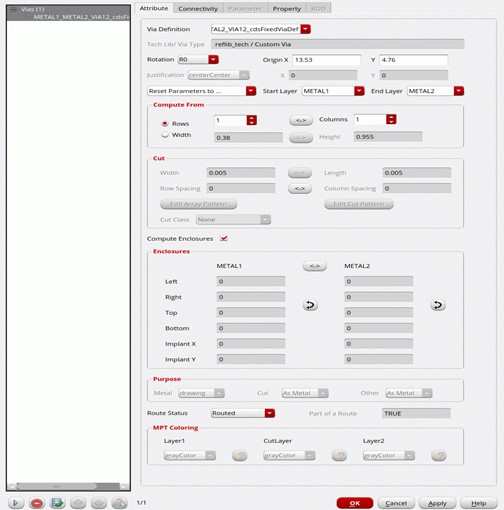
To examine a cdsFixedVia in Virtuoso:
- Select the cdsFixedVia in Virtuoso.
- Open the Edit Via Properties form. The Via Definition field displays the via definition in the Rapid MSOA PDK that was used to create the via.
Note: In the current implementation, all Virtuoso applications continue to show Via Type for a cdsFixedVia as Custom Via.
14.3.3.2 Need for cdsFixedViaVariant
Sometimes, you may need to create a constraint group (CG) containing the customVias in the CG's validViasList. For example, suppose a Non-Default Rule (NDR) is created containing a list of the custom vias to be used with that NDR. Given that currently cdsFixedVias cannot be in the validViasList of a CG such as a NDR, Innovus was enhanced to store these custom vias as cdsFixedViaVariants. The name of the equivalent cdsFixedViaVariant will be used by both Innovus and Virtuoso to refer to a particular custom via.
So in a typical design saved by Innovus, you may see cdsFixedVias (used to store custom vias contained in the design) as well as cdsFixedViaVariants (used to store custom vias that are in the validViasList of certain CGs such as NDRs). In the NDR example, if you query the NDR in Innovus, the name of the cdsFixedViaVariant will be displayed. Similarly, the name of the cdsFixedViaVariant will be displayed in Virtuoso as well.
14.4 Examples
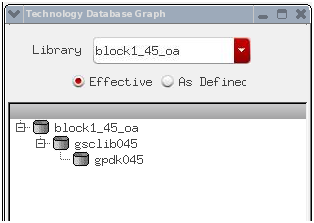
When lef2oa is run, the software converts the input LEF file into an OpenAccess file. You can view the customViaDefs that were carried over from the LEF file in the gsclib045 library:
Sample customViaDefs in the OpenAccess tech file:
;********************************
; VIADEFS
;********************************
viaDefs(
customViaDefs(
;( viaDefName libName cellName viewName layer1 layer2 resistancePerCut)
;( ---------- ------- -------- -------- ------ ------ ----------------)
( M11_M10_1x2_VH_S gsclib045 M11_M10_1x2_VH_S via Metal10 Metal11 0.0)
( M11_M10_1x2_VH_N gsclib045 M11_M10_1x2_VH_N via Metal10 Metal11 0.0)
( M11_M10_2x1_VH_W gsclib045 M11_M10_2x1_VH_W via Metal10 Metal11 0.0)
( M11_M10_2x1_VH_E gsclib045 M11_M10_2x1_VH_E via Metal10 Metal11 0.0)
( M11_M10_M_SH gsclib045 M11_M10_M_SH via Metal10 Metal11 0.0)
( M11_M10_M_NH gsclib045 M11_M10_M_NH via Metal10 Metal11 0.0)
By scrolling further down in the tech file, you can view the LDRS. The LDRS constraint group contains the validVia list:
interconnect(
( validLayers (Metal1 Metal2 Metal3 Metal4 Metal5 Metal6 Metal7 Metal8 Metal9 Metal10 Metal11 ) )
( validVias (M2_M1 M3_M2 M4_M3 M5_M4 M6_M5 M7_M6 M8_M7 M9_M8 M10_M9 M11_M10 M2_M1_HV M2_M1_VV M2_M1_VH M2_M1_HH M2_M1_2x1_HV_E M2_M1_2x1_HV_W M2_M1_1x2_HV_N M2_M1_1x2_HV_S M3_M2_VH M3_M2_HH M3_M2_HV M3_M2_VV M3_M2_M_NH M3_M2_M_SH M3_M2_2x1_VH_E M3_M2_2x1_VH_W M3_M2_1x2_VH_N M3_M2_1x2_VH_S M4_M3_HV M4_M3_VV M4_M3_VH M4_M3_HH M4_M3_M_EV M4_M3_M_WV M4_M3_2x1_HV_E M4_M3_2x1_HV_W M4_M3_1x2_HV_N M4_M3_1x2_HV_S M5_M4_VH M5_M4_HH M5_M4_HV M5_M4_VV M5_M4_M_NH M5_M4_M_SH M5_M4_2x1_VH_E M5_M4_2x1_VH_W M5_M4_1x2_VH_N M5_M4_1x2_VH_S M6_M5_HV M6_M5_VV M6_M5_VH M6_M5_HH M6_M5_M_EV M6_M5_M_WV M6_M5_2x1_HV_E M6_M5_2x1_HV_W M6_M5_1x2_HV_N M6_M5_1x2_HV_S M7_M6_VH M7_M6_HH M7_M6_HV M7_M6_VV M7_M6_M_NH M7_M6_M_SH M7_M6_2x1_VH_E M7_M6_2x1_VH_W M7_M6_1x2_VH_N M7_M6_1x2_VH_S M8_M7_HV M8_M7_VV M8_M7_VH M8_M7_HH M8_M7_M_EV M8_M7_M_WV M8_M7_2x1_HV_E M8_M7_2x1_HV_W M8_M7_1x2_HV_N M8_M7_1x2_HV_S M9_M8_VH M9_M8_HH M9_M8_HV M9_M8_VV M9_M8_M_NH M9_M8_M_SH M9_M8_2x1_VH_E M9_M8_2x1_VH_W M9_M8_1x2_VH_N M9_M8_1x2_VH_S M10_M9_HV M10_M9_VV M10_M9_VH M10_M9_HH M10_M9_2x1_HV_E M10_M9_2x1_HV_W M10_M9_1x2_HV_N M10_M9_1x2_HV_S M11_M10_VH M11_M10_HH M11_M10_HV M11_M10_VV M11_M10_M_NH M11_M10_M_SH M11_M10_2x1_VH_E M11_M10_2x1_VH_W M11_M10_1x2_VH_N M11_M10_1x2_VH_S ) )
) ;interconnect
) ;LEFDefaultRouteSpec_gsclib045
14.4.1 Setting the LDRS in Virtuoso Layout Suite
From Virtuoso Layout Suite XL:
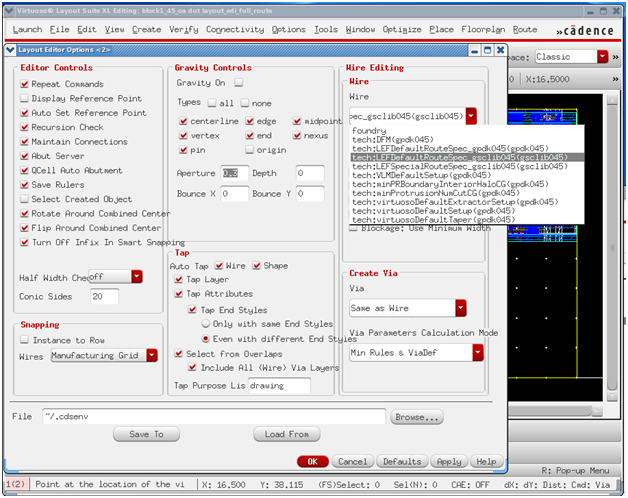
- Open the Layer Editor Options form by selecting Options - Editor.
- On the Layout Editor Options form, specify the LDRS (constraint group) to be used.
- Set Create Via to Same as Wire or to a specific LDRS. The is important because the Create Via form reflects the via spacing values in the constraint group selected here.
- Click OK.
- Open the Create Via form by selecting Create - Via.
The Create Via form now displays all the vias in the ValidVia list of the LDRS from the gsclib045 tech file.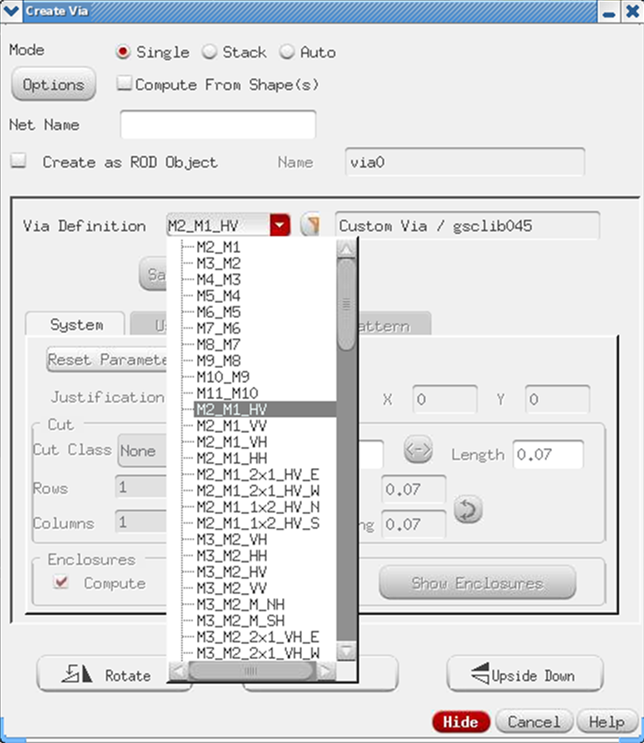
14.4.2 Checking Vias in the Tech File
Innovus provides a couple of ways to review the vias that are part of the tech file and/or are generated in Innovus:
14.4.2.1 Viewing Vias Interactively
In Innovus, you can view vias interactively. To do so, select a via and press the F4 function key. This displays all vias as seen below.
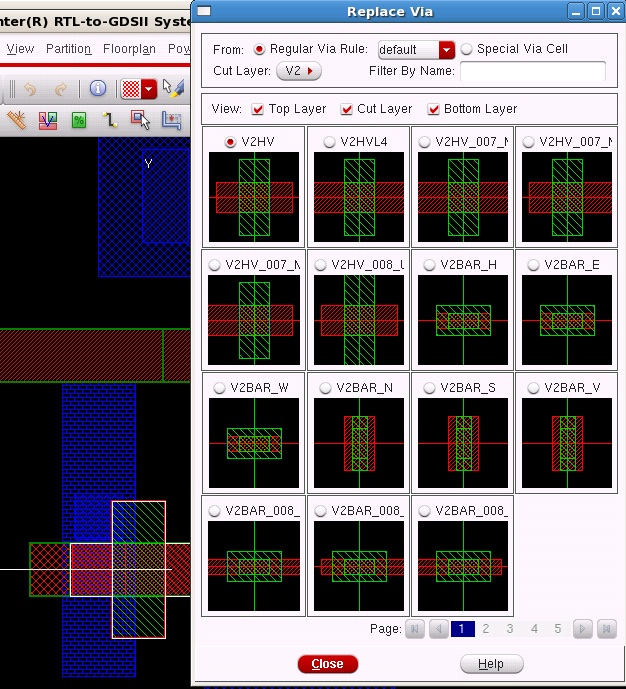
You can use appropriate filtering options as per your requirements to update the list of via cell thumbnails.
14.4.2.2 Using write_lef_library -tech_only
Use the following command to write technology data from the LEF file in Innovus to the specified file:
innovus 33> write_lef_library -tech_only generateVias.lef
The sample output file contains via information, such as follows:
VIARULE M2_M1 GENERATE DEFAULT
LAYER Metal1 ;
ENCLOSURE 0.005 0.03 ;
LAYER Metal2 ;
ENCLOSURE 0.005 0.03 ;
LAYER Via1 ;
RECT -0.035 -0.035 0.035 0.035 ;
SPACING 0.14 BY 0.14 ;
RESISTANCE 5 ;
END M2_M1
VIA M11_M10_1x2_VH_S DEFAULT
LAYER Metal10 ;
RECT -0.105 -0.49 0.105 0.13 ;
LAYER Via10 ;
RECT -0.09 -0.45 0.09 -0.27 ;
RECT -0.09 -0.09 0.09 0.09 ;
LAYER Metal11 ;
RECT -0.14 -0.48 0.14 0.12 ;
END M11_M10_1x2_VH_S
14.4.2.3 Using dumpOutVias
Use the following command to dump out vias to a specified file:
innovus 34> dumpOutVias -file generatedVias.out
In the dumpOutVias output, each via is described using fixed via constructs. You can identify a custom or fixed via by the LEF keyword that appears after the via name. Similarly, the AUTOGEN keyword appears after the vias generated by the via generator software. The output file is still a valid LEF file. However, you should use it only for visualization purposes.
Sample output:
VIA M2_M1_VV DEFAULT # LEF
LAYER Metal1 ; RECT -0.0400 -0.0650 0.0400 0.0650 ;
LAYER Metal2 ; RECT -0.0400 -0.0650 0.0400 0.0650 ;
LAYER Via1 ;
RECT -0.0350 -0.0350 0.0350 0.0350 ;
END M2_M1_VV
VIA M2_M1_HV DEFAULT # LEF
LAYER Metal1 ; RECT -0.0650 -0.0400 0.0650 0.0400 ;
LAYER Metal2 ; RECT -0.0400 -0.0650 0.0400 0.0650 ;
LAYER Via1 ;
RECT -0.0350 -0.0350 0.0350 0.0350 ;
END M2_M1_HV
VIA M2_M1_2x1_VV_E DEFAULT # AUTOGEN
LAYER Metal1 ; RECT -0.0400 -0.0650 0.1800 0.0650 ;
LAYER Metal2 ; RECT -0.0400 -0.0650 0.1800 0.0650 ;
LAYER Via1 ;
RECT -0.0350 -0.0350 0.0350 0.0350 ;
RECT 0.1050 -0.0350 0.1750 0.0350 ;
END M2_M1_2x1_VV_E
VIA M2_M1_2x1_HH_E DEFAULT # AUTOGEN
LAYER Metal1 ; RECT -0.0650 -0.0400 0.2050 0.0400 ;
LAYER Metal2 ; RECT -0.0650 -0.0400 0.2050 0.0400 ;
LAYER Via1 ;
RECT -0.0350 -0.0350 0.0350 0.0350 ;
RECT 0.1050 -0.0350 0.1750 0.0350 ;
END M2_M1_2x1_HH_E
14.5 Directing the Router to Use Only the Vias in the ITDB in Innovus
By default, power routing (sroute) looks through all the via rules to identify the best-matched via. This leads to differences in behavior in the OA and LEF/DEF flows. This may also cause issues when you are using the NanoRoute engine for the routing signal flow.
To prevent such issues, use the following setting in the flow to force the power router to use only the vias available in the ITDB:
setViaGenMode -viarule_preference [dbGet head.viaRuleGenerates.name *xxxx*]
Note: In future releases, this setting will be enhanced to support multiple naming convention for vias.