
13.1 Overview
NanoRoute High Frequency Router (NRHF) is a high frequency router introduced in the Innovus 16.1 release to address the custom and high-frequency routing needs of mixed-signal users. Built on the NanoRoute infrastructure, it provides full interoperability between various Cadence tools. NRHF supports a multiple-entry mechanism for routing constraints. Routing constraints can be entered through the Integration Constraint Editor (ICE) in Innovus or through the Constraint Manager in Virtuoso. For constraints entered in Virtuoso, the OpenAccess-based flow should be used.
NRHF supports the following specialty routing features:
- Simple shielding (Parallel shielding)
- Differential pair
- Match length, where a net’s length is matched with another net or group of nets
- Layer match
- Resistance match routing, based on the resistance input provided
- Bus routing (also supports split bus)
- Non-default rule (NDR) with any combination of the above constraints
- Length match routing, where a net is routed to match the length specified in the constraint
13.2 Invoking NRHF
Before you invoke NRHF, make sure that the design has routing constraints. Constraints can be added to the design through the following methods:
- Using the Integration Constraint Editor (ICE) in Innovus - Refer to the "Creating Interoperable Routing Constraints Using Innovus" section in the Routing Constraint Interoperability chapter for details on creating interoperable constraints in Innovus.
- Using the Constraint Manager in Virtuoso - Refer to the "Creating/Viewing Interoperable Routing Constraints in Virtuoso" section in the Routing Constraint Interoperability chapter for details.
- Using the
setIntegRouteConstraintcommand directly at the Innovus command prompt - By sourcing
setIntegRouteConstraintusing a file
After ensuring that the design has routing constraints, you can invoke NRHF by using the following command:
> routeDesign -highFrequency
13.3 Controlling NRHF Routing
Most mixed-signal users do the pre-routes on the top level before or after the placement of standard cell and blocks. Therefore, NRHF can be invoked before or after the placement of standard cells and blocks. By default, NRHF will route all nets that have routing constraints. To route only specific nets, you can use the following set of commands: Note: A net will not be routed by NRHF if no constraints are present and You can also control the routing order followed by NRHF by using the following commands: Here, If Regular NanoRoute does not disturb the routes created by NRHF for By default, NRHF tries to avoid DRC violations during routing. However, it might leave a few DRC violations because of pin access problems. In such situations, you can use the following flow to repair the violations using NanoRoute. This set of commands invokes NanoRoute ECO and does not call the NRHF router: > setNanoRouteMode -route_selected_net_only true> routeDesign -highFrequencysetNanoRouteMode -route_selected_net_only true is used. Partially routed nets are also not routed.> setNanoRouteMode -route_high_freq_constraint_groups {order bus pair match shield net}> routeDesign -highFrequency-route_high_freq_constraint_groups is used to restrict routing to only the specified constraint groups. If some groups are not in the list, they are not routed. The legal values for constraint groups are net, match, bus, pair, and shield, with match referring to all types of match constraints, such as match length, layer match, and resistance match. order is specified before the routing style arguments, NRHF honors the order in which the routing style constraint groups are specified. If order is not specified, NRHF determines the order. bus, pair (diff pair), and match constraints. For net and shield constraints, NRHF might disturb the existing routing. In general, most of the NanoRoute options are honored by NRHF. setNanoRouteMode -route_high_freq_search_repair truerouteDesign -highFrequency
Note: verify_drc cannot be used to check NRHF routes. If you are using an OpenAccess-based flow, you can use the Physical Verification System Constraint Validation (PVS-CV) tool to check NRHF routes against constraints and flag any issues.
13.4 Supported Routing Styles
NRHF supports the following routing styles:
- Non-default Routing
- Shielding
- Differential Pair
- Match Length
- Resistance Match
- Layer Match
- Bus Routing
- Length Control
These routing styles are described below.
13.4.1 Non-default Routing
NRHF supports regular Non-default Routing (NDR) just like traditional NanoRoute. You can set a netClass constraint type with NDR through ICE. You can use an existing NDR or create a new design NDR and attach it to the net. You can also add layer control to the NDR rule. An NDR can also be added to other constraint types, such as differential pair, match length, bus, layer match and resistance match. If an NDR is not attached to any net, default rules are used by the router.
Example:
setIntegRouteConstraint -type netClass -net {DTMF_INST/digsynca} -rule NDR2 -topLayer Metal5 -bottomLayer Metal1
setIntegRouteConstraint -type netClass -net {DTMF_INST/digsync3 DTMF_INST/digsync4} -rule DOUBLE_WIDTH -topLayer Metal5 -bottomLayer Metal1 -shieldNet VSS -connectSupply anyPoint -shieldType side
13.4.2 Shielding
For shielding, NRHF calls the NanoRoute code. Shielding can be used along with other styles of routing, such as differential pair, length match, layer match, resistance match, bus routing and NDR. Currently, only side shield is supported in NRHF and shield width and shield gap are not supported. The default shield width is used, and the default gap is translated to tracks. NRHF snaps the routes to the nearest track. Shields can be floating or can be connected to any point of the power or ground. Shields are not guaranteed to cover the shielded net completely.
Example:
setIntegRouteConstraint -type diffPair -net {DTMF_INST/dout[15] DTMF_INST/dout[14]} -rule wide -topLayer Metal6 -bottomLayer Metal1 -shieldNet VSS -connectSupply anyPoint -shieldType side -tolerance 20.0
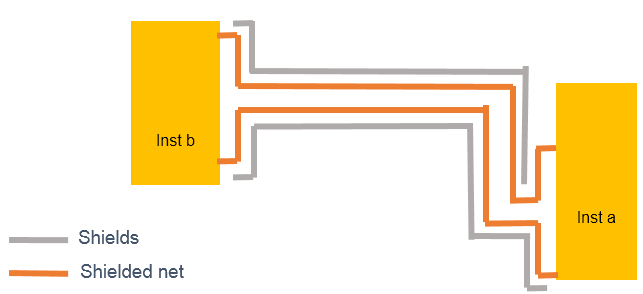
Note: Currently, the shield constraint type alone is not supported by NRHF through the setIntegRouteConstraint command. If you want NRHF to route just the shield constraint, add a netClass or diffPair constraint and specify the shield information as follows:
setIntegRouteConstraint -type netClass -net {neta netb} -shieldNet VSSsetIntegRouteConstraint -type diffPair -net {neta netb} -shieldNet VSS
13.4.3 Differential Pair
Differential pair nets are symmetrical nets that are constrained by width and spacing. Width and spacing can be provided through an NDR. Additionally, NRHF also supports the use of a minimum cut, if specified through an NDR. If an NDR is not used, you can also explicitly specify the differential pair gap in the constraint. NRHF would also honor the top/bottom layer control if specified in the constraint.
If the differential pair needs to be shielded, you can specify the shield constraint along with the differential pair constraint. NRHF currently does not support shieldWidth and shieldGap. It tries to match the routes as close as possible.
Example
setIntegRouteConstraint -type diffPair -net {DTMF_INST/digsync1 DTMF_INST/digsync2} -rule NDR2 -layerGap {Metal1 0.1 Metal2 0.1 Metal3 0.1 Metal4 0.1 Metal5 0.1 Metal6 0.1} -shieldWidth {Metal1 1 Metal2 1 Metal3 1 Metal4 1 Metal5 1 Metal6 1} -shieldGap {Metal1 1 Metal2 1 Metal3 1 Metal4 1 Metal5 1 Metal6 1} -topLayer Metal5 -bottomLayer Metal1 -shieldNet VSS -connectSupply anyPoint -shieldType side -tolerance 5
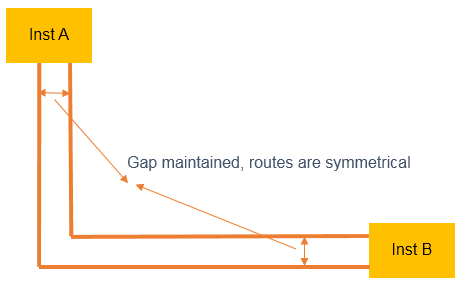
Differential Pair Routing
13.4.4 Match Length
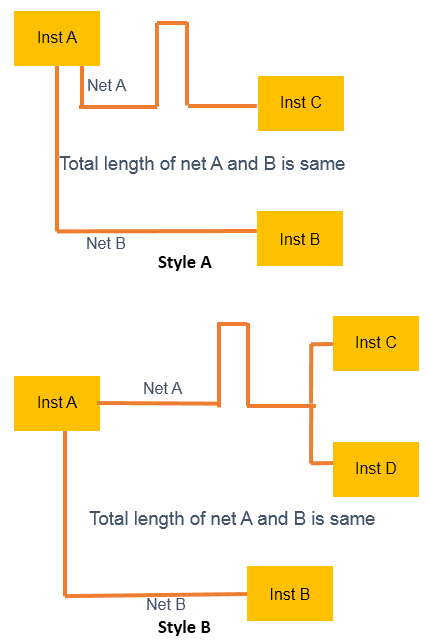
If a match length constraint is specified, NRHF matches the output pin to input pin path length. NRHF also supports multi sink. Trombones or accordions are created to match lengths between the nets. NRHF matches to the requested value only if all the nets can be matched to that length. If not, it matches all nets to the length of the longest net.
Note: The router does not try to make the layers match.
13.4.5 Resistance Match
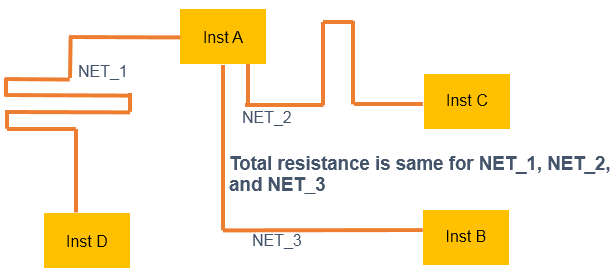
The router behavior for resistance match constraints is very similar to that of the length matching algorithm, except that instead of matching the length, the router uses the resistance value in the constraint to match the nets. The router calculates the resistance of each wire segment, including the vias, to calculate the resistance of a net. For multi-fanout nets, the effective resistance is calculated and used to match other nets. Basically, the router tries to match the output pin to input pin path resistance. Currently, the router does not alter the route width but tries to create the accordion or trombone topology to match resistance.
Notes:
- NRHF uses the layer/cut resistance values based on what Innovus database has either from LEF or the timing library. In the 16.1 release, you can specify the resistance values for each layer/cut with the constraint.
- The router does not try to make the layers match.
- Starting 17.1, NRHF has been enhanced to use the Quantus database for accurate resistance calculation.
Example
setIntegRouteConstraint -type matchLength -net {NET_1 NET_2} -rule default -hierarchicalScope local -topLayer Metal7 -bottomLayer Metal5 -tolerance 20 -matchStyle accordion -minRes 0.3 -maxRes 0.4
13.4.6 Layer Match
When Layer Match is enabled, the router will try to match the layers. In layer matching, all the nets are divided into multi-level from output pin to input pin. Each level contains the segment from pin/steiner to the next pin/steiner. For layer match routing, the router assumes that all output pins have the same number of levels to all input pins.
Example
setIntegRouteConstraint -type matchLength -name msMatchedPair_3_DTMF_INST/digsyncbDTMF_INST/digsyncc -tolerance 5 -matchStyle accordion -layerMatch -rule NDR2 -topLayer Metal5 -net {DTMF_INST/digsyncb DTMF_INST/digsyncc DTMF_INST/digsyncd}
13.4.7 Bus Routing
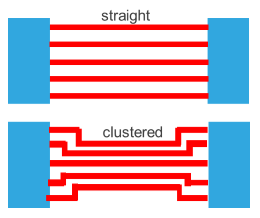
NRHF has a very robust bus routing algorithm. The router supports a simple bus, with bus pins facing each other, as well as more complex bus requirements. For complex bus requirements, the router uses different types of patterns like z, inverted z and so on. By default, the router clusters all the pins and routes with the default gap (pin gap or given bus gap). You can modify this behavior by using -accessStyle straight option through the ICE commands. See Example 4 below.
In addition to the NDR specification, you can control the routing using top/bottom layer control. You can also shield the bus routes. If the bus bits have enough spacing and will not cause any DRC violation, the router interleaves the shields. Otherwise, the bus will be only shielded on the sides. If you need a specific topology for each bus, you can specify bus guides and NRHF would honor them. If the pins are not the same width as the routes, the router will automatically taper to the pins.
By default, NRHF shields the bus only on the sides and does not interleave. To enable interleaving, use the interleaved option with the -shieldType option as shown in Example 2 below.
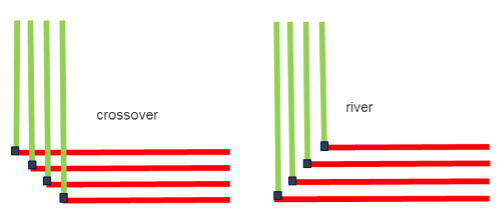
For some designs that need the control of corner style, you can choose between crossover or river routing by using the -cornerStyle crossover or -cornerStyle river options for each bus specified in the ICE constraint. See Example 3 below. The default style is crossover.
By default, NRHF chooses its own path for routing, based on the built-in heuristics. If you want to override this, you can create a bus guide prior to calling NRHF and the router will honor the guide. Buses are generally routed in the preferred direction; if you want to have planar bus routing, a bus guide is a must.
Example 1
setIntegRouteConstraint -type bus -net {DTMF_INST/dxout[0] DTMF_INST/dxout[15] DTMF_INST/dxout[8] DTMF_INST/dxout[2] DTMF_INST/dxout[5] DTMF_INST/dxout[6] DTMF_INST/dxout[11] DTMF_INST/dxout[7] DTMF_INST/dxout[3] DTMF_INST/dxout[9] DTMF_INST/dxout[14] DTMF_INST/dxout[12] DTMF_INST/dxout[1] DTMF_INST/dxout[13] DTMF_INST/dxout[4] DTMF_INST/dxout[10]} -rule default -hierarchicalScope local -topLayer Metal6 -bottomLayer Metal1 -tolerance 20.0
Example 2
setIntegRouteConstraint -type bus -net {DTMF_INST/dxout[0] DTMF_INST/dxout[15]DTMF_INST/dxout[8]DTMF_INST/dxout[2]} -rule default -layerGap { Metal3 1 Metal4 1 Metal5 1 } -hierarchicalScope local -topLayer Metal5 -bottomLayer Metal3 -shieldNet avdd_h -shieldType interleaved -minBusBit 1
Example 3
setIntegRouteConstraint -type bus -net {DTMF_INST/dxout[0] DTMF_INST/dxout[15]DTMF_INST/dxout[8]DTMF_INST/dxout[2]} -rule default -layerGap { Metal2 2.5 Metal3 2.5 } -hierarchicalScope local -topLayer Metal3 -bottomLayer Metal2 -cornerStyle river
Example 4
setIntegRouteConstraint -type bus -net {itc2\[0\] itc2\[1\] itc2\[3\]itc2\[4\]..} -rule default -layerGap { Metal6 2.5 Metal7 2.5 } -hierarchicalScope local -topLayer Metal7 -bottomLayer Metal6 -minBusBit 2 -accessStyle straight
13.4.8 Length Control
NRHF also enables you to restrict the length of nets within a specified range. You can specify the minimum and maximum lengths in um to be applied to the given nets through the setIntegRouteConstraint command. The router tries to restrict the routing within the specified minimum and maximum lengths. This applies to multi-fanout nets as well. In multi-fanout nets, NRHF honors the given length for each source to sink.
Example
setIntegRouteConstraint -type matchLength -net {NET_1 NET_2} -rule default -hierarchicalScope local -topLayer Metal7 -bottomLayer Metal4 -tolerance 20 -matchStyle accordion -minLength 78 -maxLength 100