
1
Overview
The purpose of this chapter is to provide an introduction to the Dracula® standalone physical verification product.
This chapter focuses primarily on the following:
Introducing Dracula
The Dracula product is a suite of software tools that is acknowledged as an industry standard for Integrated Circuit (IC) design verification. The following features describe Dracula’s advantages over other verification products:
-
Accuracy
Dracula software locates true errors and eliminates false ones. Dracula’s accuracy is accomplished with the following:- Electrical node description and label stamping
- Element, device, and circuit descriptions
- All-angle geometry checking
- Advanced checking to verify state-of-the-art deep submicron designs
- Exhaustive testing by Cadence and its customers
Dracula software represents all-angle geometries as trapezoidal data. This data representation technique is applied in hierarchical form to the disk storage, memory, and checking and extraction processes. -
Speed and efficiency
Dracula features a trapezoidal database that gives the checking algorithms fast, efficient access to the layout data.
A band scan approach to data processing increases performance and makes resource requirements directly proportional to the size of the IC layout. -
Interactive processing
An interactive preprocessor drives Dracula. The following features are easy to use and can increase your productivity: -
A fully integrated system
Dracula offers a full tool suite to meet most verification needs:- DRC to ensure the chip is processed correctly
- LVS and ERC to ensure the chip is electrically correct
- LPE and PRE parasitic data that is used by simulators to ensure the chip performs to specifications
- Mask generation for accuracy
These modules are integrated and work from the same database to ensure a smooth transition through each phase of IC verification.
Flat and Hierarchical Databases
Dracula offers three approaches to design verification: flat Dracula, hierarchical Dracula, and distributed Dracula.
- Flat Dracula Best for verifying small to large databases. Sold as Dracula II.
- Hierarchical Dracula Best for verifying large hierarchical databases. Sold as Dracula III.
- Distributed Dracula Best for very large flat databases. It flattens hierarchical databases.
All three products support all Dracula applications (DRC, LVS, ERC, LPE, PRE) and require similar rules files. All features described in this manual apply to hierarchical Dracula. Some apply to hierarchical Dracula only, but not to flat Dracula. Information that applies to hierarchical Dracula only is identified in the section title or by an  icon in the margin.
For more information about hierarchical checking, refer to the section, “Introducing Hierarchical Dracula”.
Dracula Applications
Dracula offers a complete set of integrated applications for verifying IC layout designs. This section describes each of the Dracula applications.
-
Design Rules Checker (DRC)
DRC performs geometric spacing checks on the layout to ensure it can be manufactured under a specified IC process technology. The DRC system is process-technology-independent; you can write different Dracula rules files for different process technologies.
DRC has a resizing capability that performs complex resizing and checking before producing the final mask geometries. Dracula can resize layouts based on mask or silicon size and can accommodate the design rule requirements of new or modified process technologies. -
Electrical Rules Checker (ERC)
ERC checks for shorted circuits, open circuits, and floating nodes. ERC isolates errors down to the shortest connection path for shorted circuits. ERC performs process-technology-independent and process-technology-dependent electrical rule checks. ERC detects the following process-dependent errors: -
Layout Versus Schematic (LVS)
LVS compares the IC layout to the schematic and reports discrepancies in the layout interconnection. LVS is process-independent and interfaces to logic simulation languages and schematic entry systems. A trace capability feature facilitates error isolation and identification. -
Layout Versus Layout (LVL)
LVL compares two mask layout databases at the device or gate level and reports discrepancies in the interconnections and in specified device parameters. -
Schematic Versus Schematic (SVS)
SVS compares two schematics. -
Layout Parameter Extraction (LPE)
LPE computes and extracts the following key electrical parameters from IC layouts:- Fixed capacitance of nodes
- Areas and perimeters of diodes
- Gate size of transistors
- Areas and perimeters of bipolar transistors
- Beta ratios
LPE uses extracted parameters from LVS consistency checks. It automatically flattens specified portions of the design hierarchy. -
Parasitic Resistance Extraction (PRE)
PRE enhances LPE by extracting parasitic resistance created by any of the conduction layers in the layout. With LPE and PRE, you can extract resistance and capacitance parameters in the interconnect layers of the layout and thus generate accurate simulations for the most critical designs.
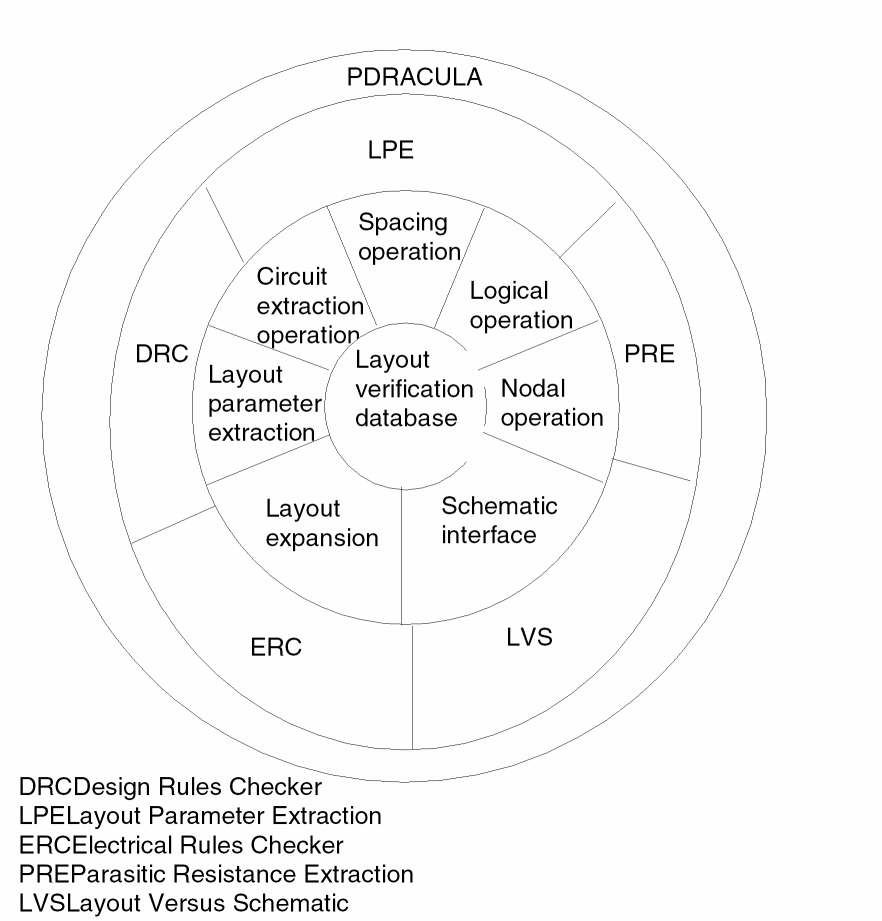
You run the Dracula applications using the preprocessor, PDRACULA. PDRACULA controls execution and most of the file management functions, eliminating the need for complex job control languages. PDRACULA provides tools for both the IC process engineer who maintains the design rules and the designer who runs Dracula and interprets the results.
The following figure shows the interaction between the preprocessor and Dracula application programs. PDRACULA is the outermost shell of the verification system. It controls the Dracula applications that perform verification operations on the layout database.
Dracula Interfaces
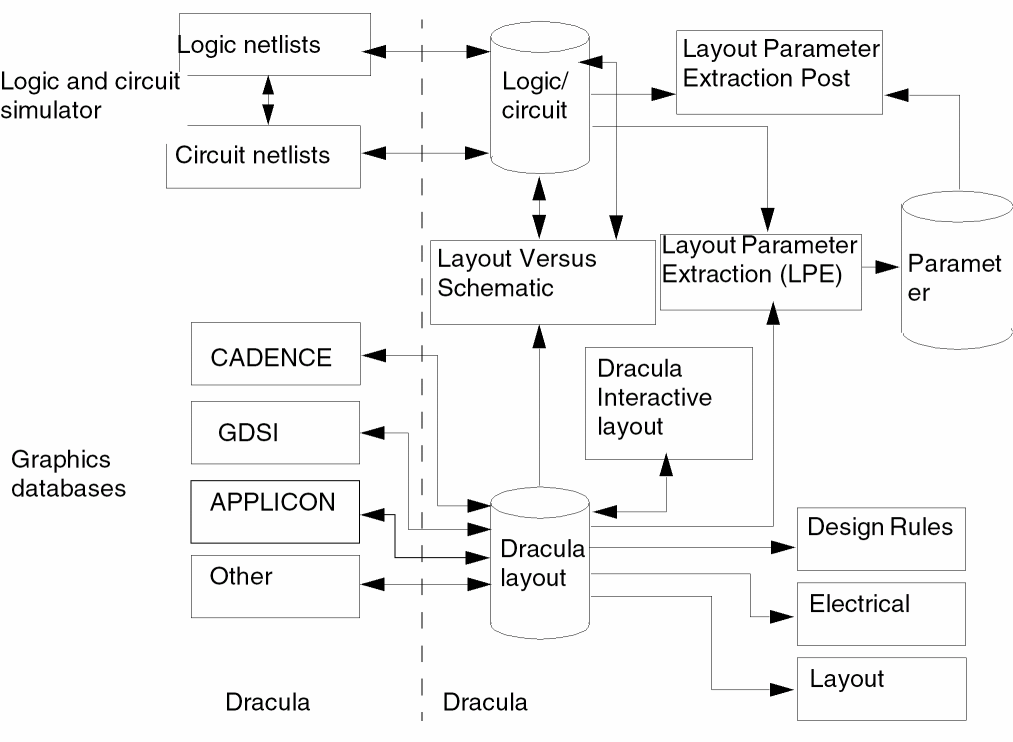
Dracula offers a full set of software that links the major steps of the IC design process. Interfaces are available for all commonly used logic and circuit simulators, graphics systems, and workstations.
The following figure shows the interfaces that Dracula supports and illustrates how the interfaces work with the Dracula tool set.
Introducing Hierarchical Dracula
Hierarchical Dracula is a complete IC layout verification program that uses the IC design hierarchy to improve verification performance and throughput. Hierarchical Dracula supports the following Dracula applications:
- Hierarchical Design Rules Checking (HDRC)
- Hierarchical Electrical Rules Checking (HERC)
- Hierarchical Layout Versus Schematic (HLVS)
- Hierarchical Layout Parameter Extraction (HLPE)
- Hierarchical Parasitic Resistance Extraction (HPRE)
- New Hierarchical Layout Versus Schematic (NHLVS)
-
Hierarchical Netlist Versus Netlist (HNVN)
Hierarchical Structure
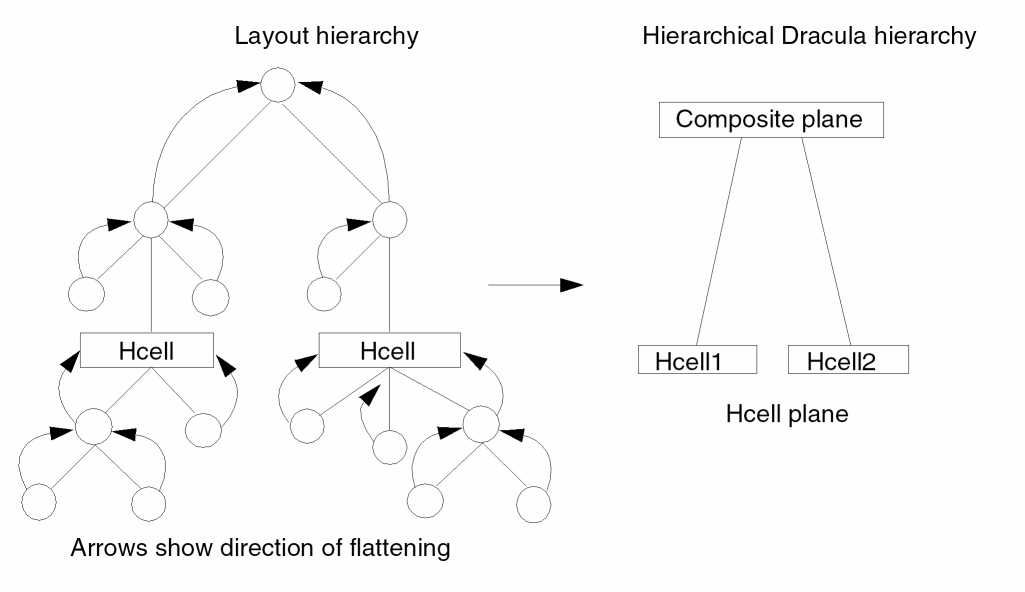
Hierarchical Dracula uses two levels of hierarchy: the Hcell plane and the composite plane.
The Hcell plane contains a set of cells chosen from the cell hierarchy. The system can choose these Hcells automatically, or the designer can choose them. The selected cells, referred to as Hcells, can be intermediate- or bottom-level cells in the layout hierarchy. Dracula expands all cells nested in an Hcell and brings them up to the Hcell plane.
The composite plane is the top level of the hierarchy. Dracula expands all cells that are not Hcells and are not contained in Hcells and brings them to the top level. This results in two levels of hierarchy, regardless of the number of levels of hierarchy in the original database.
The composite plane does not need to be the top level of your design. It can be an intermediate cell that is verified as a composite plane in one Dracula run and verified as an Hcell plane in another run.
Hierarchical Dracula uses the hierarchy of the layout database to reduce redundant operations in the following ways:
- Dracula performs operations in Hcells only once, even though these cells can be placed many times in the layout.
- Dracula recognizes the same cell-to-cell and cell-to-composite relationships and processes them once for HDRC.
This reduction gives a more concise DRC error summary by eliminating redundant error reports in multiple cell placements and reducing the time needed for verification.
HDRC operations do not assume or impose special restrictions, design methodologies, or layout limitations. These operations allow overlaps between cells so that geometries from the top level or from a given cell can penetrate or completely cross through without requiring protection frames or cell boundaries around each cell.
Functions Not Available in Hierarchical Rules Files
Although the rules file for hierarchical and flat mode Dracula are similar, you cannot use the following functions in hierarchical rules files:
Hierarchical Dracula Modes
Hierarchical Dracula operates in four different modes: flat, cell, hierarchical, and composite. To specify the mode you want, use the CHECK-MODE command in the Description block.
-
Flat Mode
If you do not use the CHECK-MODE command, flat mode is the default. Flat mode provides all Dracula capabilities and accepts rules files written for flat mode Dracula.
If you are new to Dracula, begin in flat mode. After you develop proficiency in DRC, ERC, LVS, and LPE, use the other modes for hierarchical operations. -
Cell Mode
Cell mode verifies a group of selected Hcells and reports errors on a cell-by-cell basis.
Use cell mode to check selected cells only. Do not use cell mode to check an entire layout. -
Hierarchical Mode
In hierarchical mode, HDRC checks the Hcells and the composite plane, as well as all Hcell-to-Hcell interfaces and Hcell-to-composite interfaces. Use hierarchical mode for HDRC only. -
Composite Mode
Composite mode extracts interconnect information from cells then processes composite, cell, cell-to-cell, and composite-to-cell interconnect information for HERC and HLVS. It processes only composite information for HLPE. Running HLVS in both cell mode and composite mode achieves a complete layout-to-netlist check.
Use composite mode for HDRC, HERC, HLVS, HLPE, and HPRE.
Return to top