
B
Fluid Guard Ring Environment Variables
This appendix covers the FGR-specific Layout environment variable names, descriptions, types, and values. For information about the other Virtuoso® Layout Suite L layout editor and graphics editor environment variables, refer to the Environment Variables appendix in the Virtuoso Layout Suite L User Guide.
The graphic environment variables control the characteristics of the window display and the layout environment variables control how various layout editor commands work. Many graphic environment variables have duplicate layout environment variables. In these cases, the layout variable supersedes the graphic variable unless the graphic variable is stored in the cellview. You can set both graphic and layout environment variables.
Setting Layout Environment Variables
You can set the environment variables in the following three ways:
- Within the .cdsenv File
- Within the .cdsinit File
- In the CIW
.cdsenv File
Add environment variables to the .cdsenv file when the settings should be applied while launching Layout L.
layoutenvironmentVariableNamedataTypevalue
layout fgrWrapPlaceAtMinimumDistance boolean t
.cdsinit File
Like the .cdsenv file, the environment variable settings saved in the .cdsinit file get applied when you launch Layout L.
Use the envSetVal() command, which has the following syntax, to add environment variables to the .cdsinit file:
envSetVal("layout" "environmentVariableName" 'dataTypevalue)
envSetVal("layout" "fgrWrapPlaceAtMinimumDistance" 'boolean t)
string, enclose its value within double quotes.CIW
Use the envSetVal() command in the CIW to set an environment variable for the duration of the current session. The syntax is the same as described above for the .cdsinit file.
envSetVal() command in any Cadence SKILL file that you load.If you use the CIW to set an environment variable that controls a widget on the currently open form, the implemented settings get reflected only after you close the form and then re-open it.
Displaying the Current Value of an Environment Variable
To determine the current value of any Layout L environment variable, use the following syntax in the CIW.
envGetVal("layout" "environmentVariableName")
Setting Shell Environment Variables
To set Shell environment variables, use the following syntax before starting the Virtuoso session:
setenv environmentVariableName
List of Environment Variables
Layout Environment Variables
deviceOrder
xFGR deviceOrder string { alphabetical | reverseAlphabetical | techfile }
Description
Specifies the order in which the devices are listed in the Device field in the Create Fluid Guard Ring form. The options are alphabetical, reverseAlphabetical, and techfile.
GUI Equivalent
Examples
envGetVal("xFGR" "alphabetical")
envSetVal("xFGR" "shape" 'string "alphabetical")
envSetVal("xFGR" "shape" 'string "reverseAlphabetical")
envSetVal("xFGR" "shape" 'string "techfile")
Related Topics
disableDerivedLayersInWrap
layout disableDerivedLayersInWrap boolean { t | nil }
Description
Disables the feature that ensures the minSpacing rule for a derived layer is considered when an FGR is created around its instances using the Wrap mode with the Place at Minimum Distance check box as selected.
GUI Equivalent
|
Place At Minimum Distance (Create Guard Ring Form (Old GUI)) |
Examples
envGetVal("layout" "disableDerivedLayersInWrap")
envSetVal("layout" "disableDerivedLayersInWrap" 'boolean t)
envSetVal("layout" "disableDerivedLayersInWrap" 'boolean nil)
Related Topics
fgrWrapPlaceAtMinimumDistance
layout fgrWrapPlaceAtMinimumDistance boolean { t | nil }
Description
Controls the selection of the Place at Minimum Distance check box on the Wrap tab of the Create Guard Ring form. When fgrWrapPlaceAtMinimumDistance is set to t, the Place At Minimum Distance check box is selected and the Enclose by field is disabled. However, setting the environment variable to nil, deselects the check box and makes the Enclose by field editable for specifying the guard ring distance from the object.
fgrWrapPlaceAtMinimumDistance environment variable to nil is recommended. GUI Equivalent
|
Place At Minimum Distance (Create Guard Ring Form (Old GUI)) |
Examples
-
Deselect the Place At Minimum Distance check box and make the Enclose by field editable:
envSetVal("layout" "fgrWrapPlaceAtMinimumDistance" boolean nil)
-
Return the current value of the
fgrWrapPlaceAtMinimumDistanceenvironment variable:envGetVal("layout" "fgrWrapPlaceAtMinimumDistance")
=> nil
Related Topics
fluidGuardRingInstallPath
layout fluidGuardRingInstallPath string "alternatePath"
Description
Enables you to specify the path from where the FGR-related SKILL files (vfo*.ils) are to be loaded. By default, the value string is empty, in which case these SKILL files are loaded from the following default release installation directory:
<install_dir>/tools/dfII/etc/vfo
vfo*.ils) is not recommended for customized FGRs. If you want to use it, contact your Cadence® Customer Support representative.
The default is "" (null string).
GUI Equivalent
Examples
Load the FGR-related SKILL files from a path other than the default release installation directory:
layout fluidGuardRingInstallPath string /grid/cic/tool.lnx86/dfII/etc/vfo
Related Topics
List of Environment Variables
grEnclosedBy
layout grEnclosedBy float any_positive_floating_point_number
Description
Initializes the Enclose by field on the Create Guard Ring form.
You can replace the default value with another floating point number by updating this environment variable. Otherwise, change the value for the Enclose by field by typing in the field on the Create Guard Ring form.
GUI Equivalent
Examples
envGetVal("layout" "grEnclosedBy")
envSetVal("layout" "grEnclosedBy" 'float 1.0)
Related Topics
List of Environment Variables
grMode
layout grMode string { Rectangular | Rectilinear }
Description
Sets the default FGR creation type in Wrap mode.
By default, this environment variable is set to Rectilinear. Therefore, when you launch the Create Guard Ring form, on the Wrap tab, the Rectilinear radio button is selected.
However, when you reset this environment variable to Rectangular, the Rectangular radio button appears as selected on the Wrap tab.
This environment variable is useful when you mostly create Rectangular type of FGR in Wrap mode and want that be selected as the default creation type each time you access the Create Guard Ring form.
GUI Equivalent
Examples
envGetVal("layout" "grMode")
envSetVal("layout" "grMode" 'string "Rectangular")
envSetVal("layout" "grMode" 'string "Rectilinear")
Related Topics
keepGuardRingEndsConnected
layout keepGuardRingEndsConnected boolean { t | nil }
Description
Controls whether a guard ring with touching ends will stay connected (t) or will result in opening up the guard ring (nil) during the Stretch and Quick Align command operations.
GUI Equivalent
Examples
envGetVal("layout" "keepGuardRingEndsConnected")
envSetVal("layout" "keepGuardRingEndsConnected" 'boolean t)
envSetVal("layout" "keepGuardRingEndsConnected" 'boolean nil)
Related Topics
vfoGRHideDevicesInCreateForm
layout vfoGRHideDevicesInCreateForm string "device_names"
Description
Specifies the FGR devices to be omitted from the Device drop-down list of the Create Guard Ring form. You can also use the vfoGRHideDeviceInForms property of the tfcDefineDeviceProp construct of the technology file to control the display of devices in the Create Guard Ring form.
GUI Equivalent
Examples
envGetVal("layout" "vfoGRHideDevicesInCreateForm")
envSetVal("layout" "vfoGRHideDevicesInCreateForm" 'string "M1_M2")
envSetVal("layout" "vfoGRHideDevicesInCreateForm" 'string "guardring1")
Related Topics
vfoShowOnlyFluidShapeForDrag
layout vfoShowOnlyFluidShapeForDrag boolean { t | nil }
Description
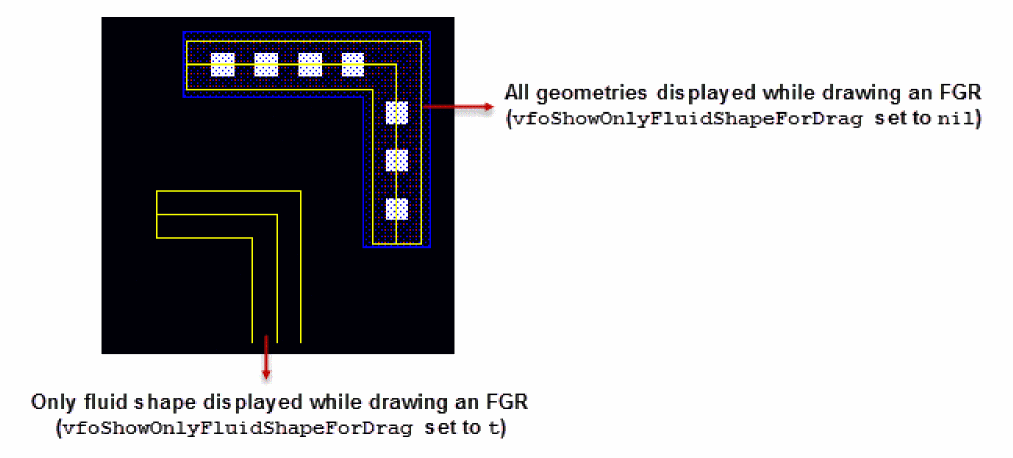
Controls the display of the fluid shape and other geometries like metal layer, diffusion layer, and contacts while drawing an FGR on the layout canvas.
When vfoShowOnlyFluidShapeForDrag is set to nil, all geometries including the fluid shape are visible as you draw the FGR on the layout canvas. However, setting the environment variable to t displays only the fluid shape. The figure below shows the difference in the two approaches.
GUI Equivalent
Examples
envGetVal("layout" "vfoShowOnlyFluidShapeForDrag")
envSetVal("layout" "vfoShowOnlyFluidShapeForDrag" 'boolean t)
envSetVal("layout" "vfoShowOnlyFluidShapeForDrag" 'boolean nil)
Related Topics
xFGR Environment Variables
autoChooseDevice
xFGR autoChooseDevice boolean { t | nil }
Description
Creates a fluid guard ring automatically if the vfoAssociatedDevices or vfoAssociatedRings properties have been defined for an FGR device.
GUI Equivalent
|
Choose Device Automatically (Create Fluid Guard Ring Form (New GUI)) |
Examples
envGetVal("xFGR" "autoChooseDevice")
envSetVal("xFGR" "autoChooseDevice" 'boolean nil)
Related Topics
creationMethod
xFGR creationMethod string { wrap | interactive }
Description
Sets the FGR creation method to one of the following values:
-
wrap: automatically creates a guard ring around the selected objects. -
interactive: lets you interactively enclose an object with the guard ring by defining the enclosing points on the canvas.
GUI Equivalent
|
Creation Method (Create Fluid Guard Ring Form (New GUI)) |
Examples
envGetVal("xFGR" "wrap")
envSetVal("xFGR" "creationMethod" 'string "interactive")
Related Topics
device
xFGR device string "device_names"
Description
Selects one of the installed FGR devices in the displayed technology library and its referenced technology libraries (ITDB).
GUI Equivalent
Examples
envGetVal("xFGR" "")
envSetVal("xFGR" "device" 'string "")
envSetVal("xFGR" "device" 'string "dev1")
envSetVal("xFGR" "device" 'string "new_device")
Related Topics
encloseByDistance
xFGR encloseByDistance float any_positive_floating_point_number
Description
Specifies the distance from the outermost layer of the fluid guard ring to the outermost layer of the enclosed device.
GUI Equivalent
|
Distance (Create Fluid Guard Ring Form (New GUI)) |
Examples
envGetVal("xFGR" "encloseByDistance")
envSetVal("xFGR" "encloseByDistance" 'float 1.0)
Related Topics
numOuterRings
xFGR numOuterRings int any_positive_integer
Description
Specifies the number of concentric rings of the guard ring to create around the selected objects.
GUI Equivalent
|
Number of Outer Rings (Create Fluid Guard Ring Form (New GUI)) |
Examples
envGetVal("xFGR" "numOuterRings")
envSetVal("xFGR" "numOuterRings" 'int 5)
Related Topics
outerRingsEncloseBy
xFGR outerRingsEncloseBy boolean { t | nil }
Description
Specifies a distance from the object at which the fluid guard ring should be placed.
GUI Equivalent
|
Enclose By (Create Fluid Guard Ring Form (New GUI)) |
Examples
envGetVal("xFGR" "outerRingsEncloseBy")
envSetVal("xFGR" "outerRingsEncloseBy" 'boolean t)
envSetVal("xFGR" "outerRingsEncloseBy" 'boolean nil)
Related Topics
shape
xFGR shape string { rectangular | rectilinear | rectangle | polygonRing | polygonFill | path }
Description
Sets the shape of the FGR that is created. You can set the FGR shape as rectangular or rectilinear for wrap creation method. You can set the FGR shape as rectangle, polygon ring, polygon fill, or path for interactive creation method.
-
rectangular: Creates a rectangular guard ring around the shape. -
rectilinear: Creates a rectilinear guard ring around the shape. -
rectangle: Creates a rectangular guard ring. -
polygonRing: Creates a ring using the entered polygon points. -
polygonFill: Covers up the space between objects using the guard ring device material. -
path: Creates a path guard ring.
GUI Equivalent
Examples
envGetVal("xFGR" "rectangular")
envSetVal("xFGR" "shape" 'string "rectangular")
envSetVal("xFGR" "shape" 'string "rectilinear")
envSetVal("xFGR" "shape" 'string "rectangle")
envSetVal("xFGR" "shape" 'string "polygonRing")
envSetVal("xFGR" "shape" 'string "polygonFill")
envSetVal("xFGR" "shape" 'string "path")
Related Topics
wrapCommon
xFGR wrapCommon boolean { t | nil }
Description
Creates a common guard ring around the selected objects. When set to nil, individual guard rings are created around each selected objects.
GUI Equivalent
|
Wrap Common (Create Fluid Guard Ring Form (New GUI)) |
Examples
envGetVal("xFGR" "wrapCommon")
envSetVal("xFGR" "wrapCommon" 'boolean t)
envSetVal("xFGR" "wrapCommon" 'boolean nil)
Related Topics
wrapType
xFGR wrapType string { placeAtMinDistance | referenceLayer | encloseBy }
Description
Specifies the wrap type for the FGR.
-
placeAtMinDistance: Creates a rectangular guard ring around the shape. It uses theminSpacingrule defined for the object layer around which the FGR is created to compute the spacing between the guard ring and the object layer. -
referenceLayer: Lets you specify the reference layer for the FGR. -
encloseBy: Lets you specify a distance from the object at which the fluid guard ring is placed.
The default is placeAtMinDistance.
GUI Equivalent
|
Wrap Type (Create Fluid Guard Ring Form (New GUI)) |
Examples
envGetVal("xFGR" "rectangular")
envSetVal("xFGR" "wrapType" 'string "placeAtMinDistance")
envSetVal("xFGR" "wrapType" 'string "referenceLayer")
envSetVal("xFGR" "wrapType" 'string "encloseBy")
Related Topics
Shell Environment Variables
FGR_CACHE_AUTO_CLEANUP
Description
Controls whether automatic cache cleaning on the design first open is enabled (ON) or not (OFF).
FGR_CACHE_TIMESTAMP_CHECK
Description
If the super-master is re-installed after saving the sub-master cache, this environment variable decides if the timestamp mismatch should be ignored and the sub-master should be read from the cache or the sub-master should be evaluated using the current Virtuoso version.
FGR_REEVAL_ON_CORRUPT_CACHE
Description
Evaluates pcells with the current Virtuoso version incase the sub-master image is not readable from the cache.pcl file. To enable this environment variable, set it to 1/t/T/true/TRUE.
FGR_MIN_VIA_SPACING_ENABLED
Description
Enables the minViaSpacing value to be considered to compute the contact spacing during installation and creation of an FGR. The minViaSpacing value is used only if the variable is set to 1/t/T/true/TRUE.
Return to top