
Pin and Label Information in the Pin Tool
(Virtuoso Layout Suite EXL) Virtuoso supports a textual pin-file driven reuse solution to help improve layout productivity. The Pin Tool lets you export a pin file or a label file from a reference design, edit the file as per your requirements, and import the file into another cellview to generate the pins and labels that are defined in the pin and label file.
A pin file comprises a set of top level and level-1 pin names and their parameters, such as their layers, purposes, widths, heights, direction, placement status, order, and location, as shown in the following image. The attributes are exported in CSV file format. These pins can be generated in the target layout view and its corresponding instances.
Starting a line with a hash symbol (#) means it is ignored, regardless of what is contained in that line. You can use it to create headings like:
You can also use the hash symbol to comment out certain entries if you do not want them to apply, but also do not want to delete them from the file altogether.

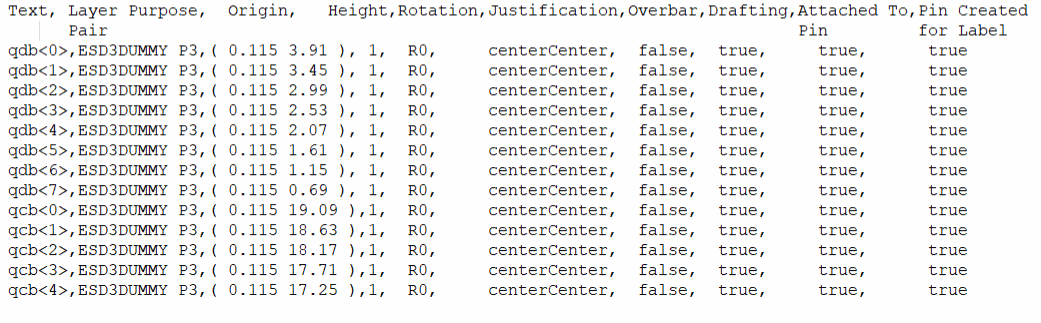
A label file contains pin label attributes, such as the layer-purpose pair, origin, height, rotation, justification, overbar, drafting, and whether the label is attached to a pin. When the Attached To Pin attribute is set to true in the label file, the labels are attached to their corresponding pins, if the pins are available.
Lines starting with a hash symbol are ignored. The following image displays a label file.
Related Topics
Exporting Pin Information to a Pin File
Importing Pin Information from a Pin File
Exporting Label Information to a Label File
Importing Label Information from a Label File
Return to top