
4
Block Placement
The Floorplan – Block Placer command enables you to automatically place all hard and soft blocks in a design and minimize the wire length and chip area.
In Layout EXL and higher tiers, choose Plan – Block Planning – Place Blocks.
Block placer runs on the entire design. Before you run block placer, ensure that the design has a PR boundary and at least one soft or hard block. The command can adjust soft blocks within the specified width and height range to maximize chip density.
Block placer supports both top-level and block-level rectilinear design boundaries.
The following table lists the cell types on which block placer operates.
| Blocks | Celltype |
|---|---|
The following table mentions block snapping with respect to the block type
| Block Type | Edge Snapping | |
Block placer moves the macros (hard blocks and soft blocks) with the following placement status:
Block placer does not alter the position and dimensions of macros with the following status:
The following table lists the placement status of blocks before and after block placement.
| Placement status before block placement | Placement status after block placement |
|---|---|
When block placer is invoked on a design, it reads the constraints specified in the Constraint Manager. You can also specify additional constraints in the Block Placer form. Block placer respects these constraints at all times.
Block placer also takes into account the blockages in a design and does not place blocks on blockages. Block placer treats pre-routes as blockages, and therefore does not place blocks on pre-routes. Also, the top-level pins having the status as Fixed, Placed, and Locked are treated as blockages, and therefore does not place blocks on such pins.
During block placement, Block placer ignores the connectivity information of standard cells that are outside the PR boundary. Block placer does not check for overlaps between blocks and pins during placement.
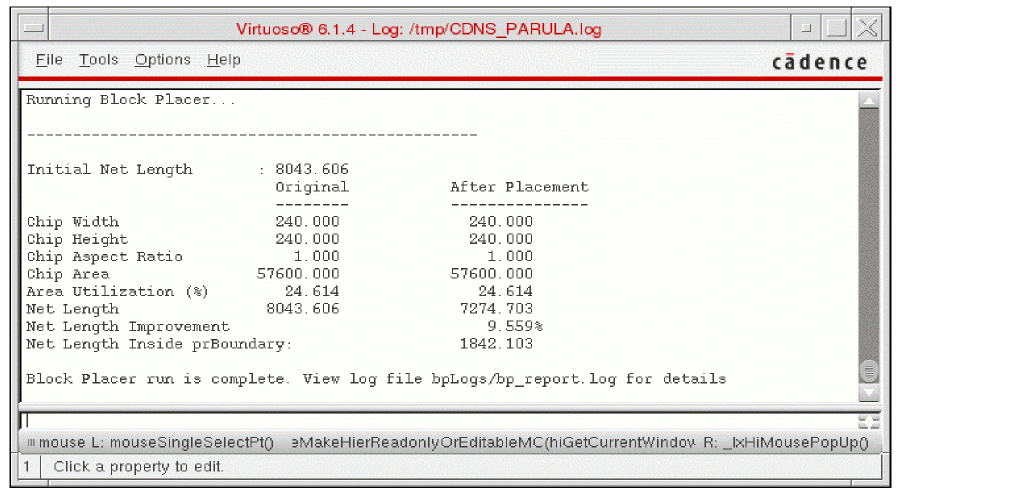
A summary report of the placement of all hard and soft blocks in the design is displayed in the CIW as shown in the following figure.
Related Topics
Specifying Block Placer Generic Settings
Return to top