|
Field
|
Description
|
|
Chip Dimensions
|
This section provides the chip dimension options.
|
|
Fixed Die
|
Specifies that the block placer cannot alter the chip dimensions. This option is selected by default if the boundary area constraint is unavailable in the design. This option is selected by default if Boundary Area constraint is unavailable in the design. However, if Boundary Area constraint is available, the Fixed Die option is deselected. The block placer runs in the variable die mode and can alter the chip dimensions, if required, to place the blocks.
Block placer always runs in Fixed Die mode if any of the following is true:
-
Design boundary is rectilinear in shape.
-
The coreBoxSpec or IO box attributes of PR boundary are present.
-
Design contains IO rows.
If Fixed Die is selected, Specify Chip Dimension Range is not available.
The value you specify in this field is retained when you restart block placer.
|
|
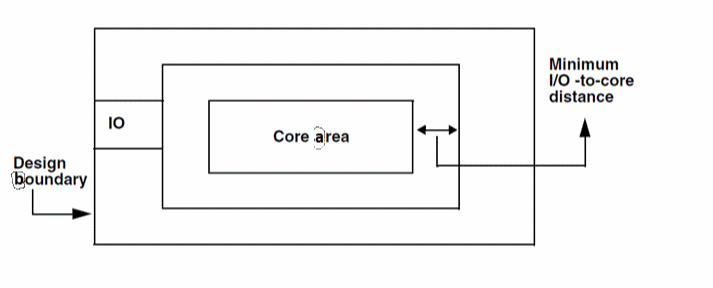
Minimum I/O to Core Distance
|
Specifies the distance between the IOBox and the coreBox (the spacing between the pads and the blocks). The default value is the maximum value of minSpacings of routing layers across all layer purposes. This option is available only when there are IO pads in the design. The value you specify in this field is retained when you restart block placer.
|
|
Minimum Boundary to Instance Distance
|
Specifies the minimum distance between the design boundary and instance edge.
This option is available only when there are no IO pads in the design and takes the top-level rectilinear boundary into account. The default value is the sum of the maximum value of minSpacings of routing layers across all layer purposes and the largest pin size in the design. The block placer retains the value you specify in this field when you restart block placer in the same Virtuoso session.
|
|
Specify Chip Dimension Range
|
Specifies the method that you want to use to define the dimensions of the chip. The initial value is populated from the values specified in the areaBoundary constraint in Constraint Manager. The above fields are available only if Fixed Die is not selected. The values you specify in these fields are retained when you restart block placer.
-
Width and Height: Activates the PRBoundary Width Range and PRBoundary Height Range options.
-
PRBoundary Width Range: Specifies the minimum and maximum width of the chip.
-
PRBoundary Height Range: Specifies the minimum and maximum height of the chip.
-
Area and Aspect Ratio: Activates the PRBoundary Area Range and PRBoundary Aspect Ratio (W/H) Range options.
-
PRBoundary Area Range: Specifies the minimum and maximum area for the design boundary. The area range is calculated from the
boundaryArea constraint as follows:
minimum area = minimum width * minimum height
maximum area = maximum width * maximum height -
PRBoundary Aspect Ratio (W/H) Range: Specifies the minimum and maximum aspect ratio for the design boundary. The aspect ratio range is calculated from the
boundaryArea constraint as follows:
minimum aspect ratio = minimum width / maximum height
maximum aspect ratio = maximum width / minimum height
|
|
Cost Order
|
This section provides the order that the block placer has to follow to minimize cost. The cost with the highest priority is minimized first.
|
|
Default Cost Order
|
Restores the original cost order.
|
|
Overlap
|
Specifies the cost used to minimize overlap between the blocks placed by block placer. If block placer is unable to place blocks without overlap, the information is displayed in the log file and the CIW.
|
|
Boundary
|
Specifies the cost used to place all the blocks within the design boundary. If the design core area is insufficient to accommodate all the blocks, block placer will generate a solution with some overlap.
|
|
Order
|
Specifies the cost used by block placer to align the blocks.
|
|
Distance
|
When this cost is used, block placer ensures that the minimum distance between the blocks and minimum distance between boundary and instance is maintained.
|
|
Net Length
|
Specifies the cost used by block placer to minimize net length. The net length is calculated based on the steiner net length estimation.
|
|
Cluster
|
Specifies the cost used by block placer to place together all the blocks belonging to a particular cluster.
|
|
Cluster Boundary
|
When this cost is used, block placer places all the instances belonging to the cluster (corresponding to the cluster boundary) within the cluster boundary. Block placer treats the cluster boundary as inclusive cluster boundary i.e. it can contain instances that do not belong to the cluster.
|
|
Net Criticality
|
Specifies the cost to ensure proximity of blocks connected by nets of high criticality. It also takes into account the connectivity between the placed, fixed, and locked pins.
|
|
Halo
|
Specifies the cost used to ensure that no block should be placed on the placement halo. Halos are treated as placement blockages. If there are no area halos around the blocks and there is no minimum distance constraint, then the blocks are abutted.
|
|
Options
|
This section provides the placement options.
|
|
Default Minimum Distance between Instances
|
Specifies the default minimum distance between instances or virtual hierarchies. You can also override this value for any instance pair through the Constraints tab. In Layout EXL, the option can be used to control the spacing between virtual hierarchies, if present in the design.
The value you specify in this field is retained when you restart block placer.
-
User Defined: Lets you define the distance between the instances or virtual hierarchies by specifying a value.
-
Pins per Side: Enables the default value when this option is selected and calculates using the following formula:
spacing = [total number of pins/number of sides of block] X [max of minWidth of layer across all layer purposes + max of minSpacing across all layer purposes].
|
|
Optimize Top-Level Pins
|
Specifies whether the block placer has to optimize the top-level pins after block placement. However, the soft block pins are not optimized. The value you specify in this field is retained when you restart block placer.
When block placer is run on variable die mode, the top-level pins are made floating. However, if Optimize Top-Level Pins is selected, the pins are placed accordingly.
When Optimize Top-Level Pins is selected, Block placer does not consider the top-level pins with Placed status as blockages.
If Optimize Top-Level Pins is not selected, then the top-level pins with Placed status are considered as routing blockages and allows the block placer to place blocks and avoid shorts with already placed pins.
|
|
Effort
|
Specifies the effort that block placer should make before arriving at the possible solutions. The minimum allowed value is 1 (least effort) and maximum allowed value is 5 (maximum effort). The default value is 3.
|
|
Number of Solutions
|
Specifies the number of solutions that you want block placer to generate. The minimum allowed value is 1 and maximum value is 5, which also provides the best results. The default value is 3. By default, block placer loads the best solution.
|
|
Enable Multi Threading
|
Reduces the time taken by the block placer to place a large number of macros.
In addition to the number of macros, the placement time depends on the design connectivity, constraints, and machine configuration, such as the number of cores and CPUs. If these parameters are kept constant, then enabling multi threading should result in a 2x performance improvement.
|
|
Enable Congestion Based Refinement
|
Enables only if congestion data is available. When this field is enabled, the congestion value is taken into account during block placement.
-
Congestion Value: Lets you specify the congestion threshold value. For example, if you specify the threshold value as 80, block placer will try to reduce the congestion in all areas in the design that have a congestion above 80 percent.
After congestion-aware block placement, if you click Undo, the congestion and global route data may still remain. In such a situation, run the global route and congestion analysis on the design to retrieve the congestion data.
|
|
Number of Iterations
|
Specifies the maximum number of iterations that can be performed between the congestion-based refinement block placer and the Global Router to bring congestion within the limits.
The congestion limit is specified in the Congestion Value field. Specifying the number of iterations improves the quality of congestion based refinement block placer and reach satisfactory congestion level. By default, Number of Iterations is disabled. This option is only enabled when Enable Congestion Based Refinement field is selected.
|