
Edge Constraint in a Floorplan Pin Constraints File
A pin constraints file is a SKILL file with constraints entered in a SKILL list. The constraints are entered in a tabular format so that they are readable and editable.
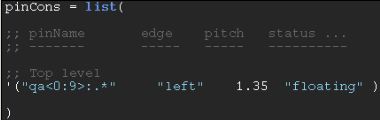
The edge constraint in a Floorplan pin constraints file specifies the side along which the pin must be placed. Valid values for this edge constraint are:
"left" | "right" | "top" | "bottom" | "edge_number" | "any"
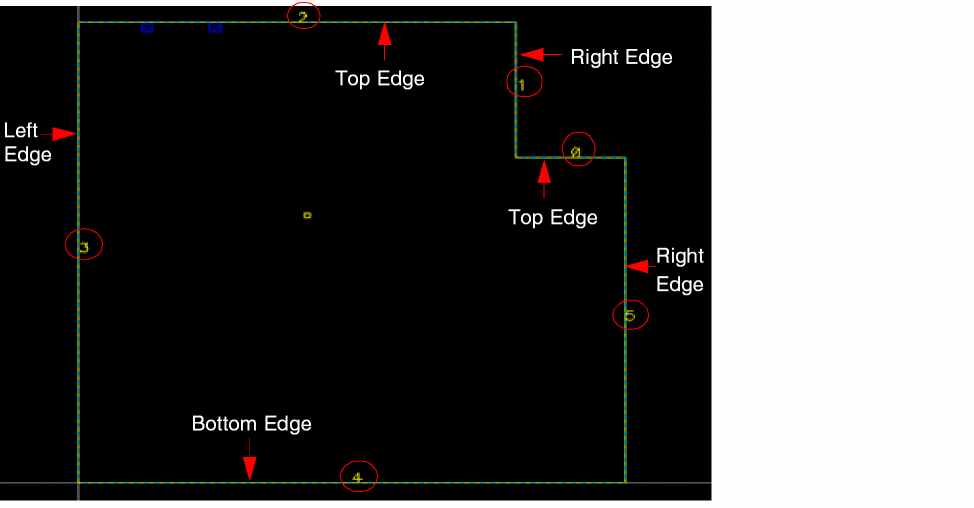
For shapes with rectangular PR boundaries, the "left", "right", "top", and "bottom" strings are supported. For shapes with rectilinear PR boundaries, specify either the edge side or the "edge_number". Edge numbers are assigned in the increasing order starting with zero, which is assigned to the edge at the right-top vertex, followed by the adjoining edge in the anti-clockwise direction.
An edge side for rectilinear boundaries may correspond to one or more edges. In the following example, the "Top" edge side can correspond to edge numbers 0 or 2. Therefore, the pin planner has a choice of edges.
The "center" and "origin" side parameter values of alignment constraints are not supported because they are not respected by the Pin Optimizer.
Use the "any" side specification for a pin that can be placed on any available edge. When the "any" side is specified, the "orderOnly" option is automatically turned on. Therefore, pin order is respected while placing the pins.
In case of pins with a single pinFig, the alignment constraint is created on the pin, and not on the pinFig—even if the constraint is specified on the pinFig.
Related Topics
Setting Pin Constraints Using a Pin Constraints File
Pin Name in a Floorplan Pin Constraints File
Edge Constraint in a Floorplan Pin Constraints File
Pitch Constraint in a Floorplan Pin Constraints File
Return to top