Pin Name in a Floorplan Pin Constraints File
A pin constraints file is a SKILL file with constraints entered in a SKILL list. The constraints are entered in a tabular format so that they are readable and editable. Pin name in a Floorplan pin constraints file identifies the pins for which constraints need to be applied.
Valid formats for specifying pin names are listed in the following table.
|
Format
|
Description
|
Examples
|
|
Regular expressions
|
Regular expressions, wildcard characters, and hierarchy delimiters “/” are recognized in the following format.
'[ Instance_Name / ] Terminal_Name [ : Pin_Name ] [ : PinFig_Name ]" | "[ Instance_Name / ] " .* "
|
'("A:A" "left" 0.01 "locked")
'("A/.*" "left" 0.01 "locked")
The following expression will not be recognized:
'("X<.*" "right" 0.1 "floating" )
'("X<[0-1]>" "right" 0.1 "floating" )
'("X<[0-1]>:X<[0-2]""right" 0.1 "floating" )
|
|
Numeric Pins
|
Numeric pin names are recognized.
|
'("3.1:4.1" "right" 0.1 "floating" )
|
|
Terminal names and pin names
|
Terminal and pin names are named OA objects. Therefore, you can assign constraints to:
Constraints assigned to terminal names are applicable to all the pins and pinFig objects in the terminal.
-
Terminal names and pin names
Constraints are applicable only to the specified pin in the specified terminal in the following format.
'("Terminal_Name:Pin_Name" "Pin_Edge" Pin_Pitch "Pin_Status")
|
'("A" "Top" 0.01 "locked")
'("A:A1" "Top" 0.01 "locked")
'("A:A2" "Top" 0.01 "locked")
|
|
Individual PinFigs
|
Here, pin figures that are placed together to implement a feed through connection. You can enter constraints for each pin shape in the following format.
'("Terminal_Name:Pin_Name:PinFig_Name" "Pin_Edge" Pin_Pitch "Pin_Status")
|
'("I1/A:A:A1" "left" 0.01 "locked")
|
|
Pin names for level-1 pins
|
When you specify instance pins, they correspond to the instance master’s Terminal_Name:Pin_Name:PinFig_Name. Ensure that you specify the instance name while defining constraints for level-1 or soft block instance pins in the following format.
'("Instance_Name/Terminal_Name:Pin_Name:PinFig_Name" "Pin_Edge" Pin_Pitch "Pin_Status")
|
'("I1/A:A:A1" "left" 0.01 "locked")
|
|
Wildcard characters and hierarchy delimiters
|
To specify the constraints on all terminals and pins for a given instance, enter only the instance name and a ".*" after the hierarchy delimiter "/".
To specify the constraints on the top-level pins, enter ".*".
You can use ".*" as a wildcard in regular expressions for names.
You can also specify regular expressions in pin or pinFig names.
|
Using hierarchy delimiter:
'("I1/.*" "left" 0.01 "locked")
Using wildcard:
'(".*" "left" 0.01 "locked")
'("ADDRESS_.*" "left" 0.01 "locked")
'(".*:PIN246.*" "left" 0.01 "locked")
'(".*:PIN246.*:PinFIG1.*" "left" 0.01 "locked")
'("D[1-3]:P.*" "right" 0.1 "floating" )
|
|
Vector single and vector bit notations
|
You can include vector single and vector bit notations, such as A<0:4>:A<0:4>, in pin names. Such vector notations are automatically expanded to their corresponding vector bits.
|
'("A<0:4>:A<0:4>" "Top" 0.01 "locked")
|
If there are duplicate entries for a pin, only the last entry is honored. All previous entries are ignored.
Examples
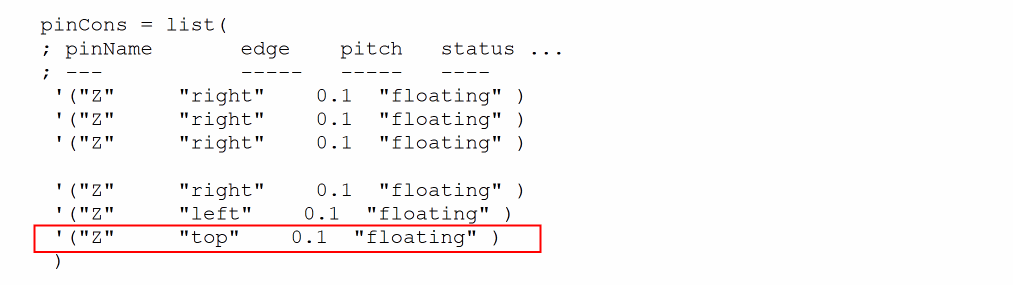
In the following example, there are multiple assignments for pin Z. However, only the last assignment is honored.
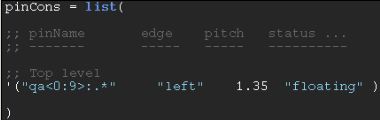
In the following example, the first entry assigns all pins in the given range to the right edge. The second entry refines the previous entry by specifying all pins on right side except one pin on left. The last entry is honored.
Related Topics
Setting Pin Constraints Using a Pin Constraints File
Pin Name in a Floorplan Pin Constraints File
Edge Constraint in a Floorplan Pin Constraints File
Pitch Constraint in a Floorplan Pin Constraints File
Return to top